
net5 webapi中 SwaggerUI如何进行版本控制
创建项目

net5就自带上了swaggerUI,见红色
     // This method gets called by the runtime. Use this method to add services to the container.

        public void ConfigureServices(IServiceCollection services)

        {

            services.AddControllers();

            services.AddSwaggerGen(c =>

            {

                c.SwaggerDoc("v1", new OpenApiInfo { Title = "Net5.WebAPI", Version = "v1" });

            });

        }

        // This method gets called by the runtime. Use this method to configure the HTTP request pipeline.

        public void Configure(IApplicationBuilder app, IWebHostEnvironment env)

        {

            if (env.IsDevelopment())

            {

                app.UseDeveloperExceptionPage();

                app.UseSwagger();

                app.UseSwaggerUI(c => c.SwaggerEndpoint("/swagger/v1/swagger.json", "Net5.WebAPI v1"));

            }

            app.UseRouting();

            app.UseAuthorization();

            app.UseEndpoints(endpoints =>

            {

                endpoints.MapControllers();

            });

        }

    }
代码改造
1.添加FirstController

 public class FirstController : ControllerBase

    {

        /// <summary>

        /// 这是V1版本的GetString

        /// </summary>

        /// <returns></returns>

        [HttpGet]

        [Route("api/[controller]/GetString")]

        public string GetToString()

        {

            return Newtonsoft.Json.JsonConvert.SerializeObject(new

            {

                Id = 123,

                Name = "闪电五连鞭"

            });

        }

        /// <summary>

        /// 这是V1版本的GetString002

        /// </summary>

        /// <returns></returns>

        [HttpGet]

        [Route("api/[controller]/GetString002")]

        public string GetString002()

        {

            return Newtonsoft.Json.JsonConvert.SerializeObject(new

            {

                Id = 123,

                Name = "闪电五连鞭"

            });

        }

        /// <summary>

        /// 这是V1版本的Add

        /// </summary>

        /// <returns>name</returns>

        [HttpPost]

        [Route("api/[controller]/Add/{name:required}")]

        public string Add(string name)

        {

            return Newtonsoft.Json.JsonConvert.SerializeObject(new

            {

                Id = 234,

                Name = name

            });

        }

        [HttpPut]

        [Route("api/[controller]/Update/{id:int}")]

        public int Update(int Id)

        {

            return Id;

        }

        [Route("api/[controller]/Update/{id:int}")]

        [HttpDelete]

        public int Delete(int Id)

        {

            return Id;

        }

        [Route("api/[controller]/Patch")]

        [HttpPatch]

        public int Patch()

        {

            return 123;

        }

    }
生成swagge有关项目的Xml注释文件,并修改其属性为“始终复制”


添加版本枚举类
 public enum ApiVersions

        {

            V1 = 1,

            V2 = 2,

            V3 = 3,

            V4 = 4,

            V5 = 5

        }
改造StartUp中swagger代码
     public void ConfigureServices(IServiceCollection services)

        {

            services.AddControllers();

            services.AddSwaggerGen(c =>

            {

                typeof(ApiVersions).GetEnumNames().ToList().ForEach(version =>

                {

                    c.SwaggerDoc(version, new OpenApiInfo()

                    {

                        Title = "Net5.WebAPI",

                        Version = version,

                        Description = $"Net5.WebAPI的 {version} 版本,可根据需要选择"

                    });

                });

                #region 为Swagger JSON and UI设置xml文档注释路径

                string basePath = Path.GetDirectoryName(typeof(Program).Assembly.Location);//获取应用程序所在目录(绝对,不受工作目录影响,建议采用此方法获取路径)

                string xmlPath = Path.Combine(basePath, "Net5.WebAPI.xml");

                c.IncludeXmlComments(xmlPath);

                #endregion

                // c.SwaggerDoc("v1", new OpenApiInfo { Title = "Net5.WebAPI", Version = "v1" });

            });

        }

        // This method gets called by the runtime. Use this method to configure the HTTP request pipeline.

        public void Configure(IApplicationBuilder app, IWebHostEnvironment env)

        {

            if (env.IsDevelopment())

            {

                app.UseDeveloperExceptionPage();

                app.UseSwagger();

                app.UseSwaggerUI(c =>

                {

                    typeof(ApiVersions).GetEnumNames().ToList().ForEach(version =>

                    {

                        c.SwaggerEndpoint($"/swagger/{version}/swagger.json", $"Net5.WebAPI {version}");

                    });

                    //c => c.SwaggerEndpoint("/swagger/v1/swagger.json", "Net5.WebAPI v1")

                });

            }

            app.UseRouting();

            app.UseAuthorization();

            app.UseEndpoints(endpoints =>

            {

                endpoints.MapControllers();

            });

        }
添加版本号
在需要进行版本控制的控制器添加版本 [ApiExplorerSettings(GroupName = "V?")]
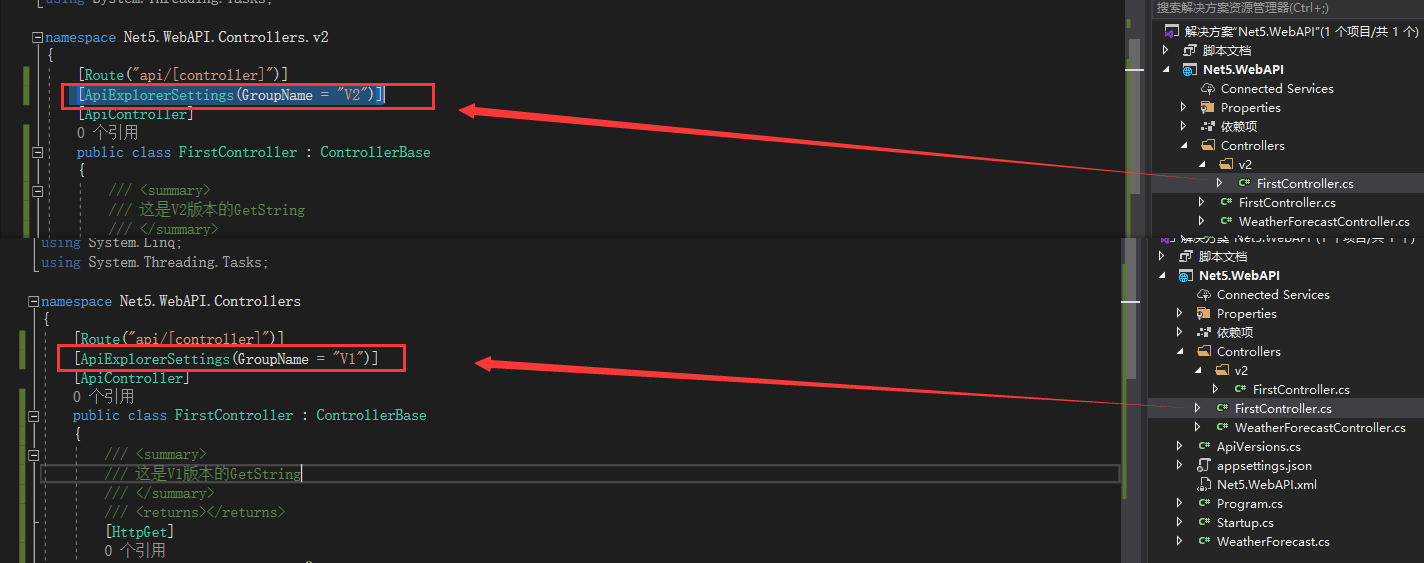

大功告成,运行效果如下
net5 webapi中 SwaggerUI如何进行版本控制的更多相关文章
- ASP.NET Core WebAPI中的分析工具MiniProfiler
介绍 作为一个开发人员,你知道如何分析自己开发的Api性能么? 在Visual Studio和Azure中, 我们可以使用Application Insight来监控项目.除此之外我们还可以使用一个免 ...
- ASP.NET Core 3.0 WebApi中使用Swagger生成API文档简介
参考地址,官网:https://docs.microsoft.com/zh-cn/aspnet/core/tutorials/getting-started-with-swashbuckle?view ...
- Autofac - MVC/WebApi中的应用
Autofac前面写了那么多篇, 其实就是为了今天这一篇, Autofac在MVC和WebApi中的应用. 一.目录结构 先看一下我的目录结构吧, 搭了个非常简单的架构, IOC(web), IBLL ...
- WebAPI中无法获取Session对象的解决办法
在MVC的WebApi中默认是没有开启Session会话支持的.需要在Global中重写Init方法来指定会话需要支持的类型 public override void Init() { PostAut ...
- webapi 中的本地登录
WebApi 身份验证方式 asp.net WebApi 中有三种身份验证方式 个人用户账户.用户可以在网站注册,也可以使用 google, facebook 等外部服务登录. 工作和学校账户.使用活 ...
- springboot中swaggerUI的使用
demo地址:demo-swagger-springboot springboot中swaggerUI的使用 1.pom文件中添加swagger依赖 2.从github项目中下载swaggerUI 然 ...
- webapi 中使用 protobuf
相比json来说,好处是速度更快,带宽占用更小.其效果大致等于json+Gzip. 在webapi中使用protobuf的方法为: 引用nuget包 Install-Package protobuf- ...
- 【AspNetCore】【WebApi】扩展Webapi中的RouteConstraint中,让DateTime类型,支持时间格式化(DateTimeFormat)
扩展Webapi中的RouteConstraint中,让DateTime类型,支持时间格式化(DateTimeFormat) 一.背景 大家在使用WebApi时,会用到DateTime为参数,类似于这 ...
- 在asp.net WebAPI 中 使用Forms认证和ModelValidata(模型验证)
一.Forms认证 1.在webapi项目中启用Forms认证 Why:为什么要在WebAPI中使用Forms认证?因为其它项目使用的是Forms认证. What:什么是Forms认证?它在WebAP ...
随机推荐
- 一个方便 LeetCode 复习的脚本
这个脚本半年前就在用了,只不过一直没有公开. 这是一个简易的 LeetCode 自动统计程序, 可自动统计最近提交通过的题目, 并以 Markdown 的形式展示相关的数据. 采用 GitHub Ac ...
- postcss 运用及原理
postcss 入坑指南 目标: 掌握 postcss 的使用 自定义 postcss 插件 掌握 stylelint 的使用 自定义 stylelint rule 扩展 css parser 解释器 ...
- ELK + Redis 日志收集 & HAProxy
参考博文:http://www.ttlsa.com/linux/haproxy-log-configuration-syslog/ 引入 Redis 消息队列 Log-file 收集数据到 Redis ...
- POJ 3581 Sequence(后缀数组)题解
题意: 已知某字符串\(str\)满足\(str_1 > max\{str_2,str_3 \cdots str_n\}\),现要求把这个字符串分成连续的三组,然后每组都翻转,问字典序最小是什么 ...
- php性能分析利器:xhprof
xhprof是facebook团队开发的用于研究php性能的扩展,并且提供了图形化的界面展示性能参数和过程.对于各种php的项目的性能瓶颈研究有一定帮助,值得一用. 我在上一篇<Dockerfi ...
- web online code editor All In One
web online code editor All In One 在线代码编辑器 Monaco Editor 摩纳哥编辑器 ️ 22.1k The Monaco Editor is the code ...
- MDN 文档高级操作进阶教程
MDN 文档高级操作进阶教程 MDN 文档, 如何优雅的使用 MDN 文档上的富文本编辑器 pre & 语法高亮器 code & note box source code 上传附件 i ...
- H5 页面与小程序之间 传递数据
H5 页面与小程序之间 传递数据 小程序里面的 H5页面与小程序之间怎么传递数据 webview与小程序之间的实时通信 webview主动发消息给小程序 webview可以利用jssdk提供的 wx. ...
- taro router
taro router https://nervjs.github.io/taro/docs/router.html bug import Taro, { Component, Config } fr ...
- PM2 in depth
PM2 in depth ecosystem.config.js module.exports = { apps : [{ name: "app", script: ". ...