
(Android UI)Action Bar
Action Bar 指明用户当前所在的界面,添加多个功能性按键和下拉式选择框,以提供能多功能。


主题一:让应用具备ActionBar
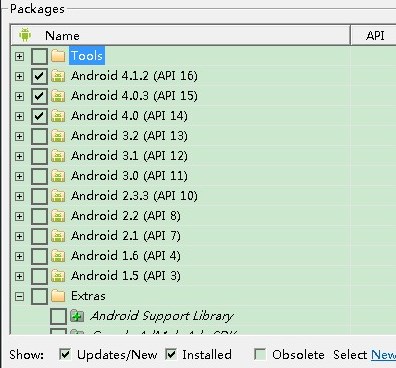
可能条件一:Support Android 3.0(API 11) and Above Only

步骤一:在<Application>标签中指明theme属性值,android:theme="@android:style/Theme.Hole",即可让应用具备ActionBar
<application

    android:name=".DemoApplication"

    android:allowBackup="true"

    android:icon="@drawable/ic_launcher"

    android:theme="@android:style/Theme.Holo" >

    <activity

        android:name=".MainActivity"

        android:label="@string/app_name" >

        <intent-filter>

            <action android:name="android.intent.action.MAIN" />

            <category android:name="android.intent.category.LAUNCHER" />

        </intent-filter>

    </activity>

    <activity android:name=".SecondActivity" >

    </activity>

</application>
可能条件二:Support Android 2.1(API 7) and Above 相当于比上者支持更低版本的Android系统

步骤一:使用ActionBarActivity
public class MainActivity extends ActionBarActivity {
步骤二:使用theme标签,指定特定主题,使用属性值:android:theme="@style/Theme.AppCompat.Light"
<activity

    android:theme="@style/Theme.AppCompat.Light"

    android:name=".MainActivity"

    android:label="@string/app_name" >

    <intent-filter>

        <action android:name="android.intent.action.MAIN" />

        <category android:name="android.intent.category.LAUNCHER" />

    </intent-filter>

</activity>
可以在<application>或者<activity>标签中指定theme均可达到以上效果。
主题二:为ActionBar添加Buttons
The action bar allows you to add buttons for the most important action items relating to the app's current context. 为当前所在的界面添加与之相关的功能按键。
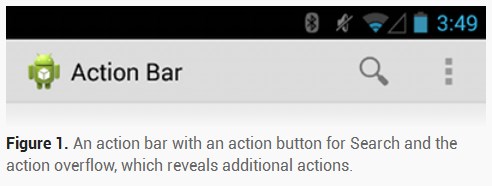
步骤一:为ActionBar布局设计.xml文件,在res/menu目录下新建main_activity_actions.xml作为其布局文件
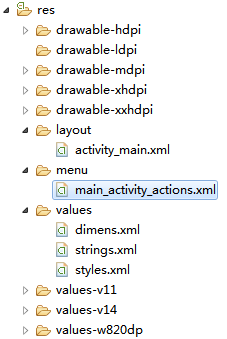
内容如下:
<menu xmlns:android="http://schemas.android.com/apk/res/android"

    xmlns:app="http://schemas.android.com/apk/res-auto"

    xmlns:tools="http://schemas.android.com/tools"

    tools:context="com.spt.MainActivity" >

    <item

        android:id="@+id/action_search"

        android:icon="@drawable/ic_menu_search"

        android:showAsAction="ifRoom"

        android:title="@string/action_search"/>

    <item

        android:id="@+id/action_settings"

        android:orderInCategory="100"

        android:title="@string/action_settings"

        android:showAsAction="never"/>

</menu>
让.xml文件显示到Activity中
    @Override

    public boolean onCreateOptionsMenu(Menu menu) {

        // Inflate the menu items for use in the action bar

        MenuInflater inflater = getMenuInflater();

        inflater.inflate(R.menu.main_activity_actions, menu);

        return super.onCreateOptionsMenu(menu);

    }
覆写onCreateOptionMenu(),并在其中指定.xml布局文件。
显示结果如下:
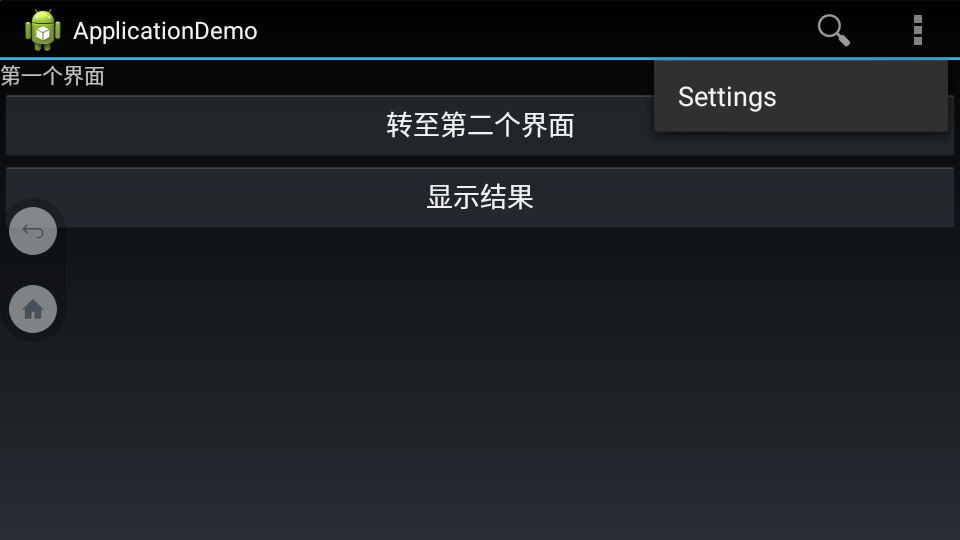
This declares that the Search action should appear as an action button when room is available in the action bar, but the Settings action should always appear in the overflow. (By default, all actions appear in the overflow, but it's good practice to explicitly declare your design intentions for each action.)
<item>标签中的android:showAsAction="ifRoom"属性,让图标已Button的形式显示;反之,赋值为"never",则显示在overflow中。
步骤二:为Button添加响应
    @Override

    public boolean onOptionsItemSelected(MenuItem item) {

        switch (item.getItemId()) {

            case R.id.action_search:

                openSearch();

                return true;

            case R.id.action_settings:

                openSettings();

                return true;

            default:

                return super.onOptionsItemSelected(item);

        }

    }
主题三:为Activity添加 Up Button

如上图所示,图中的“<”箭头实际上是可点击的Button;点击后,返回到指定Activity。
步骤一:为Activity指定Parent
<activity

    android:name=".SecondActivity"

    android:label="@string/title_activity_display_message"

    android:parentActivityName="com.spt.MainActivity" >

    <meta-data

        android:name="android.support.PARENT_ACTIVITY"

        android:value="com.spt.MainActivity" >

    </meta-data>

</activity>
步骤二:在显示 Up Button 中设置如下代码:
getActionBar().setDisplayHomeAsUpEnabled(true);
当前Activity已经知道其Parent,因此无需为其设置点击事件。
主题四:定制ActionBar主题
Android includes a few built-in activity themes that include "dark" or "light" action bar styles. You can also extend these themes to further customize the look for your action bar.
1. the Support Library APIs --> the Theme.AppCompat family of styles
2. API level 11 and higher --> the Theme.Holo family
android:theme="@android:style/Theme.Holo.Light.DarkActionBar"
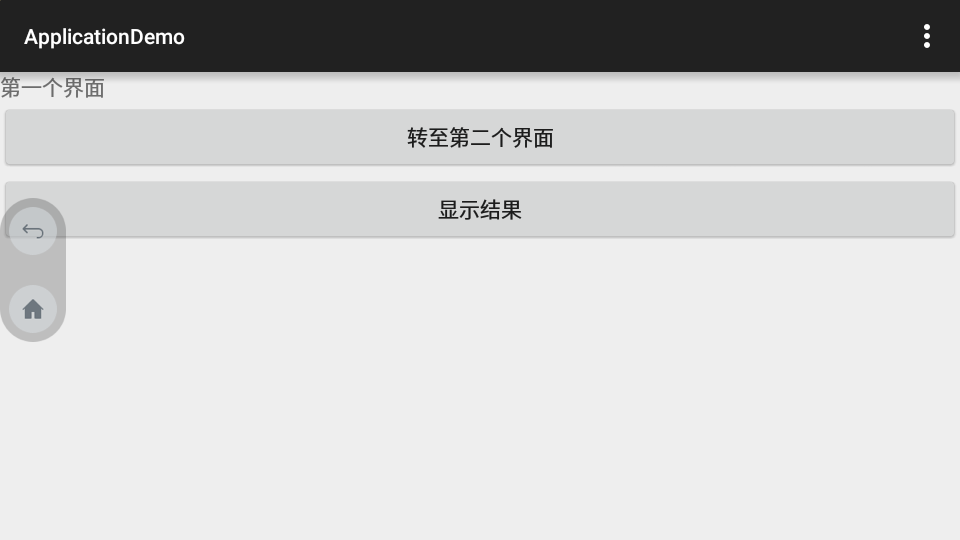
android:theme="@android:style/Theme.Holo.Light

当android:minSdkVersion="7"时,不能再使用“@android:style...”,而应该使用:android:theme="@style/Theme.AppCompat"

android:theme="@style/Theme.AppCompat.Light"

android:theme="@style/Theme.AppCompat.Light.DarkActionBar"

使用自定义的Theme:
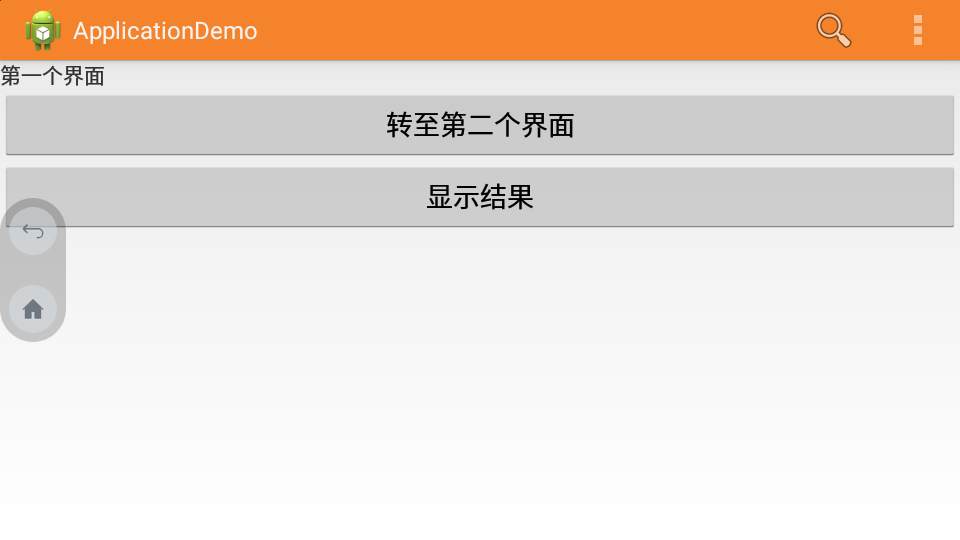
android:theme="@style/CustomActionBarTheme"
新建res/values/themes.xml文件,
<?xml version="1.0" encoding="utf-8"?>

<resources xmlns:android="http://schemas.android.com/apk/res/android">

    <!-- the theme applied to the application or activity -->

    <style name="CustomActionBarTheme" parent="@android:style/Theme.Holo.Light.DarkActionBar">

        <item name="android:actionBarStyle">@style/MyActionBar</item>

    </style>

    <style name="MyActionBar" parent="@android:style/Widget.Holo.Light.ActionBar.Solid.Inverse">

        <item name="android:background">@drawable/actionbar_background</item>

    </style>

</resources>
以上就是新建的style,名为:CustomActionBarTheme
其中使用到 @drawable/actionbar_background,指定颜色;res目录下新建drawable文件夹
<?xml version="1.0" encoding="utf-8"?>

<shape xmlns:android="http://schemas.android.com/apk/res/android"

    android:shape="rectangle" >

    <solid android:color="#FFF4832C" />

</shape>
对于使用到 Android 2.1 的应用,只需要将 @android:style/Theme.Holo.Light.DarkActionBar 替换为 @style/Theme.AppCompat.Light.DarkActionBar;同时,将 @android:style/Widget.Holo.Light.ActionBar.Solid.Inverse 替换为:@style/Widget.AppCompat.Light.ActionBar.Solid.Inverse
主题四:自定义ActionBar中字体颜色
<?xml version="1.0" encoding="utf-8"?>

<resources xmlns:android="http://schemas.android.com/apk/res/android">

    <!-- the theme applied to the application or activity -->

    <style name="CustomActionBarTheme" parent="@android:style/Theme.Holo">

        <item name="android:actionBarStyle">@style/MyActionBar</item>

        <item name="android:actionBarTabTextStyle">@style/MyActionBarTabText</item>

        <item name="android:actionMenuTextColor">@color/actionbar_text</item>

    </style>

    <!-- ActionBar styles -->

    <style name="MyActionBar" parent="@android:style/Widget.Holo.ActionBar">

        <item name="android:titleTextStyle">@style/MyActionBarTitleText</item>

    </style>

    <!-- ActionBar title text -->

    <style name="MyActionBarTitleText" parent="@android:style/TextAppearance.Holo.Widget.ActionBar.Title">

        <item name="android:textColor">@color/actionbar_text</item>

    </style>

    <!-- ActionBar tabs text styles -->

    <style name="MyActionBarTabText" parent="@android:style/Widget.Holo.ActionBar.TabText">

        <item name="android:textColor">@color/actionbar_text</item>

    </style>

</resources>
主题五:覆盖ActionBar,达到显示和隐藏目的
If, during the course of user interaction, you want to hide and show the action bar, you can do so by calling hide() and show() on the ActionBar. However, this causes your activity to recompute and redraw the layout based on its new size.
(Android UI)Action Bar的更多相关文章
- (Android UI)Android应用程序中资源:图片、字符串、颜色、布局等
Android系统设计采用代码和布局分离的设计模式,因此在设计Android应用程序时需要遵循该设计模式. “把非代码资源(如图片和字符串常量)和代码分离开来始终是一种很好的做法.”---<An ...
- 20155236 《Java程序设计》实验四(Android程序设计)实验报告
20155236 <Java程序设计>实验四(Android程序设计)实验报告 一.实验内容及步骤 第24章:初识Android 任务一:完成Hello World, 要求修改res目录中 ...
- Appium-001-测试开发环境搭建(Android - Win7)
随着移动端 App 测试自动化的兴起,为更好的控制产品质量,越来越多的中大型公司开始了移动端的自动化测试.Appium 自动化测试技术也是我很早之前就想学习的一门技术,却一直没有比较空余的时间来学习( ...
- 20145207《Java程序设计》实验四( Android程序设计)实验报告
<Java 程序设计>实验四( Android程序设计)实验报告 目录 改变 Android开发基础实验要求 实验成果 课后思考 改变 修改了之前仅仅是贴了图片,连代码都没粘的状态.增加了 ...
- 20155310 《Java程序设计》实验四 (Android程序设计)实验报告
20155310 <Java程序设计>实验四 (Android程序设计)实验报告 实验内容 1.基于Android Studio开发简单的Android应用并部署测试; 2.了解Andro ...
- 20155311 《Java程序设计》实验四 (Android程序设计)实验报告
20155311 <Java程序设计>实验四 (Android程序设计)实验报告 实验内容 基于Android Studio开发简单的Android应用并部署测试; 了解Android.组 ...
- 20155318 《Java程序设计》实验四 (Android程序设计)实验报告
20155318 <Java程序设计>实验四 (Android程序设计)实验报告 实验内容 基于Android Studio开发简单的Android应用并部署测试; 了解Android.组 ...
- 给你的移动网站加点料:推荐下载App,如果本地安装则直接打开本地App(Android/IOS)
纵观现在每家移动网站,打开首页的时候,都有各种各样的形式来提示你下载自身的移动App(Android/IOS),这是做移动客户端产品的一个很好地引流的手段.当然各家引流下载的交互和视觉各不相同,有的是 ...
- 推荐下载App,如果本地安装则直接打开本地App(Android/IOS)
推荐下载App,如果本地安装则直接打开本地App(Android/IOS) - 纵观现在每家移动网站,打开首页的时候,都有各种各样的形式来提示你下载自身的移动App(Android/IOS),这是做移 ...
随机推荐
- JQGrid导出Excel文件
系列索引 Web jquery表格组件 JQGrid 的使用 - 从入门到精通 开篇及索引 Web jquery表格组件 JQGrid 的使用 - 4.JQGrid参数.ColModel API.事件 ...
- Mybatis-PageHelper
pom.xml <?xml version="1.0" encoding="UTF-8"?> <project xmlns="htt ...
- free命令查看内存信息
free介绍 FREE(1) Linux User’s Manual FREE(1) NAME free - Display amount of free and used memory in the ...
- 使用 Google
非原版 Glgoo:http://www.glgoo.com/谷粉搜搜:http://www.gfsoso.net/谷粉搜搜:http://www.gfsswy.com/谷粉搜搜:http://guf ...
- [物理学与PDEs]第5章第4节 本构方程 - 应力与变形之间的关系
5. 4 本构方程 - 应力与变形之间的关系 5.4.1. 本构关系的一般形式 1. 若 Cauchy 应力张量 ${\bf T}$ 满足 $$\bex {\bf T}({\bf y})=\hat{\ ...
- VS Code中编写C
Visual Studio Code如何编写运行C.C++? Visual Studio Code的C/C++扩展功能 vscode配置C/C++的编译调试环境
- 使用系统用户登录Oracle
如果数据库安装不在本机上,@后面加的是服务名或IP地址 如果是sys用户的话,它具有管理员的权限,要使用sysdba或sysoper权限来登录oracle工具.
- windows bat 脚本(一)切换当前目录
一.切换当前目录 现在桌面新建一个文件, 然后打开输入 cmd /k "cd /d D:\file" 如下图点击“另存为”,保存类型选择 “所有文件” 然后会在保存路径下发现 ...
- 怎样给手机安装fiddler证书
如果需要抓取手机端的HTTPS包,就要在手机上面安装fiddler证书. 1.使用手机连接WiFi做好代理: 2.代理成功后打开手机浏览器: 3.在浏览器输入:http://IP地址:端口号后搜索(如 ...
- iOS 中的屏幕旋转shouldAutorotate和supportedInterfaceOrientations的先后关系
这2个UIViewController的属性,都和旋转相关, 当设备发生旋转时,首先会查看根controller的shouldAutorotate是否允许旋转,如果允许,再通过 supportedIn ...