
在线解析JSON+ AsyncTaskLoader
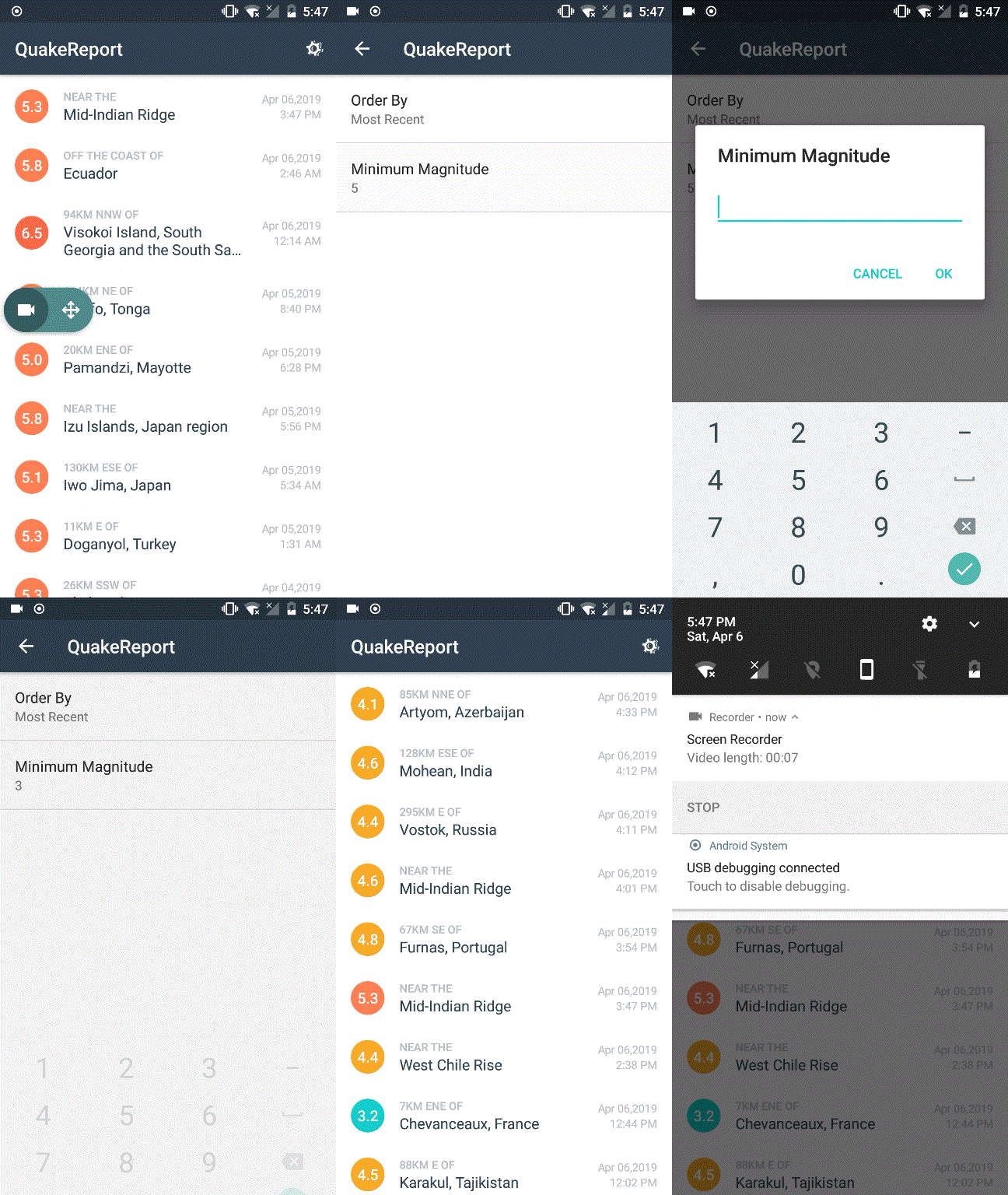
效果图:
获取并解析Json
package com.example.admin.quakereport;

import android.text.TextUtils;import android.util.Log;import org.json.JSONArray;import org.json.JSONException;import org.json.JSONObject;import java.io.BufferedReader;import java.io.IOException;import java.io.InputStream;import java.io.InputStreamReader;import java.net.HttpURLConnection;import java.net.MalformedURLException;import java.net.URL;import java.nio.charset.Charset;import java.util.ArrayList;import java.util.List;

public class QueryUtils {

    private static final String LOG_TAG = QueryUtils.class.getSimpleName();

    public static List<Earthquake> fetchEarthquakeData(String requestUrl){        URL url = createUrl(requestUrl);        String jsonResponse = null;        try        { jsonResponse = makehttpRequest(url);        }catch (IOException e){            Log.e(LOG_TAG,"Error in making http request",e); }        List<Earthquake> result = extractEarthquakes(jsonResponse);        return result;    }

    private static URL createUrl(String mUrl) {        URL url = null;        try {            url = new URL(mUrl);        } catch (MalformedURLException e) {            Log.e(LOG_TAG, "Problem building the URL ", e);        }        return url;    }

    private static String makehttpRequest(URL url)throws IOException {        String jsonResponse = "";        if (url == null) {            return jsonResponse;        }

        HttpURLConnection urlConnection = null;        InputStream inputStream = null;

        try {            urlConnection = (HttpURLConnection) url.openConnection();            urlConnection.setReadTimeout(10000);            urlConnection.setConnectTimeout(15000);            urlConnection.setRequestMethod("GET");            urlConnection.connect();

            if (urlConnection.getResponseCode() == 200) {                inputStream = urlConnection.getInputStream();                jsonResponse = readFromStream(inputStream);            } else {                Log.e(LOG_TAG, "Error in connection!! Bad Response ");            }

        } catch (IOException e) {            Log.e(LOG_TAG, "Problem retrieving the earthquake JSON results.", e);        } finally {            {                if (urlConnection != null) {                    urlConnection.disconnect();                }                if (inputStream != null) {                    inputStream.close();                }            }        }        return jsonResponse;    }

    private static String readFromStream(InputStream inputStream)throws IOException{        StringBuilder output = new StringBuilder();        if (inputStream != null) {            InputStreamReader inputStreamReader = new InputStreamReader(inputStream, Charset.forName("UTF-8"));            BufferedReader reader = new BufferedReader(inputStreamReader);            String line = reader.readLine();

            while (line != null) {                output.append(line);                line = reader.readLine();            }        }

       return output.toString();}

    private static List<Earthquake> extractEarthquakes(String earthquakeJSON){         final String getJsonArray="features",jsObject="properties",double_magnituede="mag",String_location="place"                 ,String_time="time",String_url="url";

        if (TextUtils.isEmpty(earthquakeJSON)) {            return null;        }        List<Earthquake> earthquakes = new ArrayList<>();

        try {            JSONObject baseJsonResponse = new JSONObject(earthquakeJSON);            JSONArray featureArray = baseJsonResponse.getJSONArray(getJsonArray);

            for (int i = 0; i < featureArray.length(); i++) {                JSONObject currentEarthquake = featureArray.getJSONObject(i);                JSONObject properties = currentEarthquake.getJSONObject(jsObject);                double magnitude = properties.getDouble(double_magnituede);                String location = properties.getString(String_location);                long time = properties.getLong(String_time);                String Url = properties.getString(String_url);                Earthquake earthquake = new Earthquake(magnitude, location, time,Url);                earthquakes.add(earthquake);            }

        }catch (JSONException e){            Log.e(LOG_TAG,"Error in fetching data",e);        }        return earthquakes;    }

}
android 网络连接必须放在子线程中,不推荐用AsyncTask的原因:横屏时AsyncTask不会被回收到内存。
package com.example.admin.quakereport;

import android.content.AsyncTaskLoader;import android.content.Context;import android.support.annotation.NonNull;import android.support.annotation.Nullable;

import java.util.List;

public class EarthquakeLoader extends AsyncTaskLoader<List<Earthquake>> {    private String mUrl;    private List<Earthquake> itemlist;

    public EarthquakeLoader(@NonNull Context context,String mUrl) {        super(context);        this.mUrl=mUrl;    }

    @Override    protected void onStartLoading() {        if (itemlist!=null){            deliverResult(itemlist);        }else {            forceLoad();        }    }

    @Nullable    @Override

    public List<Earthquake> loadInBackground(){        if (mUrl == null) {            return null; }        List<Earthquake> earthquakes = QueryUtils.fetchEarthquakeData(mUrl);        return earthquakes;    }

    @Override    public void deliverResult(@Nullable List<Earthquake> data) {        itemlist=data;        super.deliverResult(data);    }}
github项目源码: https://github.com/NeoWu55/Android-QuakeReport
在线解析JSON+ AsyncTaskLoader的更多相关文章
- QT使用QJson生成解析Json数据的方法
QT中使用json还是比较方便的,下面用例子直接说明 举例子之前首先推荐一个在线解析json格式的网站,具体格式用法如下图所示: 之后根据这个格式进行json数据解析. QT使用json需要包含的头文 ...
- JSON在线解析,新版本JSON在线解析
SOJSON,出了新版本的JSON在线解析,真的很好用,可以上下版本.左右版本.效果图如下.它的网址是:http://www.sojson.com/simple_json.html SOJSON集成了 ...
- 在线聊天项目1.4版 使用Gson方法解析Json字符串以便重构request和response的各种请求和响应 解决聊天不畅问题 Gson包下载地址
在线聊天项目结构图: 多用户登陆效果图: 多用户聊天效果图: 数据库效果图: 重新构建了Server类,使用了Gson方法,通过解析Json字符串,增加Info类,简化判断过程. Server类代码如 ...
- JSON在线解析及格式化校验工具 jsonin.com
JSON在线解析及格式化校验工具 JSON(JavaScript Object Notation) 是一种轻量级的数据交换格式.它使得人们很容易的进行阅读和编写.同时也方便了机器进行解析和生成.它是基 ...
- php 解析json失败,解析为空,json在线解析器可以解析,但是json_decode()解析失败(原)
$str2='{"code":200,"datas":{"id":1,"coupon_id":"123&quo ...
- WP8解析JSON格式(使用Newtonsoft.Json包)
DOTA2 WebAPI请求返回的格式有两种,一种是XML,一种是JSON,默认是返回JSON格式. 这里举一个简单的解析JSON格式的例子(更多JSON操作): { "response&q ...
- Java构造和解析Json数据的两种方法详解二
在www.json.org上公布了很多JAVA下的json构造和解析工具,其中org.json和json-lib比较简单,两者使用上差不多但还是有些区别.下面接着介绍用org.json构造和解析Jso ...
- ios 中使用SBJson拼接和解析json
1.ios解析json 使用开源json包,项目地址: http://stig.github.com/json-framework/ NSData * responseData = [res ...
- 使用JSONObject生成和解析json
1. json数据类型 类型 描述 Number 数字型 String 字符串型 Boolean 布尔型 Array 数组,以"[]"括起来 Object 对象,类似于C中的结构体 ...
随机推荐
- XML记一次带命名空间的xml读取
public static void ReadXML(string xmlUrl) { //判断文件是否存在 if (!File.Exists(xmlUrl)) { Console.WriteLine ...
- 反射:修改请求头HttpWebRequest/Webclient Header属性的date值-"此标头必须使用适当的属性进行修改"
场景:调用外部接口,接口要求Header信息里面包涵Date信息,且Date信息必须是格式化好的,(他们用的是Java),但是C#默认的是Date属性不能被修改, 所以就会出现下面的错误: 未处理的异 ...
- 如何用java控制你的电脑?
用java控制你的电脑 java,是一门强大的语言,强大的地方在于有很多类,我们可以直接的使用.而java.awt.Robot就很有意思了,顾名思义robot机器人,怎样一个机器法,如:控制鼠标方法: ...
- @RequestParam Map<String, Object> paramMap
@RequestParam 请求方式 url = "/edit?device=${device}&type=${type}" Controller @RequestMapp ...
- 左侧固定,右侧自适应的布局方式理解margin负值理论
一.浮动布局 1.先让固定宽度的div浮动!使其脱离文档流.2.margin-left的值等于固定div的宽度相等. .aside{ float: left; width: 200px; backgr ...
- ionic3 Modal组件
Modal组件主要用来弹出一些临时的框,如登录,注册的时候用 弹出页面html页面 <button ion-button small outline color="he" ...
- SQL Server捕获发生The query processor ran out of internal resources and could not produce a query plan...错误的SQL语句
最近收到一SQL Server数据库服务器的告警邮件,告警内容具体如下所示: DATE/TIME: 10/23/2018 4:30:26 PM DESCRIPTION: The query proc ...
- C#基础第五天
public struct Person { public string _name; public Gender _sex; public int _age; } public enum Gende ...
- input(type='file')上传多张照片并显示,传到后台
以下内容为网络摘抄和实践修改所得,如有雷同,请谅解!!!! 1.首先是前端页面代码: 其中,<input type="file" id="file_input&qu ...
- c/c++ linux epoll系列1 创建epoll
linux epoll系列1 创建epoll 据说select和poll的弱点是,随着连接(socket)的增加,性能会直线下降. epoll不会随着连接(socket)的增加,性能直线下降. 知识点 ...