
css中background-clip属性的作用
background-clip属性的通俗作用就是指定元素背景所在的区域,有四种取值
1、border-box
border-box是默认值,表示元素的背景从border区域(包括border)以内开始保留背景。
简单代码如下:
<!doctype html>

<html>

    <head>

        <style>

	    *{margin:0;padding:0;}

            .box{width:380px;height:280px;margin:100px auto;background:url("1.jpg") no-repeat -5px;padding:5px;border:5px dotted #000;
       background-clip:border-box;}

        </style>

   </head>

   <body>

       <div class="box"></div>

   </body>

</html>
效果如下:
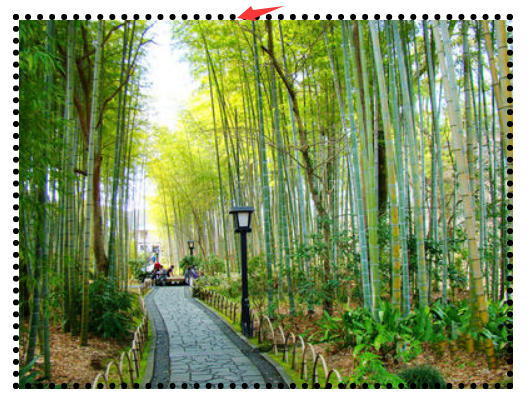

从上图我们可以看出,元素背景默认是存在于边框及以内的区域,但是不知道为什么加背景图片,不能全部覆盖;而背景颜色则没没这个问题。
2、padding-box
padding-box表示元素的背景从padding区域(包括padding)以内开始保留。
简单代码如下:
<!doctype html>

<html>

    <head>

        <style>

	    *{margin:0;padding:0;}

            .box{width:380px;height:280px;margin:100px auto;background:url("1.jpg") no-repeat -5px;padding:5px;border:5px dotted #000;
            background-clip:padding-box;}

        </style>

   </head>

   <body>

       <div class="box"></div>

   </body>

</html>
效果如下:

从上图我们可以看出背景图片存在于padding及以内区域。
3、content-box
content-box表示元素的背景从内容区域以内开始保留。
简单代码如下:
<!doctype html>

<html>

    <head>

        <style>

	    *{margin:0;padding:0;}

            .box{width:380px;height:280px;margin:100px auto;background:url("1.jpg") no-repeat -5px;padding:5px;border:5px dotted #000;
            background-clip:content-box;}

        </style>

   </head>

   <body>

       <div class="box"></div>

   </body>

</html>
效果如下:
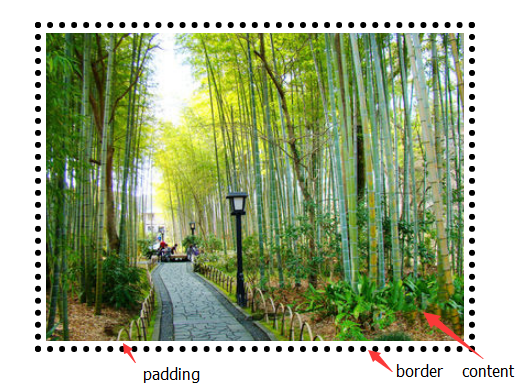
从上图我们可以看出背景图片存在于内容区域以内。
4、text
content-box表示元素的背景保留在前景内容中(文字),和其形状大小相同,目前仅支持chrome浏览器
简单代码如下:
<!doctype html>

<html>

    <head>

        <style>

	    *{margin:0;padding:0;}

            .box{width:380px;height:280px;margin:100px auto;background:red;padding:5px;border:5px dotted #000;
             font-size:100px;font-weight;bold;-webkit-background-clip:text;-webkit-text-fill-color:transparent;}

        </style>

   </head>

   <body>

       <div class="box">你 好 你 好</div>

   </body>

</html>
效果如下:
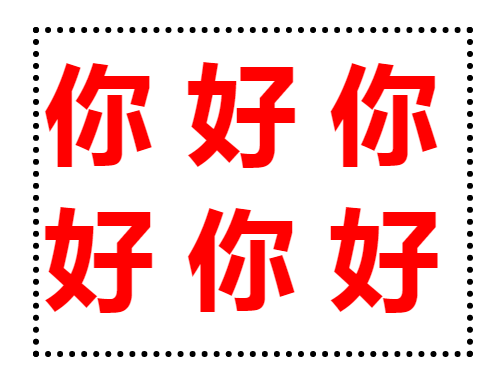
说明:目前值为text时,兼容性极差,仅知道即可。
css中background-clip属性的作用的更多相关文章
- css中background背景属性概
css中background背景属性概 background:url(背景图片路径) no-repeat;/*不重复默认在左上方*/background:url(背景图片路径) no-repeat ...
- css中background背景属性概述
background:url(背景图片路径) no-repeat;/*不重复默认在左上方*/ background:url(背景图片路径) no-repeat center;/*不重复背景图片中间显示 ...
- CSS中display:block属性的作用
display:block可以理解为块,举个简单的例子!比如你做一个超链接,<li><a href="#">超链接</a></li> ...
- 理解与应用css中的display属性
理解与应用css中的display属性 display属性是我们在前端开发中常常使用的一个属性,其中,最常见的有: none block inline inline-block inherit 下面, ...
- CSS中的display属性(none,block,inline,inline-block,inherit)
css中的display属性(none,block,inline,inline-block,inherit) display属性是我们在前端开发中常常使用的一个属性,其中,最常见的有: none bl ...
- Css中的Position属性
Css中的Position属性 Css属性在线查询地址: http://www.css88.com/book/css/properties/index.htm CSS 中的 position 属性 在 ...
- 深入理解css中的margin属性
深入理解css中的margin属性 之前我一直认为margin属性是一个非常简单的属性,但是最近做项目时遇到了一些问题,才发现margin属性还是有一些“坑”的,下面我会介绍margin的基本知识以及 ...
- 转:css中overflow:hidden 不起作用了吗?
css中overflow:hidden 不起作用了吗? 有同学遇到这样的问题,现象是给元素设置了overflow:hidden,但超出容器的部分并没有被隐藏,难道是设置的hidden失效了吗?其实看似 ...
- 前端CSS-font属性,超链接的美化,css精灵,background综合属性
前端CSS-font属性,超链接的美化,css精灵,background综合属性 1. font属性 使用font属性,能够将字号.行高.字体,能够一起设置. font:14px/24px " ...
- css中的定位属性position(转)
css中的定位属性position 同样的也是上课的时候发现学生难以理解的一些问题拿出来记录一下,希望帮助初学者. 在css中定位属性position的运用在页面中是很常用的,特别是一些结合js来 ...
随机推荐
- 兼容ie6的mvvm框架--san
最近,由于公司项目需要,使用百度mvvm框架san开发了一个兼容ie6的小项目.san的优势是强大的兼容性,能兼容到ie6.当初我自己好奇,尝试用san做了一个小型项目,这里记录一下.如果你也想尝试一 ...
- 3.1 一个简单的Java应用程序
如下一个最简单的应用程序,它将只发送一条消息到控制台窗口中: package myjavapp; public class FirstSample { public stati ...
- Ext.Ajax.request方法 参数
json数据服务器回传的方法. 在api总指出回传的格式{success;true,data:{clientName: "Fred. Olsen Lines", portOfL ...
- Fibonacci数列(codevs 1250)
题目描述 Description 定义:f0=f1=1, fn=fn-1+fn-2(n>=2).{fi}称为Fibonacci数列. 输入n,求fn mod q.其中1<=q<=30 ...
- [bzoj1598][Usaco08Mar]牛跑步_A*_Dijkstra
牛跑步 bzoj-1598 题目大意:给你n个点,m条边的有向图.求从1到n的严格的第k短路. 注释:$1\le n\le 1000$,$1\le m \le 10,000$,$1\le k \le ...
- HDU 4258(Covered Walkway-斜率优化)
Covered Walkway Time Limit: 30000/10000 MS (Java/Others) Memory Limit: 131072/131072 K (Java/Othe ...
- [Debug] Use Remote Sources to Debug a Web App on an Emulator, Simulator, or Physical Device
We can emulate different operating systems, browsers, and devices within a desktop operating system. ...
- Python内置的字符串处理函数
生成字符串变量 str='python String function' 字符串长度获取:len(str) 例:print '%s length=%d' % (str,len(str)) 连接字符 ...
- 蒟蒻的trie树专题
POJ 3630 Phone List: 模板 ///meek #include<bits/stdc++.h> using namespace std; using namespace s ...
- 将TensorFlow模型变为pb——官方本身提供API,直接调用即可
TensorFlow: How to freeze a model and serve it with a python API 参考:https://blog.metaflow.fr/tensorf ...