
极光推送配置(Android Studio),亲测有效
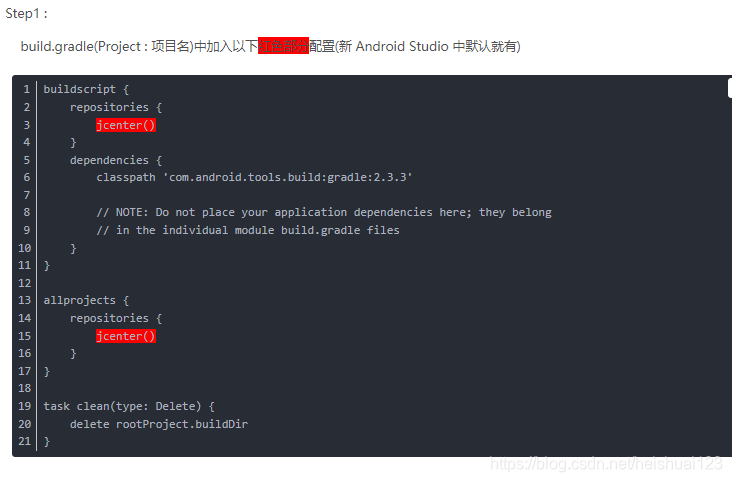
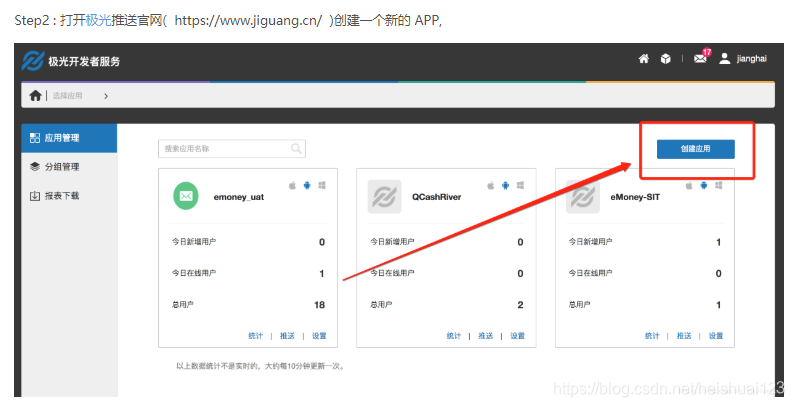
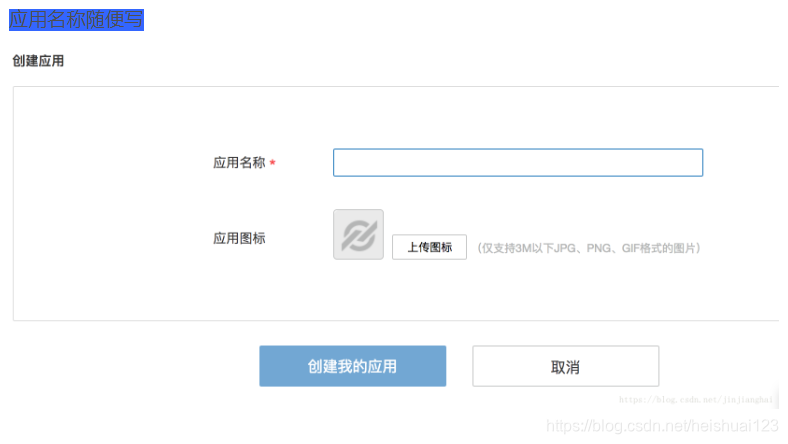
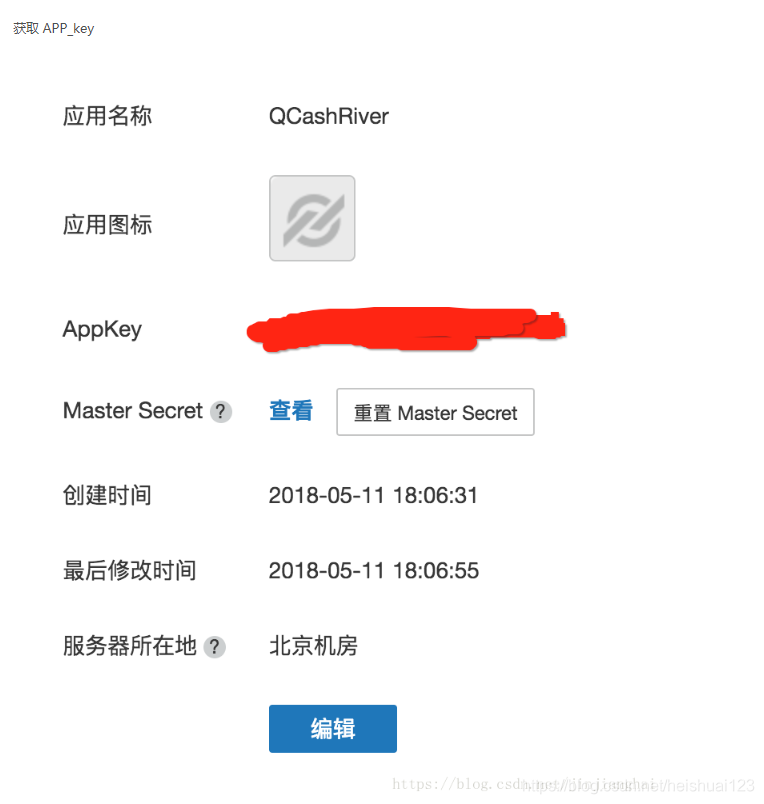
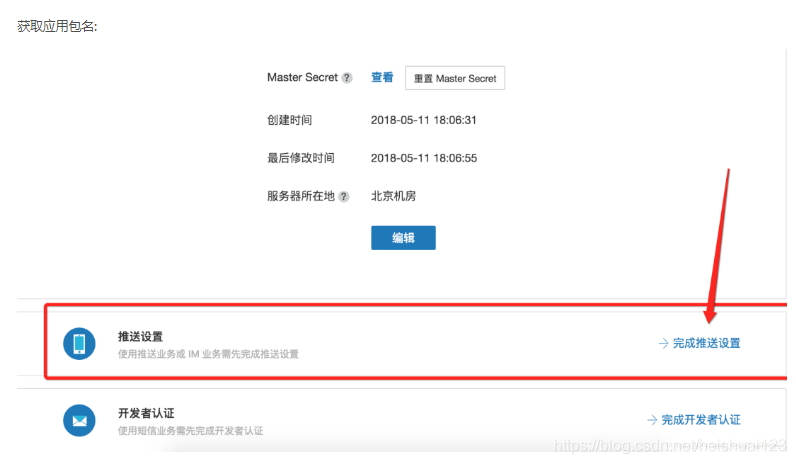
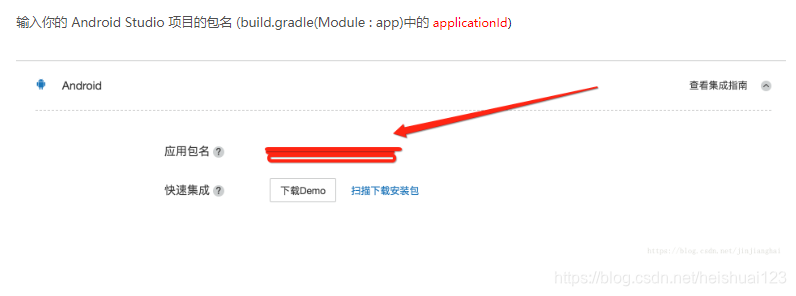
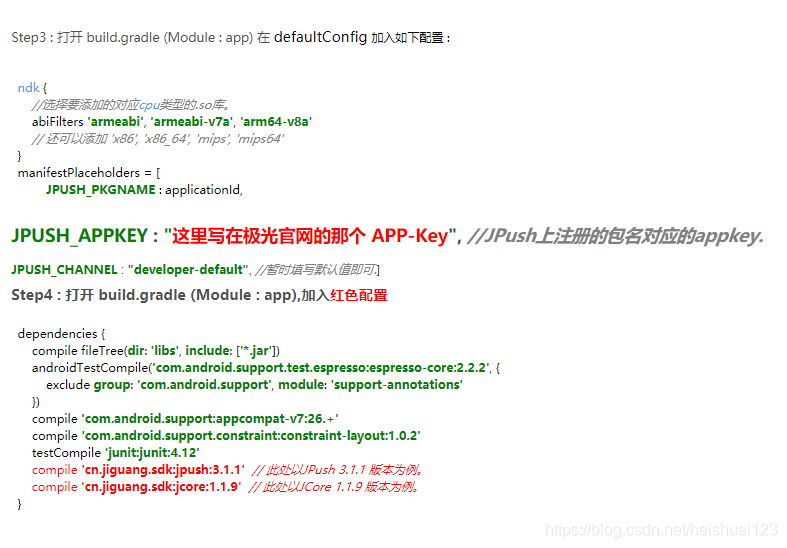
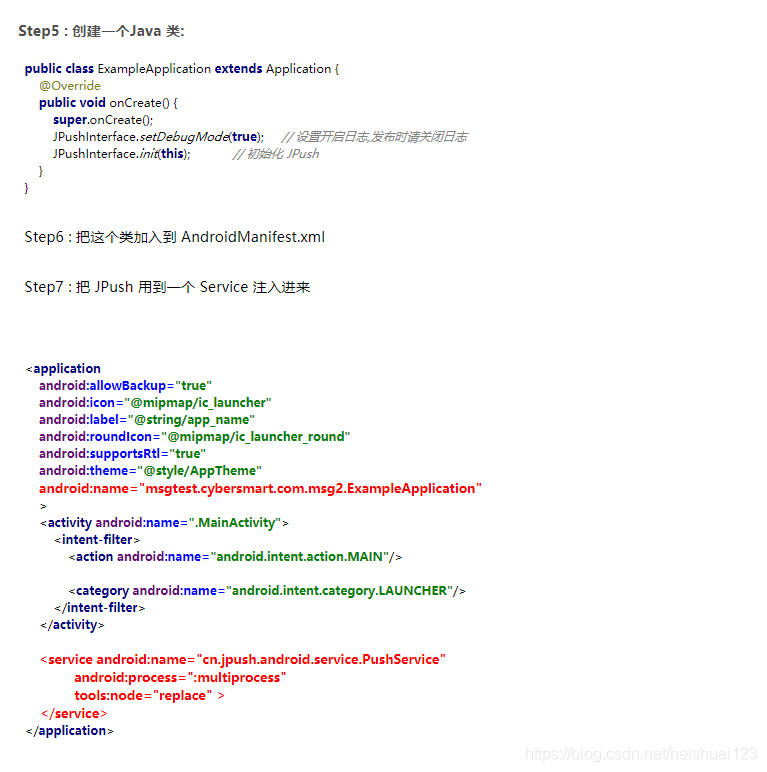
进行到这里就可以接收到通知了,但是如果你还想根据接收的消息做点什么
step8:

public class MyReceiver extends BroadcastReceiver {

    private static final String TAG = "MyReceiver";

    private NotificationManager nm;

    @Override

    public void onReceive(Context context, Intent intent) {

        if (null == nm) {

            nm = (NotificationManager) context.getSystemService(Context.NOTIFICATION_SERVICE);

        }

        Bundle bundle = intent.getExtras();

//        Log.d(TAG, "onReceive - " + intent.getAction() + ", extras: " + AndroidUtil.printBundle(bundle));

        if (JPushInterface.ACTION_REGISTRATION_ID.equals(intent.getAction())) {

            Log.d(TAG, "JPush 用户注册成功");

        } else if (JPushInterface.ACTION_MESSAGE_RECEIVED.equals(intent.getAction())) {

            Log.d(TAG, "接受到推送下来的自定义消息");

        } else if (JPushInterface.ACTION_NOTIFICATION_RECEIVED.equals(intent.getAction())) {

            Log.d(TAG, "接受到推送下来的通知");

            receivingNotification(context,bundle);

        } else if (JPushInterface.ACTION_NOTIFICATION_OPENED.equals(intent.getAction())) {

            Log.d(TAG, "用户点击打开了通知");

            openNotification(context,bundle);

        } else {

            Log.d(TAG, "Unhandled intent - " + intent.getAction());

        }

    }

    private void receivingNotification(Context context, Bundle bundle){

        String title = bundle.getString(JPushInterface.EXTRA_NOTIFICATION_TITLE);

        Log.d(TAG, " title : " + title);

        String message = bundle.getString(JPushInterface.EXTRA_ALERT);

        Log.d(TAG, "message : " + message);

        String extras = bundle.getString(JPushInterface.EXTRA_EXTRA);

        Log.d(TAG, "extras : " + extras);

    }

    private void openNotification(Context context, Bundle bundle){

        String extras = bundle.getString(JPushInterface.EXTRA_EXTRA);

   String myValue = "";

        try {

            JSONObject extrasJson = new JSONObject(extras);

            myValue = extrasJson.optString("myKey");

        } catch (Exception e) {

            Log.w(TAG, "Unexpected: extras is not a valid json", e);

            return;

        }

        Log.d(TAG, "myValue : " + myValue);

        if (TYPE_THIS.equals(myValue)) {

            Intent mIntent = new Intent(context, ThisActivity.class);

            mIntent.putExtras(bundle);

            mIntent.setFlags(Intent.FLAG_ACTIVITY_NEW_TASK);

            context.startActivity(mIntent);

        } else if (TYPE_ANOTHER.equals(myValue)){

            Intent mIntent = new Intent(context, AnotherActivity.class);

            mIntent.putExtras(bundle);

            mIntent.setFlags(Intent.FLAG_ACTIVITY_NEW_TASK);

            context.startActivity(mIntent);

        }

    }

}
step9:最后别忘了在清单中注册
    <!--极光推送接收消息-->

        <receiver

            android:name="com.psm.admininstrator.lele8teach.MyReceiver"

            android:exported="false"

            android:enabled="true">

            <intent-filter>

                <action android:name="cn.jpush.android.intent.REGISTRATION" /> <!--Required  用户注册SDK的intent-->

                <action android:name="cn.jpush.android.intent.MESSAGE_RECEIVED" /> <!--Required  用户接收SDK消息的intent-->

                <action android:name="cn.jpush.android.intent.NOTIFICATION_RECEIVED" /> <!--Required  用户接收SDK通知栏信息的intent-->

                <action android:name="cn.jpush.android.intent.NOTIFICATION_OPENED" /> <!--Required  用户打开自定义通知栏的intent-->

                <action android:name="cn.jpush.android.intent.CONNECTION" /><!-- 接收网络变化 连接/断开 since 1.6.3 -->

                <category android:name="com.psm.admininstrator.lele8teach" />

            </intent-filter>

        </receiver>

    </application>
原博客地址:https://blog.csdn.net/jinjianghai/article/details/80336099
极光推送配置(Android Studio),亲测有效的更多相关文章
- 极光推送使用实例(二) Android客户端
上一篇简单介绍了极光推送在Java服务端的实现,如果感兴趣的可以看一下极光推送使用实例(一)JAVA服务端.这篇文章介绍下极光推送在Android客户端的实现. JPush Android SDK 是 ...
- Android端 配置极光推送
由于业务须要,androidclient须要加推送.原来採用的百度推送.可是小米手机有时候收不到.后来换成了极光推送,极光的话全部设备都能收到推送,可是在高峰的时候会推迟.博主说的免费版的,收费的没用 ...
- 1、Android Studio集成极光推送(Jpush) 报错 java.lang.UnsatisfiedLinkError: cn.jpush.android.service.PushProtoco
Android studio 集成极光推送(Jpush) (华为手机)报错, E/JPush: [JPushGlobal] Get sdk version fail![获取sdk版本失败!] W/Sy ...
- JPush (极光推送) For Xamarin.Android
官方教程上讲的是 GCM (Google Cloud Messaging) , 不过 GFW 是 GCM 过不去的坎. 极光推送 JPush 是国内的一个不错的替代方案. JPush 提供的 API ...
- 极光推送android sdk集成步骤
推送,用极光,大家都说好,哈哈. 进入正题: 1.确认android studio的 Project 根目录的主 gradle 中配置了jcenter支持.(基本上现在都已经支持了,循例说一下) , ...
- android推送,极光推送
android中简单易用的消息推送方式之中的一个 -------> 极光推送 首先来介绍一下极光推送. 极光推送:英文简称 JPush,是一个面向普通开发人员免费.开放的第三方消息推送服务,我们 ...
- Android集成极光推送
要说学习极光推送,个人感觉官方文档就非常好啦,但是没法,人太懒啦,为了下次能够快速的将极光推送集成到项目中,故结合之前开发的项目和官方文档记录下简单的Android集成极光推送,在这之前,先上一张简单 ...
- Android集成JPush(极光推送)
目前只是简单的集成 1.在极光推送官网注册用户 2.创建应用 3.配置包名,获得APPKEY 去设置 输入应用包名 确定然后返回查看APPKEY 3.在应用中集成极光推送 用的jcenter自动集成的 ...
- Android 极光推送集成
集成Jpush 1.用Android Studio创建一个Demo 2.创建激光推送开发者账号,要创建极光推送开发者帐号,请访问极光推送官方网站https://www.jiguang.cn/push ...
随机推荐
- JDK源码分析 – Integer
Integer类的申明 public final class Integer extends Number implements Comparable<Integer> { … } Int ...
- ES 1.7安装ik分词elasticsearch-analysis-ik-1.2.5
IK简介 https://www.cnblogs.com/yjf512/p/4789239.html https://www.cnblogs.com/xing901022/p/5910139.html ...
- [CF912A]Tricky Alchemy
题意:你有a个黄水晶和b个蓝水晶,要求要x个黄水晶球(2黄),y个绿水晶球(1黄1蓝),z个蓝水晶球(3蓝),问还要多少水晶题解:模拟 C++ Code: #include<cstdio> ...
- 【CF edu 30 D. Merge Sort】
time limit per test 2 seconds memory limit per test 256 megabytes input standard input output standa ...
- 自定义toolbar教程
1.写toolbar的布局文件 ,toolbar.xml <?xml version="1.0" encoding="utf-8"?> <Re ...
- poj 2378 Tree Cutting 树形dp
After Farmer John realized that Bessie had installed a "tree-shaped" network among his N ( ...
- HDU 多校对抗第三场 L Visual Cube
Problem L. Visual Cube Time Limit: 2000/1000 MS (Java/Others) Memory Limit: 524288/524288 K (Java ...
- 2015年网易校招Java开发工程师(技术架构)在线笔试题
1. 程序和进程的本质区别是? A.在外存和内存存储 B.非顺序和顺序执行机器指令 C.独占使用和分时使用计算机资源 D.静态和动态特征 参考答案分析: 进程与应用程序的区别: 进程(Process ...
- AngularJS+BootStrap的一些插件
插件网址:http://jquerypluginplus.com/ 树 1.angular-bootstrap-nav-tree http://jquerypluginplus.com/angula ...
- WEB-INF 有关的目录路径问题总结
1.资源文件只能放在WebContent下面,如 CSS,JS,image等.放在WEB-INF下引用不了. 2.页面放在WEB-INF目录下面,这样可以限制访问,提高安全性.如JSP,html 3. ...