
持续集成工具Jenkins学习总结
概述
持续集成(Continuous Integration,简称CI)是一种软件开发实践,团队开发人员每次都通过自动化的构建(编译、发布、自动化测试)来验证,从而尽早的发现集成错误。持续集成最大的优点是避免了传统模式在集成阶段的除虫会议(bug meeting),其要素包括统一的代码库、自动构建、自动测试、自动部署、频繁提交修改过的代码等。
Jenkins的前身是Hudson,是基于Java开发的一种持续集成工具,是一个开源软件项目,主要用于:
- 持续、自动地构建/测试软件项目,如CruiseControl与DamageControl;
- 监控一些定时执行的任务;
Jenkins的官网:http://jenkins-ci.org/,下面我总结一下Windows下Jenkins的安装和使用。
Jenkins安装
(1)安装素材
- JDK(Jenkins运行需要Java 1.6以上的版本)
- Jenkins安装包(官网下载)
(2)安装JDK
(3)安装Jenkins
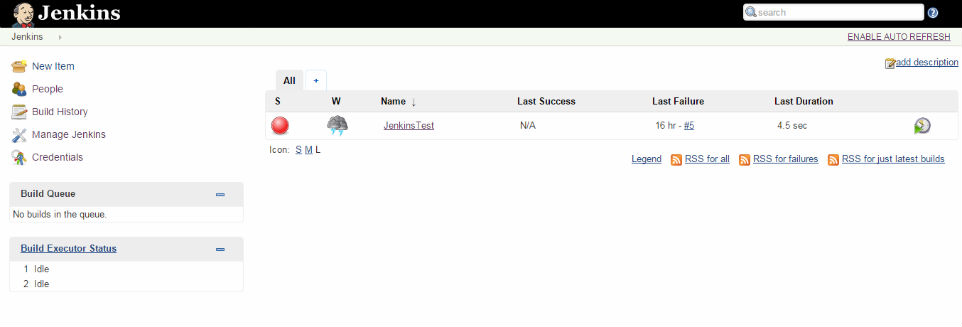
运行Jenkins安装包,按提示安装即可,安装成功之后会自动打开网页http://localhost:8080/,Jenkins主界面如下所示:
Jenkins配置
(1)配置http端口号
Jenkins默认端口号是8080,如果该端口号与其他任务的端口号冲突,就需要更改。打开Jenkins安装目录下的Jenkins.xml文件,如下所示:
<!--

  Windows service definition for Jenkins

  To uninstall, run "jenkins.exe stop" to stop the service, then "jenkins.exe uninstall" to uninstall the service.

  Both commands don't produce any output if the execution is successful.

-->

<service>

  <id>jenkins</id>

  <name>Jenkins</name>

  <description>This service runs Jenkins continuous integration system.</description>

  <env name="JENKINS_HOME" value="%BASE%"/>

  <!--

    if you'd like to run Jenkins with a specific version of Java, specify a full path to java.exe.

    The following value assumes that you have java in your PATH.

  -->

  <executable>%BASE%\jre\bin\java</executable>

  <arguments>-Xrs -Xmx256m -Dhudson.lifecycle=hudson.lifecycle.WindowsServiceLifecycle -jar "%BASE%\jenkins.war" --httpPort=8080</arguments>

  <!--

    interactive flag causes the empty black Java window to be displayed.

    I'm still debugging this.

  <interactive />

  -->

  <logmode>rotate</logmode>

  <onfailure action="restart" />

</service>
将<arguments>元素中的httpPort的值8080改为其他值即可。
(2)管理插件
Jenkins默认安装了一些插件,可根据自己的需要再安装其他插件,我额外安装的插件有:MSBuild plugin、MSTest plugin、Git plugin、GitHub plugin、Email Extension plugin等。
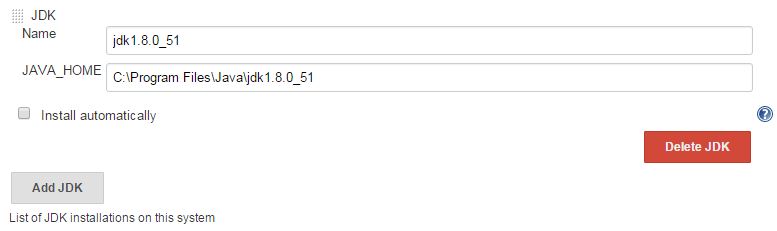
(3)配置JDK
(4)配置Git和GitHub
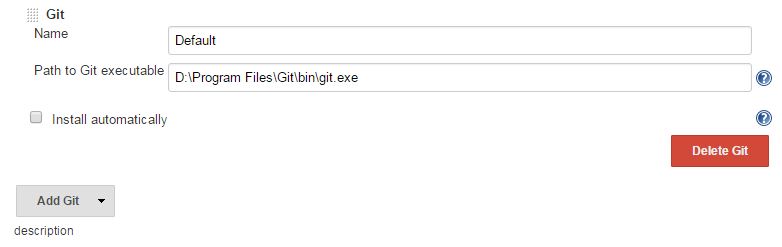
(5)配置MSBuild
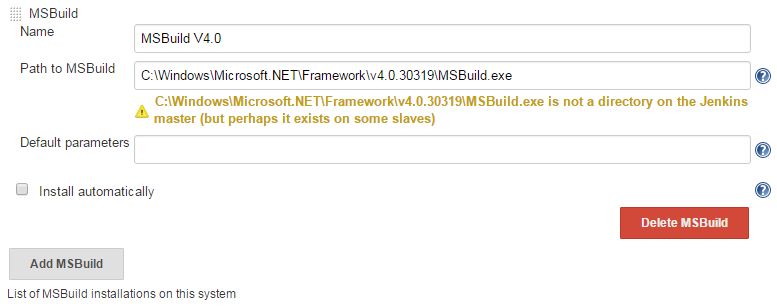
这个MSBuild是我编译DotNet程序用的,如果编译其他的(如C++程序),可点击Add MSBuild增加相应的MSBuild。
注意:如果电脑上未安装,可从其他电脑上拷贝一个。
(6)配置Extended E-mail Notification
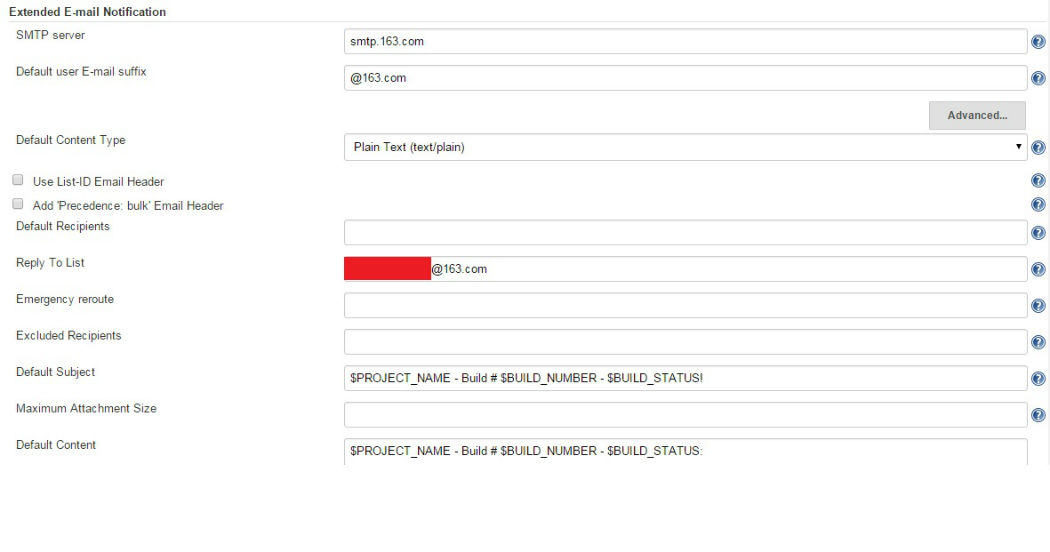
问题:这样设置后还是出现“邮件发送失败”,如果哪位解决了,还请告知,谢谢
Jenkins构建项目
(1)新建项目
在Jenkins首页点击New Item,Item Name:JenkinsTest,选择freestyle Project,OK
(2)常规设置
勾选GitHub Project,输入Project url,如我的是“https://github.com/GaoHongchen/WinFormGit.git/”
(3)设置Source Code Management
在Source Code Management项中,选择Git,填写Repository URL:https://github.com/GaoHongchen/WinFormGit.git,其他默认
(4)设置Build Triggers
根据自己的情况进行勾选,我选的是Build when a change is pushed to GitHub
(5)设置Build
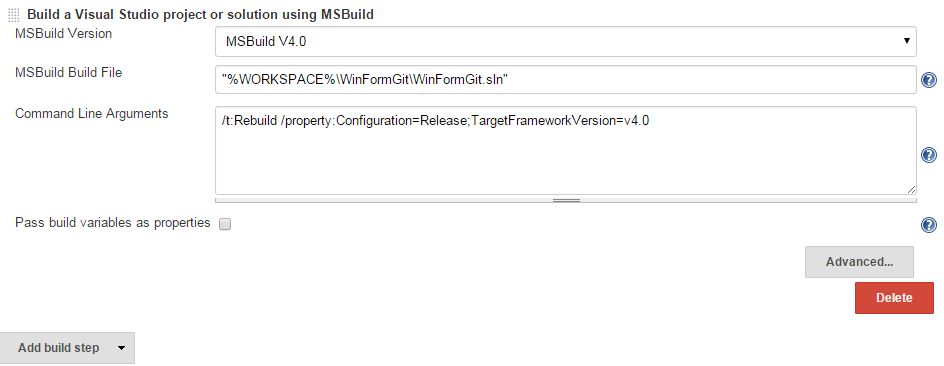
点击Add Build Step,进行选择:
1)Build a Visual Studio Project or solution using Build
2)Execute Windows batch command
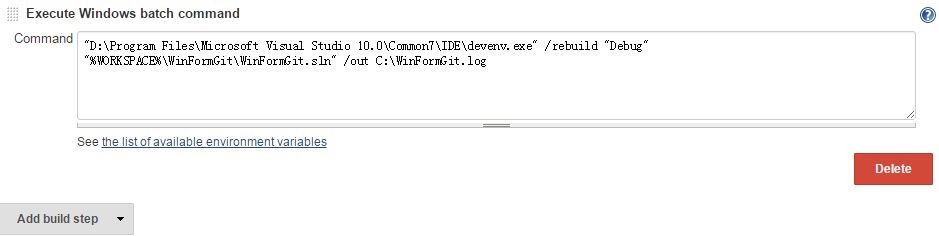
Windows Batch Command如下:
"D:\Program Files\Microsoft Visual Studio 10.0\Common7\IDE\devenv.exe" /rebuild "Debug" "%WORKSPACE%\WinFormGit\WinFormGit.sln" /out C:\WinFormGit.log
以上两种Build方式殊途同归,本项目中选择一种即可。
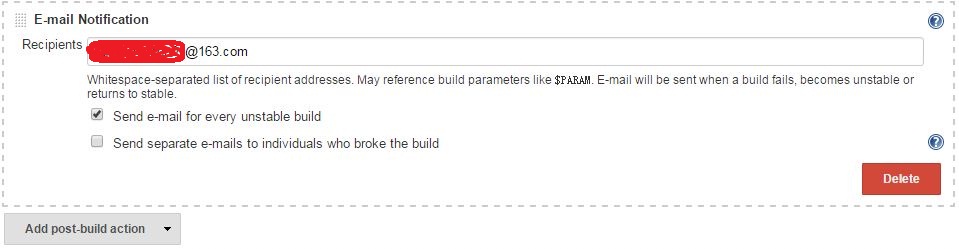
(6)设置Post-build Actions
点击Add post-build Action,我选择EMail notification,如下所示:
(7)开始构建
设置完成后,点击左侧的Build Now,开始进行构建
(8)构建结果
点击Console Output,查看构建过程及结果。若构建失败,在此可查看失败原因。
Console Output如下:
Started by user anonymous

Building in workspace D:\Program Files\Jenkins\jobs\JenkinsTest\workspace

 > D:\Program Files\Git\bin\git.exe rev-parse --is-inside-work-tree # timeout=

Fetching changes from the remote Git repository

 > D:\Program Files\Git\bin\git.exe config remote.origin.url https://github.com/GaoHongchen/WinFormGit.git # timeout=10

Fetching upstream changes from https://github.com/GaoHongchen/WinFormGit.git

 > D:\Program Files\Git\bin\git.exe --version # timeout=

 > D:\Program Files\Git\bin\git.exe -c core.askpass=true fetch --tags --progress https://github.com/GaoHongchen/WinFormGit.git +refs/heads/*:refs/remotes/origin/*

 > D:\Program Files\Git\bin\git.exe rev-parse "refs/remotes/origin/master^{commit}" # timeout=

 > D:\Program Files\Git\bin\git.exe rev-parse "refs/remotes/origin/origin/master^{commit}" # timeout=

Checking out Revision 2562db18b228c399d3d0e14f83ce305f09f64be1 (refs/remotes/origin/master)

 > D:\Program Files\Git\bin\git.exe config core.sparsecheckout # timeout=

 > D:\Program Files\Git\bin\git.exe checkout -f 2562db18b228c399d3d0e14f83ce305f09f64be1

 > D:\Program Files\Git\bin\git.exe rev-list 2562db18b228c399d3d0e14f83ce305f09f64be1 # timeout=

Path To MSBuild.exe: C:\Windows\Microsoft.NET\Framework\v4.0.30319\MSBuild.exe

Executing the command cmd.exe /C " C:\Windows\Microsoft.NET\Framework\v4.0.30319\MSBuild.exe /t:Rebuild /property:Configuration=Release;TargetFrameworkVersion=v4.0 "%WORKSPACE%\WinFormGit\WinFormGit.sln" " && exit %%ERRORLEVEL%% from D:\Program Files\Jenkins\jobs\JenkinsTest\workspace

[workspace] $ cmd.exe /C " C:\Windows\Microsoft.NET\Framework\v4.0.30319\MSBuild.exe /t:Rebuild /property:Configuration=Release;TargetFrameworkVersion=v4.0 "%WORKSPACE%\WinFormGit\WinFormGit.sln" " && exit %%ERRORLEVEL%%

Microsoft(R) 生成引擎版本 4.0.30319.17929

[Microsoft .NET Framework 版本 4.0.30319.18052]

版权所有(C) Microsoft Corporation 。保留所有权利。

Building the projects in this solution one at a time. To enable parallel build, please add the "/m" switch.

生成启动时间为 // ::。

项目“D:\Program Files\Jenkins\jobs\JenkinsTest\workspace\WinFormGit\WinFormGit.sln”在节点  上(Rebuild 个目标)。

ValidateSolutionConfiguration:

  正在生成解决方案配置“Release|x86”。

项目“D:\Program Files\Jenkins\jobs\JenkinsTest\workspace\WinFormGit\WinFormGit.sln”()正在节点  上生成“D:\Program Files\Jenkins\jobs\JenkinsTest\workspace\WinFormGit\WinFormGit\WinFormGit.csproj”() (Rebuild 个目标)。

CoreClean:

  正在删除文件“D:\Program Files\Jenkins\jobs\JenkinsTest\workspace\WinFormGit\WinFormGit\bin\Release\WinFormGit.exe”。

  正在删除文件“D:\Program Files\Jenkins\jobs\JenkinsTest\workspace\WinFormGit\WinFormGit\bin\Release\WinFormGit.pdb”。

  正在删除文件“D:\Program Files\Jenkins\jobs\JenkinsTest\workspace\WinFormGit\WinFormGit\obj\x86\Release\WinFormGit.csprojResolveAssemblyReference.cache”。

  正在删除文件“D:\Program Files\Jenkins\jobs\JenkinsTest\workspace\WinFormGit\WinFormGit\obj\x86\Release\WinFormGit.Form1.resources”。

  正在删除文件“D:\Program Files\Jenkins\jobs\JenkinsTest\workspace\WinFormGit\WinFormGit\obj\x86\Release\WinFormGit.Properties.Resources.resources”。

  正在删除文件“D:\Program Files\Jenkins\jobs\JenkinsTest\workspace\WinFormGit\WinFormGit\obj\x86\Release\WinFormGit.csproj.GenerateResource.Cache”。

  正在删除文件“D:\Program Files\Jenkins\jobs\JenkinsTest\workspace\WinFormGit\WinFormGit\obj\x86\Release\WinFormGit.exe”。

  正在删除文件“D:\Program Files\Jenkins\jobs\JenkinsTest\workspace\WinFormGit\WinFormGit\obj\x86\Release\WinFormGit.pdb”。

ResolveAssemblyReferences:

  将生成 TargetFramework 配置文件排除列表。

CoreResGen:

  "c:\Program Files\Microsoft SDKs\Windows\v7.0A\bin\NETFX 4.0 Tools\resgen.exe" /useSourcePath /r:"C:\Program Files\Reference Assemblies\Microsoft\Framework\.NETFramework\v4.0\Profile\Client\Microsoft.CSharp.dll" /r:"C:\Program Files\Reference Assemblies\Microsoft\Framework\.NETFramework\v4.0\Profile\Client\mscorlib.dll" /r:"C:\Program Files\Reference Assemblies\Microsoft\Framework\.NETFramework\v4.0\Profile\Client\System.Core.dll" /r:"C:\Program Files\Reference Assemblies\Microsoft\Framework\.NETFramework\v4.0\Profile\Client\System.Data.DataSetExtensions.dll" /r:"C:\Program Files\Reference Assemblies\Microsoft\Framework\.NETFramework\v4.0\Profile\Client\System.Data.dll" /r:"C:\Program Files\Reference Assemblies\Microsoft\Framework\.NETFramework\v4.0\Profile\Client\System.Deployment.dll" /r:"C:\Program Files\Reference Assemblies\Microsoft\Framework\.NETFramework\v4.0\Profile\Client\System.dll" /r:"C:\Program Files\Reference Assemblies\Microsoft\Framework\.NETFramework\v4.0\Profile\Client\System.Drawing.dll" /r:"C:\Program Files\Reference Assemblies\Microsoft\Framework\.NETFramework\v4.0\Profile\Client\System.Windows.Forms.dll" /r:"C:\Program Files\Reference Assemblies\Microsoft\Framework\.NETFramework\v4.0\Profile\Client\System.Xml.dll" /r:"C:\Program Files\Reference Assemblies\Microsoft\Framework\.NETFramework\v4.0\Profile\Client\System.Xml.Linq.dll" /compile Form1.resx,obj\x86\Release\WinFormGit.Form1.resources Properties\Resources.resx,obj\x86\Release\WinFormGit.Properties.Resources.resources

  正在将资源文件“Form1.resx”处理到“obj\x86\Release\WinFormGit.Form1.resources”中。

  正在将资源文件“Properties\Resources.resx”处理到“obj\x86\Release\WinFormGit.Properties.Resources.resources”中。

GenerateTargetFrameworkMonikerAttribute:

正在跳过目标“GenerateTargetFrameworkMonikerAttribute”,因为所有输出文件相对于输入文件而言都是最新的。

CoreCompile:

  C:\Windows\Microsoft.NET\Framework\v4.0.30319\Csc.exe /noconfig /nowarn:, /nostdlib+ /platform:x86 /errorreport:prompt /warn: /define:TRACE /highentropyva- /reference:"C:\Program Files\Reference Assemblies\Microsoft\Framework\.NETFramework\v4.0\Profile\Client\Microsoft.CSharp.dll" /reference:"C:\Program Files\Reference Assemblies\Microsoft\Framework\.NETFramework\v4.0\Profile\Client\mscorlib.dll" /reference:"C:\Program Files\Reference Assemblies\Microsoft\Framework\.NETFramework\v4.0\Profile\Client\System.Core.dll" /reference:"C:\Program Files\Reference Assemblies\Microsoft\Framework\.NETFramework\v4.0\Profile\Client\System.Data.DataSetExtensions.dll" /reference:"C:\Program Files\Reference Assemblies\Microsoft\Framework\.NETFramework\v4.0\Profile\Client\System.Data.dll" /reference:"C:\Program Files\Reference Assemblies\Microsoft\Framework\.NETFramework\v4.0\Profile\Client\System.Deployment.dll" /reference:"C:\Program Files\Reference Assemblies\Microsoft\Framework\.NETFramework\v4.0\Profile\Client\System.dll" /reference:"C:\Program Files\Reference Assemblies\Microsoft\Framework\.NETFramework\v4.0\Profile\Client\System.Drawing.dll" /reference:"C:\Program Files\Reference Assemblies\Microsoft\Framework\.NETFramework\v4.0\Profile\Client\System.Windows.Forms.dll" /reference:"C:\Program Files\Reference Assemblies\Microsoft\Framework\.NETFramework\v4.0\Profile\Client\System.Xml.dll" /reference:"C:\Program Files\Reference Assemblies\Microsoft\Framework\.NETFramework\v4.0\Profile\Client\System.Xml.Linq.dll" /debug:pdbonly /filealign: /optimize+ /out:obj\x86\Release\WinFormGit.exe /resource:obj\x86\Release\WinFormGit.Form1.resources /resource:obj\x86\Release\WinFormGit.Properties.Resources.resources /target:winexe /utf8output Form1.cs Form1.Designer.cs Program.cs Properties\AssemblyInfo.cs Properties\Resources.Designer.cs Properties\Settings.Designer.cs "C:\Windows\TEMP\.NETFramework,Version=v4.0,Profile=Client.AssemblyAttributes.cs"

CopyFilesToOutputDirectory:

  正在将文件从“obj\x86\Release\WinFormGit.exe”复制到“bin\Release\WinFormGit.exe”。

  WinFormGit -> D:\Program Files\Jenkins\jobs\JenkinsTest\workspace\WinFormGit\WinFormGit\bin\Release\WinFormGit.exe

  正在将文件从“obj\x86\Release\WinFormGit.pdb”复制到“bin\Release\WinFormGit.pdb”。

已完成生成项目“D:\Program Files\Jenkins\jobs\JenkinsTest\workspace\WinFormGit\WinFormGit\WinFormGit.csproj”(Rebuild 个目标)的操作。

已完成生成项目“D:\Program Files\Jenkins\jobs\JenkinsTest\workspace\WinFormGit\WinFormGit.sln”(Rebuild 个目标)的操作。

已成功生成。

     个警告

     个错误

已用时间 ::00.47

Finished: SUCCESS
Console Output
最终,项目构建状态如下:

为了配置好Jenkins,我可是构建了12次啊。虽然花费了不少时间,但学会了用Jenkins持续集成,这还是令人高兴的,哈哈。。。
持续集成工具Jenkins学习总结的更多相关文章
- 持续集成工具jenkins的使用
jenkins类似于Hadson,是一款持续集成工具.使用jenkins完成自动化部署的表现为:当开发人员向版本库提交新的代码后,应用服务器上自动部署,用户或测试人员使用的马上就是最新的应用程序.搭建 ...
- 持续集成工具Jenkins安装、部署、使用
本文介绍jenkins,利用其做项目发布与持续集成交付工具. 一.Jenkins是什么? Jenkins是基于Java开发的一种持续集成工具,用于监控持续重复的工作,功能包括: 1.持续的软件版本发布 ...
- 轻松搭建持续集成工具jenkins
1.Jenkins介绍1)什么是持续集成随着软件开发复杂度的不断提高,团队开发成员间如何更好地协同工作以确保软件开发的质量已经慢慢成为开发过程中不可回避的问题.尤其是近些年来,敏捷(Agile) 在软 ...
- 持续集成工具——Jenkins
一.jenkins简介 1.持续集成工具 2.基于JAVA环境 二.环境搭建 1.安装JDK 2.安装配置git 3.安装配置tomcat Tomcat是针对Java的一个开源中间件服务器(容器),基 ...
- 持续集成工具-Jenkins 使用介绍
Jenkins 是一个可扩展的持续集成引擎,可以为我们提供代码自动编译.打包和发布工作,减少部署成本. 一.安装与启动 Jenkins 提供了多种便捷的安装方式,比较推荐使用执行 war 包的方式. ...
- linux-centos下持续集成工具jenkins部署使用教程
centos下准备工作: 1.安装jdk环境 2.安装maven环境(用于构建项目) 3.git客户端(用于拉取源码) 此外码云还要准备一份java源码(springboot项目) 一.安装jenki ...
- 【Gerrit】持续集成工具Jenkins的安装配置与使用过程中遇到的问题整理
1.下载war包 https://jenkins.io/download/ 2.安装 java -jar jenkins.war Error: Feb 21, 2019 2:17:25 AM wins ...
- 持续集成工具之jenkins+sonarqube做代码扫描
上一篇我们主要聊了下代码质量管理平台sonarqube的安装部署以及它的工作方式做了简单的描述和代码扫描演示:回顾请参考https://www.cnblogs.com/qiuhom-1874/p/13 ...
- 【持续集成】jenkins安装部署从git获取代码
一:持续集成的概念: 1.1:总体的概括 持续集成Continuous Integration 持续交付Continuous Delivery 持续部署Continuous Deployment 1. ...
随机推荐
- mysql 模糊查询语句比较(LIKE、instr、locate、find_in_set、position)
大家都知道mysql 模糊查询的常用方法是LIKE 但这个语句查询效率很慢,那么有没有比较好的方法呢,下面本人测试了几个语句 测试数据800条左右 1,
- C# 获取系统时间及时间格式
--DateTime 数字型 System.DateTime currentTime=new System.DateTime(); 取当前年月日时分秒 currentTime=System. ...
- Mysql binlog
理解Mysql binlog 日志的三种模式 本文介绍下,mysql中binlog日志的三种模式,了解了各种模式的不同之处,才能更好地应用.有需要的朋友建议参考下. 一,模式1 Row Lev ...
- PHP实现异步调用方法研究
作者: Laruence 本文地址: http://www.laruence.com/2008/04/14/318.html 转载请注明出处 , ,); curl_setopt_array(, ); ...
- JS中this的指向问题&使用call或apply模拟new
this的指向由调用时决定而不是定义时决定,定义的方式: //直接定义在函数里 var a="window中的a"; var name="window"; fu ...
- SpreadJS电子表格
SpreadJS是wijmo旗下的一款HTML5电子表格控件. 官方网址:http://wijmo.com/products/spreadjs/ 在这里简单整理了SpreadJS几个比较简单的特点,如 ...
- smbclient提示NT_STATUS_INSUFFICIENT_RESOURCES
Rhel6中使用smbclient命令打开windows共享文件夹,出现: Linux Samba protocol negotiation failed: NT_STATUS_INSUFFICIEN ...
- MVC使用内建的Form辅助器方法创建Select元素
第一种方法: List<SelectListItem> statusItems = new List<SelectListItem>(); statusI ...
- printAB()
#include <iostream> void printA() { std::cout << "A" << std::endl; } voi ...
- 项目中可能用到的demo
1. 轮播图 https://github.com/codingZero/XRCarouselView 2. 图表 https://github.com/Zirkfied/ZFChart