
Android移动APP开发笔记——Cordova(PhoneGap)通过CordovaPlugin插件调用 Activity 实例
引言
Cordova(PhoneGap)采用的是HTML5+JavaScript混合模式来开发移动手机APP,因此当页面需要获取手机内部某些信息时(例如:联系人信息,坐标定位,短信等),程序就需要调用手机内部的API跟页面进行信息交换。Cordova 特别为此定制了完善的解决方案,以方便用户进行程序编辑。在这一章里将为大家逐一介绍Cordova与Actitity通讯的实现原理。
目录
二、页面通过 cordova.exec 函数调用 CordovaPlugin 插件
四、页面通过CordovaPlugin插件调用Activity开发实例
一、CordovaPlugin类简介
CordovaPlugin是Cordova插件的父类,用户自定义的插件必须继承父类,它的主要常用属性如下
| 属性 | 详细说明 |
| CordovaWebView | 视图管理器,当中包括PluginManager、CordovaWebViewEngine、ICordovaCookieManager等多个对象,用于管理界面渲染,视图加载过程中的生命周期 |
| CordovaInterface | 定义startActivityForResult、setActivityResultCallback等主要方法,获取调用上下文中的Activity对象 |
| CordovaPreferences | 用于管理bundle中的属性值 |
表格1.1
CordovaPlugin的常用方法如下
| 方法 | 详细说明 |
| void privateInitialize(String serviceName, CordovaInterface cordova, CordovaWebView webView, CordovaPreferences preferences) | 插件初始化时执行,用于定义service名称,cordovaInterface接口,CodovaWebView视图,CordovaPreferences 属性等值 |
| boolean execute(String action, String rawArgs, CallbackContext callbackContext) | 在开发插件时,用户的自定义方法,当页面调用插件时系统首先将会运行此方法 |
| boolean execute(String action, JSONArray args, CallbackContext callbackContext) | 同上 |
| boolean execute(String action, CordovaArgs args, CallbackContext callbackContext) | 同上 |
| void onActivityResult(int requestCode, int resultCode, Intent intent) | 在开发插件时,用户的自定义方法,插件调用startActivityForResult后的回调函数。 |
| String getServiceName() | 获取在config文件中该服务的名称 |
| Boolean shouldAllowRequest(String url) | 判断是否允许此请求 |
| Boolean shouldAllowNavigation(String url) | 判断是否允许此导航 |
| Boolean shouldOpenExternalUrl(String url) | 判断是否打开外部链接 |
| boolean onReceivedHttpAuthRequest(CordovaWebView view, ICordovaHttpAuthHandler handler, String host, String realm) | |
| boolean onReceivedClientCertRequest(CordovaWebView view, ICordovaClientCertRequest request) |
表格1.2
CordovaPlugin的详细解析可参考官网
二、页面调用 CordovaPlugin 插件实例
大概了解 CordovaPlugin 类的使用方法后,下面为大家介绍一下页面调用插件的例子。首先打开文件res/xml/config.xml为插件进行配置。
<preference/>可用于运行环境中的常用参数,例如:全屏设置,滚动条设置,背景色设置等等
<preference name="Fullscreen" value="true" />
<preference name="DisallowOverscroll" value="true"/>
<preference name="BackgroundColor" value="0xff0000ff"/>
<feature></feature>节点用于设置插件描述,feature的name属性是设置插件的唯一标示,在页面调用插件时将通过name找到此插件
在开发插件时,先为此插件添加一个<feature>节点,在<param>中绑定插件的后台执行文件ShowMessagePlugin.java
<param name="android-package" value="org.apache.cordova.showmessage.ShowMessagePlugin" />
 <?xml version='1.0' encoding='utf-8'?>

 <widget id="com.sun.androidapp" version="0.0.1" xmlns="http://www.w3.org/ns/widgets" xmlns:cdv="http://cordova.apache.org/ns/1.0">

     <!--设置运行环境中的参数值  -->

     <preference name="loglevel" value="DEBUG" />

     <!-- 插件描述 -->

     <feature name="Whitelist">

         <param name="android-package" value="org.apache.cordova.whitelist.WhitelistPlugin" />

         <param name="onload" value="true" />

     </feature>

     <feature name="ShowMessage">

         <param name="android-package" value="org.apache.cordova.showmessage.ShowMessagePlugin" />

     </feature>

     <allow-intent href="market:*" />

     <!-- 该APP名称 -->

     <name>AndroidTest</name>

     <!-- APP描述 -->

     <description>

         A sample Apache Cordova application that responds to the deviceready event.

     </description>

     <!-- 作者信息描述 -->

     <author email="dev@cordova.apache.org" href="http://cordova.io">

         Apache Cordova Team

     </author>

     <!-- 默认启动页面 -->

     <content src="index.html" />

     <!-- 指定app可进行通信的域名,*为所有 -->

     <access origin="*" />

     <!-- App默认只请允许通过手机端直接打开,若想通过网站,SMS等方式调用APP,则需要设置allow-intent配置 -->

     <allow-intent href="http://*/*" />

     <allow-intent href="https://*/*" />

     <allow-intent href="tel:*" />

     <allow-intent href="sms:*" />

     <allow-intent href="mailto:*" />

     <allow-intent href="geo:*" />

 </widget>
建立org.apache.cordova.showmessage.ShowMessagePlugin类,且继承CordovaPlugin基类,并实现
bool execute(action,args,callbackcontext) 方法。当页面调用此插件时,默认执行此方法。
action 是唯一标识符,系统可根据不同的action进行不同的操作。
args是页面传入的参数,支持String, JsonArray,CordovaArgs 等三种不同的类型。
callbackcontext是系统的上下文,当完成操作后调用callbackcontext.success(支持多类型参数)方法,表示插件操作已完成,并把参数返还到页面。最终返回true代表插件执行成功,false代表执行失败
 package org.apache.cordova.showmessage;

 public class ShowMessagePlugin extends CordovaPlugin {

     @Override

     public boolean execute(String action,JSONArray args,CallbackContext context)

             throws JSONException{

         if(action.equals("mydream")){

             String msg=args.getString(0)+"'s dream is to become a "+args.getString(1);

             context.success(msg);

             return true;

         }

         return false;

     }

 }
在 cordova.js 包中,最常用的是 cordova.exec(success,failed,service,action,args)函数,页面正是通过此函数调用插件。
success 用于绑定插件执行成功后回调的回调函数
failed用于绑定执行失败的回调函数
service与config.xml配置文件中feature字节的name属性相对应
action与ShowMessagePlugin对象boolean excute方法中action参数对应,用于分辨插件执行的方法类型,插件可根据action类型的不同作出分类处理。
args为输入参数
Name: <input type="text" id="txt1"/>
Dream:<input type="text" id="txt2"/>
<input type="button" onclick="btnclick()" name="btn" value="Click"/> <br/>
<label id="label"></label> <script type="text/javascript"> function btnclick(){
var name=$("#txt1").val();
var dream=$("#txt2").val();
//通过 cordova.exec (success,failed,serviceName,action,args)函数调用插件
cordova.exec(success,failed,"ShowMessage","mydream",[name,dream])
} //成功调用插件,获取返回值后的页面处理函数
function success(result){
if(result!=null)
$("#label").html(result);
else
alert("no message");
} //调用失败后的处理函数
function failed(msg){
......
}
</script>
测试结果

三、CordovaInterface接口说明
CordovaInterface 接口默认是由 CordovaInterfaceImpl 类实现的,当中包括了一个Activity对象。当打开APP时 Cordova 会默认启动此 Activity 以承载 Cordova 核心引擎对程序进行管理。ExecutorService 则负责对象对线程池进行管理,PluginManager则负责对插件进行管理,CordovaPlugin则是Cordova插件的父类,所有插件都必须继承CordovaPlugin。
| 属性 | 详细说明 |
| Activity | 打开APP时 Cordova 会默认启动此 Activity 以承载 Cordova 核心引擎对程序进行管理 |
| ExecutorService | 对线程池进行管理 |
| PluginManager | 插件管理器,用于管理插件的生成,运行,结束等生命周期 |
| CordovaPlugin | 通过startActivityForResult方法绑定CordovaPlugin插件 |
| ActivityResultHolder | 内部类,封装了requestCode, resultCode, intent等对象 |
表格2.1
CordovaInterfaceImpl定义了三个最常用方法
| 方法 | 详细说明 |
| void startActivityForResult(CordovaPlugin command, Intent intent, int requestCode) | 绑定CordovaPlugin参数,并调用Activity对象的startActivityForResult(intent, requestCode)方法,根据 intent 绑定值跳转到对应的activity |
| void setActivityResultCallback(CordovaPlugin plugin) | 激发CordovaPlugin对象的onActivityResult事件 |
| boolean onActivityResult(int requestCode, int resultCode, Intent intent) | 封装Acticity对象的onActivityResult回调函数, 激发CordovaPlugin对象的onActivityResult事件 |
表格2.2
四、页面通过CordovaPlugin插件调用Activity开发实例
类似于第一节实例,在页面通过cordova.exec(success,failed,service,action,args)方法调用插件,返回时调用success函数进行处理显示结果
        出游省份:

        <select id="select1">

           <option value='1' selected='selected'>黑龙江</option>

           <option value='2'>吉林</option>

           <option value='3'>辽宁</option>

        </select>

        <input type="button" onclick="btnclick()" name="btn" value="查找"/> <br/>

        路线景点:

        <label id="label"></label><br/>

        <script type="text/javascript">

             function btnclick(){

                  var province=$("#select1").val();

                  //通过 cordova.exec (success,failed,serviceName,actionName,args)函数调用插件

                  cordova.exec(success,null,"ShowMessage","showMessage",[province]);

             }

             //成功调用插件,获取返回值后的页面处理函数

             function success(result){

                  if(result!=null)

                      $("#label").html(result);

                  else

                      alert("no message");

             }

        </script>

插件通过判断action参数判断进行不同的处理,然后通过Intent对象绑定将要启动的Activity,最后通过CordovaInterface中的startActivityForResult(cordovaPlugin,intent,int)方法启动该Activity。当 Activity 结束后,系统将调用回调函数 onActivityResult(int requestCode, int resultCode, Intent intent)
在此说明一下Intent类的用途,此类主要用于绑定当前的活动与子活动之间关系,当中包含6种构造函数。
1、Intent() 空构造函数
2、Intent(Intent o) 拷贝构造函数
3、Intent(String action) 指定action类型的构造函数
4、Intent(String action, Uri uri) 指定Action类型和Uri的构造函数,URI主要是结合程序之间的数据共享ContentProvider
5、Intent(Context packageContext, Class<?> cls) 传入组件的构造函数,也就是此例子中使用到的
6、Intent(String action, Uri uri, Context packageContext, Class<?> cls) 前两种结合体
Intent 类中封装了一个Bundle 对象 mExtras,可用于主活动与子活动之间传值,系统可通过 putExtra 方法把参数传入mExtras, 也可通过 getShortExtra、getIntExtra、getBooleanExtra、getByteExtra 等多个方法从mExtras 获取参数值。
 public class ShowMessagePlugin extends CordovaPlugin {

     private CallbackContext context;

     @Override

     public boolean execute(String action,JSONArray args,CallbackContext context)

              throws JSONException{

         this.context=context;

         //根据action判断调用方法

         if(action.equals("showMessage")){

             //通过Intent绑定将要调用的Activity

             Intent intent=new Intent(this.cordova.getActivity(),SpotActivity.class);

             //加入将要传输到activity中的参数

             intent.putExtra("province", args.getString(0));

             //启动activity

             this.cordova.startActivityForResult(this, intent, 0);

         }

         return true;

     }

     @Override

     public void onActivityResult(int requestCode, int resultCode, Intent intent) {

         // 根据resultCode判断处理结果

         if(resultCode==Activity.RESULT_OK){

             String spot=intent.getStringExtra("spot");

             context.success(spot);

         }

     }

 }
Activity 被触发后先通过 setContentView 方法绑定视图,再从intent 对象中获取输入参数进行处理。
完成操作后,通过 Activity 类 setResult(int resultCode, Intent data) 方法绑定返回值,其中resultCode可被 cordovaPlugin 插件用作判断返回值的处理结果。
最后调用 Activity 对象的 finish 方法关闭 SpotActivity,把返回值回传到 CordovaPlugin。
 public class SpotActivity extends Activity{

     private CheckBox chk1,chk2,chk3;

     @Override

     public void onCreate(Bundle savedInstanceState){

         super.onCreate(savedInstanceState);

         //绑定视图

         setContentView(R.layout.goods_list);

         //从intent中获取输入参数

         Integer province=Integer.parseInt(this.getIntent().getStringExtra("province"));

         setSpots(province);

     }

     private void setSpots(Integer n){

         this.chk1=(CheckBox)this.findViewById(R.id.checkBox1);

         this.chk2=(CheckBox)this.findViewById(R.id.checkBox2);

         this.chk3=(CheckBox)this.findViewById(R.id.checkBox3);

         switch(n){

             case 1:

                 chk1.setText("漠河");

                 chk2.setText("北极村");

                 chk3.setText("九曲十八湾");

                 break;

             case 2:

                 chk1.setText("长白山");

                 chk2.setText("雾凇岛");

                 chk3.setText("朝鲜自治州");

                 break;

             case 3:

                 chk1.setText("鸭绿江");

                 chk2.setText("笔架山");

                 chk3.setText("凤凰山");

                 break;

             default:

                 break;

         }

     }

     public void btn_onClick(View view){

         String spot="";

         if(chk1.isChecked())

             spot+=chk1.getText();

         if(chk2.isChecked())

             spot+=" "+chk2.getText();

         if(chk3.isChecked())

             spot+=" "+chk3.getText();

         //通过setResult绑定返回值

         Intent intent=new Intent();

         intent.putExtra("spot",spot);

         setResult(RESULT_OK,intent);

         //关闭该activity,把返回值传回到cordovaPlugin插件

         this.finish();

     }

 }
Activity 视图
 <?xml version="1.0" encoding="utf-8"?>

 <LinearLayout xmlns:android="http://schemas.android.com/apk/res/android"

     android:layout_width="match_parent"

     android:layout_height="match_parent"

     android:layout_alignParentBottom="true"

     android:orientation="vertical" >

     <TextView

         android:layout_width="wrap_content"

         android:layout_height="wrap_content"

         android:text="选择景点"

         android:layout_marginTop="80dp"/>

     <CheckBox

         android:id="@+id/checkBox1"

         android:layout_width="wrap_content"

         android:layout_height="wrap_content"/>

     <CheckBox

         android:id="@+id/checkBox2"

         android:layout_width="wrap_content"

         android:layout_height="wrap_content"/>

     <CheckBox

         android:id="@+id/checkBox3"

         android:layout_width="wrap_content"

         android:layout_height="wrap_content"/>

     <Button

         android:id="@+id/button1"

         style="?android:attr/buttonStyleSmall"

         android:layout_width="wrap_content"

         android:layout_height="40dp"

         android:text="确认"

         android:layout_marginTop="20dp"

         android:onClick="btn_onClick"/>

 </LinearLayout>
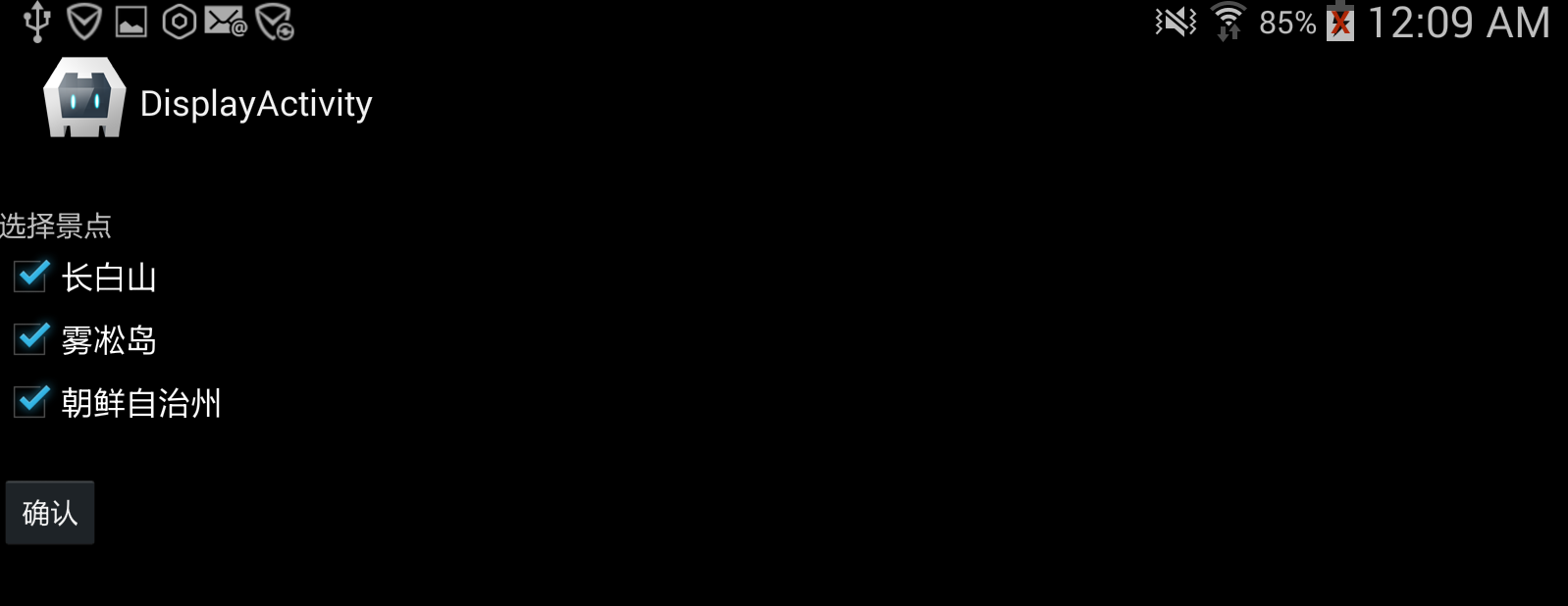
activity 关闭后,cordovaPlugin 插件将调用回调函数 onActivityResult(int requestCode, int resultCode, Intent intent),回调函数中可根据 resultCode 参数判断处理情况,根据不同的结果对intent 中的返回值 bundler 对象进行不同处理。 最后使用 callbackContext 对象中的 success(string) 方法把处理结果回传到页面;
处理结果:

Android移动APP开发笔记——Cordova(PhoneGap)通过CordovaPlugin插件调用 Activity 实例的更多相关文章
- Android移动APP开发笔记——最新版Cordova 5.3.1(PhoneGap)搭建开发环境
引言 简单介绍一下Cordova的来历,Cordova的前身叫PhoneGap,自被Adobe收购后交由Apache管理,并将其核心功能开源改名为Cordova.它能让你使用HTML5轻松调用本地AP ...
- android模块化app开发笔记-2插件间布局文件共享
android编程时布局文件,图片资源等都是放在同一个文件夹下,这样照成一个问题就是我们想重用UI布局文件和图片时就还需要其分离这些资料,相信大部分android程序员都遇到过这样的问题,其痛苦程度不 ...
- Android 开发笔记(一) 按钮事件调用Activity
UI创建按钮及事件 Button mEmailSignInButton = (Button) findViewById(R.id.email_sign_in_button);mEmailSignInB ...
- Android APP开发笔记
环境搭建 windows系统上需要以下软件: android SDK -- app开发工具包, 开发运行环境(包括SDK管理工具,和虚拟设备管理). JDK -- java 开发工具包, 负责app代 ...
- 混合开发 Hybird Cordova PhoneGap web 跨平台 MD
Markdown版本笔记 我的GitHub首页 我的博客 我的微信 我的邮箱 MyAndroidBlogs baiqiantao baiqiantao bqt20094 baiqiantao@sina ...
- Windows 8.1 store app 开发笔记
原文:Windows 8.1 store app 开发笔记 零.简介 一切都要从博彦之星比赛说起.今年比赛的主题是使用Bing API(主要提到的有Bing Map API.Bing Translat ...
- Android菜鸟的成长笔记(10)——使用Bundle在Activity之间传值
原文:[置顶] Android菜鸟的成长笔记(10)——使用Bundle在Activity之间传值 前面我们了解了如何启动一个Activity,一个Activity在启动另外一个Activity的时候 ...
- [Phonegap+Sencha Touch] 移动开发77 Cordova Hot Code Push插件实现自己主动更新App的Web内容
原文地址:http://blog.csdn.net/lovelyelfpop/article/details/50848524 插件地址:https://github.com/nordnet/cord ...
- 小学英语课文朗读APP开发笔记(一):创建Win7虚拟机
1 缘起 以小米盒子为代表的OTT机顶盒.智能电视的快速普及,快速推动了Android技术在机顶盒.智能电视领域的普及.既然都是用的Android操作系统,那么从技术上来说应该是大同小异的,当然和手机 ...
随机推荐
- 【转】HTTP POST GET 本质区别详解
一 原理区别 一般在浏览器中输入网址访问资源都是通过GET方式:在FORM提交中,可以通过Method指定提交方式为GET或者POST,默认为GET提交 Http定义了与服务器交互的不同方法,最基本的 ...
- Linux下chkconfig命令详解
chkconfig命令主要用来更新(启动或停止)和查询系统服务的运行级信息.谨记chkconfig不是立即自动禁止或激活一个服务,它只是简单的改变了符号连接. 使用语法:chkconfig [--ad ...
- JSON字符串解析
有时保存在数据库的数据是一串json字符串,需要进行读取的时候就需要解析操作. 简单介绍两种: 1.net.sf.json.* 2.com.alibaba.fastjson.* 需要的包自行下载. 第 ...
- java反射案例
Java反射经典实例 2007-08-29 17:55:25 分类: Java Java提供了一套机制来动态执行方法和构造方法,以及数组操作等,这套机制就叫——反射.反射机制是如今很多流行框架的实现 ...
- OD使用教程8
方式一基本的打补丁方式: 打开程序之后首先会跳出一个nag窗口,从中我们知道了可以将nag窗口作为切入点,只要找到了nag的触发点就等同于找到注册与未注册的判断的点 右键-查找-所有参考文本字串 ...
- 1260: [CQOI2007]涂色paint
Description 假设你有一条长度为5的木版,初始时没有涂过任何颜色.你希望把它的5个单位长度分别涂上红.绿.蓝.绿.红色,用一个长度为5的字符串表示这个目标:RGBGR. 每次你可以把一段连续 ...
- vuejs 和 element 搭建的一个后台管理界面
介绍: 这是一个用vuejs2.0和element搭建的后台管理界面. 相关技术: vuejs2.0:渐进式JavaScript框架,易用.灵活.高效,似乎任何规模的应用都适用. element:基于 ...
- linux指令记录
sudo mount /dev/sda3 data 挂载硬盘到当前目录下的data文件夹
- C++中未初始化的bool值的问题
原创文件,欢迎阅读,禁止转载. 问题描述 你见过一个这样的bool值吗,判断 var 和 !var 都是成立的,今天被我遇到了,是在一个坑里遇到的.今天调试了一个程序,发送一个网络消息,结果总是得不到 ...
- 狗扑论坛 自动刷取VIP狗粮
狗扑论坛 自动刷取VIP狗粮 开始闲狗粮回复太慢就自己想了想去写一个,成功总是给我的哈哈. 自己花了一小时 时间慢慢学就慢慢写的 虽然代码简单 但是已经够自己用了 using System; usi ...