
ArcGIS Add-in插件开发从0到1及实际案例分享
同学做毕设,要求我帮着写个ArcGIS插件,实现功能为:遍历所有图斑,提取相邻图斑的公共边长及其他属性(包括相邻图斑的ID),链接到属性表中。搞定后在这里做个记录。本文分两大部分:
- ArcGIS插件开发流程
- 实际案例分享
一、ArcGIS插件开发流程
该部分不涉及具体业务,力求以最快速度了解ArcGIS Add-in插件从开发到使用的具体流程。
1.新建项目


2.编写业务代码

3.编译

4.安装插件
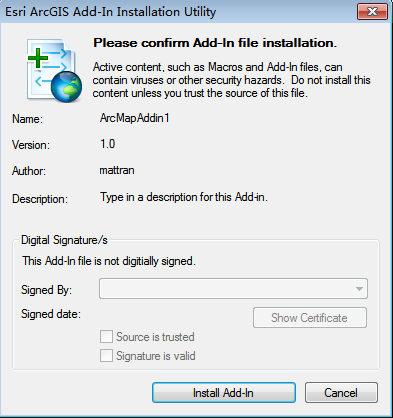

5.使用插件



二、实际案例分享
上面已经说了,案例来源于实际的需求,此处想必没有比直接上代码更实用更有feel了。实现功能为:遍历所有图斑,提取相邻图斑的公共边长及其他属性(包括相邻图斑的ID),并保存到文本文件中。注释已经写的很详细了,所以具体过程也不多说,有啥问题直接留言,我会看到的~
 using System;

 using System.Collections.Generic;

 using System.Text;

 using System.IO;

 using ESRI.ArcGIS.Framework;

 using ESRI.ArcGIS.Carto;

 using ESRI.ArcGIS.ArcMapUI;

 using System.Windows.Forms;

 using ESRI.ArcGIS.Geometry;

 using ESRI.ArcGIS.Geodatabase;

 using System.Runtime.InteropServices;

 using ESRI.ArcGIS.ADF.CATIDs;

 namespace SharedSide

 {

     public class SharedSide : ESRI.ArcGIS.Desktop.AddIns.Button

     {

         private IApplication m_application;

         private static IMap map;

         public SharedSide()

         {

         }

         protected override void OnClick()

         {

             m_application = ArcMap.Application;

             map = (m_application.Document as IMxDocument).FocusMap;

             FormSelect formSelect = new FormSelect();

             IEnumLayer layers = map.get_Layers(null, false);

             layers.Reset();

             ILayer layer = layers.Next();

             while (layer != null)

             {

                 formSelect.cmbLayers.Items.Add(layer.Name);

                 layer = layers.Next();

             }

             formSelect.ShowDialog();

             if (formSelect.IsOK)

             {

                 ILayer selectedLayer = GetLayerByName(formSelect.cmbLayers.Text);

                 IFeatureLayer pFeatureLayer = selectedLayer as IFeatureLayer;

                 int featureCount = pFeatureLayer.FeatureClass.FeatureCount(null);

                 IFeatureCursor featureCursor = pFeatureLayer.Search(null, false);

                 IFeature pFeature = null;

                 // 最大相邻图斑数

                 int maxNumAdajacency = ;

                 // 具有相邻图斑的要素

                 List<IFeature> featuresHasAdjacency = new List<IFeature>();

                 // 对应featureHasAdjacency的相邻图斑

                 List<List<IFeature>> adjacentFeatures = new List<List<IFeature>>();

                 // 对应adjacentFeatures的公共边长度

                 List<List<double>> adjacentLengths = new List<List<double>>();

                 // 提取边相邻的相邻图斑并计算公共边长度

                 while ((pFeature = featureCursor.NextFeature()) != null)

                 {

                     // 与pFeature相邻的图斑

                     List<IFeature> adjacentFeature = AdjacentPolygons(pFeature, pFeatureLayer);

                     // pFeature与adjacentFeature的公共边长度

                     List<double> adjacentLength = new List<double>();

                     // 计算公共边长度并去掉只有公共点相邻的图斑

                     if (adjacentFeature.Count > )

                     {

                         for (int i = ; i < adjacentFeature.Count; i++)

                         {

                             double length = LengthOfSide((pFeature.Shape as IPolygon), (adjacentFeature[i].Shape as IPolygon));

                             if (length == )

                             {// 如果只有公共点相邻,则移除

                                 adjacentFeature.Remove(adjacentFeature[i]);

                             }

                         }

                         for (int i = ; i < adjacentFeature.Count; i++)

                         {

                             double length = LengthOfSide((pFeature.Shape as IPolygon), (adjacentFeature[i].Shape as IPolygon));

                             adjacentLength.Add(length);

                         }

                     }

                     if (adjacentFeature.Count > )

                     {// 如果去掉只有公共点相邻的情况pFeature仍有图斑与之相邻

                         featuresHasAdjacency.Add(pFeature);

                         adjacentFeatures.Add(adjacentFeature);

                         adjacentLengths.Add(adjacentLength);

                     }

                     // 3.查找最多相邻图斑数

                     if (adjacentFeature.Count > maxNumAdajacency)

                     {

                         maxNumAdajacency = adjacentFeature.Count;

                     }

                 }

                 System.Runtime.InteropServices.Marshal.ReleaseComObject(featureCursor);

                 // 将相邻图斑的公共边长度及DLBM属性写入文本文件保存

                 string text = "OBJECTID";

                 for (int i = ; i < maxNumAdajacency; i++)

                 {

                     string str = (",相邻" + (i + ) + "-OBJECTID") + (",相邻" + (i + ) + "-公共边长") + (",相邻" + (i + ) + "-DLBM");

                     text += str;

                 }

                 WriteData(formSelect.txtPath.Text, text);

                 int n = featuresHasAdjacency.Count;

                 for (int i = ; i < n; i++)

                 {

                     int nIndex = featuresHasAdjacency[i].Table.FindField("OBJECTID");

                     string str = featuresHasAdjacency[i].get_Value(nIndex).ToString();

                     int m = adjacentFeatures[i].Count;

                     for (int j = ; j < m; j++)

                     {

                         str += "," + adjacentFeatures[i][j].get_Value(adjacentFeatures[i][j].Table.FindField("OBJECTID")).ToString();

                         str += "," + adjacentLengths[i][j].ToString();

                         str += "," + adjacentFeatures[i][j].get_Value(adjacentFeatures[i][j].Table.FindField("DLBM")).ToString();

                     }

                     WriteData(formSelect.txtPath.Text, str);

                 }

                 MessageBox.Show("计算完成!");

             }

         }

         protected override void OnUpdate()

         {

             Enabled = ArcMap.Application != null;

         }

         // 通过图层名称查找指定图层

         public static ILayer GetLayerByName(string lyrName)

         {

             ILayer findLayer = null;

             IEnumLayer pEnumLayer = map.get_Layers();

             pEnumLayer.Reset();

             ILayer pLayer = pEnumLayer.Next();

             while (pLayer != null)

             {

                 if (pLayer.Name == lyrName)

                 {

                     findLayer = pLayer;

                 }

                 pLayer = pEnumLayer.Next();

             }

             return findLayer;

         }

         // 判断线是否为面的边界

         public static bool isBoundary(IPolyline iPolyline, IPolygon iPolygon)

         {

             bool isBoundary;

             ITopologicalOperator topoOper = iPolygon as ITopologicalOperator;

             IPolyline boundLine = topoOper.Boundary as IPolyline;

             IRelationalOperator reltOper = iPolyline as IRelationalOperator;

             isBoundary = reltOper.Overlaps(boundLine);

             return isBoundary;

         }

         // 查找当前图层中与某图斑相邻的其他图斑(包括有公共边的和公共点的)

         public static List<IFeature> AdjacentPolygons(IFeature iFeature, IFeatureLayer featureLayer)

         {

             List<IFeature> listFeature = new List<IFeature>();

             IRelationalOperator reltOperator = iFeature.Shape as IRelationalOperator;

             int featureCount = featureLayer.FeatureClass.FeatureCount(null);

             IFeatureCursor featureCursor = featureLayer.Search(null, false);

             IFeature feature = null;

             while ((feature = featureCursor.NextFeature()) != null)

             {

                 if (feature.OID == iFeature.OID)

                 {

                     continue;

                 }

                 bool isAdjacent = reltOperator.Touches(feature.Shape);

                 if (isAdjacent)

                 {

                     listFeature.Add(feature);

                 }

             }

             return listFeature;

         }

         // 计算两个图斑公共边的长度

         public static double LengthOfSide(IPolygon iPolygon1, IPolygon iPolygon2)

         {

             IPolyline polyline;

             ITopologicalOperator topoOper = iPolygon1 as ITopologicalOperator;

             polyline = topoOper.Intersect(iPolygon2, esriGeometryDimension.esriGeometry1Dimension) as IPolyline;

             return polyline.Length;

         }

         // 写入数据到文件

         private static void WriteData(string filePath, string text)

         {

             FileStream fs = new FileStream(filePath, FileMode.Append, FileAccess.Write);

             StreamWriter sw = new StreamWriter(fs);

             sw.WriteLine(text);

             sw.Close();

             fs.Close();

         }

     }

 }
ArcGIS Add-in插件开发从0到1及实际案例分享的更多相关文章
- ArcGIS API for JavaScript 4.0(一)
原文:ArcGIS API for JavaScript 4.0(一) 最近ArcGIS推出了ArcGIS API for JavaScript 4.0,支持无插件3D显示,而且比较Unity和Sky ...
- js面向对象插件的做法框架new goBuy('.cakeItem',{ add:'.add', reduce:'.reduce' },[1,0.7,0.6]);
/*弹窗购买蛋糕*/;(function(){ var $DialogBg=$(".Dialogbg-Select"); var $Dialog=$(".Dialog-S ...
- arcengine帮助http://help.arcgis.com/en/sdk/10.0/arcobjects_net/conceptualhelp/index.html#/what_s_new_for_developers_at_10_/0001000002zp000000/
http://help.arcgis.com/en/sdk/10.0/arcobjects_net/conceptualhelp/index.html#/what_s_new_for_develope ...
- arcgis中nodata设为0及其小技巧
一.arcgis中nodata设为0 两个栅格进行叠加,有时会有一部分没有数据,即用identify点击该区域,Value为NoDat a,而不是像其他非空区域一样有值. 此时注意nodata区域要赋 ...
- 离线部署ArcGIS Runtime for Android100.5.0
环境 系统:window 7 JDK:1.8.0_151 Maven:3.6.1 Android Studio:2.3 ArcGIS Runtime SDK for Android:100.5.0 1 ...
- ArcGIS Pro Add-In插件开发[ArcGIS Pro SDK for .NET]
本文基于 Windows7 + VS2019 + .NET Framework 4.8 + ArcGIS Pro 2.5 开发和撰写. 目录 开发环境配置 获取ArcGIS Pro 安装VS2019 ...
- “指定的参数已超出有效值的范围”在【 parameterUpdate.Add(new OracleParameter("STATUS", 0));】报错
改成:parameterUpdate.Add()); 就不报错,并不能知道为什么,有知道为什么的,评论告诉我. /// <summary> /// 插入数据 /// </summar ...
- 常见ArcGIS操作(以10.0为例)
文章版权由作者李晓晖和博客园共有,若转载请于明显处标明出处:http://www.cnblogs.com/naaoveGIS/ 1.建立缓冲区 先在图层属性表里面新建一个缓冲区半径字段,然后对该字段赋 ...
- 2.mongoDB add user in v3.0 问题的解决(Property 'addUser' of object admin is not a func)
问题:创建mongodb帐户时,出错 > db.addUser('jyu', 'aerohive') 2015-08-05T20:03:02.767+0800 E QUERY TypeE ...
随机推荐
- angularJS之$watch的一个小介绍
现在最近公司项目使用angularJS进行开发:以前也接触过但是不多,趁着现在熟悉回来. 如题,angular中$watch也是我们在开发的时候需要的各种监听: $watch接收3个参数,第一个是对象 ...
- 亚马逊EC2弹性IP收费
刚收到亚马逊云账单,被扣了4.44刀,吓尿,麻溜的去查账单详情,发现之前弃用的美国实例有个弹性IP没释放掉,占着茅坑还不拉屎,被扣钱宝宝无话可说,赶紧释放... $0.005 per Elastic ...
- webstorm增加less开发插件
原文 http://a317222029201405212739.iteye.com/blog/2174140 引自 http://www.tuicool.com/articles/aeye6rY ...
- redis持久化配置
redis有rdb和aof两种持久化方式: rdb 默认方式,配置文件中相关的有: save 900 1 #900秒一次,若有1个或以上key修改则save一次,以下相同 save 300 10 sa ...
- 【转】C#使用ESC指令控制POS打印机打印小票
.前言 C#打印小票可以与普通打印机一样,调用PrintDocument实现.也可以发送标注你的ESC指令实现.由于 调用PrintDocument类时,无法操作使用串口或TCP/IP接口连接的pos ...
- test homework2 ~ faulty program
Program1:
- 关于phpcms 万一忘记密码怎么破?
莫慌~海洋小生教你~我也是偷偷学来的,呀哈哈哈! first:............................你就认命吧!哈哈哈... 开玩笑开玩笑! LOOK HERE ↓: 1.在没有安装 ...
- LINUX下编译源码时所需提前安装的常用依赖包列表
yum -y install gcc gcc-c++ autoconf libjpeg libjpeg-devel libpng libpng-devel freetype freetype-deve ...
- c++共享内存(转载)
对于连个不同的进程之间的通信,共享内存是一种比较好的方式,一个进程把数据发送到共享内存中, 另一个进程可以读取改数据,简单记录一下代码 #define BUF_SIZE 256 TCHAR szNam ...
- VS.Net 2015 Update3 学习(2) jquery-form, jquery-validation,jquery-validation-unobtrusive一起用
我觉DataAnnotations非常酷的一个功能.但是教程中的@ajaxform的却不怎么优雅,需要全局的onSucces等函数.因此我使用jquery-form做ajax提交. function ...