
用Python调用Shell命令
Python经常被称作“胶水语言”,因为它能够轻易地操作其他程序,轻易地包装使用其他语言编写的库,也当然可以用Python调用Shell命令。
用Python调用Shell命令有如下几种方式:
第一种:os.system
os.system("The command you want").

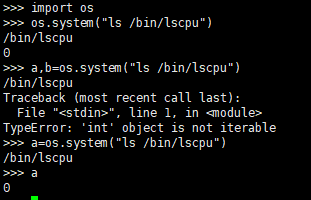
这个调用相当直接,且是同步进行的,程序需要阻塞并等待返回。返回值是依赖于系统的,直接返回系统的调用返回值,所以windows和linux是不一样的。
第二种:os.popen
os.popen(command[,mode[,bufsize]])
先给大家看个例子

可以看出,popen方法通过p.read()获取终端输出,而且popen需要关闭close().当执行成功时,close()不返回任何值,失败时,close()返回系统返回值. 可见它获取返回值的方式和os.system不同。
第三种,使用commands ( python3失效)
根据你需要的不同,commands模块有三个方法可供选择。getstatusoutput, getoutput, getstatus。
commands.getstatusoutput(cmd) 返回(status, output).

commands.getoutput(cmd) 只返回输出结果

commands.getstatus(file) 返回ls -ld file的执行结果字符串,调用了getoutput,不建议使用此方法

但是,如上三个方法都不是Python推荐的方法,而且在Python3中其中两个已经消失。
第四种,subprocess《Python文档中目前全力推荐》
subprocess使用起来同样简单:
直接调用命令,返回值即是系统返回。shell=True表示命令最终在shell中运行。Python文档中出于安全考虑,不建议使用shell=True。建议使用Python库来代替shell命令,或使用pipe的一些功能做一些转义。官方的出发点是好的,不过真心麻烦了很多, so....
但是,我使用subprocess失败了
>>> import subprocess

>>> subprocess.call("cat %s |grep %s > %s " % ("/home/www/running/os-app-api/nohup.out","2019-10-28","~/nohup-2019-10-28.out"))

Traceback (most recent call last):

  File "<stdin>", line 1, in <module>

  File "/usr/lib64/python3.6/subprocess.py", line 287, in call

    with Popen(*popenargs, **kwargs) as p:

  File "/usr/lib64/python3.6/subprocess.py", line 729, in __init__

    restore_signals, start_new_session)

  File "/usr/lib64/python3.6/subprocess.py", line 1364, in _execute_child

    raise child_exception_type(errno_num, err_msg, err_filename)

FileNotFoundError: [Errno 2] No such file or directory: 'cat /home/www/running/os-app-api/nohup.out |grep 2019-10-28 > ~/nohup-2019-10-28.out ': 'cat /home/www/running/os-app-api/nohup.out |grep 2019-10-28 > ~/nohup-2019-10-28.out '
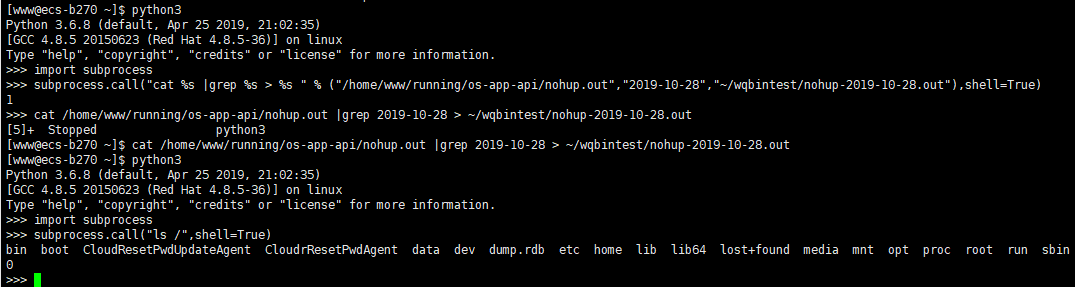
但是。。我可以直接运行在shell里面:

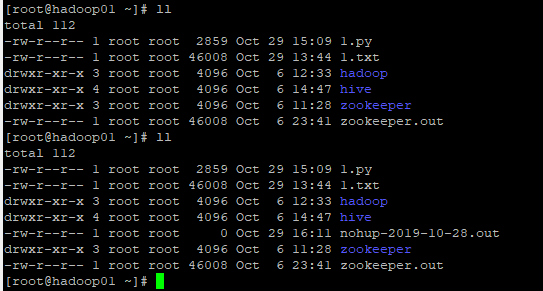
同样的 我用os.system 去运行,也确实产生了。。好奇
>>> import os

>>> os.system("cat %s |grep %s > %s " % ("/home/www/running/os-app-api/nohup.out","2019-10-28","~/nohup-2019-10-28.out"))

256
源码研究:
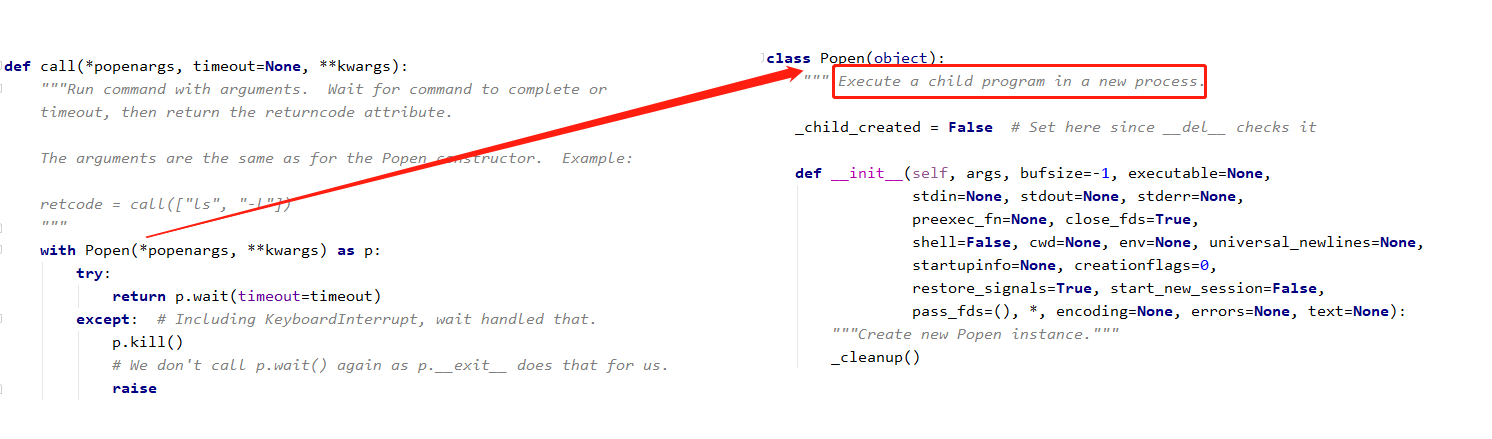
这里面最为重要的几个参数是:.

args:要执行的shell命令,或者是命令的列表;

bufsize:缓冲区大小;。

stdin、stdout、stderr:表示程序的标准输入、标准输出以及错误输出。

shell:是否直接执行命令,如果设置为True就表示可以直接执行;

cwd:当前的工作目录;

env:子进程环境变量;
案例:
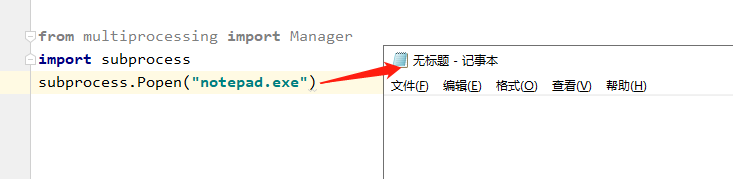
subprocess模块里面还有一项功能比较强大的支持在于可以直接使用标准输入、标准输出和错误输出进行进程的数据通讯操作。
例如,在Python安装完成之后都会存在有交互式的编程环境,那么本次将通过程序调用交互式编程环境。
直接操作python命令行,在python命令行中直接输入程序。
def main():

    subp_popen=subprocess.Popen("python.exe",stdin=subprocess.PIPE,stdout=subprocess.PIPE,stderr=subprocess.PIPE)

    subp_popen.stdin.write("print('subp_popen.stdin.write1')\n".encode())

    subp_popen.stdin.write("print('subp_popen.stdin.write2')\n".encode())

    subp_popen.stdin.write(("print('subp_popen.stdin.write3'+1)").encode())

    subp_popen.stdin.close()

    cmd_out=subp_popen.stdout.read()

    subp_popen.stdout.close()

    print(cmd_out.decode())

    cmd_err=subp_popen.stderr.read()

    subp_popen.stderr.close()

    print(cmd_err)

if __name__ == '__main__':

    main()
结果:

用Python调用Shell命令的更多相关文章
- python 调用 shell 命令方法
python调用shell命令方法 1.os.system(cmd) 缺点:不能获取返回值 2.os.popen(cmd) 要得到命令的输出内容,只需再调用下read()或readlines()等 ...
- python 调用shell命令三种方法
#!/usr/bin/python是告诉操作系统执行这个脚本的时候,调用/usr/bin下的python解释器: #!/usr/bin/env python这种用法是为了防止操作系统用户没有将pyth ...
- python 调用 shell 命令
记录 python 调用 shell 命令的方法 加载 os 模块, 使用 os 类 import os; os.system("ls /");
- python 调用shell命令的方法
在python程序中调用shell命令,是件很酷且常用的事情…… 1. os.system(command) 此函数会启动子进程,在子进程中执行command,并返回command命令执行完毕后的退出 ...
- python调用shell命令
1.subprocess介绍 官方推荐 subprocess模块,os.system(command) 这个废弃了 亲测 os.system 使用sed需要进行字符转义,非常麻烦 python3 su ...
- Python 调用 Shell命令
python程序中调用shell命令,是件很酷且常用的事情今天来总结一下 1.使用os模块 的 system 此函数会启动子进程,在子进程中执行command,并返回comman ...
- Python调用shell命令常用方法
Python调用shell指令 方法一.使用os模块的system方法:os.system(cmd),其返回值是shell指令运行后返回的状态码,int类型,0表示shell指令成功执行,256表示未 ...
- (转载)python调用shell命令之os 、commands、subprocess
linux系统下进入python交互式环境: 一.os 模块 1.1.os模块的exec方法簇: python交互界面中: In [1]: import os In [2]: os.exec os.e ...
- python调用shell命令之三慷慨法
preface: 忙于近期的任务,须要用到libsvm的一些命令.如在终端执行java svm_train train_file model_file. pythonsubset.py file tr ...
随机推荐
- Linux文件权限实践
用户测试准备: groupadd incahome ##一个家庭(dongdaxia的家) useradd dongdaxia -g incahome ##让家庭主人dongdaxia属于incaho ...
- 第六周课程总结&java实验报告四
第六周课程总结: 一.instanceof关键字 1.作用:在Java中可以使用instanceof关键字判断一个对象到底是哪个类的实例. 2.格式:对象 instanceof 类 -> 返回b ...
- [图像分割] OpenCV 的 GrabCut 函数使用和源码解读
转自 zouxy09 GrabCut 原理参考这里,以下为 GrabCut 源码: ——看别人写的好的代码也很享受,干净利落,有些处理的细节也学习一下. /*M//////////////////// ...
- [转帖]查看Linux用的桌面是GNOME、KDE或者其他
http://superuser.com/questions/96151/how-do-i-check-whether-i-am-using-kde-or-gnome KDE 基于QT做的 已经越来越 ...
- 【转帖】.NET的一点历史故事:Novell的崩溃和Xamarin的重生
.NET的一点历史故事:Novell的崩溃和Xamarin的重生 https://blog.csdn.net/sD7O95O/article/details/78096502 学习安装 mono 时了 ...
- VMware虚拟机下安装CentOS 6.10并配置访问外网
VMware安装包以及CentOS 6.5安装包 链接:https://pan.baidu.com/s/1wQi5GSgp4klXhtd84aoMSA 提取码:9l5y 链接:https://pan. ...
- 【LOJ】#3036. 「JOISC 2019 Day3」指定城市
LOJ#3036. 「JOISC 2019 Day3」指定城市 一个点的可以dp出来 两个点也可以dp出来 后面的就是在两个点的情况下选一条最长的链加进去,用线段树维护即可 #include < ...
- 初识WSGI接口
WSGI WSGI全称为Web Server Gateway Interface,WSGI允许web框架和web服务器分开,可以混合匹配web服务器和web框架,选择一个适合的配对.比如,可以在Gun ...
- pycharm虚拟环境的搭建
目录 优点 windows 安装 配置虚拟环境管理器工作目录 MacOS.Linux 安装 工作文件 配置 使用 pycharm使用 新建项目 添加环境 使用环境 优点 1.使不同应用开发环境相互独立 ...
- spring 的工厂类
spring 的工厂类 1. 工厂类 BeanFactory 和 ApplicationContext 的区别. ApplicationContext 是 BeanFactory 的子接口,提供了比父 ...