
ActiveMQ C#实例
重点参考:NMS Documentation
一、ActiveMQ Queue
在ActiveMQ中Queue是一种点对点的消息分发方式,生产者在队列中添加一条消息,然后消费者消费一条消息,这条消息保证送达并且只会被一个消费者接收。
生产者
  class ActiveMQSend

    {

        // Example connection strings:

        //    activemq:tcp://activemqhost:61616    //localhost

        //    stomp:tcp://activemqhost:61613

        //    ems:tcp://tibcohost:7222

        //    msmq://localhost

        string activemqIP = ConfigurationManager.AppSettings["activemqIP"];

        string SendQueue = ConfigurationManager.AppSettings["SendQueue"];

        HyExcel.ExcelHelper helper = new HyExcel.ExcelHelper();

        /// <summary>

        /// 发送消息到队列

        /// </summary>

        public void Send(string sendmessage)

        {

            try

            {

                Uri connecturi = new Uri(activemqIP);

                // NOTE: ensure the nmsprovider-activemq.config file exists in the executable folder.

                IConnectionFactory factory = new NMSConnectionFactory(connecturi);

                using (IConnection connection = factory.CreateConnection())

                using (ISession session = connection.CreateSession())

                {

                    //Defaults to queue if type is not specified:

                    IDestination sendDestination = SessionUtil.GetDestination(session, SendQueue);  //发送目的地

                    // Create a consumer and producer

                    using (IMessageProducer producer = session.CreateProducer(sendDestination))

                    {

                        // Start the connection so that messages will be processed.

                        connection.ExceptionListener += Connection_ExceptionListener; ;

                        connection.Start();

                        producer.DeliveryMode = MsgDeliveryMode.Persistent; //消息持久化(到本地文件),消费者可以随时取到数据,而未持久化的发送数据在activemq服务重启之后数据是会清掉的。

                        // Send a message

                        ITextMessage request = session.CreateTextMessage(sendmessage);

                        request.NMSCorrelationID = "abc";

                        request.Properties["NMSXGroupID"] = "cheese";

                        request.Properties["myHeader"] = "Cheddar";

                        producer.Send(request);

                        string fullPath = Environment.CurrentDirectory + "\\" + DateTime.Now.ToString("yyyyMMddhhmmss") + ".txt";

                        helper.WriteFile(fullPath, "云端同步数据:" + sendmessage);

                    }

                }

            }

            catch (Exception ex)

            {

                string fullPath = Environment.CurrentDirectory + "\\" + DateTime.Now.ToString("yyyyMMddhhmmss") + ".txt";

                helper.WriteFile(fullPath, ex.Message);

            }

        }

        private void Connection_ExceptionListener(Exception exception)

        {

            Console.WriteLine("生产者发生异常:{0}", exception);

        }

    }
消费者
class ActiveMQReceive

    {

        public static void CloudSyncThread(string threadName)

        {

            Console.WriteLine(threadName + "开始工作!");

            IConnection connection = null;

            try

            {

                string activemqIP = ConfigurationManager.AppSettings["cloudConsumerip"];

                Uri connecturi = new Uri(activemqIP);

                // NOTE: ensure the nmsprovider-activemq.config file exists in the executable folder.

                //IConnectionFactory factory = new NMSConnectionFactory(connecturi);

                IConnectionFactory factory = new NetTxConnectionFactory(connecturi); //可以支持failover:tcp://

                connection = factory.CreateConnection();

                ISession session = connection.CreateSession();

                //接收源地址

                IDestination receiveSource = SessionUtil.GetDestination(session, "CLOUND_SYNC");

                // Create a consumer and producer

                using (IMessageConsumer consumer = session.CreateConsumer(receiveSource))

                {

                    // Start the connection so that messages will be processed.

                    connection.Start();

                    while (true)

                    {

                        //消费者一直在,若队列没有消息,会阻塞,不返回

                        ITextMessage revMessage = consumer.Receive() as ITextMessage;

                        //超过这个时间,队列里没有消息,则会返回null

                        //ITextMessage revMessage = consumer.Receive(new TimeSpan(0, 0, 30)) as ITextMessage;

                        if (revMessage == null)

                        {

                            Console.WriteLine("接收数据" + "No message received!");

                            continue;

                            //break;

                        }

                        else

                        {

                            Console.WriteLine("Received message:" + revMessage.NMSCorrelationID + "+" + revMessage.Text);

                            Console.WriteLine(revMessage.Text);

                        }

                    }

                }

            }

            catch (Exception ex)

            {

                Console.WriteLine(ex.Message);

            }

            finally

            {

                if (connection != null)

                {

                    connection.Close();

                }

            }

        }

    }
以上是消费者的同步消费数据,也可以改为异步
public class TestMain

{

    protected static AutoResetEvent semaphore = new AutoResetEvent(false);

    protected static ITextMessage message = null;

    protected static TimeSpan receiveTimeout = TimeSpan.FromSeconds();

    public static void Main(string\[\] args)

    {

        // Example connection strings:

        //    activemq:tcp://activemqhost:61616

        //    stomp:tcp://activemqhost:61613

        //    ems:tcp://tibcohost:7222

        //    msmq://localhost

        Uri connecturi = new Uri("activemq:tcp://activemqhost:61616");

        Console.WriteLine("About to connect to " + connecturi);

        // NOTE: ensure the nmsprovider-activemq.config file exists in the executable folder.

        IConnectionFactory factory = new NMSConnectionFactory(connecturi);

        using(IConnection connection = factory.CreateConnection())

        using(ISession session = connection.CreateSession())

        {

            IDestination destination = SessionUtil.GetDestination(session, "queue://FOO.BAR");

            Console.WriteLine("Using destination: " + destination);

            // Create a consumer and producer

            using(IMessageConsumer consumer = session.CreateConsumer(destination))

            using(IMessageProducer producer = session.CreateProducer(destination))

            {

                // Start the connection so that messages will be processed.

                connection.Start();

        producer.DeliveryMode = MsgDeliveryMode.Persistent;

                producer.RequestTimeout = receiveTimeout;

                consumer.Listener += new MessageListener(OnMessage);

                // Send a message

                ITextMessage request = session.CreateTextMessage("Hello World!");

                request.NMSCorrelationID = "abc";

                request.Properties\["NMSXGroupID"\] = "cheese";

                request.Properties\["myHeader"\] = "Cheddar";

                producer.Send(request);

                // Wait for the message

                semaphore.WaitOne((int) receiveTimeout.TotalMilliseconds, true);

                if(message == null)

                {

                    Console.WriteLine("No message received!");

                }

                else

                {

                    Console.WriteLine("Received message with ID:   " + message.NMSMessageId);

                    Console.WriteLine("Received message with text: " + message.Text);

                }

            }

        }

    }

    protected static void OnMessage(IMessage receivedMsg)

    {

        message = receivedMsg as ITextMessage;

        semaphore.Set();

    }

}
二、ActiveMQ Topic
Topic和Queue类似,不过生产者发送的消息会被多个消费者接收,保证每个订阅的消费者都会接收到消息。
在管理平台可以看到每条Topic消息有两个记录值,一个是订阅的消费者数量,一个是已经接收的消费者数量。
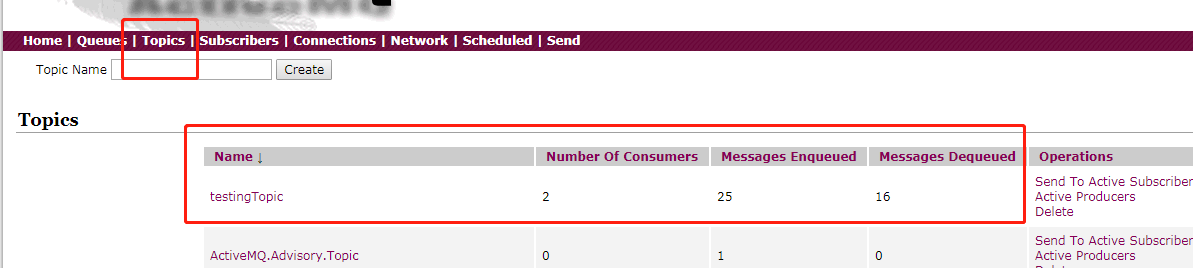
发布者
 class ActiveMQPub

    {

        /// <summary>

        /// 发布消息

        /// </summary>

        public static void Pub()

        {

            try

            {

                //Create the Connection Factory

                IConnectionFactory factory = new ConnectionFactory("tcp://localhost:61616/");

                using (IConnection connection = factory.CreateConnection())

                {

                    //Create the Session

                    using (ISession session = connection.CreateSession())

                    {

                        IDestination sendDestination = SessionUtil.GetTopic(session, "testingTopic");  //发送目的地

                        //Create the Producer for the topic/queue

                        IMessageProducer prod = session.CreateProducer(sendDestination);

                        //Send Messages

                        int i = ;

                        while (!Console.KeyAvailable)

                        {

                            ITextMessage msg = prod.CreateTextMessage();

                            msg.Text = i.ToString();

                            Console.WriteLine("Sending: " + i.ToString());

                            prod.Send(msg, Apache.NMS.MsgDeliveryMode.NonPersistent, Apache.NMS.MsgPriority.Normal, TimeSpan.MinValue);

                            System.Threading.Thread.Sleep();

                            i++;

                        }

                    }

                }

                Console.ReadLine();

            }

            catch (System.Exception e)

            {

                Console.WriteLine("{0}", e.Message);

                Console.ReadLine();

            }

        }

    }
订阅者
class ActiveMQSub

    {

        /// <summary>

        /// 订阅者。可以启动多个实例,从启动时开始接受消息的,之前发布者发布的的消息是获取不到的。

        /// </summary>

        public static void Sub()

        {

            try

            {

                //Create the Connection factory

                IConnectionFactory factory = new ConnectionFactory("tcp://localhost:61616/");

                //Create the connection

                using (IConnection connection = factory.CreateConnection())

                {

                    connection.ClientId = "testing time=" + DateTime.Now.ToString(); //区分不同的客户端(订阅者)

                    connection.Start();

                    //Create the Session

                    using (ISession session = connection.CreateSession())

                    {

                        IDestination sendDestination = SessionUtil.GetTopic(session, "testingTopic");  //发送目的地

                        //Create the Consumer

                        IMessageConsumer consumer = session.CreateConsumer(sendDestination);

                        consumer.Listener += new MessageListener(consumer_Listener);

                        Console.ReadLine();

                    }

                    connection.Stop();

                    connection.Close();

                }

            }

            catch (System.Exception e)

            {

                Console.WriteLine(e.Message);

            }

        }

        static void consumer_Listener(IMessage message)

        {

            try

            {

                ITextMessage msg = (ITextMessage)message;

                Console.WriteLine("Receive: " + msg.Text);

            }

            catch (System.Exception e)

            {

                Console.WriteLine(e.Message);

            }

        }

    }
三、消息的持久性
为了避免意外宕机以后丢失信息,需要做到重启后可以恢复消息队列,消息传输一般都会采用持久化机制。
ActiveMQ的消息持久化机制有JDBC,AMQ,KahaDB和LevelDB,无论使用哪种持久化方式,消息的存储逻辑都是一致的:
就是在发送者将消息发送出去后,消息中心首先将消息存储到本地数据文件、内存数据库或者远程数据库等,然后试图将消息发送给接收者,发送成功则将消息从存储中删除,失败则继续尝试。
消息中心启动以后首先要检查指定的存储位置,如果有未发送成功的消息,则需要把消息发送出去。
持久化机制
ActiveMQ默认采用持久化到文件机制(kahaDB),只要在发消息时设置消息为持久化就可以了。
打开安装目录下的配置文件:
D:\ActiveMQ\apache-activemq\conf\activemq.xml在约80行会发现默认的配置项:
<persistenceAdapter>

     <kahaDB directory="${activemq.data}/kahadb"/>

</persistenceAdapter>
注意这里使用的是kahaDB,是一个基于文件支持事务的消息存储器,是一个可靠,高性能,可扩展的消息存储器。
他的设计初衷就是使用简单并尽可能的快。KahaDB的索引使用一个transaction log,并且所有的destination只使用一个index,有人测试表明:如果用于生产环境,支持1万个active connection,每个connection有一个独立的queue。该表现已经足矣应付大部分的需求。
然后再发送消息的时候改变第二个参数为:
MsgDeliveryMode.Persistent
Message保存方式有2种
0:PERSISTENT:【默认就是持久化的】保存到磁盘,consumer消费之后,message被删除。
1:NON_PERSISTENT:保存到内存,消费之后message被清除。
注意:堆积的消息太多可能导致内存溢出。
更多参考:ActiveMQ的消息持久化机制
使用Queue时
使用queue,即队列时,每个消息只有一个消费者,所以,持久化很简单,只要保存到数据库即可然后,随便一个消费者取走处理即可。某个消费者关掉一阵子,也无所谓。
producer.DeliveryMode = MsgDeliveryMode.Persistent; //不过这个是默认的,不设置也可以
使用Topic时
使用topic,即订阅时,每个消息可以有多个消费者,就麻烦一些。
对于topic的消息,有两种订阅类型:Durable Subscribers 和 NonDurable Subscribers。
一般的订阅,订阅者必须时刻处于活跃状态,才不会遗漏任何信息;持久性订阅,当订阅者处于非活动状态时,代理会为它们保留信息,下一次连接之后推送给它们。
特点:
- 持久订阅者和非持久订阅者针对的Domain是Pub/Sub,而不是P2P
- 当Broker发送消息给订阅者时,如果订阅者处于 inactive (离线)状态:持久订阅者可以收到消息,而非持久订阅者则收不到消息。
当持久订阅者处于 inactive 状态时,Broker需要为持久订阅者保存消息;会造成的影响是:如果持久订阅者订阅的消息太多则会溢出。(当消息投递成功之后,Broker就可以把消息删除了)
- 为Connection指定一个唯一的ClientID
- 在这里,Connection有客户端的含义
- ClientID的变化,将被视为不同的客户端 - 创建Subscriber时,指定一个name
- name的变化,将被视为不同的订阅者
订阅端代码:
//Create the Connection factory

                IConnectionFactory factory = new ConnectionFactory("tcp://localhost:61616/");

                //Create the connection

                using (IConnection connection = factory.CreateConnection())

                {

                    string clientName = "testing time";

                    connection.ClientId = clientName; //区分不同的客户端(订阅者)。持久订阅需要设置这个。

                    connection.Start();

                    //Create the Session

                    using (ISession session = connection.CreateSession(AcknowledgementMode.AutoAcknowledge))

                    {

                        //IDestination sendDestination = SessionUtil.GetTopic(session, "testingTopic");  //发送目的地

                        //Create the Consumer

                        //IMessageConsumer consumer = session.CreateConsumer(sendDestination); //普通订阅

                        ITopic topic = SessionUtil.GetTopic(session, "testingTopic");  //发送目的地

                        IMessageConsumer consumer = session.CreateDurableConsumer(topic, clientName,null,false); //持久化订阅

                        consumer.Listener += new MessageListener(consumer_Listener);

                        Console.ReadLine();

                    }

                    connection.Stop();

                    connection.Close();

                }
CreateDurableConsumer 创建持久化订阅者,根据ClientId 去区分不同的客户端。
关闭订阅者,再从新开启,之前的信息同样可以获取到。
注意:使用相同的“clientID”,则认为是同一个消费者。两个程序使用相同的“clientID”,则同时只能有一个连接到activemq,第二个连接的会报错。
四、ActiveMQ-类型转换问题
protected static void OnMessage(IMessage receivedMsg)

        {

            Console.WriteLine(receivedMsg);

            message = receivedMsg as ITextMessage;

            semaphore.Set();

        }
receivedMsg是有值的,然而转成ItextMessage后,message为null了。
调试发现receivedMsg的类型不是ItextMessage ,而是ActiveMQBytesMessage。

ActiveMQ C#实例的更多相关文章
- ActiveMQ介绍和ActiveMQ入门实例
ActiveMQ百度百科 ActiveMQ入门实例-cnblogs.com 作者用的是5.5的版本,我测试时用的是5.6,按照作者说的整了一下,走得通
- ActiveMQ入门实例Demo
前面我们已经搭建和配置好了ActiveMQ,下面来看一个Demo,体验一下MQ. JMS 消息模型 JMS消息服务应用程序结构支持两种模型:点对点模型,发布者/订阅者模型. (1)点对点模型(Queu ...
- ActiveMQ入门实例
1.下载ActiveMQ 去官方网站下载:http://activemq.apache.org/ 2.运行ActiveMQ 解压缩apache-activemq-5.5.1-bin.zip,然后双击a ...
- java 消息机制 ActiveMQ入门实例
1.下载ActiveMQ 去官方网站下载:http://activemq.apache.org/ 我下载的时候是 ActiveMQ 5.14.0 Release版 2.运行ActiveMQ 解压缩ap ...
- ActiveMQ入门实例(转)
1.下载ActiveMQ 去官方网站下载:http://activemq.apache.org/ 2.运行ActiveMQ 解压缩apache-activemq-5.5.1-bin.zip,然后双击a ...
- Java消息机制 ActiveMQ入门实例
转载自:http://www.cnblogs.com/wyh3721/p/5917316.html 1.下载ActiveMQ 去官方网站下载:http://activemq.apache.org/ ...
- ActiveMQ入门实例(转)
转载自:http://www.cnblogs.com/xwdreamer/archive/2012/02/21/2360818.html 1.下载ActiveMQ 去官方网站下载:http://act ...
- 消息中间件-ActiveMQ入门实例
1.下载ActiveMQ: http://activemq.apache.org/download-archives.html 2.运行ActiveMQ 解压缩apache-activemq-5.5. ...
- ActiveMQ学习总结(2)——ActiveMQ入门实例教程
1.下载ActiveMQ 去官方网站下载:http://activemq.apache.org/ 2.运行ActiveMQ 解压缩apache-activemq-5.5.1-bin.zip,然后双击a ...
随机推荐
- 前端 aes 加密
<!DOCTYPE html> <html> <head> <meta charset="UTF-8"> <title> ...
- Luogu4081 USACO17DEC Standing Out from the Herd(广义后缀自动机)
建出广义SAM,通过parent树对每个节点求出其是否仅被一个子串包含及被哪个包含. 写了无数个sam板子题一点意思都没啊 #include<bits/stdc++.h> using na ...
- Bootstrap3 CDN 使用手册
一.一般功能 <link href="https://cdn.bootcss.com/bootstrap/3.3.7/css/bootstrap.css" rel=" ...
- SQL Server系统函数:日期函数
原文:SQL Server系统函数:日期函数 1.返回当前日期和时间 select GETDATE() '当前日期-精确到33毫秒' select GETUTCDATE() 'UTC日期和时间-精确到 ...
- 在sublime3中运行python文件
1.首先下载Sublime和Python,安装Python环境 注意:如果不想动手亲自配置Python环境安装的时候环境变量,请在安装的界面给Add Python 3.5 To Path前面打上对号. ...
- K最近邻算法项目实战
这里我们用酒的分类来进行实战练习 下面来代码 1.把酒的数据集载入到项目中 from sklearn.datasets import load_wine #从sklearn的datasets模块载入数 ...
- linux安装tmux分屏插件
linuxtmux分屏 一.安装tmux 二.基本使用 三.鼠标操作 一.安装tmux yum install -y tmux TMUX2版本以下 二.基本使用 使用tmux一般使用命令和快捷键来操作 ...
- nginx和PHP之间的通信
如果程序员a和B在windows上开发代码,它们可以被分离到不同的服务器,因为nginx和PHP之间的通信是基于TCP fastcgi协议的我们可以在程序员的windows pc上安装nginx,使用 ...
- bond模式详解
目录 bond模式详解 一.什么是bond? 二.为什么使用bond? 三.bond模式配置 1.配置linux bond 2.将bond绑定到ovs上面(可选) 四.bond模式 1.模式0 2.模 ...
- 【异常】java.sql.SQLException: Could not retrieve transaction read-only status from server Query
1 详细异常 java.sql.SQLException: Could not retrieve transaction read-only status , ], [ChargingOrderRea ...