
Flutter移动电商实战 --(15)商品推荐区域制作
1、推荐商品类的编写
这个类接收一个List参数,就是推荐商品的列表,这个列表是可以左右滚动的。
/*商品推荐*/

class Recommend extends StatelessWidget {

  final List  recommendList;

  Recommend({Key key, this.recommendList}) : super(key: key);

}
2、推荐标题内部方法的编写
实际开发中,要尽量减少嵌套,我们需要把复杂的组件,单独拿出一个方法进行编写。这里就把商品推荐标题单独拿出一个方法进行编写。
/*推荐商品标题*/

Widget _titleWidget(){

 return Container(

   alignment: Alignment.centerLeft,

   padding: EdgeInsets.fromLTRB(10.0, 2.0, 0,5.0),

   decoration: BoxDecoration(

     color:Colors.white,

     border: Border(

       bottom: BorderSide(width:0.5,color:Colors.black12)

     )

   ),

   child:Text(

     '商品推荐',

     style:TextStyle(color:Colors.pink)

     )

 );

}
3、推荐商品单独项编写
把推荐商品的每一个子项我们也分离出来。每一个子项都使用InkWell,这样为以后的页面导航作准备。里边使用了Column,把内容分成三行。
先不充关于InkWel的使用
InkWell有的叫溅墨效果,有的叫水波纹效果。使用场景是给一些无点击事件的部件添加点击事件时使用(也支持长按、双击等事件),同时你也可以去修改它的颜色和形状。
InkWell(

  borderRadius: BorderRadius.circular(8.0), /*圆角*/

  splashColor: Colors.transparent, /*溅墨色(波纹色)*/

  highlightColor: Colors.transparent, /*点击时的背景色(高亮色)*/

  onTap: () {},/*点击事件*/

  child: Container(),

);
再回访推荐商品的编写
Widget _item(index){

    return InkWell(

      onTap: (){},

      child: Container(

        height: ScreenUtil().setHeight(330),

        width: ScreenUtil().setWidth(250),

        padding: EdgeInsets.all(8.0),

        decoration:BoxDecoration(

          color:Colors.white,

          border:Border(

            left: BorderSide(width:0.5,color:Colors.black12)

          )

        ),

        child: Column(

          children: <Widget>[

            Image.network(recommendList[index]['image']),

            Text('¥${recommendList[index]['mallPrice']}'),

            Text(

              '¥${recommendList[index]['price']}',

              style: TextStyle(

                decoration: TextDecoration.lineThrough,

                color:Colors.grey

              ),

            )

          ],

        ),

      ),

    );

}
4、横向列表组件的编写
横向列表组件也进行单独编写,以减少嵌套,这样我们就把每一个重要的部分都进行了分离。
Widget _recommedList(){

  return Container(

    height: ScreenUtil().setHeight(330),

    child: ListView.builder(

      scrollDirection: Axis.horizontal,

      itemCount: recommendList.length,

      itemBuilder: (context,index){

        return _item(index);

      },

    ),

  );

}
有了这三个基本组件,最后我们在build方法里进行组合,形成商品推荐区域。
@override

Widget build(BuildContext context) {

return Container(

   height: ScreenUtil().setHeight(380),

   margin: EdgeInsets.only(top: 10.0),

   child: Column(

     children: <Widget>[

       _titleWidget(),

       _recommedList()

     ],

   ),

);

}
5、整个组件的类代码如下
// 商品推荐

class Recommend extends StatelessWidget {

  final List  recommendList;

  Recommend({Key key, this.recommendList}) : super(key: key);

  @override

  Widget build(BuildContext context) {

    return Container(

       height: ScreenUtil().setHeight(380),

       margin: EdgeInsets.only(top: 10.0),

       child: Column(

         children: <Widget>[

           _titleWidget(),

           _recommedList()

         ],

       ),

    );

  }

// 推荐商品标题

  Widget _titleWidget(){

     return Container(

       alignment: Alignment.centerLeft,

       padding: EdgeInsets.fromLTRB(10.0, 2.0, 0,5.0),

       decoration: BoxDecoration(

         color:Colors.white,

         border: Border(

           bottom: BorderSide(width:0.5,color:Colors.black12)

         )

       ),

       child:Text(

         '商品推荐',

         style:TextStyle(color:Colors.pink)

         )

     );

  }

  Widget _recommedList(){

      return Container(

        height: ScreenUtil().setHeight(330),

        child: ListView.builder(

          scrollDirection: Axis.horizontal,

          itemCount: recommendList.length,

          itemBuilder: (context,index){

            return _item(index);

          },

        ),

      );

  }

  Widget _item(index){

    return InkWell(

      onTap: (){},

      child: Container(

        height: ScreenUtil().setHeight(330),

        width: ScreenUtil().setWidth(250),

        padding: EdgeInsets.all(8.0),

        decoration:BoxDecoration(

          color:Colors.white,

          border:Border(

            left: BorderSide(width:0.5,color:Colors.black12)

          )

        ),

        child: Column(

          children: <Widget>[

            Image.network(recommendList[index]['image']),

            Text('¥${recommendList[index]['mallPrice']}'),

            Text(

              '¥${recommendList[index]['price']}',

              style: TextStyle(

                decoration: TextDecoration.lineThrough,

                color:Colors.grey

              ),

            )

          ],

        ),

      ),

    );

  }

}
6、准备数据并进行调用
在 HomePage build 中继续添加:
List<Map> recommendList = (data['data']['recommend'] as List).cast();

 Recommend(recommendList:recommendList),
效果图:
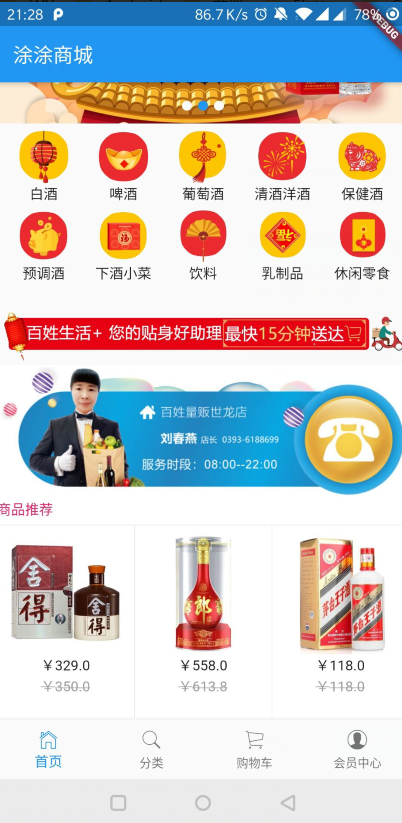
Flutter移动电商实战 --(15)商品推荐区域制作的更多相关文章
- 15-Flutter移动电商实战-商品推荐区域制作
1.推荐商品类的编写 这个类接收一个List参数,就是推荐商品的列表,这个列表是可以左右滚动的. /*商品推荐*/class Recommend extends StatelessWidget { ...
- Flutter移动电商实战 --(1)项目学习记录
1.项目相关截图 2.项目知识点梳理图 Dio2.0: Dio是一个强大的 Dart Http 请求库,支持 Restful API.FormData.拦截器.请求取消等操作. Swiper: Swi ...
- Flutter移动电商实战 --(43)详细页_补充首页跳转到详细页
首页轮播点击到详细页 修改我们轮播这里的代码:SwiperDiy这个类这里的代码 return InkWell( onTap: (){ Application.router.navigateTo(co ...
- Flutter移动电商实战 --(40)路由_Fluro的全局注入和使用方法
路由注册到顶层,使每个页面都可以使用,注册到顶层就需要在main.dart中 main.dart注册路由 注入 onGenerateRoute是MaterialApp自带的路由配置项, 首页跳转到详细 ...
- Flutter移动电商实战 --(51)购物车_Provide中添加商品
新加provide的cart.dart页面 引入三个文件.开始写provide类.provide需要用with 进行混入 从prefs里面获取到数据,判断有没有数据,如果有数据就返转正List< ...
- Flutter移动电商实战 --(37)路由_Fluro引入和商品详细页建立
https://github.com/theyakka/fluro pages/details_page.dart新建页面 使用路由 先添加路由插件的引用 fluro: ^1.4.0 如果网络上下载不 ...
- Flutter移动电商实战 --(33)列表页_子类和商品列表交互效果
主要实现点击小类下面的列表跟着切换 获取右侧下面的列表信息,即要传递大类的id也要传递小类的,所以需要把左侧的大类的id也要Provide化 可以看下网站上的接口说明: https://jspang. ...
- Flutter移动电商实战 --(28)列表页_商品列表后台接口调试
主要调试商品列表页的接口 这个接口是最难的因为有大类.小类还有上拉加载 先配置接口 config/service_url.dart //const serviceUrl='http://test.ba ...
- Flutter移动电商实战 --(53)购物车_商品列表UI框架布局
cart_page.dart 清空原来写的持久化的代码; 添加对应的引用,stless生成一个静态的类.建议始终静态的类,防止重复渲染 纠正个错误,上图的CartPage单词拼错了,这里改过来防止后面 ...
随机推荐
- js入门第二篇之流程控制语句
表达式语句: 一个表达式可以产生一个值,有可能是运算.函数调用 字面量 表达式可以放在任何需要值的地方. 语句: 语句可以理解成一个行为,循环语句和判断语句就是典型的语句,一个程序有多个语句组成. 流 ...
- Java 面向对象(一)面向对象思想
一.面向对象思想 1.概述 Java语言是一种面向对象的程序设计语言,而面向对象思想是一种程序设计思想,我们在面向对象思想的指引下,使用Java语言去设计.开发计算机程序. 这里的对象泛指现实中一切事 ...
- 6.Java集合-LinkedList实现原理及源码分析
Java中LinkedList的部分源码(本文针对1.7的源码) LinkedList的基本结构 jdk1.7之后,node节点取代了 entry ,带来的变化是,将1.6中的环形结构优化为了直线型链 ...
- 批量更新sql
跨库 批量更新 UPDATE a.table_1upINNER JOIN ( SELECT user_id, user_org_company_id, FROM b.table_2) AS tmp O ...
- 阿里P7浅谈Java的Spring Bean
1.简单java 类,实现 Serializable 接口 package com.curtis.bean;import java.io.Serializable;@SuppressWarnings( ...
- springboot系列(四)springboot 配置
在springboot出现之前,spring项目会存在多个配置文件,如web.xml,配置spring的多个spring-xxx.xml,xxx代表配置spring的某一功能,如aplication- ...
- No PostCSS Config found in报错解决
前情提要]日前本人将本地项目上传GitHub之后,然后再clone到本地,运行是报错:Error: No PostCSS Config found in... 项目在本地打包运行的时候不报错,上传到 ...
- [Visual Studio] 自定义项目模板(.vsix扩展)
VS自定义项目模板:[2]创建VSIX项目模板扩展 听语音 | 浏览:1237 | 更新:2015-01-02 09:21 | 标签:软件开发 1 2 3 4 5 6 7 分步阅读 一键约师傅 百度师 ...
- SpringMVC 一次请求加载Controller多次
原因之一:HTML页面中 css样式 background:url() 或 img.iframe标签 src设置为空 例:<div style="background:url()&qu ...
- Vue -- element-ui el-table 点击tr项页面跳转,返回后缓存回显点击项
页面跳转反显(点击项,点击table滚动的位置,搜索条件,分页回显) 点击table tr项后,页面跳转到下级页面,返回回显搜索条件.当前页码.并将点击项select选中.滚动条也被记录回显跳转时滚动 ...