
TensorFlow:谷歌图像识别网络inception-v3下载与查看结构
学习博客:
# https://www.cnblogs.com/felixwang2/p/9190731.html
 # https://www.cnblogs.com/felixwang2/p/9190731.html

 # TensorFlow(十四):谷歌图像识别网络inception-v3下载与查看结构

 import tensorflow as tf

 import os

 import tarfile

 import requests

 # inception模型下载地址

 inception_pretrain_model_url = 'http://download.tensorflow.org/models/image/imagenet/inception-2015-12-05.tgz'

 # inception_pretrain_model_url = 'http://download.tensorflow.org/models/inception_v4_2016_09_09.tar.gz'

 # 模型存放地址

 inception_pretrain_model_dir = "inception_model"

 if not os.path.exists(inception_pretrain_model_dir):

     os.makedirs(inception_pretrain_model_dir)

 # 获取文件名,以及文件路径

 filename = inception_pretrain_model_url.split('/')[-1]

 filepath = os.path.join(inception_pretrain_model_dir, filename)

 # 下载模型

 if not os.path.exists(filepath):

     print("download: ", filename)

     r = requests.get(inception_pretrain_model_url, stream=True)

     with open(filepath, 'wb') as f:

         for chunk in r.iter_content(chunk_size=1024):

             if chunk:

                 f.write(chunk)

 print("finish: ", filename)

 # 解压文件

 tarfile.open(filepath, 'r:gz').extractall(inception_pretrain_model_dir)

 # 模型结构存放文件

 log_dir = 'inception_log'

 if not os.path.exists(log_dir):

     os.makedirs(log_dir)

 # classify_image_graph_def.pb为google训练好的模型

 inception_graph_def_file = os.path.join(inception_pretrain_model_dir, 'classify_image_graph_def.pb')

 # inception_graph_def_file = os.path.join(inception_pretrain_model_dir, 'inception_v4.ckpt')

 gpu_options = tf.GPUOptions(allow_growth=True)

 with tf.Session(config=tf.ConfigProto(gpu_options=gpu_options)) as sess:

     # 创建一个图来存放google训练好的模型

     with tf.gfile.FastGFile(inception_graph_def_file, 'rb') as f:

         graph_def = tf.GraphDef()

         graph_def.ParseFromString(f.read())

         tf.import_graph_def(graph_def, name='')

     # 保存图的结构

     writer = tf.summary.FileWriter(log_dir, sess.graph)

     writer.close()

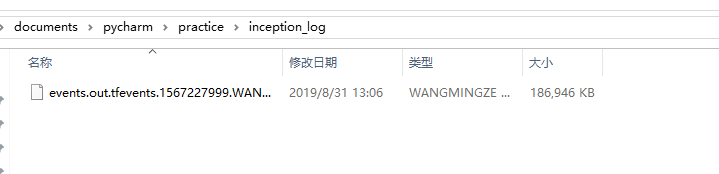
查看网络:
在命令窗口输入:
tensorboard --logdir=D:\documents\pycharm\practice\inception_log
窗口输出:TensorBoard 1.13.1 at http://wangmingze:6006 (Press CTRL+C to quit)
但是我输入这个网址无法访问,宇于是就输入:http://localhost:6006 就进去了。
由于网页截图太小,我就下载图片并上传,这样显示比较清楚。

TensorFlow:谷歌图像识别网络inception-v3下载与查看结构的更多相关文章
- Tensorflow学习(练习)—下载骨骼图像识别网络inception数据集
import tensorflow as tfimport osimport tarfileimport requests #inception模型下载地址inception_pretrain_mod ...
- TensorFlow(十四):谷歌图像识别网络inception-v3下载与查看结构
上代码: import tensorflow as tf import os import tarfile import requests #inception模型下载地址 inception_pre ...
- 源码分析——迁移学习Inception V3网络重训练实现图片分类
1. 前言 近些年来,随着以卷积神经网络(CNN)为代表的深度学习在图像识别领域的突破,越来越多的图像识别算法不断涌现.在去年,我们初步成功尝试了图像识别在测试领域的应用:将网站样式错乱问题.无线领域 ...
- 微调Inception V3网络-对Satellite分类
目录 1. 流程概述 2. 准备数据集 2.1 Satellite数据集介绍 3. Inception V3网络 4. 训练 4.1 基于Keras微调Inception V3网络 4.2 Keras ...
- Inception V3 的 tensorflow 实现
tensorflow 官方给出的实现:models/inception_v3.py at master · tensorflow/models · GitHub 1. 模型结构 首先来看 Incept ...
- 1、VGG16 2、VGG19 3、ResNet50 4、Inception V3 5、Xception介绍——迁移学习
ResNet, AlexNet, VGG, Inception: 理解各种各样的CNN架构 本文翻译自ResNet, AlexNet, VGG, Inception: Understanding va ...
- Windows10 64位下安装TensorFlow谷歌人工智能系统已官方原生支持
Windows10 64位下安装TensorFlow谷歌人工智能系统已官方原生支持 GitHub - tensorflow/tensorflow: Computation using data flo ...
- TensorFlow创建DeepDream网络
TensorFlow创建DeepDream网络 Google 于 2014 年在 ImageNet 大型视觉识别竞赛(ILSVRC)训练了一个神经网络,并于 2015 年 7 月开放源代码. 该网络学 ...
- 深度卷积网络-Inception系列
目录 1. Inception V1 1.1 Inception module 2. Inception V2 3. Inception V3 4. Inception V4, Inception-R ...
随机推荐
- day27 综合架构 rsync备份服务
sync软件使用方法: rsync命令 1v4 a 本地备份数据 cp [root@nfs01 backup]# cp /etc/hosts /tmp [root@nfs01 backup]# ll ...
- wcf编程资料
如下为WCF编辑资料 链接:https://pan.baidu.com/s/1kZnc6eNOfEggHSfJNXj8Ag 提取码:gj7s 复制这段内容后打开百度网盘手机App,操作更方便哦 第01 ...
- CF399B Red and Blue Balls
题目 CF399B 洛谷RemoteJudge 思路 很容易发现,栈中靠上的蓝色球的出栈,对它下方的蓝色球没有影响. 举个例子: 第一步中靠上的蓝色球在第三步出栈了,这一过程对它下面的蓝色球(即第一步 ...
- ORA-01843: not a valid month
问题描述 ORA-01843: not a valid month oracle数据库插入出现无效的月份
- 实现简单的 JS 模块加载器
实现简单的 JS 模块加载器 1. 背景介绍 按需加载是前端性能优化的一个重要手段,按需加载的本质是从远程服务器加载一段JS代码(这里主要讨论JS,CSS或者其他资源大同小异),该JS代码就是一个模块 ...
- IntelliJ IDEA 2017.3尚硅谷-----创建动态的 Java Web
- 防止不同账号之间localStorage数据错误
set和get的时候,key后面加上用户ID
- 隐写工具F5-steganography的使用
1.git clone https://github.com/matthewgao/F5-steganography 2.进入F5-steganography-master文件夹,在空白处 ctrl+ ...
- 1059 Prime Factors (25分)
1059 Prime Factors (25分) 1. 题目 2. 思路 先求解出int范围内的所有素数,把输入x分别对素数表中素数取余,判断是否为0,如果为0继续除该素数知道余数不是0,遍历到sqr ...
- 开发笔记—钉钉服务商应用isv开发,从应用配置,到获取客户企业通讯录
以第三方企业微应用为例 在第三方企业微应用应用时,比较底层的需求,就是应用需要获取客户企业的通讯录,即部门/员工的数据.本人整理以下几个关键数据,供大家开发参考. 新建第三方微应用时,能拿到这些初始数 ...