
spring aop实现日志收集
概述
详细
使用spring aop 来实现日志的统一收集功能。
spring aop 配置
首先,我们定义2种注解,一种是给service用的,一种是给Controller用的。
给service使用的aop扫描
<aop:aspectj-autoproxy />

<context:annotation-config />

<context:component-scan base-package="com.demodashi">

	<context:exclude-filter type="annotation" expression="org.springframework.stereotype.Controller" />

</context:component-scan>

<tx:annotation-driven />
给Controller使用的aop扫描
<aop:aspectj-autoproxy />

<aop:aspectj-autoproxy proxy-target-class="true" />

<!-- 扫描web包,应用Spring的注解 -->

<context:component-scan	base-package="com.demodashi">

	<context:include-filter type="annotation" expression="org.springframework.stereotype.Controller" />

	<context:exclude-filter type="annotation" expression="javax.inject.Named" />

	<context:exclude-filter type="annotation" expression="javax.inject.Inject" />

</context:component-scan>
java实现
实现思路,先定义两个注解类,一个给service类用的,一个给从controller类用的,然后使用切面类,对这两个注解进行绑定监控。结果就是,当使用注解绑定某个service类或者controller类的某个方法时,这个切面类就能监控到,并且能获取到这个service方法的相关输入,输出参数等。这样,就能实现了aop日志了。
给controller使用的注解类
package com.demodashi.aop.annotation;

import java.lang.annotation.*;

/**

 *自定义注解 拦截Controller

 */

@Target({ElementType.PARAMETER, ElementType.METHOD})

@Retention(RetentionPolicy.RUNTIME)

@Documented

public  @interface ControllerLogAnnotation {

    String description()  default "";

}
给service使用的注解类
package com.demodashi.aop.annotation;

import java.lang.annotation.*;

/**

 *自定义注解 拦截service

 */

@Target({ElementType.PARAMETER, ElementType.METHOD})

@Retention(RetentionPolicy.RUNTIME)

@Documented

public  @interface ServiceLogAnnotation {

    String description()  default "";

}
日志切面类
package com.demodashi.aop;

import java.lang.reflect.Method;

import javax.servlet.http.HttpServletRequest;

import javax.servlet.http.HttpSession;

import org.aspectj.lang.JoinPoint;

import org.aspectj.lang.annotation.AfterReturning;

import org.aspectj.lang.annotation.AfterThrowing;

import org.aspectj.lang.annotation.Aspect;

import org.aspectj.lang.annotation.Before;

import org.aspectj.lang.annotation.Pointcut;

import org.slf4j.Logger;

import org.slf4j.LoggerFactory;

import org.springframework.stereotype.Component;

import org.springframework.web.context.request.RequestContextHolder;

import org.springframework.web.context.request.ServletRequestAttributes;

import com.alibaba.fastjson.JSONObject;

import com.demodashi.aop.annotation.ControllerLogAnnotation;

import com.demodashi.aop.annotation.ServiceLogAnnotation;

import com.demodashi.base.UserVO;

/**

 * 切点类

 * @author xgchen

 *

 */

@Aspect

@Component

public  class SystemLogAspect {

	public SystemLogAspect(){

	}

    //本地异常日志记录对象

    private  static  final Logger logger = LoggerFactory.getLogger(SystemLogAspect.class);

    //Service层切点

    @Pointcut("@annotation(com.demodashi.aop.annotation.ServiceLogAnnotation)")

    public  void serviceAspect() {

    }

    //Controller层切点

    @Pointcut("@annotation(com.demodashi.aop.annotation.ControllerLogAnnotation)")

    public  void controllerAspect() {

    }

    /**

     * 前置通知 用于拦截Controller层记录用户的操作

     *

     * @param joinPoint 切点

     */

    @Before("controllerAspect()")

	public  void doBefore4control(JoinPoint joinPoint) {

        HttpServletRequest request = ((ServletRequestAttributes) RequestContextHolder.getRequestAttributes()).getRequest();

        HttpSession session = request.getSession();

        //读取session中的用户

        UserVO user = (UserVO) session.getAttribute("USER");

        //请求的IP

        String ip = request.getRemoteAddr();

         try {

            //*========控制台输出=========*//

            System.out.println("=====control 前置通知开始=====");

            System.out.println("请求方法:" + (joinPoint.getTarget().getClass().getName() + "." + joinPoint.getSignature().getName() + "()"));

            System.out.println("方法描述:" + getControllerMethodDescription(joinPoint));

            System.out.println("请求人ID:" + user.getId());

            System.out.println("请求人NAME:" + user.getName());

            System.out.println("请求IP:" + ip);

            System.out.println("=====前置通知结束=====");

        }  catch (Exception e) {

            //记录本地异常日志

            logger.error("==前置通知异常==");

            logger.error("异常信息:{}", e.getMessage());

        }

    }

    @Before("serviceAspect()")

    public  void doBefore4service(JoinPoint joinPoint) {

    	HttpServletRequest request = ((ServletRequestAttributes) RequestContextHolder.getRequestAttributes()).getRequest();

        HttpSession session = request.getSession();

        //读取session中的用户

        UserVO user = (UserVO) session.getAttribute("USER");

        //获取请求ip

        String ip = request.getRemoteAddr();

        //获取用户请求方法的参数并序列化为JSON格式字符串

        String params = "";

         if (joinPoint.getArgs() !=  null && joinPoint.getArgs().length > 0) {

             for ( int i = 0; i < joinPoint.getArgs().length; i++) {

                params += JSONObject.toJSON(joinPoint.getArgs()[i]).toString() + ";";

            }

        }

        try {

            /*========控制台输出=========*/

        	System.out.println("=====service 前置通知开始=====");

            System.out.println("异常方法:" + (joinPoint.getTarget().getClass().getName() + "." + joinPoint.getSignature().getName() + "()"));

            System.out.println("方法描述:" + getServiceMthodDescription(joinPoint));

            System.out.println("请求人ID:" + user.getId());

            System.out.println("请求人NAME:" + user.getName());

            System.out.println("请求IP:" + ip);

            System.out.println("请求参数:" + params);

        }  catch (Exception ex) {

            //记录本地异常日志

            logger.error("==异常通知异常==");

            logger.error("异常信息:{}", ex.getMessage());

        }

    }

    @AfterReturning(pointcut="serviceAspect()", returning="returnValue")

    public  void after4service(JoinPoint joinPoint, Object returnValue) {

    	HttpServletRequest request = ((ServletRequestAttributes) RequestContextHolder.getRequestAttributes()).getRequest();

        HttpSession session = request.getSession();

        //读取session中的用户

        UserVO user = (UserVO) session.getAttribute("USER");

        //获取请求ip

        String ip = request.getRemoteAddr();

        //获取用户请求方法的参数并序列化为JSON格式字符串

        String params = "";

         if (joinPoint.getArgs() !=  null && joinPoint.getArgs().length > 0) {

             for ( int i = 0; i < joinPoint.getArgs().length; i++) {

                params += JSONObject.toJSON(joinPoint.getArgs()[i]).toString() + ";";

            }

        }

        try {

            /*========控制台输出=========*/

        	System.out.println("=====service 后置通知开始=====");

            System.out.println("异常方法:" + (joinPoint.getTarget().getClass().getName() + "." + joinPoint.getSignature().getName() + "()"));

            System.out.println("方法描述:" + getServiceMthodDescription(joinPoint));

            System.out.println("请求人ID:" + user.getId());

            System.out.println("请求人NAME:" + user.getName());

            System.out.println("请求IP:" + ip);

            System.out.println("请求参数:" + params);

            System.out.println("返回值为:" + JSONObject.toJSON(returnValue).toString());

        }  catch (Exception ex) {

            //记录本地异常日志

            logger.error("==异常通知异常==");

            logger.error("异常信息:{}", ex.getMessage());

        }

    }

    /**

     * 异常通知 用于拦截service层记录异常日志

     *

     * @param joinPoint

     * @param e

     */

    @AfterThrowing(pointcut = "serviceAspect()", throwing = "e")

	public  void doAfterThrowing(JoinPoint joinPoint, Throwable e) {

    	HttpServletRequest request = ((ServletRequestAttributes) RequestContextHolder.getRequestAttributes()).getRequest();

        HttpSession session = request.getSession();

        //读取session中的用户

        UserVO user = (UserVO) session.getAttribute("USER");

        //获取请求ip

        String ip = request.getRemoteAddr();

        //获取用户请求方法的参数并序列化为JSON格式字符串

        String params = "";

         if (joinPoint.getArgs() !=  null && joinPoint.getArgs().length > 0) {

             for ( int i = 0; i < joinPoint.getArgs().length; i++) {

            	 params += JSONObject.toJSON(joinPoint.getArgs()[i]).toString() + ";";

            }

        }

        try {

            /*========控制台输出=========*/

            System.out.println("=====异常通知开始=====");

            System.out.println("异常代码:" + e.getClass().getName());

            System.out.println("异常信息:" + e.getMessage());

            System.out.println("异常方法:" + (joinPoint.getTarget().getClass().getName() + "." + joinPoint.getSignature().getName() + "()"));

            System.out.println("方法描述:" + getServiceMthodDescription(joinPoint));

            System.out.println("请求人ID:" + user.getId());

            System.out.println("请求人NAME:" + user.getName());

            System.out.println("请求IP:" + ip);

            System.out.println("请求参数:" + params);

            System.out.println("=====异常通知结束=====");

        }  catch (Exception ex) {

            //记录本地异常日志

            logger.error("==异常通知异常==");

            logger.error("异常信息:{}", ex.getMessage());

        }

         /*==========记录本地异常日志==========*/

        logger.error("异常方法:{}异常代码:{}异常信息:{}参数:{}", joinPoint.getTarget().getClass().getName() + joinPoint.getSignature().getName(), e.getClass().getName(), e.getMessage(), params);

    }

    /**

     * 获取注解中对方法的描述信息 用于service层注解

     *

     * @param joinPoint 切点

     * @return 方法描述

     * @throws Exception

     */

     public  static String getServiceMthodDescription(JoinPoint joinPoint)

             throws Exception {

        String targetName = joinPoint.getTarget().getClass().getName();

        String methodName = joinPoint.getSignature().getName();

        Object[] arguments = joinPoint.getArgs();

        Class targetClass = Class.forName(targetName);

        Method[] methods = targetClass.getMethods();

        String description = "";

         for (Method method : methods) {

             if (method.getName().equals(methodName)) {

                Class[] clazzs = method.getParameterTypes();

                 if (clazzs.length == arguments.length) {

                    description = method.getAnnotation(ServiceLogAnnotation. class).description();

                     break;

                }

            }

        }

         return description;

    }

    /**

     * 获取注解中对方法的描述信息 用于Controller层注解

     *

     * @param joinPoint 切点

     * @return 方法描述

     * @throws Exception

     */

     public  static String getControllerMethodDescription(JoinPoint joinPoint)  throws Exception {

        String targetName = joinPoint.getTarget().getClass().getName();

        String methodName = joinPoint.getSignature().getName();

        Object[] arguments = joinPoint.getArgs();

        Class targetClass = Class.forName(targetName);

        Method[] methods = targetClass.getMethods();

        String description = "";

         for (Method method : methods) {

             if (method.getName().equals(methodName)) {

                Class[] clazzs = method.getParameterTypes();

                 if (clazzs.length == arguments.length) {

                    description = method.getAnnotation(ControllerLogAnnotation. class).description();

                     break;

                }

            }

        }

         return description;

    }

}
aop使用
就是将注解绑定到具体的service方法上面,或者control方法,如下所示:
@ServiceLogAnnotation(description = "修改密码")

@Override

public UserVO changePassword(UserVO vo, String newPassword) {

	vo.setPassword(newPassword);

	return vo;

}
@ResponseBody

@RequestMapping("/editPassword.do")

@ControllerLogAnnotation(description = "接受修改密码的请求")

public Map changePassword(ModelMap modelMap, HttpServletRequest request,

		HttpServletResponse response) throws IOException {

	String message = null;

	String result = null;

	Object vo = request.getSession().getAttribute("USER");

	if (vo == null) {

		message = "操作失败:对象不能为空!";

	} else if (StringUtils.isBlank(request.getParameter("newPassword"))) {

		message = "新登陆密码不能为空!";

	}

	if (message == null) {

		try {

			userApplication.changePassword((UserVO)vo, request.getParameter("newPassword"));

			message = "修改成功!";

			result = ConstantBean.SUCCESS;

		} catch (Exception e) {

			message = e.getMessage();

			result = ConstantBean.SYSERR;

		}

	} else {

		result = ConstantBean.SYSERR;

	}

	return toMap("data", message, "result", result);

}
运行起来
首把demo导入到eclipse后,运行的界面如下:
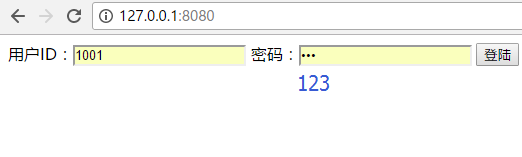
用户名 1001 密码 123
登陆后,修改密码,则看到eclipse控制台打印如下信息:
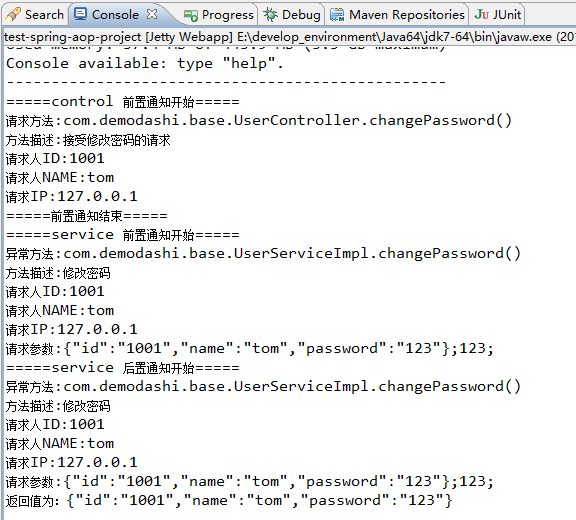
这样一个aop收集日志的功能了,这样的方式比直接把log写在具体的方法上要强多了,收集起来的log,可以直接写在本地,也可以接入elk方案。
接入elk方案可以参考本网站中的:《ELK + kafka 日志方案》
注:本文著作权归作者,由demo大师发表,拒绝转载,转载需要作者授权
spring aop实现日志收集的更多相关文章
- Spring AOP 完成日志记录
Spring AOP 完成日志记录 http://hotstrong.iteye.com/blog/1330046
- Spring AOP进行日志记录
在java开发中日志的管理有很多种.我一般会使用过滤器,或者是Spring的拦截器进行日志的处理.如果是用过滤器比较简单,只要对所有的.do提交进行拦截,然后获取action的提交路径就可以获取对每个 ...
- Spring AOP进行日志记录,管理
在java开发中日志的管理有很多种.我一般会使用过滤器,或者是Spring的拦截器进行日志的处理.如果是用过滤器比较简单,只要对所有的.do提交进行拦截,然后获取action的提交路径就可以获取对每个 ...
- TinyFrame再续篇:整合Spring AOP实现日志拦截
上一篇中主要讲解了如何使用Spring IOC实现依赖注入的.但是操作的时候,有个很明显的问题没有解决,就是日志记录问题.如果手动添加,上百个上千个操作,每个操作都要写一遍WriteLog方法,工作量 ...
- 使用Spring AOP 实现日志管理(简单教程)
有时候,我们在做项目时会遇到这样的需求: 给XXX.java中的所有方法加上指定格式的日志输出. 针对这种指定类.或者指定方法进行共性操作的功能,我们完全可以使用Spring AOP来实现. 本文使用 ...
- Spring AOP统一日志 全量日志
Spring AOP 切面@Around注解的具体使用 lichuangcsdn 2019-02-19 23:21:36 63936 收藏 61分类专栏: Spring 文章标签: Spring AO ...
- spring aop简单日志实例
转载自:http://www.blogjava.net/laoding/articles/242611.html 一直就用spring的IOC,遗憾spring的另一重要组成部分AOP却没用过,所以近 ...
- Spring AOP的日志记录
现在的项目是Spring+MyBatis,前段时间项目经理让我干了一个活,就是给所有的controller里的所有方法加上日志记录的代码,其实没有多少,也就300来个方法,也没有抱怨什么,一边打着瞌睡 ...
- spring:利用Spring AOP 使日志输入与方法分离
对方法进行日志输出是一种很常见的功能.传统的做法是把输出语句写在方法体的内部,在调用该方法时,用输入语句输出信息来记录方法的执行! 1.先写一个普通类: package com.importnew; ...
随机推荐
- ptime概述
官方给出的ptime的定义是:ptime gives the length of time in milliseconds represented by themedia in a packet.简单 ...
- Java hashCode() 和 equals()的若干问题解答<转载自skywang12345>
第1部分 equals() 的作用equals()的作用是用来判断两个对象是否相等.equals()定义在JDK的Object类中.通过判断两个对象的地址是否相等(即,是否是同一个对象)来区分它们是否 ...
- OpenCV教程(48) 特征值匹配
OpenCV中通过下面的代码,可以匹配两幅的图像的特征值. // Read input images cv::Mat image1= cv::imread("../church0 ...
- c++流缓冲学习---rdbuf()
我们使用STL编程的时候有时候会想到把一个流对象指向的内容用另一个流对象来输出,比如想把一个文件的内容输出到显示器上,我们可以用简单的两行代码就可以完成: ifstream infile(" ...
- 析构函数 (C++)
最近发现自己对析构函数的认知有一定的问题,因为之前有在使用placement new时主动调用对象的析构函数,所以觉得析构函数只是个普通的成员函数,调用的时候只会执行自己方法体内的代码内容,而回收内存 ...
- The node (XXX.XXX.XXX.XXX,XXX.XXX.XXX.XXX)has already some ScaleIO components installed
安装ScaleIO 1.32遇到如下报错, 怎么办? 很简单, 在控制面板里把ScaleIO的软件删掉即可.
- GDB 程序调试简单实践
用了好久的GCC/G++ 却一直都没用过GDB调试过程序,有时程序不是非常大,一般有错,直接看编译器编译结果就几乎相同知道错在哪儿了,或者使用codeblocks单步调试,甚至回到windows以下调 ...
- Kafka:ZK+Kafka+Spark Streaming集群环境搭建(五)针对hadoop2.9.0启动之后发现slave上正常启动了DataNode,DataManager,但是过了几秒后发现DataNode被关闭
启动之后发现slave上正常启动了DataNode,DataManager,但是过了几秒后发现DataNode被关闭 以slave1上错误日期为例查看错误信息: /logs/hadoop-spark- ...
- RAMPS1.4 3d打印控制板接线与测试5
切片软件是生产打印机主控板可以识别的代码(Gcode)的工具,没有这个软件的帮忙,打印机不能识别3d模型文件.这里暂时只介绍Slic3r这个切片软件.简单好用功能强大. 1.打开expert模式 Sl ...
- Cognos11第三方权限认证之OpenDJ
一.安装OpenDJ 安装java环境,配置OPENDJ_JAVA_HOME环境变量指向java,然后傻瓜安装,出现下面的界面则说明安装成功 注意安装的过程中会指定管理用户cn的密码,默认的cn是 ...