
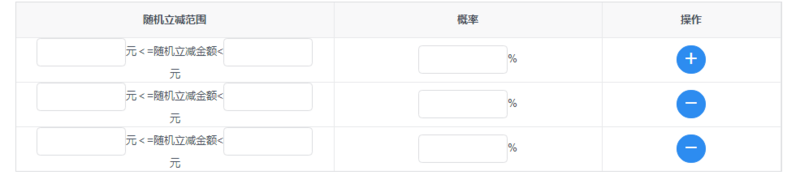
iview,用render函数渲染
<Table border :columns="discountColumns" :data="discountData.rows"></Table>

     discountData: {

                    total: 1, rows: [

                        {

                            randomDiscountRangeMax: '',

                            randomDiscountRangeMin: '',

                            population: ''

                        },

                    ],

                    defaultRows:

                        {

                            randomDiscountRangeMax: '',

                            randomDiscountRangeMin: '',

                            population: ''

                        },

                }

    discountColumns: [

                    {

                        key: 'randomDiscountRange',

                        align: 'center',

                        title: '随机立减范围',

                        render: (h, params) => {

                            var me = this

                            return h('div', [h('Input', {

                                props: {

                                    type: 'text',

                                    value: me.discountData.rows[params.index].randomDiscountRangeMin,

                                    disabled: this.getIsDetail(),

                                },

                                style: {

                                    width: '100px'

                                },

                                on: {

                                    'on-blur': (event) => {

                                        me.discountData.rows[params.index].randomDiscountRangeMin = event.target.value

                                    }

                                }

                            }),

                                h('span', '元<=随机立减金额<'),

                                h('Input', {

                                    props: {

                                        type: 'text',

                                        value: me.discountData.rows[params.index].randomDiscountRangeMax,

                                        disabled: this.getIsDetail(),

                                    },

                                    style: {

                                        width: '100px'

                                    },

                                    on: {

                                        'on-blur': (event) => {

                                            this.discountData.rows[params.index].randomDiscountRangeMax = event.target.value

                                        }

                                    }

                                }),

                                h('span', '元')])

                        }

                    },

                    {

                        key: 'population',

                        align: 'center',

                        title: '概率',

                        width: 300,

                        render: (h, params) => {

                            var me = this

                            return h('div', [h('Input', {

                                props: {

                                    type: 'text',

                                    value: me.discountData.rows[params.index].population,

                                    disabled: this.getIsDetail(),

                                },

                                style: {

                                    width: '100px'

                                },

                                on: {

                                    'on-blur': (event) => {

                                        this.discountData.rows[params.index].population = event.target.value

                                    }

                                }

                            }), h('span', '%')])

                        }

                    }, {

                        key: 'operation',

                        align: 'center',

                        title: '操作',

                        width: 200,

                        render: (h, params) => {

                            return h('div', [

                                h('Button', {

                                    props: {

                                        type: 'primary',

                                        shape: 'circle',

                                        icon: 'plus',

                                        disabled: this.getIsDetail(),

                                    },

                                    style: {

                                        display: params.index !== 0 ? 'none' : 'inline'

                                    },

                                    on: {

                                        click: () => {

                                            this.add('discountData')

                                        }

                                    }

                                }), h('Button', {

                                    props: {

                                        type: 'primary',

                                        shape: 'circle',

                                        icon: 'minus',

                                        disabled: this.getIsDetail(),

                                    },

                                    style: {

                                        display: params.index === 0 ? 'none' : 'inline'

                                    },

                                    on: {

                                        click: () => {

                                            this.remove(params.index, 'discountData')

                                        }

                                    }

                                })

                            ])

                        }

                    }

                ]

 add (dataName) {

                var obj = JSON.parse(JSON.stringify(this[dataName].defaultRows))

                this[dataName].rows.push(obj)

            }

 remove (index, value) {

                this[value].rows.splice(index, 1)

           }
iview,用render函数渲染的更多相关文章
- render 函数渲染表格的当前数据列使用
columns7: [ { title: '编号', align: 'center', width: 90, key: 'No', render: (h, params) => { return ...
- 使用render函数渲染组件
使用render函数渲染组件:https://www.jianshu.com/p/27ec4467a66b
- iview的render函数使用
render渲染函数详解 https://www.cnblogs.com/weichen913/p/9676210.html iview表格的render函数作用是自定义渲染当前列,权限高于key,所 ...
- iview中render函数监听事件
iview的table中添加datepicker在组件中嵌套组件,如果需要监听子组件的自定义事件,应该使用render中的on:{ 'on-change' () => { console.log ...
- 在vue中结合render函数渲染指定的组件到容器中
1.demo 项目结构: index.html <!DOCTYPE html> <html> <head> <title>标题</title> ...
- [转]iview的render函数用法
原文地址:https://www.jianshu.com/p/f593cbc56e1d 一.使用html的标签(例如div.p) 原生标签用法 二.使用iview的标签(例如Button) iview ...
- [转]iview render函数常用总结(vue render函数)
原文地址:https://blog.csdn.net/weixin_43206949/article/details/89385550 iview 的render函数就是vue的render函数ivi ...
- iview table表中使用render函数props传值出现问题
使用iview中的table表格时避免不了使用render函数渲染自定义内容,或者渲染组件.但是在正常使用时出现了props传值无法识别, 按照官网介绍使用props如下: render: (h, p ...
- iview使用之怎样通过render函数在table组件表头添加图标及判断多个状态
在实际项目开发中,我们经常会用到各种各样的表格,比如在表格中填加下拉菜单,按钮,图标及可以根据状态显示对应文字等等,因为这段时间一直在做后台管理系统,所以表格用的就比较多,当然UI组件库我用的是ivi ...
随机推荐
- qq sid qq sid 是什么 qq sid 怎么用
韩梦飞沙 韩亚飞 313134555@qq.com yue31313 han_meng_fei_sha ======= qq sid qq sid 是什么 qq sid 怎么用 ===== ...
- BZOJ2612 : [Poi2003]Sums
设d[i]表示能拼出的x中满足x%a[0]=i的最小的x,其中d[0]=0. 若d[x%a[0]]<=x,则一定可以拼出x,否则一定不可以. 建出带权有向图,点的标号从0到a[0]-1,i号点向 ...
- 华为S5300系列交换机限制特定IP可以登录Web
针对Web管理可能有如下需求: 1.限制某个特定IP允许访问Web 2.默认修改80端口访问 那么针对上面的设置可以有效杜绝而已Web密码暴力破解,增强交换机安全等. 实现: 1.限制特定IP登录We ...
- Android 开源库获取途径整理
介绍眼下收藏 Android 开源库比較多的 GitHub 项目.站点.Twitter.App 及怎样获取最新的 Android 开源库. 微信号: 1. GitHub Android 开源项目汇总 ...
- 前端构建和模块化工具-coolie
[前言] 假设你之前用过前端模块化工具:seajs.requirejs. 用过前端构建工具grunt.gulp, 而且感到了一些不方便和痛苦,那么你能够试试coolie [coolie] 本文不是一篇 ...
- WINUSB Descriptors
Reading string descriptors: String (0x01): "Travis Robinson" String (0x02): "Benchmar ...
- C#编程(七十)----------dynamic类型
原文链接 : http://blog.csdn.net/shanyongxu/article/details/47296033 dynamic类型 C#新增了dynamic关键字,正是因为这一个小小的 ...
- C++ inline内联函数
inline 函数避免函数调用的开销 // find longer of two strings const string &shorterString(const string &s ...
- ASP.NET MVC:@helper 不能调试
ASP.NET MVC 的 @helper 不能设置断点,当然我们可以将逻辑移动到扩展方法中,这里介绍另外一种方式,使用:System.Diagnostics.Debug.WriteLine,编程旅途 ...
- Unity3D 经常使用库
JSON.NET:http://james.newtonking.com/json LitJSON: http://lbv.github.io/litjson/ ProtoBuf - net:htt ...