
用css制作星级评分
Step 1: XHTML
<ul class="star-rating">
<li><a href="#" title="Rate this 1 star out of 5" class="one-star">1</a></li>
<li><a href="#" title="Rate this 2 stars out of 5" class="two-stars">2</a></li>
<li><a href="#" title="Rate this 3 stars out of 5" class="three-stars">3</a></li>
<li><a href="#" title="Rate this 4 stars out of 5" class="four-stars">4</a></li>
<li><a href="#" title="Rate this 5 stars out of 5" class="five-stars">5</a></li>
</ul>
这里只介绍静态的技术,随后会给出系统的应用,你也是自己加程序来尝试一下,还可以采用ajax来做出绚丽的效果
Step 2:图像|Graphics
为了节省您的空间和宽带,我们采用gif图,这个图片就是打分的按钮。
Step 3:CSS
.star-rating{
list-style: none; /* turn off the default list image bullets*/
margin: 3px; /*I wan't some space around this thing*/
padding: 0px; /* I'm anal. I'm pretty sure OL's have a default padding of 0px, but we'll set it to 0px just to be safe*/
width: 100px; /*This list is 5 stars, each star is 20px, therefore it should be 5 x 20px = 100px wide*/
height: 20px; /* The height of each star is 20px. Since this is a horizontal list, we will set the list height to the height of the star.*/
position: relative; /*Very important. We will be using absolute positioning later. We want to use relatively-absolute positioning.*/
background: url(star_rating.gif) top left repeat-x; /* By repeating this image horizontally, the list will appear to have five stars.*/
}
根据代码我们知道:
去掉了ul的margin和padding以及list-style,定义了高20px宽100px的一个区块
下来时按钮元素的制作,下面是css
.star-rating li{
padding:0px; /* no padding at all*/
margin:0px; /* no margin at all*/
/*\*/ /*Backslash hack, this causes IE5 Mac NOT to see this rule*/
float: left; /* for any other browser, we are going to float left, this makes a horizontal list*/
/* */ /* end the IE5 Backslash hack*/
}
这段代码让li实现横向排放,并解决IE5 MAC bug
继承上面的按钮元素样式,再定义鼠标动作,下面是css
.star-rating li a{
display:block; /* we want a block item, so that we can mess with its height and width*/
width:20px; /* easy stuff, we want the width to be the same as the star width*/
height: 20px; /* same as the width*/
text-decoration: none; /* remove the underline from the link*/
text-indent: -9000px; /* indent the text off the screen using a [url=http://www.mezzoblue.com/tests/revised-image-replacement/]image-replacement technique[/url], we dont want to see the text anymore.*/
z-index: 20; /*we'll come back to this*/
position: absolute; /*we can now control the exact x and y coordinates of each star, relative to the parent UL*/
padding: 0px; /*once again, we don't need any padding*/
background-image:none; /* we will not show the star*/
}
13. .star-rating li a:hover{
14. background: url(star_rating.gif) left bottom; /*this is where the magic is*/
15. z-index: 1; /*move this star to the bottom of the z-index stack*/
16. left: 0px; /*move this star all the way to the left, aligned with the side of the UL parent item*/
17. }
下来我们要考虑怎样才能显示不同的星级,三星?四星?原理是什么,我们继续将背景图片横向重复显示,然后定义a和a:hover的宽度来区分选择的星级。
下面是css
.star-rating a.one-star{
left: 0px;
}
.star-rating a.one-star:hover{
width:20px;
}
.star-rating a.two-stars{
left:20px;
}
.star-rating a.two-stars:hover{
width: 40px;
}
.star-rating a.three-stars{
left: 40px;
}
.star-rating a.three-stars:hover{
width: 60px;
}
.star-rating a.four-stars{
left: 60px;
}
.star-rating a.four-stars:hover{
width: 80px;
}
.star-rating a.five-stars{
left: 80px;
}
.star-rating a.five-stars:hover{
width: 100px;
}
到此,这个制作完成
第一个模型中忽视了半星级的情况和无初始的星级,下来我们就是要解决这个问题。
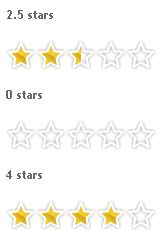
Step 1. 先看看效果|Check it in action
Step 2: The XHTML
<ul class="star-rating">
<li class="current-rating">Currently 3.5/5 Stars.</li>
<li><a href="#" title="1 star out of 5" class="one-star">1</a></li>
<li><a href="#" title="2 stars out of 5" class="two-stars">2</a></li>
<li><a href="#" title="3 stars out of 5" class="three-stars">3</a></li>
<li><a href="#" title="4 stars out of 5" class="four-stars">4</a></li>
<li><a href="#" title="5 stars out of 5" class="five-stars">5</a></li>
</ul>
和第一个模型的结构相似,唯一不同的是:
<li class="current-rating">Currently 3.5/5 Stars.</li>
定义初始值
Step 3: The Star Image
我们制作一个有三个星的图片,第一个星是空值,第二个是要选择的值,第三个是真实的值。

Step 4: The CSS, the Magic
.star-rating li.current-rating{
background: url(star_rating.gif) left bottom;
position: absolute;
height: 30px;
display: block;
text-indent: -9000px;
z-index: 1;
}
他定义了初始值,为了避免继承容器ul的相对定位,采用position: absolute;每个星的高度为height:30px;别的就是隐藏文本和定义对齐方式。
空值css
.star-rating{
…
background: url(star_rating.gif) top left repeat-x;
}
选择值css
.star-rating li a:hover{
background: url(star_rating.gif) left center;
…
}
初始值当然会随着选择变动,那么怎样实现它的变化呢?
<li class="current-rating" style="width:105px;">Currently 3.5/5 Stars.</li>
看了这段代码相信你就知道是什么原因了!那这个width是怎样计算的呢?
Average Rating|平均值: 3.5
Each Star Width|每个星的宽度: 30px;
Set width to|将宽度设为: 3.5 * 30 = 105px
下面欣赏一下这个新模型吧
* Example 1: 150 x 30 star rating system* Example 2: 125 x 25 star rating system* Example 3: 25 x 125 vertical star rating system
我们用php来实现
首先是实现的原理
从上一个css实现星级评分I 、II,可是看出,只要能识别onclick和将数据记录至数据库中存储,然后从数据库中调用出数据进行计算就
可以得到当前的评分均值——当前的分值。
1.下面是建立数据库的sql
CREATE TABLE ratings(
id INT NOT NULL AUTO_INCREMENT PRIMARY KEY,
total_votes INT NOT NULL,
total_value INT NOT NULL,
which_id INT NOT NULL,
which_table VARCHAR(255),
used_ips LONGTEXT NULL
);
2.参数文件引用
<?php
require("connectDB.php");
require("closeDB.php");
require("tableName.php");
require("openDB.php");
?>
3.显示投票程序和更新投票数据程序
<?php
$rating_posted=$_GET['vote'];//pased variable by the the stars value
$id=$_GET['id'];
$query=mysql_query("SELECT total_votes, total_value, used_ips FROM $tableName WHERE id='".$id."' ")or die(" Error: ".mysql_error());
$numbers=mysql_fetch_assoc($query);
$checkIP=unserialize($numbers['used_ips']);
$count=$numbers['total_votes'];//how many votes total
$current_rating=$numbers['total_value'];//total number of rating added together and stored
$sum=$rating_posted+$current_rating;// add together the current vote value and the total vote value
$tense=($count==1) ? "vote" : "votes";//plural form votes/vote
$voted=@mysql_fetch_assoc(@mysql_query("SELECT title FROM $tableName WHERE used_ips LIKE '%".$_SERVER['REMOTE_ADDR']."%' AND id='$id' ")); //Pattern match ip:suggested by Bramus! http://www.bram.us/ - this variable searches through the previous ip address that have voted and returns true or false
if($voted){
echo "<div class=\"rating\">".
"<ul class=\"star-rating\">".
"<li class=\"current-rating\" style=\"width:". @number_format($current_rating/$count,2)*20 ."px;\">Current rating.</li>".
"<li class=\"one-star\">1</li>".
"<li class=\"two-stars\" >2</li>".
"<li class=\"three-stars\">3</li>".
"<li class=\"four-stars\">4</li>".
"<li class=\"five-stars\">5</li>".
"</ul>".
"<p>Rating: <strong>".@number_format($current_rating/$count,2)."</strong> {".$count." ".$tense." cast} <br />You have previously voted.</p></div>";//show the current value of the vote with the current numbers
}else{
if(isset($_GET['vote'])){
if($sum==0){
$added=0;//checking to see if the first vote has been tallied
}else{
$added=$count+1;//increment the current number of votes
}
if(is_array($checkIP)){
array_push($checkIP,$_SERVER['REMOTE_ADDR']);//if it is an array i.e. already has entries the push in another value
}else{
$checkIP=array($_SERVER['REMOTE_ADDR']);//for the first entry
}
$insert=serialize($checkIP);
mysql_query("UPDATE $tableName SET total_votes='".$added."', total_value='".$sum."', used_ips='".$insert."' WHERE id='".$_GET['id']."'");
echo "<div class=\"rating\"><p>Rating: <strong>".@number_format($sum/$added,2)."</strong> {".$added." ".$tense." cast} <span>Thank you for your vote!</span></p></div>";//show the updated value of the vote
}else{
?>
4.访问者评分程序
<!DOCTYPE html PUBLIC "-//W3C//DTD XHTML 1.0 Strict//EN" "http://www.w3.org/TR/xhtml1/DTD/xhtml1-strict.dtd">
<html xmlns="http://www.w3.org/1999/xhtml">
<head>
<title>CSS: Star Rater Example</title>
<meta http-equiv="Content-Type" content="text/html; charset=utf-8">
<link href="styles2-1.css" rel="stylesheet" type="text/css" media="all">
</head>
<body>
<div class="rating">
<p>How clear was this tutorial?</p>
<ul class="star-rating">
<li class="current-rating" style="width:<?php echo @number_format($current_rating/$count,2)*20 ?>px;">Current rating</li>
<li><a href="<?php echo $_SERVER['PHP_SELF'] . "?" .$_GET['section'] . "&id=" . $_GET['id'] . "&vote=1";?>" title="Rate this 1 star out of 5" class="one-star">1</a></li>
<li><a href="<?php echo $_SERVER['PHP_SELF'] . "?" .$_GET['section'] . "&id=" . $_GET['id'] . "&vote=1";?>" title="Rate this 2 stars out of 5" class="two-stars" >2</a></li>
<li><a href="<?php echo $_SERVER['PHP_SELF'] . "?" .$_GET['section'] . "&id=" . $_GET['id'] . "&vote=1";?>" title="Rate this 3 stars out of 5" class="three-stars" >3</a></li>
<li><a href="<?php echo $_SERVER['PHP_SELF'] . "?" .$_GET['section'] . "&id=" . $_GET['id'] . "&vote=1";?>" title="Rate this 4 stars out of 5" class="four-stars" >4</a></li>
<li><a href="<?php echo $_SERVER['PHP_SELF'] . "?" .$_GET['section'] . "&id=" . $_GET['id'] . "&vote=1";?>" title="Rate this 5 stars out of 5" class="five-stars" >5</a></li>
</ul>
</body></html>
5.最新评分结果提示
<?php
echo "<p>Rating: <strong>".@number_format($sum/$count,2)."</strong> {".$count." ".$tense." cast}</p></div>";//show the current updated value of the vote
} // end isset get vote
} //end voted true, false
?>
下一步是将结果记入数据库,现在没有时间去研究了,请大家等待下一篇文章或者去原出处阅读!
用css制作星级评分的更多相关文章
- 纯css实现星级评分效果
效果 效果图如下,纯css实现超酷炫的星级评分动画效果 实现思路 5个类型为radio的input,label标签修改样式背景图为星星 label标签给每个星星鼠标停留时加注名字 点击星星有放大旋 ...
- 基于 bootstrap 字体图标,用纯CSS实现星级评分功能
需要用到的图标 实现原理 关键属性是 text-overflow: clip;,表示直接截断文本.我们经常用这个属性的另一个值 text-overflow: ellipsis; 来做省略表示. 先平铺 ...
- js css 点亮 星级评分
利用css 和 js 实现星级评分 <!DOCTYPE html> <html lang="en"> <head> <meta chars ...
- js星级评分点击星级评论打分效果
html代码: <!DOCTYPE html PUBLIC "-//W3C//DTD XHTML 1.0 Transitional//EN" "http://www ...
- js星级评分点击星级评论打分效果--收藏--转载
<!DOCTYPE html PUBLIC "-//W3C//DTD XHTML 1.0 Transitional//EN" "http://www.w3.org/ ...
- 原生JS实现-星级评分系统
今天我又写了个很酷的实例:星级评分系统(可自定义星星个数.显示信息) sufuStar.star();使用默认值5个星星,默认信息 var msg = [........]; sufuStar.sta ...
- javascript星级评分(多个)
JS打多个类型星级评分: <!DOCTYPE html PUBLIC "-//W3C//DTD XHTML 1.0 Transitional//EN" "http: ...
- JavaScript星级评分
事件onmouseover <!DOCTYPE html PUBLIC "-//W3C//DTD XHTML 1.0 Transitional//EN" "http ...
- 原生javascript星级评分
写个最简单的原生js的星级评分: <div id="rank" class="pingfen"> <ul> <li>< ...
随机推荐
- LOL 战斗力查询
LOL(英雄联盟) 战斗力查询 接口:http://lolbox.duowan.com/playerDetail.php?serverName=serverName&playerName=pl ...
- 【剑指offer】面试题30:最小的K个数
import random def partition(data, start, end): if end <= start: return start index = random.randi ...
- 【APP接口开发】php输出json格式数据
请一定配合使用null转空字符的方法一起使用:(_unsetNull() 和 _json() 配合使用) 在一些接口的调用中,直接查询数据库出来的字段可能为null字段,但是为了简便前端的判断,需要把 ...
- js判断浏览器是否关闭
http://www.blogjava.net/wyz191/archive/2008/12/08/245089.html JS window.onunload=function(){ ...
- Linux命令-目录处理命令:ls
ls 查看当前目文件 ls -a 查看当前目录的所有文件(--all所有文件) 以"."开头的文件是隐藏文件. ls / 查看根目录的文件 ls -l 查看当前目录文件(--lo ...
- FFmpeg音视频同步示例
原文地址:https://my.oschina.net/u/555002/blog/79324 前面整个的一段时间,我们有了一个几乎无用的电影播放器.当然,它能播放视频,也能播放音频,但是它还不能被称 ...
- ztree获取选中节点
$(document).ready(function(){ $.fn.zTree.init($("#treeDemo"), setting, zNodes); }); functi ...
- [C/C++11语法]_[0基础]_[lamba 表达式介绍]
场景 lambda 表达式在非常多语言里都有一席之地,由于它的原因,能够在函数里高速定义一个便携的函数,或者在函数參数里直接高速构造和传递. 它能够说是匿名函数对象,一般仅仅适用于某个函数内,仅仅做暂 ...
- JS 对象的属性如果没有就初始化
function fuck (inObj, path, parms) { // 一个长得像对象的字符串 var Things = path.split("."); // 即将返回的 ...
- MYSQL服务器复制配置
首先声明:此文是在失去U盘极度郁闷的时候写的,有些零散,估计也有错误.欢迎大家指出 MYSQL服务器复制配置 这是根据我之前看的MYSQL复制的文档然后自己亲自实验的过程.配置的功能比较简单. ...