
opencv3.2.0 分离颜色通道&多通道图像混合
##名称:分离颜色通道&多通道图像混合

##平台:QT5.7.1+OpenCV3.2.0

##时间:2017年12月11日

/***************创建QT控制台程序*******************/

#include <QCoreApplication>

#include <opencv2/core/core.hpp>

#include <opencv2/highgui/highgui.hpp>

#include <opencv2/imgproc/imgproc.hpp>

#include <iostream>

using namespace std;

using namespace cv;

int main()

{

    //定义相关变量

    Mat image;

    Mat imageGray;

    Mat imageGreenChannel,imageBlueChannel,imageRedChannel;

    Mat imageBlue,imagePurple,imageGreen,imageYellow,imageRed;

    vector<Mat> channels;

    image = imread("/home/ttwang/Valley_logo.jpg");       //读入原图

    imageGray = imread("/home/ttwang/Valley_logo.jpg",); //读入灰度图

    /***************得到蓝色通道图和紫色通道图*****************/

    split(image,channels);//分离彩色通道

    imageBlueChannel = channels.at(); //蓝色通道的引用返回给imagBlueChannel

    addWeighted(imageBlueChannel,1.0,imageGray,0.5,,imageBlueChannel);//混合后的蓝色通道

    merge(channels,imageBlue);//此时蓝色通道已经变味了,

                         //再通过merge将三个通道重新合并成一个三通道,便得到蓝色通道图

    imageRedChannel = channels.at();  //在上面处理后的基础上,分离红色通道,可得到紫色通道图

    addWeighted(imageRedChannel,1.0,imageGray,0.5,,imageRedChannel);

    merge(channels,imagePurple);

    imshow("blue",imageBlue);

    imshow("purple",imagePurple);

    /***************得到绿色通道图和黄色通道图*****************/

    split(image,channels);//要想出现绿色的图像,需要对原图进行重新分离

    imageGreenChannel = channels.at();

    addWeighted(imageGreenChannel,1.0,imageGray,0.5,,imageGreenChannel);

    merge(channels,imageGreen);

    imageGreenChannel = channels.at();

    addWeighted(imageRedChannel,1.0,imageGray,0.5,,imageRedChannel);

    merge(channels,imageYellow);

    imshow("green",imageGreen);

    imshow("yellow",imageYellow);

    /***************得到红色通道图*****************/

    split(image,channels);

    imageRedChannel = channels.at();

    addWeighted(imageRedChannel,1.0,imageGray,0.5,,imageRedChannel);

    merge(channels,imageRed);

    imshow("red",imageRed);

    waitKey();

    return ;

}
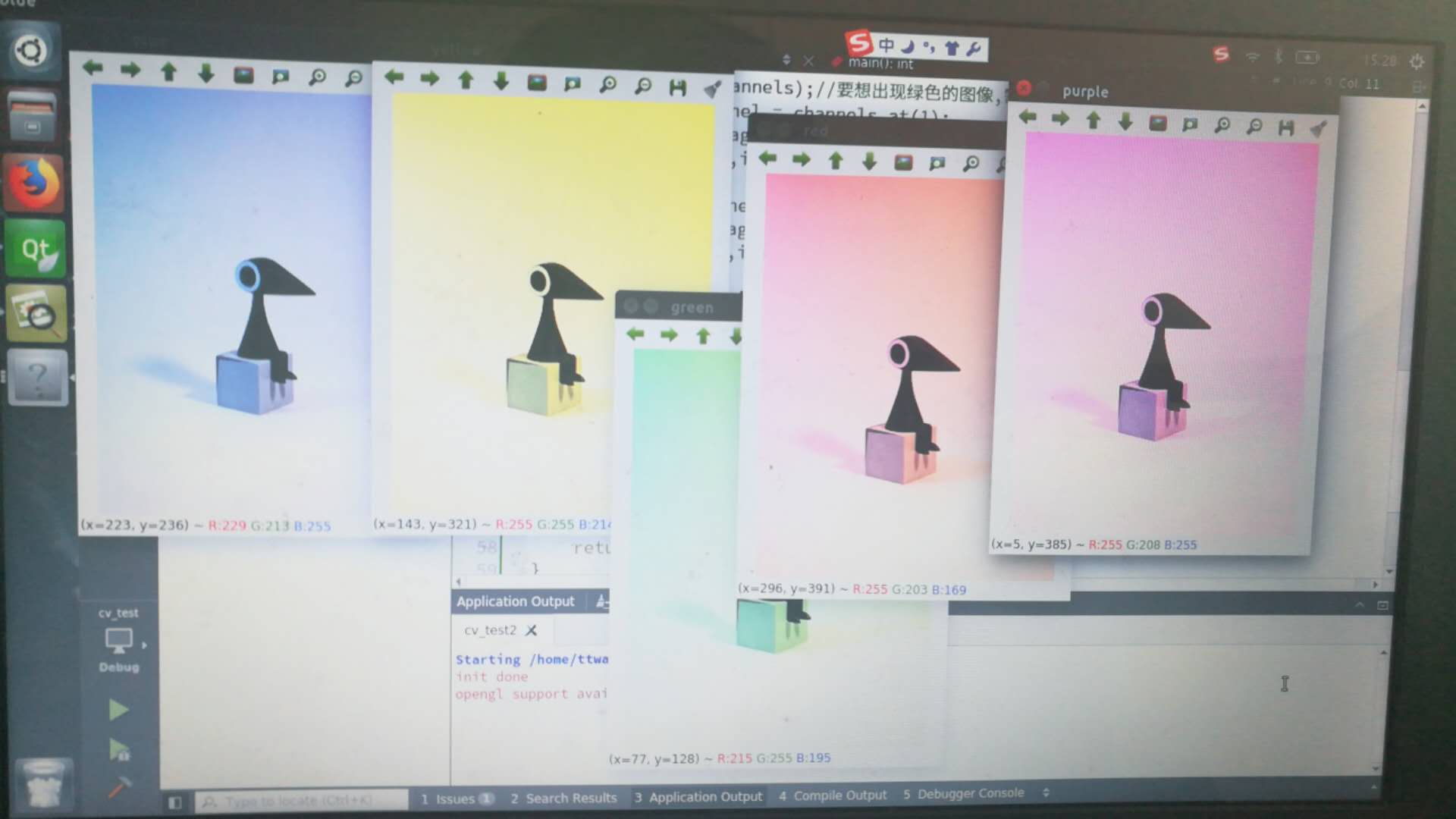
运行结果:
opencv3.2.0 分离颜色通道&多通道图像混合的更多相关文章
- 学习 opencv---(4) 分离颜色通道 && 多通道混合
上篇文章中我们讲到了使用addWeighted函数进行图像混合操作,以及将ROI和addWeighted函数结合起来使用,对指定区域进行图像混合操作. 而为了更好地观察一些图像材料的特征,有时需要对R ...
- opencv 3 core组件进阶(2 ROI区域图像叠加&图像混合;分离颜色通道、多通道图像混合;图像对比度,亮度值调整)
ROI区域图像叠加&图像混合 #include <opencv2/core/core.hpp> #include <opencv2/highgui/highgui.hpp&g ...
- 【opencv学习笔记三】opencv3.4.0数据类型解释
opencv提供了多种基本数据类型,我们这里分析集中常见的类型.opencv的数据类型定义可以在D:\Program Files\opencv340\opencv\build\include\open ...
- 多通道(Multichannel)单通道(singlechannel)图像概念梳理
在做机器视觉时,常常要将一个多通道图像分离成几个单通道图像或者将几个单通道图像合成一个多通道图像,以方便图像处理,但是.写这篇博客,是为加深对这两个概念的理解,下面会给出部分OpenCV对单通道与多通 ...
- 机器学习进阶-图片基本处理-ROI区域 1.img[0:200, 0:200]截取图片 2.cv2.split(对图片的颜色通道进行拆分) 3. cv2.merge(将颜色通道进行合并) 4 cur_img[:, :, 0] = 0 使得b通道的颜色数值为0
1. 截取图片的部分区域img[0:200, 0:200], 读入的图片是ndarray格式 2. b, g, r = cv2.split(img) # 对图片的颜色通道进行拆分 3.img = c ...
- opencv3.2.0图像离散傅里叶变换
源码: ##名称:离散傅里叶变换 ##平台:QT5.7.1+opencv3.2.0 ##日期:2017年12月13. /**** 新建QT控制台程序****/ #include <QCoreAp ...
- opencv3.2.0图像对比度与亮度调整
##名称:图像对象度与对比度调整(由轨迹条分别控制对比度和亮度值) ##平台:QT5.7.1+opencv3.2.0 ##时间:2017年12月13日 /***********建立QT控制台程序*** ...
- OpenCV3.1.0中调用MHI(Motion History Images, 运动历史图像)
写在前边: OpenCV3.0+要想使用MHI,就要现安装扩展模块opencv_contrib.安装方法见:ubuntu 14.04 64位 安装Opencv3.1.0 (包含opencv_contr ...
- 学习 opencv---(3) ROI 区域图像叠加&初级图像混合
在这篇文章里,我们一起学习了在OpenCV中如何定义感兴趣区域ROI,如何使用addWeighted函数进行图像混合操作,以及将ROI和addWeighted函数结合起来使用,对指定区域进行图像混合操 ...
随机推荐
- Python小白学习之路(十六)—【内置函数一】
将68个内置函数按照其功能分为了10类,分别是: 数学运算(7个) abs() divmod() max() min() pow() round() sum() 类型转换(24个) bo ...
- POJ 1118
#include<iostream> #include<set> #include<stdio.h> #include<math.h> #include ...
- liunx相关指令
修改网卡命名规范 a 如何进入到救援模式 修改网卡 1.修改配置文件名称 /etc/sysconfig/network-scripts/ 名称为:ifcfg-xxx 2.修改配置文件内的 dev ...
- 可调试Windows服务框架
参考: Build A Windows Service Framework 新建ServiceFramework类库,项目中需引用: using System.Configuration.Instal ...
- 【树】Sum Root to Leaf Numbers
题目: Given a binary tree containing digits from 0-9 only, each root-to-leaf path could represent a nu ...
- Ubuntukylin-14.04-desktop( 不带分区)安装步骤详解
不多说,直接上干货! Ubuntukylin-14.04-desktop(带分区)安装步骤详解 Ubuntu14.04安装之后的一些配置 Ubuntukylin-14.04-desktop( 不带分区 ...
- 根据屏幕尺寸计算rem
!(function (doc, win) { var docEle = doc.documentElement, evt = "onorientationchange" in w ...
- 在商城系统中使用设计模式----简单工厂模式之在springboot中使用简单工厂模式
1.前言: 不了解简单工厂模式请先移步:在商城中使用简单工厂.在这里主要是对springboot中使用简单工厂模式进行解析. 2.问题: 什么是简单工厂:它的实现方式是由一个工厂类根据传入的参数,动态 ...
- 面试:http协议
转自:http://www.cnblogs.com/ranyonsue/p/5984001.html#undefined HTTP简介 HTTP协议是Hyper Text Transfer Proto ...
- Classpath entry org.maven.ide.eclipse.MAVEN2_CLASSPATH_CONTAINER will not be exported or published
sometimes when importing a maven project in eclipse, i get the following error: Classpath entry org. ...