
android 学习随笔二十三(动画:Fragment )
- Fragment
* 用途:在一个Activity里切换界面,切换界面时只切换Fragment里面的内容
* 在一个Activity中切换多个界面,每个界面就是一个Fragment
* Fragmnent的内容也是一个View对象
* 生命周期方法跟Activity一致,可以理解把其为就是一个Activity
* fragment切换时会销毁旧的,再创建新的
* 定义布局文件作为Fragment的显示内容
//此方法返回的View就会被显示在Fragment上
@Override
public View onCreateView(LayoutInflater inflater, ViewGroup container,
Bundle savedInstanceState) {
// TODO Auto-generated method stub
//用布局文件填充成一个View对象,返回出去,那么就显示在Fragment上了
View v = inflater.inflate(R.layout.fragment01, null);
return v;
}
* 把Fragment显示至指定ViewGroup中
//把fragment显示至界面
//new出fragment对象
Fragment01 fg = new Fragment01();
FragmentManager fm = getFragmentManager();
//开启事务
FragmentTransaction ft = fm.beginTransaction();
//把fragment对象显示到指定资源id的组件里面
ft.replace(R.id.fl, fg);
ft.commit();
package com.itheima.fragment;

import android.os.Bundle;

import android.annotation.SuppressLint;

import android.app.Activity;

import android.app.FragmentManager;

import android.app.FragmentTransaction;

import android.view.Menu;

import android.view.View;

public class MainActivity extends Activity {

    @Override

    protected void onCreate(Bundle savedInstanceState) {

        super.onCreate(savedInstanceState);

        setContentView(R.layout.activity_main);

        showfagment01();

    }

    private void showfagment01() {

        //1.创建fragment对象

        Fragment01 fragment1 = new Fragment01();

        //2.获取fragment管理器

        FragmentManager fm = getFragmentManager();

        //3.开启事务

        FragmentTransaction ft = fm.beginTransaction();

        //4.显示fragment

        //arg0:设置把fragment显示在哪个容器中

        ft.replace(R.id.fl, fragment1);

        //5.提交

        ft.commit();

    }

    public void click1(View v){

        showfagment01();

    }

    public void click2(View v){

        //1.创建fragment对象

        Fragment02 fragment2 = new Fragment02();

        //2.获取fragment管理器

        FragmentManager fm = getFragmentManager();

        //3.开启事务

        FragmentTransaction ft = fm.beginTransaction();

        //4.显示fragment

        //arg0:设置把fragment显示在哪个容器中

        ft.replace(R.id.fl, fragment2);

        //5.提交

        ft.commit();

    }

    public void click3(View v){

        //1.创建fragment对象

        Fragment03 fragment3 = new Fragment03();

        //2.获取fragment管理器

        FragmentManager fm = getFragmentManager();

        //3.开启事务

        FragmentTransaction ft = fm.beginTransaction();

        //4.显示fragment

        //arg0:设置把fragment显示在哪个容器中

        ft.replace(R.id.fl, fragment3);

        //5.提交

        ft.commit();

    }

}
MainActivity
package com.itheima.fragment;

import android.app.Fragment;

import android.os.Bundle;

import android.view.LayoutInflater;

import android.view.View;

import android.view.ViewGroup;

public class Fragment01 extends Fragment {

    //系统自动调用,返回的View对象作为Fragment的内容显示

    @Override

    public View onCreateView(LayoutInflater inflater, ViewGroup container,

            Bundle savedInstanceState) {

        View v = inflater.inflate(R.layout.fragment01, null);

        return v;

    }

}
Fragment01
package com.itheima.fragment;

import android.app.Fragment;

import android.os.Bundle;

import android.view.LayoutInflater;

import android.view.View;

import android.view.ViewGroup;

public class Fragment02 extends Fragment {

    //系统自动调用,返回的View对象作为Fragment的内容显示

    @Override

    public View onCreateView(LayoutInflater inflater, ViewGroup container,

            Bundle savedInstanceState) {

        View v = inflater.inflate(R.layout.fragment02, null);

        return v;

    }

}
Fragment02
package com.itheima.fragment;

import android.app.Fragment;

import android.os.Bundle;

import android.view.LayoutInflater;

import android.view.View;

import android.view.ViewGroup;

public class Fragment03 extends Fragment {

    //系统自动调用,返回的View对象作为Fragment的内容显示

    @Override

    public View onCreateView(LayoutInflater inflater, ViewGroup container,

            Bundle savedInstanceState) {

        View v = inflater.inflate(R.layout.fragment03, null);

        return v;

    }

}
Fragment03
<?xml version="1.0" encoding="utf-8"?>

<manifest xmlns:android="http://schemas.android.com/apk/res/android"

    package="com.itheima.fragment"

    android:versionCode="1"

    android:versionName="1.0" >

    <uses-sdk

        android:minSdkVersion="11"

        android:targetSdkVersion="17" />

    <application

        android:allowBackup="true"

        android:icon="@drawable/ic_launcher"

        android:label="@string/app_name"

        android:theme="@style/AppTheme" >

        <activity

            android:name="com.itheima.fragment.MainActivity"

            android:label="@string/app_name" >

            <intent-filter>

                <action android:name="android.intent.action.MAIN" />

                <category android:name="android.intent.category.LAUNCHER" />

            </intent-filter>

        </activity>

    </application>

</manifest>
AndroidManifest
<LinearLayout xmlns:android="http://schemas.android.com/apk/res/android"

    xmlns:tools="http://schemas.android.com/tools"

    android:layout_width="match_parent"

    android:layout_height="match_parent"

    android:paddingBottom="@dimen/activity_vertical_margin"

    android:paddingLeft="@dimen/activity_horizontal_margin"

    android:paddingRight="@dimen/activity_horizontal_margin"

    android:paddingTop="@dimen/activity_vertical_margin"

    tools:context=".MainActivity"

    android:orientation="horizontal"

    >

    <FrameLayout

        android:id="@+id/fl"

        android:layout_weight="1"

        android:layout_width="0dp"

        android:layout_height="match_parent"

        ></FrameLayout>

    <LinearLayout

        android:layout_width="wrap_content"

        android:layout_height="match_parent"

        android:orientation="vertical"

        >

        <Button

            android:layout_width="wrap_content"

            android:layout_height="wrap_content"

            android:text="界面1"

            android:onClick="click1"

            />

        <Button

            android:layout_width="wrap_content"

            android:layout_height="wrap_content"

            android:text="界面2"

            android:onClick="click2"

            />

        <Button

            android:layout_width="wrap_content"

            android:layout_height="wrap_content"

            android:text="界面3"

            android:onClick="click3"

            />

        </LinearLayout>

</LinearLayout>
activity_main
<?xml version="1.0" encoding="utf-8"?>

<LinearLayout xmlns:android="http://schemas.android.com/apk/res/android"

    android:layout_width="match_parent"

    android:layout_height="match_parent"

    android:orientation="vertical"

    android:background="#00ff00"

    >

    <TextView

        android:layout_width="wrap_content"

        android:layout_height="wrap_content"

        android:textSize="30sp"

        android:text="这是plus的帽子的绿色"

        />

</LinearLayout>
fragment01
<?xml version="1.0" encoding="utf-8"?>

<LinearLayout xmlns:android="http://schemas.android.com/apk/res/android"

    android:layout_width="match_parent"

    android:layout_height="match_parent"

    android:orientation="vertical"

    android:background="#ff0000"

    >

    <TextView

        android:layout_width="wrap_content"

        android:layout_height="wrap_content"

        android:textSize="30sp"

        android:text="这是热情的红色"

        />

</LinearLayout>
fragment02
<?xml version="1.0" encoding="utf-8"?>

<LinearLayout xmlns:android="http://schemas.android.com/apk/res/android"

    android:layout_width="match_parent"

    android:layout_height="match_parent"

    android:orientation="vertical"

    android:background="#0000ff"

    >

    <TextView

        android:layout_width="wrap_content"

        android:layout_height="wrap_content"

        android:textSize="30sp"

        android:text="这是plus戴上帽子的心情的蓝色"

        />

</LinearLayout>
fragment03
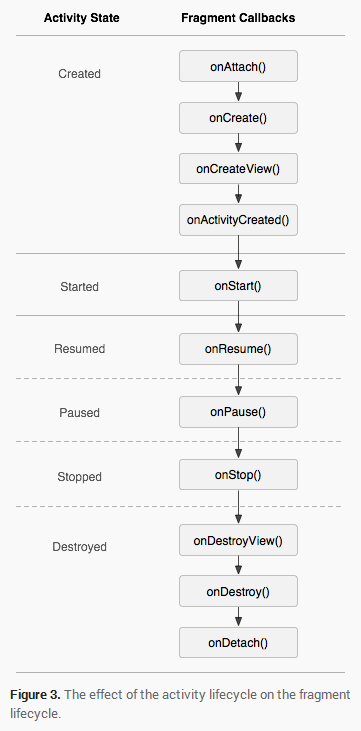
- 生命周期
* fragment切换时旧fragment对象会销毁,新的fragment对象会被创建
- 低版本兼容
* 在support-v4.jar包中有相关api,也就是说fragment可以在低版本模拟器运行
package com.itheima.fragment;

import android.os.Bundle;

import android.annotation.SuppressLint;

import android.support.v4.app.FragmentActivity;

import android.support.v4.app.FragmentManager;

import android.support.v4.app.FragmentTransaction;

import android.view.Menu;

import android.view.View;

public class MainActivity extends FragmentActivity {

    @Override

    protected void onCreate(Bundle savedInstanceState) {

        super.onCreate(savedInstanceState);

        setContentView(R.layout.activity_main);

        showfagment01();

    }

    private void showfagment01() {

        //1.创建fragment对象

        Fragment01 fragment1 = new Fragment01();

        //2.获取fragment管理器

        FragmentManager fm = getSupportFragmentManager();

        //3.开启事务

        FragmentTransaction ft = fm.beginTransaction();

        //4.显示fragment

        //arg0:设置把fragment显示在哪个容器中

        ft.replace(R.id.fl, fragment1);

        //5.提交

        ft.commit();

    }

    public void click1(View v){

        showfagment01();

    }

    public void click2(View v){

        //1.创建fragment对象

        Fragment02 fragment2 = new Fragment02();

        //2.获取fragment管理器

        FragmentManager fm = getSupportFragmentManager();

        //3.开启事务

        FragmentTransaction ft = fm.beginTransaction();

        //4.显示fragment

        //arg0:设置把fragment显示在哪个容器中

        ft.replace(R.id.fl, fragment2);

        //5.提交

        ft.commit();

    }

    public void click3(View v){

        //1.创建fragment对象

        Fragment03 fragment3 = new Fragment03();

        //2.获取fragment管理器

        FragmentManager fm = getSupportFragmentManager();

        //3.开启事务

        FragmentTransaction ft = fm.beginTransaction();

        //4.显示fragment

        //arg0:设置把fragment显示在哪个容器中

        ft.replace(R.id.fl, fragment3);

        //5.提交

        ft.commit();

    }

}
package com.itheima.fragment;

import android.os.Bundle;

import android.support.v4.app.Fragment;

import android.view.LayoutInflater;

import android.view.View;

import android.view.ViewGroup;

public class Fragment01 extends Fragment {

    //系统自动调用,返回的View对象作为Fragment的内容显示

    @Override

    public View onCreateView(LayoutInflater inflater, ViewGroup container,

            Bundle savedInstanceState) {

        View v = inflater.inflate(R.layout.fragment01, null);

        return v;

    }

}
Fragment01
- Fragment和Activity传递数据
package com.itheima.transmit;

import android.os.Bundle;

import android.annotation.SuppressLint;

import android.app.Activity;

import android.app.FragmentManager;

import android.app.FragmentTransaction;

import android.view.Menu;

import android.view.View;

import android.widget.EditText;

import android.widget.TextView;

public class MainActivity extends Activity {

    private Fragment01 fragment1;

    @Override

    protected void onCreate(Bundle savedInstanceState) {

        super.onCreate(savedInstanceState);

        setContentView(R.layout.activity_main);

        showfagment01();

    }

    private void showfagment01() {

        //1.创建fragment对象

        fragment1 = new Fragment01();

        //2.获取fragment管理器

        FragmentManager fm = getFragmentManager();

        //3.开启事务

        FragmentTransaction ft = fm.beginTransaction();

        //4.显示fragment

        //arg0:设置把fragment显示在哪个容器中

        ft.replace(R.id.fl, fragment1);

        //5.提交

        ft.commit();

    }

    public void click1(View v){

        showfagment01();

    }

    public void click2(View v){

        //1.创建fragment对象

        Fragment02 fragment2 = new Fragment02();

        //2.获取fragment管理器

        FragmentManager fm = getFragmentManager();

        //3.开启事务

        FragmentTransaction ft = fm.beginTransaction();

        //4.显示fragment

        //arg0:设置把fragment显示在哪个容器中

        ft.replace(R.id.fl, fragment2);

        //5.提交

        ft.commit();

    }

    public void click3(View v){

        //1.创建fragment对象

        Fragment03 fragment3 = new Fragment03();

        //2.获取fragment管理器

        FragmentManager fm = getFragmentManager();

        //3.开启事务

        FragmentTransaction ft = fm.beginTransaction();

        //4.显示fragment

        //arg0:设置把fragment显示在哪个容器中

        ft.replace(R.id.fl, fragment3);

        //5.提交

        ft.commit();

    }

    public void click4(View v){

        EditText et_main = (EditText) findViewById(R.id.et_main);

        String text = et_main.getText().toString();

        fragment1.setText(text);

    }

    public void setText(String text){

        TextView tv_main = (TextView) findViewById(R.id.tv_main);

        tv_main.setText(text);

    }

}
MainActivity
package com.itheima.transmit;

import android.app.Fragment;

import android.os.Bundle;

import android.view.LayoutInflater;

import android.view.View;

import android.view.ViewGroup;

import android.webkit.WebView.FindListener;

import android.widget.TextView;

public class Fragment01 extends Fragment {

    private TextView tv;

    //系统自动调用,返回的View对象作为Fragment的内容显示

    @Override

    public View onCreateView(LayoutInflater inflater, ViewGroup container,

            Bundle savedInstanceState) {

        View v = inflater.inflate(R.layout.fragment01, null);

        tv = (TextView) v.findViewById(R.id.tv_fragment1);

        return v;

    }

    public void setText(String text){

        tv.setText(text);

    }

}
Fragment01
package com.itheima.transmit;

import android.app.Fragment;

import android.os.Bundle;

import android.view.LayoutInflater;

import android.view.View;

import android.view.View.OnClickListener;

import android.view.ViewGroup;

import android.widget.Button;

import android.widget.EditText;

public class Fragment03 extends Fragment implements OnClickListener {

    private EditText et;

    //系统自动调用,返回的View对象作为Fragment的内容显示

    @Override

    public View onCreateView(LayoutInflater inflater, ViewGroup container,

            Bundle savedInstanceState) {

        View v = inflater.inflate(R.layout.fragment03, null);

        Button bt_fragment03 = (Button) v.findViewById(R.id.bt_fragment03);

        et = (EditText) v.findViewById(R.id.et_fragment03);

        bt_fragment03.setOnClickListener(this);

        return v;

    }

    @Override

    public void onClick(View v) {

        String text = et.getText().toString();

        ((MainActivity)getActivity()).setText(text);

    }

}
Fragment03
<LinearLayout xmlns:android="http://schemas.android.com/apk/res/android"

    xmlns:tools="http://schemas.android.com/tools"

    android:layout_width="match_parent"

    android:layout_height="match_parent"

    android:paddingBottom="@dimen/activity_vertical_margin"

    android:paddingLeft="@dimen/activity_horizontal_margin"

    android:paddingRight="@dimen/activity_horizontal_margin"

    android:paddingTop="@dimen/activity_vertical_margin"

    tools:context=".MainActivity"

    android:orientation="horizontal"

    >

    <FrameLayout

        android:id="@+id/fl"

        android:layout_weight="1"

        android:layout_width="0dp"

        android:layout_height="match_parent"

        ></FrameLayout>

    <LinearLayout

        android:layout_width="wrap_content"

        android:layout_height="match_parent"

        android:orientation="vertical"

        >

        <Button

            android:layout_width="wrap_content"

            android:layout_height="wrap_content"

            android:text="界面1"

            android:onClick="click1"

            />

        <Button

            android:layout_width="wrap_content"

            android:layout_height="wrap_content"

            android:text="界面2"

            android:onClick="click2"

            />

        <Button

            android:layout_width="wrap_content"

            android:layout_height="wrap_content"

            android:text="界面3"

            android:onClick="click3"

            />

        <EditText

            android:id="@+id/et_main"

            android:layout_width="match_parent"

            android:layout_height="wrap_content"

            />

        <Button

            android:layout_width="wrap_content"

            android:layout_height="wrap_content"

            android:text="提交"

            android:onClick="click4"

            />

        <TextView

            android:id="@+id/tv_main"

            android:layout_width="wrap_content"

            android:layout_height="wrap_content"

            />

        </LinearLayout>

</LinearLayout>
activity_main
<?xml version="1.0" encoding="utf-8"?>

<LinearLayout xmlns:android="http://schemas.android.com/apk/res/android"

    android:layout_width="match_parent"

    android:layout_height="match_parent"

    android:orientation="vertical"

    android:background="#00ff00"

    >

    <TextView

        android:layout_width="wrap_content"

        android:layout_height="wrap_content"

        android:textSize="30sp"

        android:text="这是plus的帽子的绿色"

        />

    <TextView

        android:id="@+id/tv_fragment1"

        android:layout_width="wrap_content"

        android:layout_height="wrap_content"

        />

</LinearLayout>
fragment01
<?xml version="1.0" encoding="utf-8"?>

<LinearLayout xmlns:android="http://schemas.android.com/apk/res/android"

    android:layout_width="match_parent"

    android:layout_height="match_parent"

    android:orientation="vertical"

    android:background="#0000ff"

    >

    <TextView

        android:layout_width="wrap_content"

        android:layout_height="wrap_content"

        android:textSize="30sp"

        android:text="这是plus戴上帽子的心情的蓝色"

        />

    <EditText

        android:id="@+id/et_fragment03"

        android:layout_width="match_parent"

        android:layout_height="wrap_content"

        />

    <Button

        android:id="@+id/bt_fragment03"

        android:layout_width="wrap_content"

        android:layout_height="wrap_content"

        android:text="提交"

        />

</LinearLayout>
fragment03
android 学习随笔二十三(动画:Fragment )的更多相关文章
- android 学习随笔二十六(动画:属性动画)
属性动画,属性动画是真正改变对象的某个属性的值 * 补间动画,只是一个动画效果,组件其实还在原来的位置上,xy没有改变1.位移:* 第一个参数target指定要显示动画的组件* 第二个参数proper ...
- android 学习随笔二十五(动画:补间动画)
补间动画(TweenAnimation) * 原形态变成新形态时为了过渡变形过程,生成的动画就叫补间动画(为了让对象从初始状态向结束状态改变的过程更加自然而自动生成的动画效果)* 位移.旋转.缩放.透 ...
- android 学习随笔二十四(动画:帧动画)
帧动画,一张张图片不断的切换,形成动画效果 * 在drawable目录下定义xml文件,子节点为animation-list,在这里定义要显示的图片和每张图片的显示时长 * FrameAnimatio ...
- android 学习随笔二十一(内容提供者 )
一.内容提供者* 应用的数据库是不允许其他应用访问的* 内容提供者的作用就是让别的应用访问到你的私有数据* 自定义内容提供者,继承ContentProvider类,重写增删改查方法,在方法中写增删改查 ...
- Android学习(二十三)SubMenu 子菜单
一.SubMenu子菜单 和功能菜单相似,但是可以添加子菜单. 二.实现步骤: 1.通过onCreateOptionsMenu方法创建子菜单,可以通过代码动态创建,也可以通过xml进行创建. 2.通过 ...
- android 学习随笔二十九(自定义监听 )
package com.itheima.momo.dialog; import com.itheima.momo.R; import android.app.AlertDialog; import a ...
- android 学习随笔二十八(应用小知识点小结 )
去掉标题栏的方法 第一种:也一般入门的时候经常使用的一种方法requestWindowFeature(Window.FEATURE_NO_TITLE);//去掉标题栏注意这句一定要写在setConte ...
- android 学习随笔二十二(小结)
ADB进程 * adb指令 * adb install xxx.apk * adb uninstall 包名 * adb devices * adb start-server * adb kill-s ...
- android 学习随笔二十(多媒体编程 )
1.图片处理 加载大图片 图片大小的计算 图片大小 = 图片的总像素 * 每个像素占用的大小 * 单色图:每个像素占用1/8个字节* 16色图:每个像素占用1/2个字节* 256色图:每个像素占用1个 ...
随机推荐
- Java学习-023-Properties 类 XML 配置文件读取及写入源代码
之前的几篇 Properties 文章已经讲述过了 Java 配置文件类 Properties 的基本用法,查看 JDK 的帮助文档时,也可看到在 Properties 类中还有两个方法 loadFr ...
- Java学习-010-创建文件夹源代码
此文源码主要为应用 Java 创建文件目录的源码.若有不足之处,敬请大神指正,不胜感激! 创建文件夹源代码如下所示: /** * @function 文件操作:创建文件夹.若文件夹不存在,则级联创建文 ...
- JavaScript实现在文本框中输入空格时自动填写某个值
<script language="javascript" type="text/javascript"> var txtText4 = " ...
- Ioc-Autofac的使用
serveral IoC Framework has already exist on the market,Take account of compenhensive factor,Autofa ...
- keyup、keydown和keypress
1.keydown(fn)(按下触发) 语法: $().keydown(function(e){ alert(e.keyCode); //按下a返回65 }) 例子: 2.keyup(fn)(按下弹起 ...
- 安装nodejs+ionic+cordova环境心得
1.安装node-v0.10.38-x64.msi版本(从nodejs中下载最稳定版本,最后安装ionic安不上,然后又安装node-v0.10.38-x64.msi,再安装ionicok了.不知道是 ...
- Spring Boot 1 创建Demo
Spring Boot的主要优点: 为所有Spring开发者更快的入门 开箱即用,提供各种默认配置来简化项目配置 内嵌式容器简化Web项目 没有冗余代码生成和XML配置的要求 入门操作: 1.打开ht ...
- 第六篇 SQL Server代理深入作业步骤工作流
本篇文章是SQL Server代理系列的第六篇,详细内容请参考原文. 正如这一系列的前几篇所述,SQL Server代理作业是由一系列的作业步骤组成,每个步骤由一个独立的类型去执行.每个作业步骤在技术 ...
- C++内存未释放的情况
以下例子中,存储了整数123的记亿体空间不能被删除,因为地址丢失了.这些空间已无法再使用. #include <iostream> using namespace std; int mai ...
- Python生成8位随机密码
#!/usr/bin/env python # -*- coding: utf- -*- import random import string #第一种方法 seed = "1234567 ...