
Android 表格布局 TableLayout
属性介绍
stretchColumns:列被拉伸
shrinkColumns:列被收缩
collapseColumns:列被隐藏
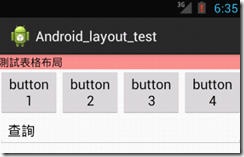
举例测试
    <TableLayout

        android:id="@+id/table1"

        android:layout_width="fill_parent"

        android:layout_height="wrap_content"

        android:stretchColumns="0" >

        <TableRow

            android:id="@+id/row1"

            android:layout_width="fill_parent"

            android:layout_height="wrap_content" >

            <TextView

                android:id="@+id/textView"

                android:layout_width="wrap_content"

                android:layout_height="wrap_content"

                android:background="#fd8d8d"

                android:text="測試表格布局"

                android:textColor="#000000" />

        </TableRow>

    </TableLayout>

    <TableLayout

        android:id="@+id/table2"

        android:layout_width="fill_parent"

        android:layout_height="wrap_content"

        android:shrinkColumns="0,1,2,3" >

        <TableRow

            android:id="@+id/row2"

            android:layout_width="fill_parent"

            android:layout_height="wrap_content" >

            <Button

                android:id="@+id/button1"

                android:layout_width="wrap_content"

                android:layout_height="wrap_content"

                android:text="button1" />

            <Button

                android:id="@+id/button2"

                android:layout_width="wrap_content"

                android:layout_height="wrap_content"

                android:text="button2" />

            <Button

                android:id="@+id/button3"

                android:layout_width="wrap_content"

                android:layout_height="wrap_content"

                android:text="button3" />

            <Button

                android:id="@+id/button4"

                android:layout_width="wrap_content"

                android:layout_height="wrap_content"

                android:text="button4" />

        </TableRow>

    </TableLayout>

    <TableLayout

        android:id="@+id/table3"

        android:layout_width="fill_parent"

        android:layout_height="wrap_content"

        android:stretchColumns="0" >

        <TableRow

            android:id="@+id/row3"

            android:layout_width="fill_parent"

            android:layout_height="wrap_content" >

            <EditText

                android:id="@+id/editText"

                android:layout_width="fill_parent"

                android:layout_height="wrap_content"

                android:text="查詢" />

        </TableRow>

    </TableLayout>
Android 表格布局 TableLayout的更多相关文章
- Android 表格布局<TableLayout>
表格布局即,tableLayout,表格布局通过行.列的形式来管理UI组件,TablelLayout并不需要明确地声明包含多少行.多少列,而是通过TableRow,以及其他组件来控制表格的行数和列数, ...
- .Net程序猿玩转Android开发---(8)表格布局TableLayout
表格布局TableLayout是Android中比較经常使用的一个布局控件,既然是表格,肯定有行和列,TableLayout中的行有TableRow组成.列依据每行控件的数量来确定 假如第一行有3个控 ...
- Android 自学之表格布局 TableLayout
表格布局(TableLayout),表格布局采用行.列的形式来管理UI组件,TableLayout并不需要明确的声明多少行,多少列,而是通过TableRow.其他组件来控制表格的行数和列数. 每次想T ...
- Android表格布局(Table Layout)
Android表格布局(Table Layout) 先来看布局管理器之间继承关系图: 图1 可知TableLayout继承了LinearLayout,所以表格布局本质上依然是线性管理器. 表格布局采用 ...
- Android表格布局之设置边框
Android表格布局本身没有边框,不过可以通过背景色的设置可以实现表格边框的显示. 首先可以设置TableRow的背景色,然后设置内容的背景色.根据它们的颜色差就出现了边框.只要微调Content与 ...
- Android课程---表格布局TableLayout
特别注意:由于表格布局继承自线性布局,因此并不显示表格线 示例代码: <?xml version="1.0" encoding="utf-8"?> ...
- Android布局_表格布局TableLayout
一.TableLayout概述 TableLayout表格布局模型以行列的形式管理子控件,每一行为一个TableRow的对象,当然也可以是一个View的对象 二.TableLayout的全局属性 1 ...
- Android开发5:布局管理器2(表格布局TableLayout)
版本:Android4.3 API18 学习整理:liuxinming 概念 TableLayout继承了LinearLayout,因此它的本质依然是线性布局管理器. 表格布局采 ...
- Android中的表格布局TableLayout
表格布局最基本的三个属性: XML代码实例: <?xml version="1.0" encoding="utf-8"?> <LinearLa ...
随机推荐
- redis的主从复制,以及使用sentinel自动处理主机宕机问题,集群
以下部分想看懂得有一定的redis基础,且步骤是连贯的,错一步都不行.redis运行多个实例,不懂得自行百度. 1. redis主从同步 原理: 从服务器向主服务器发送 SYNC 命令. 接到 SYN ...
- java Math类常用方法
package com.niuke.test; public class MathDemo { public static void main(String args[]){ /** * abs求绝对 ...
- day20191001国庆默写
day20191001国庆默写恢复 重在理解,而不是死记硬背.认真专心看6遍,做6遍. 学会码字,每天码字二小时.持之以恒. 任重道远,出发,走多少算多少.100分的试卷,会做20分也比一个努力也没有 ...
- mybatis精讲(五)--映射器组件
目录 前言 标签 select insert|update|delete 参数 resultMap cache 自定义缓存 # 加入战队 微信公众号 前言 映射器之前我们已经提到了,是mybatis特 ...
- 在Windows系统中构建还原ASP.NET Core 源码
大家好,这几天试着从Github上拉取AspNetCore的源码,尝试着通过Visual Studio 打开,但是并不尽人意.我们需要去构建我们拉去的源代码,这样才可以通过VisualStudio可还 ...
- oracle创建jobs定时任务报错:PLS-00306: wrong number or types of arguments in call to 'JOB'
原脚本: begin sys.dbms_job.submit(job => job, what => 'xxx;', ...
- 基于VMware Workstation下Windows server的搭建
网络安全学习内容 一.VMware安装Windows系统 1.1安装配置虚拟机 需要提前准备的东西: 配置网络实验室的IP: 为了满足实验中一些需要用到网络的需求,学校为我们提供了每个人学号密码的 ...
- HashMap踩坑实录——谁动了我的奶酪
说到HashMap,hashCode 和 equals ,想必绝大多数人都不会陌生,然而你真的了解这它们的机制么?本文将通过一个简单的Demo还原我自己前不久在 HashMap 上导致的线上问题,看看 ...
- 使用Cocoapods创建私有podspec
Cocoapods是非常好用的一个iOS依赖管理工具,使用它可以方便的管理和更新项目中所使用到的第三方库,以及将自己的项目中的公共组件交由它去管理.Cocoapods的介绍及优点本文就不在赘述,我开始 ...
- java之单例设计模式
什么是设计模式? 设计模式是在大量的实践中总结和理论化之后优选的代码结构.编程风格.以及解决问题的思考方式.设计模式就像是经典的棋谱,不同的棋局,我们用不同的棋谱,免去我们自己再思考和探索. 所谓单例 ...