
springMVC_注解方式搭建基础环境
---恢复内容开始---
一、jar包环境,web配置文件和Spring-MVC配置文件的,相关的modelAndview
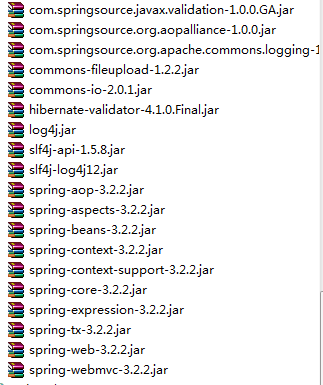
1.配置DispatcherServlet
<servlet>
<servlet-name>action</servlet-name>
<servlet-class>org.springframework.web.servlet.DispatcherServlet</servlet-class>
<init-param>
<param-name>contextConfigLocation</param-name>
<param-value>classpath:spring-mvc.xml</param-value>
</init-param>
<load-on-startup>1</load-on-startup>
</servlet>
<servlet-mapping>
<servlet-name>action</servlet-name>
<url-pattern>/</url-pattern>
</servlet-mapping>
2.配置bean.xml文件的监听器
<context-param>
<param-name>contextConfigLocation</param-name>
<param-value>classpath:beans.xml</param-value>
</context-param>
<listener>
<listener-class>org.springframework.web.context.ContextLoaderListener</listener-class>
</listener>
3.配置Spring-MVC.xml文件
3.1配置扫描控制器Cotroller包路径和注解驱动
xsi:schemaLocation="http://www.springframework.org/schema/beans
http://www.springframework.org/schema/beans/spring-beans-3.2.xsd
http://www.springframework.org/schema/mvc
http://www.springframework.org/schema/mvc/spring-mvc-3.2.xsd
http://www.springframework.org/schema/context
http://www.springframework.org/schema/context/spring-context-3.2.xsd ">
<!-- 自动扫描 -->
<context:component-scan base-package="springmvcpractice\web\controller">
</context:component-scan>
<mvc:resources location="/resources/" mapping="/images/**"/>
<!-- 注解驱动 -->
<mvc:annotation-driven>
</mvc:annotation-driven>
3.2配置文件上传解析器
<!-- 文件上传解析器 id 必须为multipartResolver -->
<bean id="multipartResolver" class="org.springframework.web.multipart.commons.CommonsMultipartResolver">
<property name="maxUploadSize" value="10485760">
</property>
</bean>
3.3配置内部资源解析器和静态视图资源路径
<!-- 映射静态资源 -->
<mvc:resources location="/images/" mapping="/images/**"/>
<mvc:resources location="/upload/" mapping="/upload/**"/>
<!-- 内部资源视图解析器 prefix + logicName + suffix /WEB-INF/jsps/ + index + .jsp-->
<bean id="internalResourceViewResolver" class="org.springframework.web.servlet.view.InternalResourceViewResolver">
<!-- 前缀 -->
<property name="prefix" value="/WEB-INF/jsps/"/>
<!-- 后缀 -->
<property name="suffix" value=".jsp"/>
</bean>
3.4配置beans.xml文件的Service包路径的自动扫描
<?xml version="1.0" encoding="UTF-8"?>
<beans xmlns="http://www.springframework.org/schema/beans"
xmlns:xsi="http://www.w3.org/2001/XMLSchema-instance"
xmlns:mvc="http://www.springframework.org/schema/mvc"
xmlns:context="http://www.springframework.org/schema/context"
xsi:schemaLocation="http://www.springframework.org/schema/beans
http://www.springframework.org/schema/beans/spring-beans-3.2.xsd
http://www.springframework.org/schema/mvc
http://www.springframework.org/schema/mvc/spring-mvc-3.2.xsd
http://www.springframework.org/schema/context
http://www.springframework.org/schema/context/spring-context-3.2.xsd ">
<!-- 自动扫描 -->
<context:component-scan base-package="springmvcpractice\service"/>
</beans>
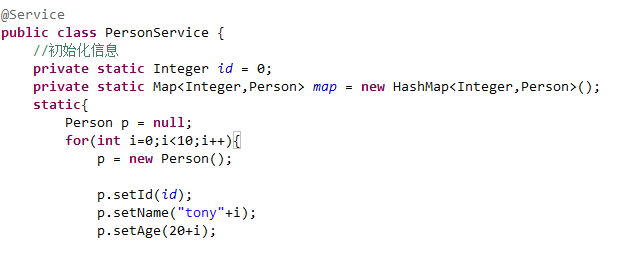
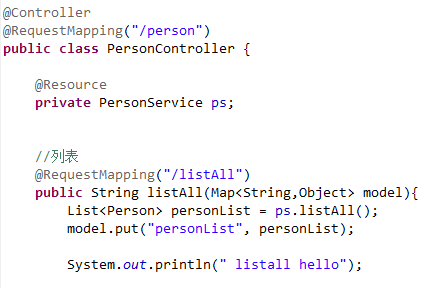
二、配置编写,person bean,personService和contorller的实体类

三、
---恢复内容结束---
springMVC_注解方式搭建基础环境的更多相关文章
- JAVA配置&注解方式搭建简单的SpringMVC前后台交互系统
前面两篇文章介绍了 基于XML方式搭建SpringMVC前后台交互系统的方法,博文链接如下: http://www.cnblogs.com/hunterCecil/p/8252060.html htt ...
- 使用注解方式搭建SpringMVC
1.以前搭建Spring MVC 框架一般都使用配置文件的方式进行,相对比较繁琐.spring 提供了使用注解方式搭建Spring MVC 框架的方式,方便简洁.使用Spring IOC 作为根容器管 ...
- ubuntu通过apt-get方式搭建lnmp环境以及php扩展安装
v 一直是在用的lnmp的集成安装包搭建lnmp环境,因为工作需要需要安装ldap扩展,在网上怎么都找不到源码安装包,只能卸载掉原来的lnmp环境,用ubuntu的php5-ldap扩展, 在安装中遇 ...
- springMVC_配置文件搭建基础环境
SpringMVC与Struts的区别. 一.基础jar包 二.①DispatcherServlet,handelMapping,webAction(colltroller),ModelAndView ...
- EF6 在原有数据库中使用 CodeFirst 总复习(一、搭建基础环境)
本来以为已经会了,可动手时发现许多问题还是模糊不清,正所谓眼高手低.只能重新查资料,再复习一遍. vs.net2013 ef6 mvc5 sqlserver2008 一.建立数据库 Bloggi ...
- CDH5.2+CM5.2+impala2+Spark1.1 集群搭建基础环境准备
測试集群简单介绍:一共同拥有4台机器:10.10.244.136.10.10.244.137.10.10.244.138.10.10.244.139. 10.10.244.136是管理节点.另外3台是 ...
- (一)OpenStack---M版---双节点搭建---基础环境配置
↓↓↓↓↓↓↓↓视频已上线B站↓↓↓↓↓↓↓↓ >>>>>>传送门 配置如下 本次搭建采用2台4核4G的虚拟机,也可以用2台2核4G 主机名 配置 网络 Contr ...
- django 学习笔记(一)搭建基础环境
1.安装django 下载地址 https://github.com/django/django 解压后进入文件夹运行指令 >> python setup.py install 2.创建工 ...
- ASP.NET MVC4 微信公众号开发之网页授权(一):搭建基础环境
首先你得注册并认证一个个人或企业的微信公众号===服务号从而确保获得以下接口权限: 然后打开公众号设置里的功能设置里找到业务域名和网页授权域名分别填上你的域名(注:已备案的域名),如下图所示: 到这里 ...
随机推荐
- input 被checked时和label配合的妙用
input 和label配合的妙用 1:作为文字隐藏与否的开关: 如下代码:对div里面所包含的文字较多,一开始只展示小部分,当用户点击按钮时,进行全部内容的展示(按钮是以向下隐藏箭头的图片) htm ...
- Authorization Bypass in RSA NetWitness
https://www.cnblogs.com/iAmSoScArEd/ SEC Consult Vulnerability Lab Security Advisory < 20190515-0 ...
- Android笔记(十二)AndroidManiFest.xml
AndroidManiFest.xml清单文件是每个Android项目所必须的,它是整个Android应用的全局描述文件.AndroidManiFest.xml清单文件说明了该应用的名称.所使用的图标 ...
- Sublime Text 解决 Unable to download XXX 问题
Sublime Text 安装插件报错: Package Control Unable to download XXX. Please view the console for more detail ...
- JDK源码那些事儿之ArrayBlockingQueue
线程在JDK中是非常重要的一块内容,所有的应用服务都离不开线程的相关操作,对于大量线程的使用都是推荐使用线程池来进行操作和管理,JDK本身提供的线程池在服务中经常被使用到,以往经常使用Executor ...
- python_面向对象——反射
1.反射 四个方法:getattr() 获取 class Person(): def __init__(self,name,age): self.name = name self.age = age ...
- fsLayuiPlugin树+数据表格使用
fsLayuiPlugin 是一个基于layui的快速开发插件,支持数据表格增删改查操作,提供通用的组件,通过配置html实现数据请求,减少前端js重复开发的工作. GitHub下载 码云下载 测试环 ...
- 2019-2020-1 20199312《Linux内核原理与分析》第四周作业
计算机和操作系统的法宝 计算机三个法宝 存储程序计算机.函数调用堆栈机制.中断 操作系统:中断中断上下文的切换--保护和恢复现场 进程上下文的切换. Linux源代码目录分析 arch目录:代码量庞大 ...
- codeforces#571Div2 D---Vus the Cossack and Numbers【贪心】
题目:http://codeforces.com/contest/1186/problem/D 题意:给定一个大小为$n$的浮点序列,这$n$个数的和为0. 现在对这个序列中的每个数,进行向上取整或向 ...
- Spring第二次案例和AOP
Spring加上AOP com.mapper.entity.UserInfo package com.Spring.entity; public class UserInfo { private In ...