
Python笔记 #07# NumPy 文档地址 & Subsetting 2D Arrays
文档地址:np.array()
1、<class 'numpy.ndarray'>
ndarray 表示 n 维度(n D)数组 (= n 行数组)。
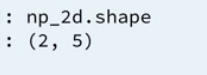
2、打印 array 结构 —— np_array.shape
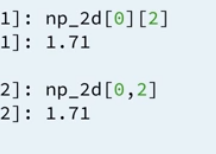
3、Subsetting 2D Arrays 的两种方式
不管是 arr[1][2] 还是 arr[1,2] 都是可行的,不过教程推荐第二种方式。
4、代码演示 & 一个取子集的小技巧
创建:
# Create baseball, a list of lists

baseball = [[180, 78.4],

            [215, 102.7],

            [210, 98.5],

            [188, 75.2]]

# Import numpy

import numpy as np

# Create a 2D numpy array from baseball: np_baseball

np_baseball = np.array(baseball)

# Print out the type of np_baseball

print(type(np_baseball))

# Print out the shape of np_baseball

print(np_baseball.shape)
打印结构:
# baseball is available as a regular list of lists

# Import numpy package

import numpy as np

# Create a 2D numpy array from baseball: np_baseball

np_baseball =  np.array(baseball)

# Print out the shape of np_baseball

print(np_baseball.shape)
小技巧:

# baseball is available as a regular list of lists

# Import numpy package

import numpy as np

# Create np_baseball (2 cols)

np_baseball = np.array(baseball)

# Print out the 50th row of np_baseball

print(np_baseball[49,:])

# Select the entire second column of np_baseball: np_weight

np_weight = np_baseball[:,1]

# Print out height of 124th player

print(np_baseball[123,0])
5、整体数学运算
# baseball is available as a regular list of lists

# updated is available as 2D numpy array

# Import numpy package

import numpy as np

# Create np_baseball (3 cols)

np_baseball = np.array(baseball)

# Print out addition of np_baseball and updated

print(np_baseball + updated)

# Create numpy array: conversion

conversion = np.array([0.0254, 0.453592, 1])

# Print out product of np_baseball and conversion

print(conversion * np_baseball)
Python笔记 #07# NumPy 文档地址 & Subsetting 2D Arrays的更多相关文章
- 使用sphinx快速为你python注释生成API文档
sphinx简介sphinx是一种基于Python的文档工具,它可以令人轻松的撰写出清晰且优美的文档,由Georg Brandl在BSD许可证下开发.新版的Python3文档就是由sphinx生成的, ...
- 使用sphinx为python注释生成docAPI文档
sphinx简介 sphinx是一种基于Python的文档工具,它可以令人轻松的撰写出清晰且优美的文档,由Georg Brandl在BSD许可证下开发. 新版的Python3文档就是由sphinx生成 ...
- python快速生成注释文档的方法
python快速生成注释文档的方法 今天将告诉大家一个简单平时只要注意的小细节,就可以轻松生成注释文档,也可以检查我们写的类方法引用名称是否重复有问题等.一看别人专业的大牛们写的文档多牛多羡慕,不用担 ...
- 找到python官方标准库文档
python中有很多标准库.我们没法记住全部标准库,但是可以在:https://docs.python.org/3/py-modindex.html 中查看标准库的索引 在python的官方文档中,如 ...
- python常用模块-配置文档模块(configparser)
python常用模块-配置文档模块(configparser) 作者:尹正杰 版权声明:原创作品,谢绝转载!否则将追究法律责任. ConfigParser模块用于生成和修改常见配置文档,当前模块的名称 ...
- EXTJS文档地址
文档地址:http://docs.sencha.com/extjs/4.2.3/#!/api/Ext.form.field.Field-event-change
- 【Swagger2】解决swagger文档地址请求404的问题
一.出现的问题背景 某个项目,本地启动后,访问swagger文档地址可以访问到, http://localhost:8203/doc.html.但是部署到开发环境就访问不到,报404资源找不到的问题 ...
- VMware vSphere ESXi 和 vCenter Server 5.1 文档地址
VMware vSphere ESXi 和 vCenter Server 5.1 文档地址 https://pubs.vmware.com/vsphere-51/index.jsp?top ...
- hugo官方相关文档地址
+++ date="2020-10-17" title="hugo官方相关文档地址" tags=["hugo"] categories=[& ...
随机推荐
- UIImageView 和 UIWebView 小结
本文转载至:http://www.cnblogs.com/huangdongcheng/archive/2011/11/21.html 1.UIImageView的讲解 (1)初始化 UIImageV ...
- js获取一个字符串中指定字符第n次出现的位置
function nthIndexOf(str,c,n){ var x=str.indexOf(c); for(var i=0;i<num;i++){ x=str.indexOf(c,x+1); ...
- LeetCode——Balanced Binary Tree
Description: Given a binary tree, determine if it is height-balanced. For this problem, a height-bal ...
- python epoll实现异步socket
一.同步和异步: 在程序执行中,同步运行意味着等待调用的函数.线程.子进程等的返回结果后继续处理:异步指不等待当下的返回结果,直接运行主进程下面的程序,等到有返回结果时,通知主进程处理.有点高效. 二 ...
- java的list集合操作List<T>转化List<Long>
java的list集合操作List<T>转化List<Long> package com.google.common.collect; import com.google.co ...
- mysql查杀会话
root登陆mysql,查看会话(show processlist\G;): mysql> kill
- Eclipse Tomcat插件的使用
目录 Eclipse Tomcat插件的使用 Eclipse Tomcat插件的使用 我使用的Eclipse版本是:4.6.3 Eclipse已经自带Tomcat插件,不需要再自己进行安装 1.新建T ...
- Log4j最简入门及实例
Log4j真的很简单,简单到令人发指的地步.不是要记录日志吗?那就给你一个Log,然后你用Log来写东西就行了,先来一个完整类示例: package test; import org.apache.c ...
- pymysql executemany
Cursor Objects — PyMySQL 0.7.2 documentation https://pymysql.readthedocs.io/en/latest/modules/cursor ...
- UIWebView中加载的网页尺寸太大,如何让网页适应屏幕大小 WebView加载HTML图片大小自适应与文章自动换行
webview.scalesPageToFit = YES; http://www.cnblogs.com/yujidewu/p/5740934.html 若需要根据图片原本大小,宽度小于320px的 ...