
NET Core 拓展方法和中间件集合(支持NET Core2.0+)
# Pure.NETCoreExtentensions
https://github.com/purestackorg/Pure.NETCoreExtensions
NET Core 拓展方法和中间件集合(支持NET Core2.0+)
包含拓展方法:
DistributedCacheExtensions
ConfigurationExtensions
CookiesExtensions
ServiceCollectionExtensions
EnvironmentExtensions
HttpContextExtensions
HttpRequestExtentions
FormFileExtentions
HeaderDictionaryExtensions
DefaultIdentityUserClaimsExtensions
LoggerFactoryExtensions
UrlHelperExtensions
SmtpEmailSenderExtensions
WebHostBuilderExtensions
ApplicationBuilderExtensions
包含中间件:
FriendlyExceptionsMiddleware
HtmlMinificationMiddleware
HttpExceptionMiddleware
InternalServerErrorOnExceptionMiddleware
NoServerHttpHeaderMiddleware
ClientRateLimitMiddleware
IpRateLimitMiddleware
StatisticsMiddleware
常用基类:
BaseController
BaseControllerWithIdentity
TokenBucketLimitingService
LeakageBucketLimitingService
Platform
使用说明:
1.引用相关包:
<PackageReference Include="Microsoft.AspNetCore.Http" Version="2.0.3" />
<PackageReference Include="Microsoft.AspNetCore.Identity" Version="2.0.3" />
<PackageReference Include="Microsoft.AspNetCore.Mvc" Version="2.0.4" />
<PackageReference Include="Microsoft.AspNetCore.StaticFiles" Version="2.0.3" />
<PackageReference Include="Microsoft.Extensions.Configuration" Version="2.0.2" />
<PackageReference Include="Microsoft.Extensions.Configuration.FileExtensions" Version="2.0.2" />
<PackageReference Include="Microsoft.Extensions.Configuration.Json" Version="2.0.2" />
<PackageReference Include="Microsoft.Extensions.Identity.Stores" Version="2.0.3" />
<PackageReference Include="Microsoft.Extensions.Options.ConfigurationExtensions" Version="2.0.2" />
2.引用命名空间
using Pure.NetCoreExtensions
3.配置 Startup.cs 文件
 public void Configure(IApplicationBuilder app, IHostingEnvironment env)

        {

            if (env.IsDevelopment())

            {

                app.UseDeveloperExceptionPage();

            }

            app.UseMvc(routes =>

            {

                routes.MapRoute(

                    name: "default",

                    template: "{controller=HelloWorld}/{action=Index}/{id?}");

            });

            //global middleware

            app.UseGlobalHostingEnvironment(env)

                .UseGlobalHttpContext()

                .UseGlobalLoggerFactory()

                .UseGlobalErrorHandling()

               ;

            app.Run(async (context) =>

            {

                await context.Response.WriteAsync("Hello World!");

            });

        }
4.完成 !
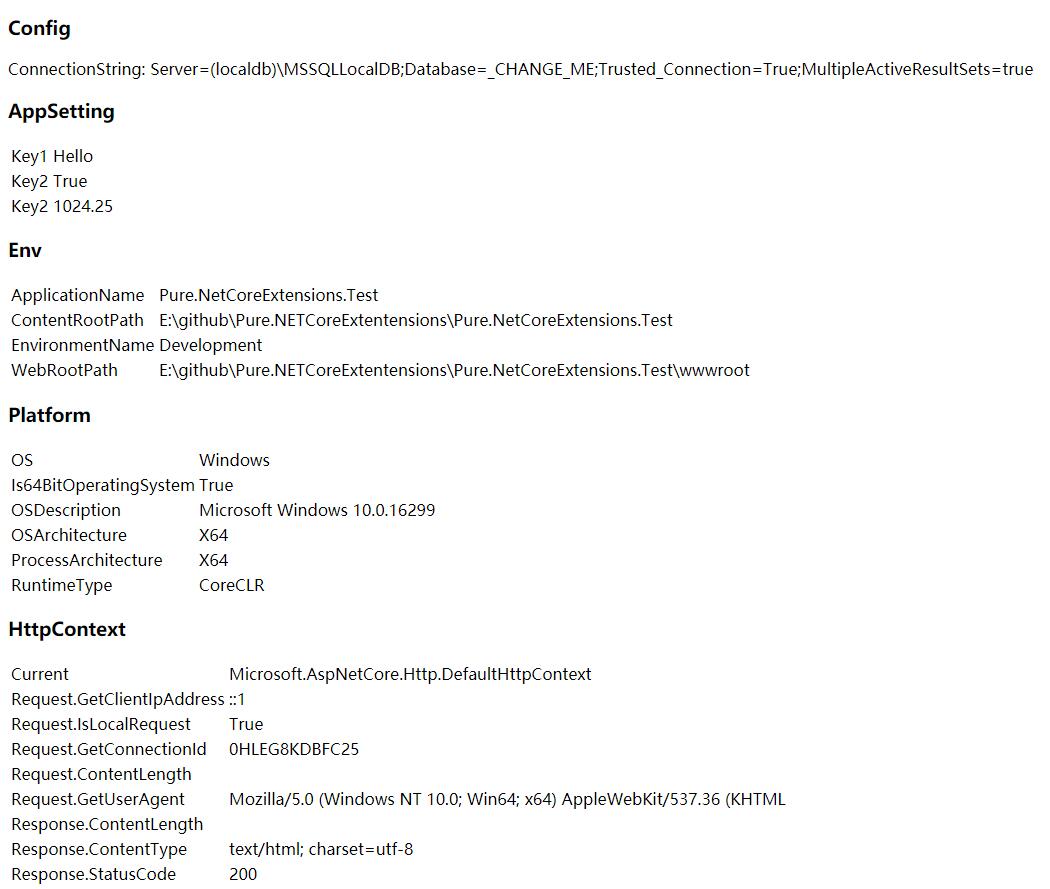
下面测试代码和截图:
@{

    ViewData["Title"] = "Index";

    Layout = "_Layout";

}

@using Pure.NetCoreExtensions;

<h2>Hello World!</h2>

@DateTime.Now.ToString("yyyy-MM-dd HH:mm:ss fff")

<h3>Config</h3>

<p>

    ConnectionString: @ConfigurationManager.Configuration.GetConnectionString()

</p>

<h3>AppSetting</h3>

<p>

    <table>

        <tr>

            <td>Key1</td>

            <td> @ConfigurationManager.AppSettings["Key1"]</td>

        </tr>

        <tr>

            <td>Key2</td>

            <td> @ConfigurationManager.AppSettings["Key2"]</td>

        </tr>

        <tr>

            <td>Key2</td>

            <td> @ConfigurationManager.AppSettings["Key3"]</td>

        </tr>

    </table>

</p>

<h3>Env</h3>

<p>

    <table>

        <tr>

            <td>ApplicationName</td>

            <td> @GlobalHostEnvironment.ApplicationName </td>

        </tr>

        <tr>

            <td>ContentRootPath</td>

            <td> @GlobalHostEnvironment.ContentRootPath </td>

        </tr>

        <tr>

            <td>EnvironmentName</td>

            <td> @GlobalHostEnvironment.EnvironmentName </td>

        </tr>

        <tr>

            <td>WebRootPath</td>

            <td> @GlobalHostEnvironment.WebRootPath </td>

        </tr>

    </table>

</p>

<h3>Platform</h3>

<p>

    <table>

        <tr>

            <td>OS</td>

            <td> @Platform.OS </td>

        </tr>

        <tr>

            <td>Is64BitOperatingSystem</td>

            <td> @Platform.Is64BitOperatingSystem </td>

        </tr>

        <tr>

            <td>OSDescription</td>

            <td> @Platform.OSDescription </td>

        </tr>

        <tr>

            <td>OSArchitecture</td>

            <td> @Platform.OSArchitecture </td>

        </tr>

        <tr>

            <td>ProcessArchitecture</td>

            <td> @Platform.ProcessArchitecture </td>

        </tr>

        <tr>

            <td>RuntimeType</td>

            <td> @Platform.RuntimeType </td>

        </tr>

    </table>

</p>

<h3>HttpContext</h3>

<p>

    <table>

        <tr>

            <td>Current</td>

            <td> @GlobalHttpContext.Current   </td>

        </tr>

        <tr>

            <td>Request.GetClientIpAddress </td>

            <td> @GlobalHttpContext.Current.Request.GetClientIpAddress()   </td>

        </tr>

        <tr>

            <td>Request.IsLocalRequest </td>

            <td> @GlobalHttpContext.Current.Request.IsLocalRequest()   </td>

        </tr>

        <tr>

            <td>Request.GetConnectionId </td>

            <td> @GlobalHttpContext.Current.Request.GetConnectionId()   </td>

        </tr>

        <tr>

            <td>Request.ContentLength </td>

            <td> @GlobalHttpContext.Current.Request.GetRequestId()   </td>

        </tr>

        <tr>

            <td>Request.GetUserAgent </td>

            <td> @GlobalHttpContext.Current.Request.GetUserAgent()   </td>

        </tr>

        <tr>

            <td>Response.ContentLength </td>

            <td> @GlobalHttpContext.Current.Response.ContentLength   </td>

        </tr>

        <tr>

            <td>Response.ContentType </td>

            <td> @GlobalHttpContext.Current.Response.ContentType   </td>

        </tr>

        <tr>

            <td>Response.StatusCode </td>

            <td> @GlobalHttpContext.Current.Response.StatusCode   </td>

        </tr>

    </table>

</p>
截图
NET Core 拓展方法和中间件集合(支持NET Core2.0+)的更多相关文章
- 开源且功能强大的C# 扩展方法类库Pure.Ext,包含1000+个拓展方法 (支持.Net Framework和.Net Core)
先上地址 Github: https://github.com/purestackorg/pure.ext Gitee: https://gitee.com/purestack/pure.ext 扩展 ...
- .NET Core中间件的注册和管道的构建(2)---- 用UseMiddleware扩展方法注册中间件类
.NET Core中间件的注册和管道的构建(2)---- 用UseMiddleware扩展方法注册中间件类 0x00 为什么要引入扩展方法 有的中间件功能比较简单,有的则比较复杂,并且依赖其它组件.除 ...
- 反射 DataTable拓展方法 转实体对象、实体集合、JSON
Mapper类 using System; using System.Collections.Generic; using System.Data; using System.Globalizatio ...
- asp.net core中写入自定义中间件
首先要明确什么是中间件?微软官方解释:https://docs.microsoft.com/zh-cn/aspnet/core/fundamentals/middleware/?tabs=aspnet ...
- asp.net core mvc 管道之中间件
asp.net core mvc 管道之中间件 http请求处理管道通过注册中间件来实现各种功能,松耦合并且很灵活 此文简单介绍asp.net core mvc中间件的注册以及运行过程 通过理解中间件 ...
- ASP.NET CORE 管道模型及中间件使用解读
说到ASP.NET CORE 管道模型不得不先来看看之前的ASP.NET 的管道模型,两者差异很大,.NET CORE 3.1 后完全重新设计了框架的底层,.net core 3.1 的管道模型更加灵 ...
- asp.net core 3.1 自定义中间件实现jwt token认证
asp.net core 3.1 自定义中间件实现jwt token认证 话不多讲,也不知道咋讲!直接上代码 认证信息承载对象[user] /// <summary> /// 认证用户信息 ...
- 用UseMiddleware扩展方法注册中间件类
用UseMiddleware扩展方法注册中间件类 .NET Core中间件的注册和管道的构建(2)---- 用UseMiddleware扩展方法注册中间件类 0x00 为什么要引入扩展方法 有的中间件 ...
- Zepto 添加手势判断拓展方法(思路+原理)
一.前言 这几个月事情比较多,写了一些博客都没有来得及整理发布,今天刚好有一位同事在开发前端页面的时候用到了手势判断.所以翻出了之前写的 demo,顺便整理一下作为记录. 手势判断在各种应用中都十分常 ...
随机推荐
- MySQL查询结果写入到文件总结
Mysql查询结果导出/输出/写入到文件 方法一:直接执行命令: mysql> select count(1) from table into outfile '/tmp/test.txt'; ...
- Ubuntu上装KVM:安装、初次使用
KVM 是 Linux 内核自带的虚拟机系统, 使用它,你的机器就可以变成几台机了 试用过程如下: 环境: Ubuntu 14.04 64bit 1, KVM需要CPU硬件支持虚拟化,所以首先要确认 ...
- 设置VMWARE通过桥接方式使用主机无线网卡上网(转载)
其它人的评论:好文,使用bridged最简单;桥接也可选择自定义的虚拟网络-->VMnet1,这样可以让虚机的IP于主机不同,与VMnet1相同.将主机的的网络访问共享给VMnet1(这个法子没 ...
- Redis的强大之处
[Redis的强大之处] 1.拥有对脚本的支持(此处是lua),脚本可选择性的缓存. 2.提供HyperLogLog计数器. 3.提供5种数据类型的全方位支持:List.Hash.Set.Ordere ...
- rabbitmq的简单介绍二
上一篇博客我们没有介绍完rabbitmq,今天我们接着上一篇的博客继续介绍rabbitmq 这边的博客的内容如下 1.组播,对指定的队列设置关键词,通过关键词来控制消息的分发 2.更加细致的组播 先来 ...
- wcf将一个服务同时绑定到http和tcp的写法
服务器端:<?xml version="1.0" encoding="utf-8" ?><configuration> <con ...
- curl模拟多线程抓取网页(优化)
通过上篇文章清楚了通过curl_multi_*函数可以一次请求多个url,但是也留下了问题,就是结果要等所有数据请求结束一起返回,才能逐个处理数据.优化代码,使先成功请求的url先返回处理结果,而不是 ...
- 发现ramnit样本一枚
https://files.cnblogs.com/files/yfish/DesktopLayer.rar
- git忽略某个文件夹
data/cache/* !data/cache/index.html !data/cache/smiOAuthToken.php
- Java 设计模式系列(十五)观察者模式(Observer)
Java 设计模式系列(十五)观察者模式(Observer) Java 设计模式系列目录(https://www.cnblogs.com/binarylei/p/10198698.html) Java ...