
自然语言12_Tokenizing Words and Sentences with NLTK
sklearn实战-乳腺癌细胞数据挖掘(博主亲自录制视频教程)
https://study.163.com/course/introduction.htm?courseId=1005269003&utm_campaign=commission&utm_source=cp-400000000398149&utm_medium=share
https://www.pythonprogramming.net/tokenizing-words-sentences-nltk-tutorial/
# -*- coding: utf-8 -*-

"""

Created on Sun Nov 13 09:14:13 2016

@author: daxiong

"""

from nltk.tokenize import sent_tokenize,word_tokenize

example_text="Five score years ago, a great American, in whose symbolic shadow we stand today, signed the Emancipation Proclamation. This momentous decree came as a great beacon light of hope to millions of Negro slaves who had been seared in the flames of withering injustice. It came as a joyous daybreak to end the long night of bad captivity."

list_sentences=sent_tokenize(example_text)

list_words=word_tokenize(example_text)
代码测试

Tokenizing Words and Sentences with NLTK
Welcome to a Natural Language Processing tutorial series, using the Natural Language Toolkit, or NLTK, module with Python.
The NLTK module is a massive tool kit, aimed at helping you with
the entire Natural Language Processing (NLP) methodology. NLTK will aid
you with everything from splitting sentences from paragraphs, splitting
up words, recognizing the part of speech of those words, highlighting
the main subjects, and then even with helping your machine to understand
what the text is all about. In this series, we're going to tackle the
field of opinion mining, or sentiment analysis.
In our path to learning how to do sentiment analysis with NLTK, we're going to learn the following:
- Tokenizing - Splitting sentences and words from the body of text.
- Part of Speech tagging
- Machine Learning with the Naive Bayes classifier
- How to tie in Scikit-learn (sklearn) with NLTK
- Training classifiers with datasets
- Performing live, streaming, sentiment analysis with Twitter.
- ...and much more.
In order to get started, you are going to need the NLTK module, as well as Python.
If you do not have Python yet, go to Python.org and download the latest version of Python if you are on Windows. If you are on Mac or Linux, you should be able to run an apt-get install python3
Next, you're going to need NLTK 3. The easiest method to installing the NLTK module is going to be with pip.
For all users, that is done by opening up cmd.exe, bash, or whatever shell you use and typing:pip install nltk
Next, we need to install some of the components for NLTK. Open python via whatever means you normally do, and type:
	  import nltk

	  nltk.download()
Unless you are operating headless, a GUI will pop up like this, only probably with red instead of green:
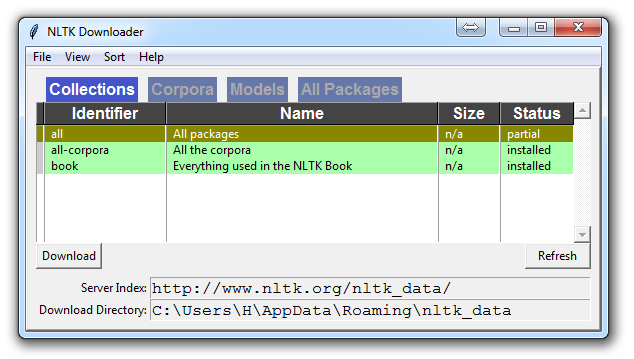
Choose to download "all" for all packages, and then click 'download.' This will give you all of the tokenizers, chunkers, other algorithms, and all of the corpora. If space is an issue, you can elect to selectively download everything manually. The NLTK module will take up about 7MB, and the entire nltk_data directory will take up about 1.8GB, which includes your chunkers, parsers, and the corpora.
If you are operating headless, like on a VPS, you can install everything by running Python and doing:
import nltk
nltk.download()
d (for download)
all (for download everything)
That will download everything for you headlessly.
Now that you have all the things that you need, let's knock out some quick vocabulary:
- Corpus - Body of text, singular. Corpora is the plural of this. Example: A collection of medical journals.
- Lexicon - Words and their meanings. Example: English dictionary. Consider, however, that various fields will have different lexicons. For example: To a financial investor, the first meaning for the word "Bull" is someone who is confident about the market, as compared to the common English lexicon, where the first meaning for the word "Bull" is an animal. As such, there is a special lexicon for financial investors, doctors, children, mechanics, and so on.
- Token - Each "entity" that is a part of whatever was split up based on rules. For examples, each word is a token when a sentence is "tokenized" into words. Each sentence can also be a token, if you tokenized the sentences out of a paragraph.
These are the words you will most commonly hear upon entering the Natural Language Processing (NLP) space, but there are many more that we will be covering in time. With that, let's show an example of how one might actually tokenize something into tokens with the NLTK module.
from nltk.tokenize import sent_tokenize, word_tokenize

EXAMPLE_TEXT = "Hello Mr. Smith, how are you doing today? The weather is great, and Python is awesome. The sky is pinkish-blue. You shouldn't eat cardboard."

print(sent_tokenize(EXAMPLE_TEXT))
At first, you may think tokenizing by things like words or sentences is a rather trivial enterprise. For many sentences it can be. The first step would be likely doing a simple .split('. '), or splitting by period followed by a space. Then maybe you would bring in some regular expressions to split by period, space, and then a capital letter. The problem is that things like Mr. Smith would cause you trouble, and many other things. Splitting by word is also a challenge, especially when considering things like concatenations like we and are to we're. NLTK is going to go ahead and just save you a ton of time with this seemingly simple, yet very complex, operation.
The above code will output the sentences, split up into a list of sentences, which you can do things like iterate through with a for loop.['Hello
Mr. Smith, how are you doing today?', 'The weather is great, and Python
is awesome.', 'The sky is pinkish-blue.', "You shouldn't eat
cardboard."]
So there, we have created tokens, which are sentences. Let's tokenize by word instead this time:
print(word_tokenize(EXAMPLE_TEXT))
Now our output is: ['Hello', 'Mr.', 'Smith', ',', 'how', 'are', 'you', 'doing', 'today', '?', 'The', 'weather', 'is', 'great', ',', 'and', 'Python', 'is', 'awesome', '.', 'The', 'sky', 'is', 'pinkish-blue', '.', 'You', 'should', "n't", 'eat', 'cardboard', '.']
There are a few things to note here. First, notice that punctuation is treated as a separate token. Also, notice the separation of the word "shouldn't" into "should" and "n't." Finally, notice that "pinkish-blue" is indeed treated like the "one word" it was meant to be turned into. Pretty cool!
Now, looking at these tokenized words, we have to begin thinking about what our next step might be. We start to ponder about how might we derive meaning by looking at these words. We can clearly think of ways to put value to many words, but we also see a few words that are basically worthless. These are a form of "stop words," which we can also handle for. That is what we're going to be talking about in the next tutorial.
自然语言12_Tokenizing Words and Sentences with NLTK的更多相关文章
- 自然语言27_Converting words to Features with NLTK
https://www.pythonprogramming.net/words-as-features-nltk-tutorial/ Converting words to Features with ...
- 自然语言18.1_Named Entity Recognition with NLTK
QQ:231469242 欢迎nltk爱好者交流 https://www.pythonprogramming.net/named-entity-recognition-nltk-tutorial/?c ...
- 自然语言15_Part of Speech Tagging with NLTK
https://www.pythonprogramming.net/part-of-speech-tagging-nltk-tutorial/?completed=/stemming-nltk-tut ...
- 自然语言处理NLP程序包(NLTK/spaCy)使用总结
NLTK和SpaCy是NLP的Python应用,提供了一些现成的处理工具和数据接口.下面介绍它们的一些常用功能和特性,便于对NLP研究的组成形式有一个基本的了解. NLTK Natural Langu ...
- 初识NLTK
需要用处理英文文本,于是用到python中nltk这个包 f = open(r"D:\Postgraduate\Python\Python爬取美国商标局专利\s_exp.txt") ...
- Python 自然语言处理(1) 计数词汇
Python有一个自然语言处理的工具包,叫做NLTK(Natural Language ToolKit),可以帮助你实现自然语言挖掘,语言建模等等工作.但是没有NLTK,也一样可以实现简单的词类统计. ...
- 【Python自然语言处理】第一章学习笔记——搜索文本、计数统计和字符串链表
这本书主要是基于Python和一个自然语言工具包(Natural Language Toolkit, NLTK)的开源库进行讲解 NLTK 介绍:NLTK是一个构建Python程序以处理人类语言数据的 ...
- python笔记10-----便捷网络数据NLTK语料库
1.NLTK的概念 NLTK:Natural language toolkit,是一套基于python的自然语言处理工具. 2.NLTK中集成了语料与模型等的包管理器,通过在python编辑器中执行. ...
- python机器学习——分词
使用jieba库进行分词 安装jieba就不说了,自行百度! import jieba 将标题分词,并转为list seg_list = list(jieba.cut(result.get(" ...
随机推荐
- 关于#pragma once和#ifndefine组合的区别
最近在看duilib代码,发现头文件既有#pragma once 又有 #ifndefine...#define,忽然就觉得有点不解,因为据我所知这两者都是防止头文件二次包含的. 经过下面两位的解释后 ...
- PHP mail()函数
<?php /* PHP mail()函数 参数 描述 to 必需.规定 email 接收者. subject 必需.规定 email 的主题.注释:该参数不能包含任何新行字符. message ...
- SharedPreference写入-读取
SharedPreference文件保存格式为xml文件. 一.SharedPreference写入 SharedPreferences sharedPreferences = context.get ...
- Oracle:高效插入大量数据经验之谈
来源于:http://www.cnblogs.com/liwenzhen238/p/3610518.html 在很多时候,我们会需要对一个表进行插入大量的数据,并且希望在尽可能短的时间内完成该工作,这 ...
- Java面试常考知识点
1. 什么是Java虚拟机?为什么Java被称作是“平台无关的编程语言”? Java虚拟机是一个可以执行Java字节码的虚拟机进程.Java源文件被编译成能被Java虚拟机执行的字节码文件. Jav ...
- [转]Java Web基础——Action+Service +Dao三层的功能划分
原文地址:http://blog.csdn.net/inter_peng/article/details/41021727 参考来源:http://www.xuebuyuan.com/2153333. ...
- poj1523 求割点 tarjan
SPF Time Limit: 1000MS Memory Limit: 10000K Total Submissions: 7678 Accepted: 3489 Description C ...
- log4net在Asp.net Mvc中的应用配置与介绍
log4net在.NET中的地位就不多言语了,此篇文章着重配置.较少介绍使用.因为在网上你可以在网上搜到几十万的文章告诉你怎么用.安装的话也不废话了,很简单.Nuget里搜索一下"log4n ...
- servlet监听器Listener(理论+例子)
Listener采用了观察者模式(24种模式之一),Listener是servlet的监听器,他可以监听客户端的请求.服务器端的操作等, 通过监听器,可以自动激发一些操作.比如:监听在线用户数量 当增 ...
- BitmapFactory
1.以文件流的方式,假设在sdcard下有test.png图片FileInputStream fis = newFileInputStream("/sdcard/test.png" ...