
docker 启动失败 Job for docker.service failed because the control process exited with error code. See "systemctl status docker.service" and "journalctl -xe" for details.
CentOS7安装docker,安装成功后,启动失败 提示:
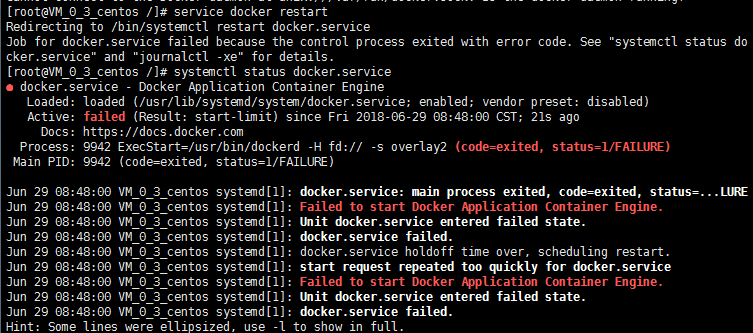
我们可以看到此处它提示是Failed to start Docker Application Container Engine.
于是在网上找各种类似错误,有说是需要把firewalld.service及selinux关闭。呃,这个的话是能够导致docker启动不了,可博主这块儿不是因为这个原因导致。
后来查到,docker的engine 基于Device Mapper提供的一种存储驱动,而它又依赖与 devicemapper。于是乎我将它给删除并重启服务,解决了docker无法正常启动的问题。
# rm -rf /var/lib/docker/
# 添加如下内容 #
vim /etc/docker/daemon.json
{ "graph": "/mnt/docker-data", "storage-driver": "overlay" }
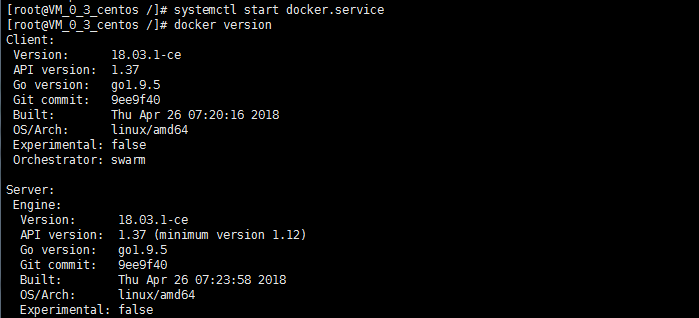
服务启动成功!
docker 启动失败 Job for docker.service failed because the control process exited with error code. See "systemctl status docker.service" and "journalctl -xe" for details.的更多相关文章
- CentOS启动docker1.13失败(Job for docker.service failed because the control process exited with error code. See "systemctl status docker.service" and "journalctl -xe" for details.)
一.启动失败 1.启动docker [root@localhost ~]# systemctl start docker Job for docker.service failed because t ...
- Linux系统Docker启动问题Job for docker.service failed because the control process exited with error code. See "systemctl status docker.service"
在Liunx中使用Docker, 注: Liunx使用的是在虚拟机下的centOS7版本在刚开始安装Docker时没有任何错误, 但是在后续的docker启动过程中, 出现以下问题: [root@zk ...
- docker 报错: Job for docker.service failed because the control process exited with error code. See "systemctl status docker.service" and "journalctl -xe" for details.
centos 启动docker服务报错: Job for docker.service failed because the control process exited with error cod ...
- Linux 重启网卡失败 Job for network.service failed because the control process exited with error code. See "systemctl status network.service" and "journalctl -xe" for details.
linux下重启网卡使用命令 : service network restart 时报错: [root@slave01 hadoop]# service network restart Startin ...
- Jenkins 安装启动提示“iJob for jenkins.service failed because the control process exited with error code. See "systemctl status jenkins.service" and "journalctl -xe" for details.”
通过RPM安装Jenkins简单方便,不太需要复杂的过程,但是在安装完成以后启动Jenkins的时候提示“Starting jenkins (via systemctl): Job for jenki ...
- kali linux重启网卡失败:Job for networking.service failed because the control process exited with error code. See "systemctl status networking.service" and "journalctl -xe" for details. 问题排查
linux菜鸡的时候,总是为了配置网络而烦恼,重启网卡的原因有很多,我这次是因为配置了固定IP[使用第三方工具连接]所以需要重启网卡,出现 Job for networking.service fai ...
- Job for httpd.service failed because the control process exited with error code. See "systemctl status httpd.service" and "journalctl -xe" for details
thinkphp 在Apache上配置启用伪静态,重启Apache1 restart 竟然失败了,报错 Job for httpd.service failed because the control ...
- Job for php-fpm.service failed because the control process exited with error code. See "systemctl status php-fpm.service" and "journalctl -xe" for details.
[root@web01 ~]# systemctl start php-fpm Job for php-fpm.service failed because the control process ...
- Job for apache2.service failed because the control process exited with error code. See "systemctl status apache2.service" and "journalctl -xe" for details.
环境:Ubuntu 16.04.1 + Django 1.11.15 + Apache 2.4.18 + python 3.5 此篇文章内容提到的第几步,对照以下链接中的步骤 百度云的ubuntu1 ...
- Job for mysqld.service failed because the control process exited with error code. See "systemctl status mysqld.service" and "journalctl -xe" for details.
一.前言 Job for mysqld.service failed because the control process exited with error code. See "sys ...
随机推荐
- Linux重启Mysql命令
- Python实现Newton和lagrange插值
一.介绍Newton和lagrange插值:给出一组数据进行Newton和lagrange插值,同时将结果用plot呈现出来1.首先是Lagrange插值:根据插值的方法,先对每次的结果求积,在对结果 ...
- 彻底搞懂Javascript的this
在Javascript中,最玄妙的特性之一,就是this的指向玄幻莫测,一会儿指向这一会儿指向那,让初学者十分伤脑筋. 本文总结一下,方便初学者掌握奥妙之处,同时方便老鸟温故而知新. 首先,看一段代码 ...
- docker离线导入导出镜像
docker save -o mysqlies.tar 5ada6380f248(镜像id) # 镜像id是要导出的 有镜像的机器 在有镜像的机器上执行docker load --input ...
- Smobiler客户端会话
//客户端会话存值 Client.Session["userid"] = Class1.userid; //客户端会话取值 userid = Client.Session[&quo ...
- JXL 简单示例
JXL 1 Overview 1 Overview Home page: http://jexcelapi.sourceforge.net/ JXL 是一个开源的 Excel 开发库,支持 Excel ...
- Dubbo(三):框架设计
整体设计 图例说明: 图中左边淡蓝背景的为服务消费方使用的接口,右边淡绿色背景的为服务提供方使用的接口,位于中轴线上的为双方都用到的接口. 图中从下至上分为十层,各层均为单向依赖,右边的黑色箭头代表层 ...
- statsvn使用小记
准备工作 1.安装TortoiseSVN,在安装时需要安装svn命令行工具: 2.拉取svn代码: svn co https://svn.myserver.cn/svn/myproject1\trun ...
- 学习笔记之Django
The Web framework for perfectionists with deadlines | Django https://www.djangoproject.com/ Django m ...
- vue使用html2canvas生成图片并保存到本地
html2canvas官方文档 http://html2canvas.hertzen.com/ npm下载依赖 npm install html2canvas -S 在需要使用的地方引入 import ...