
Install your Application into RaspberryPi2 and automatically start up
如何安装和卸载应用程序到RaspberryPi2? 如何配置应用程序在RaspberryPi2开机后自动启动?
How to install your app into RaspberryPi2?
How to configure your app automatically start up after device booting?
Read this article, and you will find the answers. Follow me, let’s go!
1 First you need to prepare an app package
Open VS solution, and double click the Package.appxmanifest file
You can configure the application in several tabs, it seems that it’s necessary to set a splash screen image on Visual Assets tab (for me it should be 1240x600 pix)
From the Packaging tab, you can enter a friendly package name and display name. The version is set to 1.0.0 as default. The build number will auto grow with your creation times.
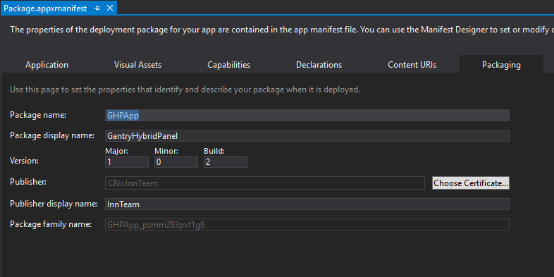
Save the file after you have made the necessary edits for your app.
Now let’s start to create an app package.
In Solution Explorer, choose one start up project, right-click and choose Store->Create App Packages.

In Create Your Packages wizard, choose No unless you want to upload the app to the windows store, then click Next.
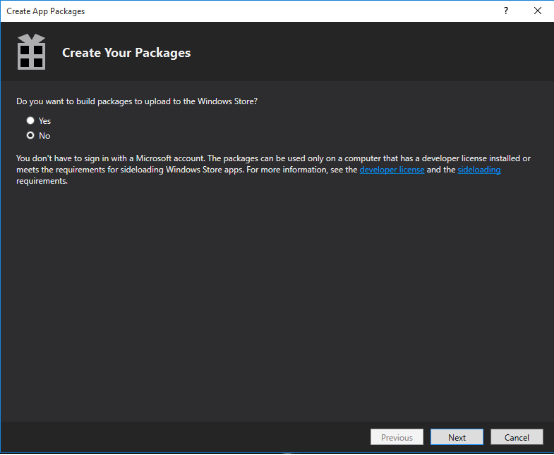
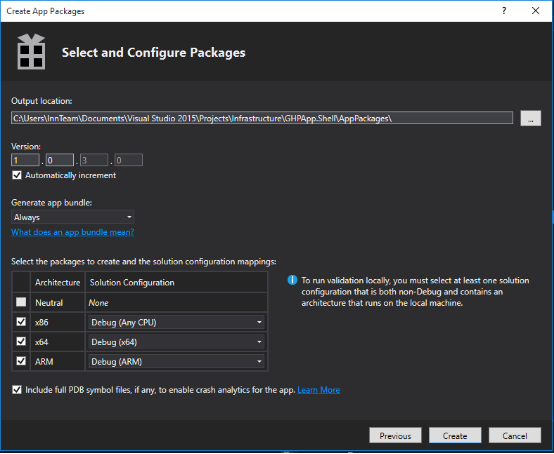
In Select and Configuration package dialog,
Select Always in Generate app bundle listbox, select all three architecture configurations(x86,x64 and ARM), no matter choose debug or release.
Click Create to generate the appxbundle package.
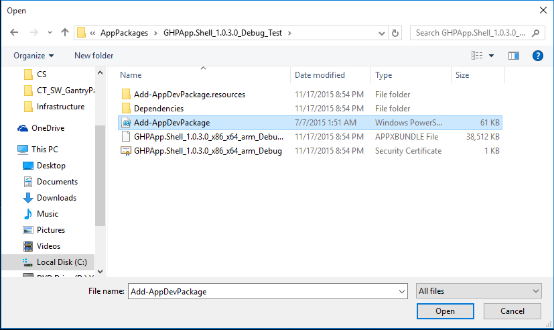
See AppPackages
2 Use Web-based device management to install/uninstall app
Web-based device management
provides basic configuration and device management capabilities which allows you add/remove applications and review the real time performance of windows IoT Device. Also you can use it to make diagnosis on the device and catch some error logs.
Set up connection
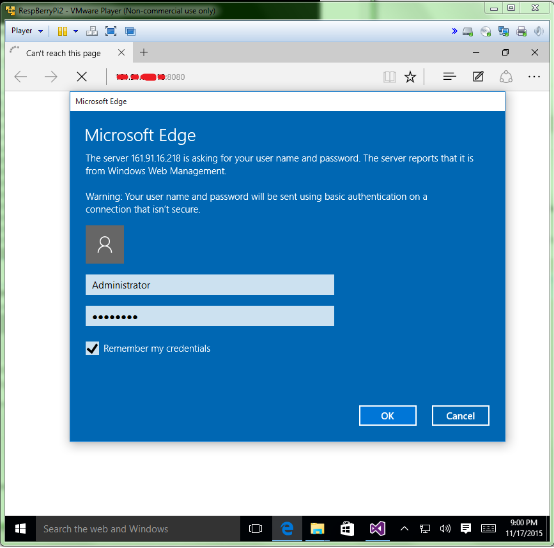
Open the browser, and enter the IP address of Raspberrypi2 with :8080 in the end.
In the credentials dialog, use the default username and password: Administrator, p@ssw0rd (if you haven’t changed the password yet)
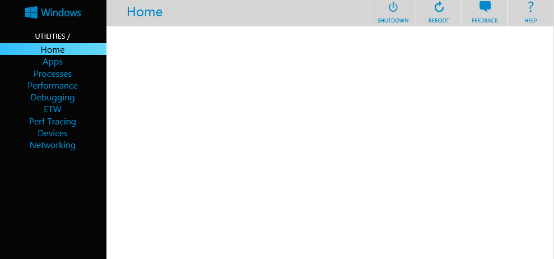
Then you will see the device management Home screen.(May prompt you message to change password)
Install an app
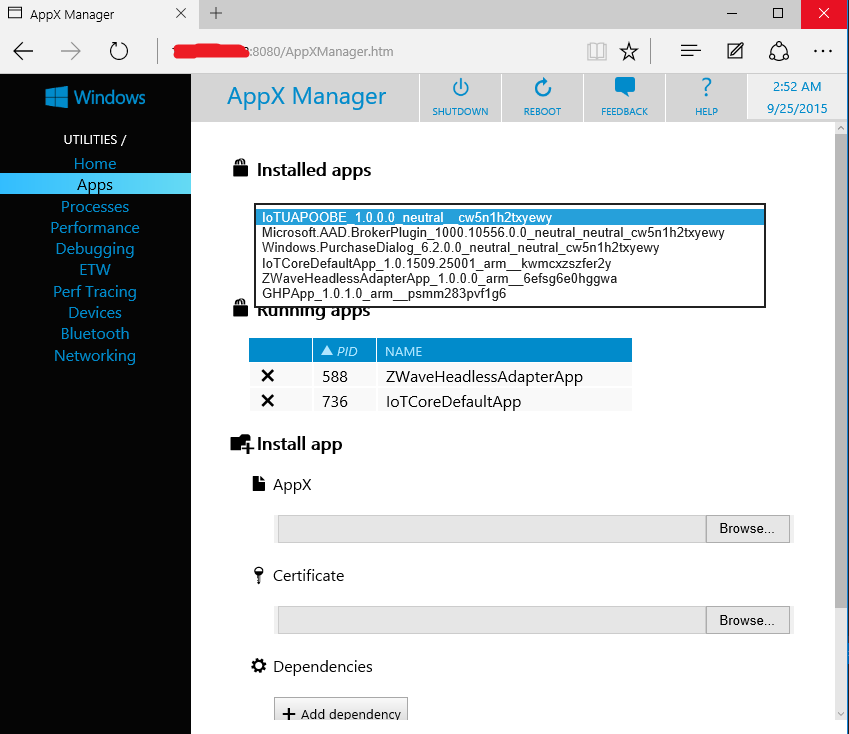
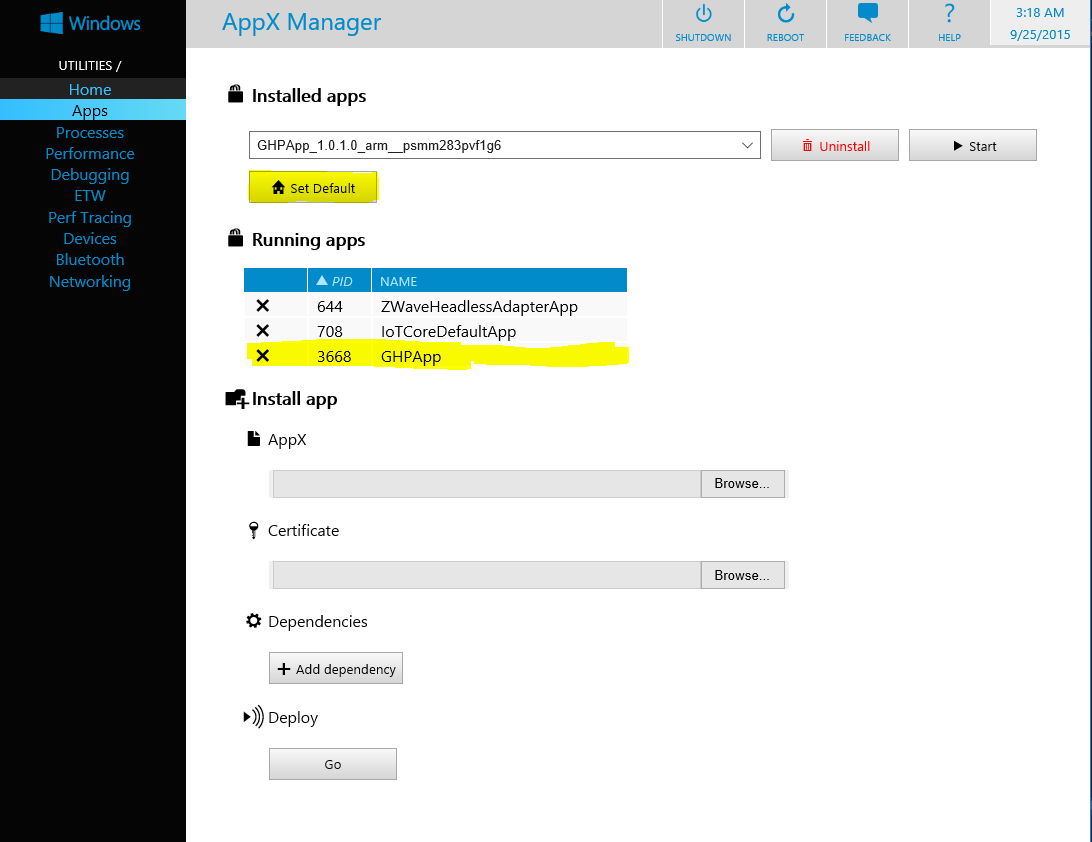
In web-based device management page, Apps provides the install/uninstall functionality for Appx packages and bundles on your device.
Open the Appx screen, click Appx browse and find the .appxbundle file
Click certificate browse, find the .cer file
Add dependencies, one by one.
In Deploy section, click Go, it will show "Done!" well below after installing complete.

Then you can refresh the page and see your app installed in installed apps listbox.
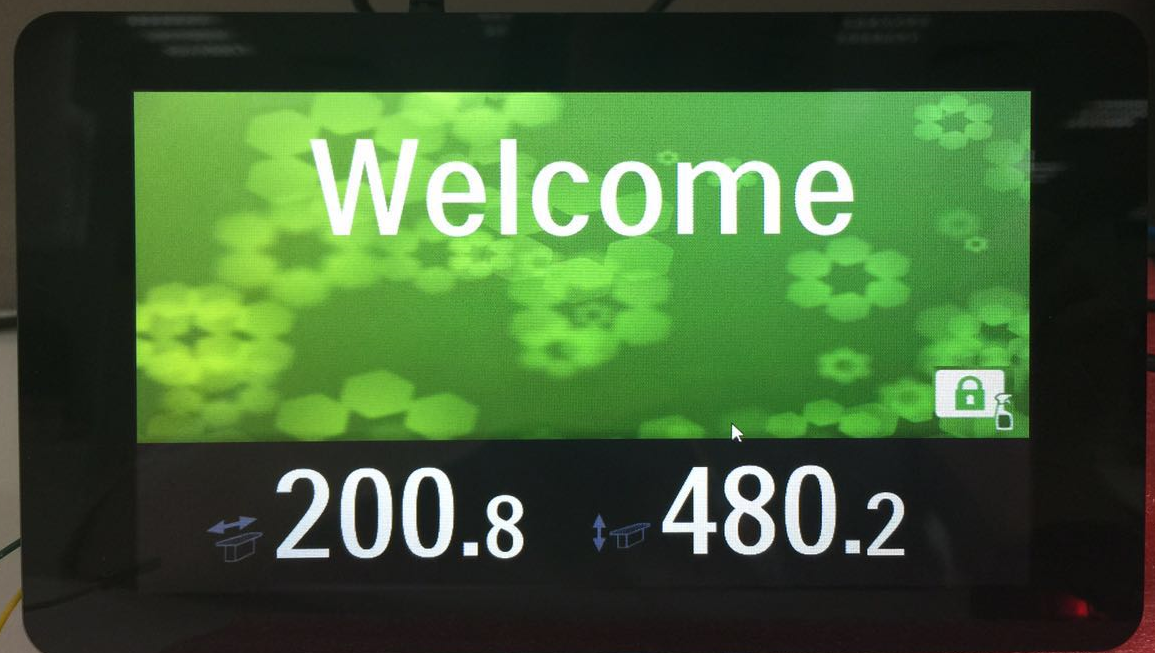
Choose your app and click start, you will see your application on RaspberryPi2.
You can setup your app as default start up application after booting, just click Set Default, then you can reboot the device to validate if it works.
If you want to uninstall your app, just make sure your app is not running. (click X before the running app), and choose your app in installed apps, click uninstall.
References:
https://ms-iot.github.io/content/en-US/win10/tools/Webb.htm
https://msdn.microsoft.com/en-us/library/hh454036.aspx
An easy way to install application
The above is talking how to use web-based device management to install an app package. However, there is an easier way. You can just use VS to help install the app. Actually, once you configure the debug architecture and remote machine to deploy the packages, it has already installed the application into the remote device.
Let’s have a look. Make sure your app is removed from Raspberrypi2.
Choose ARM and Remote machine, input IP address and select none, click Deploy solution.
Open Web-based device management, you can see the application has been installed. Now you can configure it as default start up application if you want.
Note: For only deploying application into RaspberryPi2(ARM based), you can simply use VS to help you install the package, if you want to create an app for all devices, follow the web-based device management instruction.(step1 and 2)
后记:折腾了几天,终于移植了部分WPF代码到UWP上,虽然都是C#+xaml, 看起来似乎差不多,但是区别真的挺大,修改了好多地方,原来的程序用到了Mef,Module,region等等prism中的概念,而针对Universal windows app的prism.windows 以及prism.core 是不支持的,使用了prism.unity代替了原来的mef, (貌似Mef2支持UWP)其他的只得先copy了prism源代码,改了一部分,总算可以运行起最开始的界面了。说起原版WPF程序,其layout和workflow也是相当复杂的,都是可配置的,扩展了prism的region,哪天没有GBP约束了,我就把框架研究研究,发出来。
Install your Application into RaspberryPi2 and automatically start up的更多相关文章
- The certificate used to sign ***has either expired or has been revoked. An updated certificate is required to sign and install the application
真机测试的时候弹出这样的提示:The certificate used to sign ***has either expired or has been revoked. An updated ce ...
- The certificate used to sign “AppName” has either expired or has been revoked. An updated certificate is required to sign and install the application解决
问题 The certificate used to sign "AppName" has either expired or has been revoked. An updat ...
- webpacke install vue application 报错 Failed at the phantomjs-prebuilt@2.1.14 install script
刚刚在网上下了个开源的项目: https://github.com/ing670/webappkiller 执行npm install 报错:npm ERR! Failed at the phanto ...
- XCode 4.3 Unable to load persistent store UserDictionary.sqlite 以及 ios simulator failed to install the application
I have been working on an iOS app for some time, all of a sudden I am getting the following crash ev ...
- csvn install guide
一. make sure java install $ java -version $ echo $JAVA_HOME 二. untar tgz file $ tar xf CollabNetSubv ...
- Sharing The Application Tier File System in Oracle E-Business Suite Release 12.2
The most current version of this document can be obtained in My Oracle Support Knowledge Document 13 ...
- Android application testing with the Android test framework
目录(?)[-] Android automated testing 1 How to test Android applications Tip 2 Unit tests vs functional ...
- 转贴:sudo apt-get install 可以安装的一些软件
Ubuntu 下的一些软件安装sudo apt-get install virtualbox#华主席推荐 2007年年度最佳软件,最佳编辑选择奖得主.....sudo apt-get install ...
- How to modify a compiled Android application (.apk file)
Today I’d like to share with you my findings about how an existing .apk file can be modified. An .ap ...
随机推荐
- sizeToFit的学习与认知
今天一扫前两日的坏心情,终于有心情平静下来,今天我是根据网络上的一些资料进行学习,今天学习的内容是 sizeToFit() 方法在不方便手动布局的场景中的使用. 首先感谢资料的提供者:参考1 参考2 ...
- SpringMVC数据绑定一(基本类型、数组和对象(简单对象、层级对象、多参数对象))
一.int和Integer类型 如:参数为int类型的请求 @Controller public class TestController { @RequestMapping(value=" ...
- Identity Server 4 原理和实战(完结)_----选看 OpenId Connect 简介
Identity Procider:身份提供商
- linux tar命令及解压总结
把常用的tar解压命令总结下,当作备忘: tar -c: 建立压缩档案 -x:解压 -t:查看内容 -r:向压缩归档文件末尾追加文件 -u:更新原压缩包中的文件 这五个是独立的命令,压缩解压都要用到其 ...
- React 从入门到进阶之路(六)
之前的文章我们介绍了 React 表单事件 键盘事件 事件对象以及 React中 的 ref 获取 dom 节点 .双向数据绑定.接下来我们将介绍 React 表单详解 约束性和非约束性组件 inpu ...
- throw UnsupportedOperationException
package org.usc.action; import java.util.ArrayList; import java.util.Arrays; import java.util.List; ...
- E20180513-hm
letter n. 信; 证书,许可证; 字母,文字; 字面意义; bracket n. 支架,悬臂; 括弧; 类别,等级; [数] 同类项; coefficient n. 系数; (测定某种质量或 ...
- uoj#269. 【清华集训2016】如何优雅地求和(数论)
传送门 首先,如果\(f(x)=1\),那么根据二项式定理,有\(Q(f,n,k)=1\) 当\(f(x)=x\)的时候,有\[Q=\sum_{i=0}^ni\times \frac{n!}{i!(n ...
- [Xcode 实际操作]九、实用进阶-(6)在Swift文件中调用Object-C的类和方法
目录:[Swift]Xcode实际操作 本文将演示在Swift文件中调用Object-C的类和方法. 在项目文件夹[DemoApp]上点击鼠标右键 ->[New File]创建一个Object- ...
- 【BZOJ4548】小奇的糖果
→原题传送门←(by Hzwer) 「题目背景」 小奇不小心让糖果散落到了地上,它对着满地的彩色糖果胡思乱想. 「问题描述」 有 N 个彩色糖果在平面上.小奇想在平面上取一条水平的线段,并拾起它上方或 ...