
UITabBarController的创建与自定义TarBar---学习笔记三
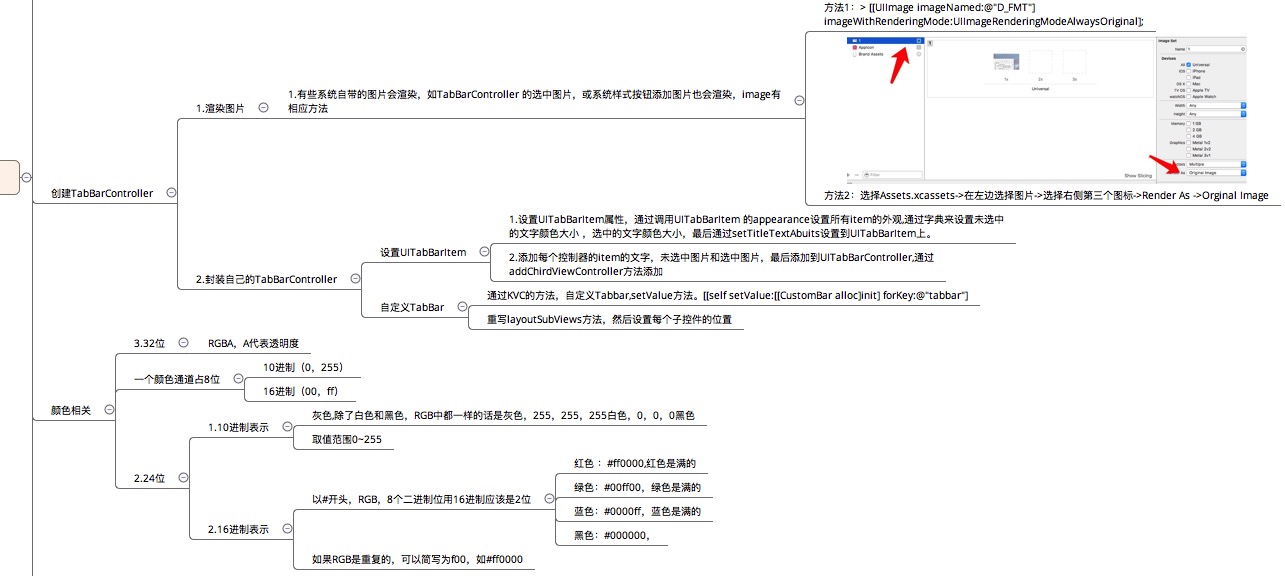
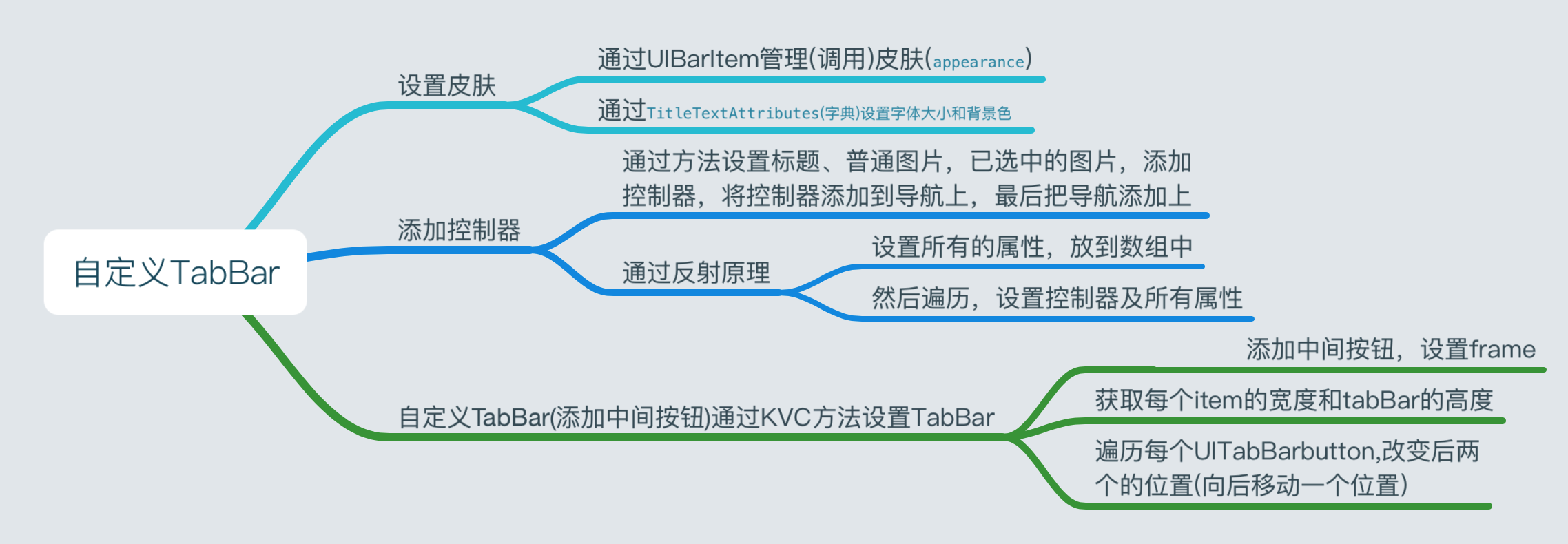
代码如下:
#import <UIKit/UIKit.h>

@interface BSJTabBarViewController : UITabBarController

@end

#import "BSJTabBarViewController.h"

#import "BSJTabBar.h"

@interface BSJTabBarViewController ()

@end

@implementation BSJTabBarViewController

#pragma mark --- life cycle

- (void)viewDidLoad {

    [super viewDidLoad];

    // Do any additional setup after loading the view.

//    self.tabBarItem = [UITabBarItem application]

    UITabBarItem *tabBarItem = [UITabBarItem  appearance];

    //未选中的

    NSMutableDictionary *norAttri = [NSMutableDictionary dictionary];

    norAttri[NSFontAttributeName] = [UIFont systemFontOfSize:14];

    norAttri[NSForegroundColorAttributeName] = [UIColor grayColor];

    [tabBarItem setTitleTextAttributes:norAttri forState:UIControlStateNormal];

    //选中的

    NSMutableDictionary *selectAttri = [NSMutableDictionary dictionary];

    selectAttri[NSForegroundColorAttributeName] = [UIColor darkGrayColor];

    [tabBarItem setTitleTextAttributes:selectAttri forState:UIControlStateSelected];

//精华

[self setupChridViewController:[[UITableViewController alloc] init] title:NSLocalizedString(@"精华", nil) normalImage:@"tabBar_essence_icon" selectedImage:@"tabBar_essence_click_icon"];

[self setupChridViewController:[[UIViewController alloc] init] title:NSLocalizedString(@"关注", nil) normalImage:@"tabBar_friendTrends_icon" selectedImage:@"tabBar_friendTrends_click_icon"];

[self setupChridViewController:[[UITableViewController alloc] init] title:NSLocalizedString(@"新帖", nil) normalImage:@"tabBar_new_icon" selectedImage:@"tabBar_new_click_icon"];

[self setupChridViewController:[[UITableViewController alloc] init] title:NSLocalizedString(@"我", nil) normalImage:@"tabBar_me_icon" selectedImage:@"tabBar_me_click_icon"];

 // 通过KVC,可以改变属性为readOnly,改变它的Key,也就是通过它的value找到它的key

[self setValue:[[BSJTabBar alloc] init] forKey:@"tabBar"];

 }

- (void)setupChridViewController:(UIViewController *)vc title:(NSString *)title normalImage:(NSString *)normalImage selectedImage:(NSString *)selectedImage{ vc.title = title;

if (normalImage.length && selectedImage.length )

{ vc.tabBarItem.image = [UIImage imageNamed:normalImage];

vc.tabBarItem.selectedImage = [UIImage imageNamed:selectedImage]; }

[self addChildViewController:vc]; }

//tabBar

#import <UIKit/UIKit.h>

 @interface BSJTabBar : UITabBar

 @end

#import "BSJTabBar.h"

@interface BSJTabBar() @property (nonatomic, weak)UIButton *publicButton;

@end

@implementation BSJTabBar

 - (void)layoutSubviews{ [super layoutSubviews];

// BSJLogFunc CGFloat buttonW = self.frame.size.width/5;

 CGFloat buttonH = self.frame.size.height;

 CGFloat buttonY = 0;

CGFloat i = 0;

 for (UIView *subView in self.subviews)

 { BSJLog(@"%@",NSStringFromClass(subView.class));

 // if (![subView.class isSubclassOfClass:[NSClassFromString(@"UITabBarButton") class]]) continue;

if (![@"UITabBarButton" isEqualToString:NSStringFromClass(subView.class)]) continue; CGFloat buttonX = i*buttonW; if (i >= 2) { buttonX += buttonW; } subView.frame = CGRectMake(buttonX, buttonY, buttonW, buttonH); i++; }

//        [

self.publicButton setFrame:CGRectMake(0, 0, self.frame.size.width/5, self.frame.size.height)];

//

self.publicButton.center = CGPointMake(self.center.x, self.center.y);

}

 #pragma mark --- response methods

 - (void)buttonClick:(UIButton *)sender{

}

#pragma mark --- setters and getters

- (UIButton *)publicButton{

 if (!_publicButton)

{ UIButton *button = [UIButton buttonWithType:UIButtonTypeCustom];

[button setImage:[UIImage imageNamed:@"tabBar_publish_icon"] forState:UIControlStateNormal];

[button setImage:[UIImage imageNamed:@"tabBar_publish_click_icon"] forState:UIControlStateHighlighted];

 [button addTarget:self action:@selector(buttonClick:) forControlEvents:UIControlEventTouchUpInside];

 [self addSubview:button]; _publicButton = button; } return _publicButton;

}

 @end
UITabBarController的创建与自定义TarBar---学习笔记三的更多相关文章
- [Firefly引擎][学习笔记三][已完结]所需模块封装
原地址:http://www.9miao.com/question-15-54671.html 学习笔记一传送门学习笔记二传送门 学习笔记三导读: 笔记三主要就是各个模块的封装了,这里贴 ...
- angular学习笔记(三十)-指令(6)-transclude()方法(又称linker()方法)-模拟ng-repeat指令
在angular学习笔记(三十)-指令(4)-transclude文章的末尾提到了,如果在指令中需要反复使用被嵌套的那一坨,需要使用transclude()方法. 在angular学习笔记(三十)-指 ...
- openresty 学习笔记三:连接redis和进行相关操作
openresty 学习笔记三:连接redis和进行相关操作 openresty 因其非阻塞的调用,令服务器拥有高性能高并发,当涉及到数据库操作时,更应该选择有高速读写速度的redis进行数据处理.避 ...
- Oracle学习笔记三 SQL命令
SQL简介 SQL 支持下列类别的命令: 1.数据定义语言(DDL) 2.数据操纵语言(DML) 3.事务控制语言(TCL) 4.数据控制语言(DCL)
- JSP学习笔记(三):简单的Tomcat Web服务器
注意:每次对Tomcat配置文件进行修改后,必须重启Tomcat 在E盘的DATA文件夹中创建TomcatDemo文件夹,并将Tomcat安装路径下的webapps/ROOT中的WEB-INF文件夹复 ...
- VSTO学习笔记(三) 开发Office 2010 64位COM加载项
原文:VSTO学习笔记(三) 开发Office 2010 64位COM加载项 一.加载项简介 Office提供了多种用于扩展Office应用程序功能的模式,常见的有: 1.Office 自动化程序(A ...
- Java IO学习笔记三
Java IO学习笔记三 在整个IO包中,实际上就是分为字节流和字符流,但是除了这两个流之外,还存在了一组字节流-字符流的转换类. OutputStreamWriter:是Writer的子类,将输出的 ...
- 学习笔记(三)--->《Java 8编程官方参考教程(第9版).pdf》:第十章到十二章学习笔记
回到顶部 注:本文声明事项. 本博文整理者:刘军 本博文出自于: <Java8 编程官方参考教程>一书 声明:1:转载请标注出处.本文不得作为商业活动.若有违本之,则本人不负法律责任.违法 ...
- muduo网络库学习笔记(三)TimerQueue定时器队列
目录 muduo网络库学习笔记(三)TimerQueue定时器队列 Linux中的时间函数 timerfd简单使用介绍 timerfd示例 muduo中对timerfd的封装 TimerQueue的结 ...
随机推荐
- os模块汇总
os.name 输出字符串指示正在使用的平台.如果是window 则用'nt'表示,对于Linux/Unix用户,它是'posix'. os.getcwd() 函数得到当前Python脚本工作的目录路 ...
- 【夯实PHP系列】购物车代码说明PHP的匿名函数
1. 定义:匿名函数(Anonymous functions),也叫闭包函数(closures),允许 临时创建一个没有指定名称的函数.最经常用作回调函数(callback)参数的值.当然,也有其它应 ...
- 小记max-with与 max-device-width
max-with是浏览器的宽度,max-device-width是设备显示器的宽度 浏览器宽度不等于显示器宽度 浏览器可以缩小 1.max-device-width是设备整个显示区域的宽度,例如,真实 ...
- window对象的属性及事件。
不同的运行环境有不同的“顶层对象”,而在浏览器的环境中,顶层对象就是window对象.window就是指当前的浏览器窗口. 例:var a = 1: window.a; //1 1.window对象的 ...
- iOS UIScrollView的使用
一.为什么要用UIScrollView? 移动设备的屏幕大小是极其有限的,因此直接展示在用户眼前的内容也相当有限当展示的内容较多,超出一个屏幕时,用户可通过滚动手势来查看屏幕以外的内容普通的UIVie ...
- 云南南天电子信息产业股份有限公司某站SQL注入漏洞
220.163.13*.** root@kali:~# sqlmap -u http://www.****.com.cn/****.Aspx?keyword= -v 1 --dbs --tam ...
- JAVA静态代理模式(从现实生活角度理解代码原理)
代理模式(Proxy):为其他对象提供一种代理以控制对这个对象的访问. 代理模式说白了就是"真实对象"的代表,在访问对象时引入一定程度的间接性,因为这种间接性可以附加多种用途. 在 ...
- Attempt to insert non-property list object 报错原因
NSUserDefault 支持的存储类型有:NSString. NSNumber.NSDate. NSArray.NSDictionary.BOOL.NSInteger.NSFloat等系统定义的数 ...
- Android编码规范01
目标: 掌握Java & Android命名规范 在研究Android源代码的基础上改进命名规范 考核内容 说出四种常用的命名法 比较java和C#的命名规范的不同点 总结: 读不同程序员写的 ...
- 【Swift】iOS开发历险记(二)
前言 这个系列主要是一些开发中遇到的坑记录分享,有助于初学者跨过这些坑,攒够 7 条发一篇. 声明 欢迎转载,但请保留文章原始出处:) 博客园:http://www.cnblogs.com 农民伯 ...