
C# 学习之旅(1)
第一, 输入输出流都来自控制台。
 using System;

 using System.Collections.Generic;

 using System.Linq;

 using System.Text;

 namespace ConsoleApplication1

 {

     class Program

     {

         static void Main(string[] args)

         {

             int year = int.Parse(System.Console.ReadLine());

             int month = int.Parse(System.Console.ReadLine());

             int day = int.Parse(System.Console.ReadLine());

             int days = fun(year, month, day);

             Console.WriteLine("{0}年{1}月{2}日是该年的第{3}天。", year, month, day, days);

             Console.ReadLine();

         }

         static int fun(int year, int month, int day)

         {

             int[] mon = new int[]{,,,,,,,,,,,};

             if ((year %  ==  && year %  != ) || year %  == )

                 mon[] = ;

             int days = ;

             for (int i=; i < month - ; i++)

                 days = mon[i] + days;

             days = days + day;

             return days;

         }

     }

 }
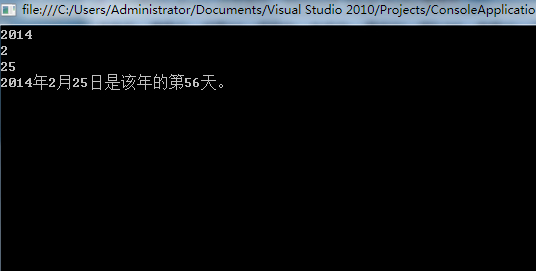
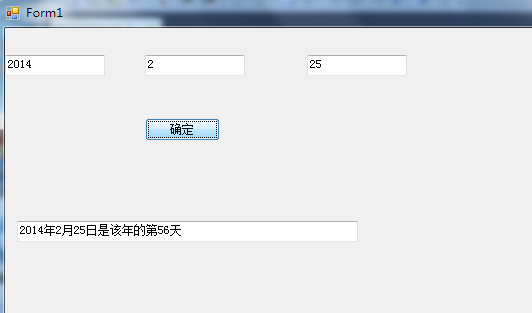
第二, 输入输出都来自于窗口的textBox。
下面的的代码是双击“按钮”键之后的程序段
 using System;

 using System.Collections.Generic;

 using System.ComponentModel;

 using System.Data;

 using System.Drawing;

 using System.Linq;

 using System.Text;

 using System.Windows.Forms;

 namespace WindowsFormsApplication1

 {

     public partial class Form1 : Form

     {

         public Form1()

         {

             InitializeComponent();

         }

         private void button1_Click(object sender, EventArgs e)

         {

             int year =  int.Parse(textBox1.Text);

             int month = int.Parse(textBox2.Text);

             int day = int.Parse(textBox3.Text);

             int days = fun(year, month, day);

             textBox4.Text = string.Format("{0}年{1}月{2}日是该年的第{3}天",year,month,day,days);

         }

         static int fun(int year, int month, int day)

         {

             int[] mon = new int[] { , , , , , , , , , , ,  };

             if ((year %  ==  && year %  != ) || year %  == )

                 mon[] = ;

             int days = ;

             for (int i = ; i < month - ; i++)

                 days = mon[i] + days;

             days = days + day;

             return days;

         }

     }

 }
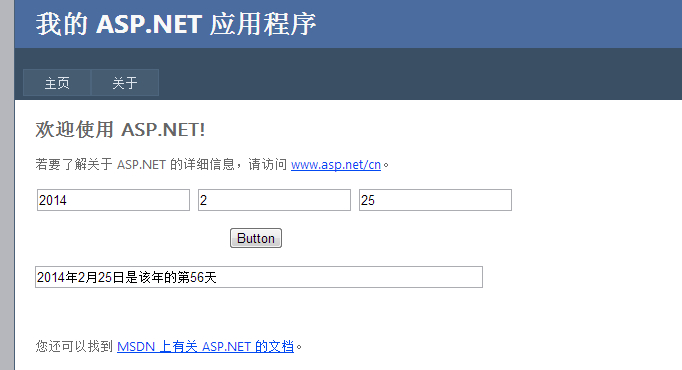
第三, 输入输出都来自于网页上的TextBox(表格)。
下面的的代码是双击“按钮”键之后的程序段
 using System;

 using System.Collections.Generic;

 using System.Linq;

 using System.Web;

 using System.Web.UI;

 using System.Web.UI.WebControls;

 namespace WebApplication1

 {

     public partial class _Default : System.Web.UI.Page

     {

         protected void Page_Load(object sender, EventArgs e)

         {

         }

         protected void Button1_Click(object sender, EventArgs e)

         {

             int year = int.Parse(TextBox1.Text);

             int month = int.Parse(TextBox2.Text);

             int day = int.Parse(TextBox3.Text);

             int days = fun(year, month, day);

             TextBox4.Text = string.Format("{0}年{1}月{2}日是该年的第{3}天", year, month, day, days);

         }

         static int fun(int year, int month, int day)

         {

             int[] mon = new int[] { , , , , , , , , , , ,  };

             if ((year %  ==  && year %  != ) || year %  == )

                 mon[] = ;

             int days = ;

             for (int i = ; i < month - ; i++)

                 days = mon[i] + days;

             days = days + day;

             return days;

         }

     }

 }
———————————————————————————————————————————————————————————————————————————
声明:
本文为 大Yi巴狼 对自己所学的知识整理和实现。
本文档欢迎自由转载,但请务必保持本文档完整或注明来之本文档。本文档未经 大Yi巴狼 同意,不得用于商业用途。最后,如果您能从这个简单文档里获得些许帮助,大Yi巴狼 将对自己的一点努力感到非常高兴;由于作者本人水平有限,如果本文档中包含的错误给您造成了不便,在此提前说声抱歉。
祝身体健康,工作顺利。
C# 学习之旅(1)的更多相关文章
- WCF学习之旅—第三个示例之四(三十)
上接WCF学习之旅—第三个示例之一(二十七) WCF学习之旅—第三个示例之二(二十八) WCF学习之旅—第三个示例之三(二十九) ...
- Hadoop学习之旅二:HDFS
本文基于Hadoop1.X 概述 分布式文件系统主要用来解决如下几个问题: 读写大文件 加速运算 对于某些体积巨大的文件,比如其大小超过了计算机文件系统所能存放的最大限制或者是其大小甚至超过了计算机整 ...
- WCF学习之旅—第三个示例之二(二十八)
上接WCF学习之旅—第三个示例之一(二十七) 五.在项目BookMgr.Model创建实体类数据 第一步,安装Entity Framework 1) 使用NuGet下载最新版的Entity Fram ...
- WCF学习之旅—第三个示例之三(二十九)
上接WCF学习之旅—第三个示例之一(二十七) WCF学习之旅—第三个示例之二(二十八) 在上一篇文章中我们创建了实体对象与接口协定,在这一篇文章中我们来学习如何创建WCF的服务端代码.具体步骤见下面. ...
- WCF学习之旅—WCF服务部署到IIS7.5(九)
上接 WCF学习之旅—WCF寄宿前的准备(八) 四.WCF服务部署到IIS7.5 我们把WCF寄宿在IIS之上,在IIS中宿主一个服务的主要优点是在发生客户端请求时宿主进程会被自动启动,并且你可以 ...
- WCF学习之旅—WCF服务部署到应用程序(十)
上接 WCF学习之旅—WCF寄宿前的准备(八) WCF学习之旅—WCF服务部署到IIS7.5(九) 五.控制台应用程序宿主 (1) 在解决方案下新建控制台输出项目 ConsoleHosting.如下 ...
- WCF学习之旅—WCF服务的Windows 服务程序寄宿(十一)
上接 WCF学习之旅—WCF服务部署到IIS7.5(九) WCF学习之旅—WCF服务部署到应用程序(十) 七 WCF服务的Windows 服务程序寄宿 这种方式的服务寄宿,和IIS一样有一个一样 ...
- WCF学习之旅—WCF服务的WAS寄宿(十二)
上接 WCF学习之旅—WCF服务部署到IIS7.5(九) WCF学习之旅—WCF服务部署到应用程序(十) WCF学习之旅—WCF服务的Windows 服务程序寄宿(十一) 八.WAS宿主 IIS ...
- WCF学习之旅—WCF服务的批量寄宿(十三)
上接 WCF学习之旅—WCF服务部署到IIS7.5(九) WCF学习之旅—WCF服务部署到应用程序(十) WCF学习之旅—WCF服务的Windows 服务程序寄宿(十一) WCF学习之旅—WCF ...
- WCF学习之旅—第三个示例之五(三十一)
上接WCF学习之旅—第三个示例之一(二十七) WCF学习之旅—第三个示例之二(二十八) WCF学习之旅—第三个示例之三(二十九) WCF学习 ...
随机推荐
- 嵌入式设备上的 Linux 系统开发
转载:http://www.ibm.com/developerworks/cn/linux/embed/embdev/index.html 如果您刚接触嵌入式开发,那么大量可用的引导装载程序(bo ...
- c# TCP/IP编程
这东西很多朋友都有写过了,我也就写着玩玩,就当做个笔记吧.不废话了. TCP/IP在数据通信中被广泛的使用,自然得包含客户端和服务端,当然,自己自言自语不是什么不可以,可那样貌似有点神经. 好了,那就 ...
- 使用cocos2d-x制作 Texture unpacker
使用cocos2d-x制作 Texture unpacker 没错,就是unpacker. 在大多数游戏包里面,可以找到很多纹理图集,他们基本上是用texture packer制作的,有plist文件 ...
- xmlns="http://schemas.xmlsoap.org/wsdl/",这是什么意思,我只知道:xmlns:xx=....,
表示没有prefix,相当于你的xsi为空.这个很常用,后面就省得每行都要加一个前缀了. 解决方案 » "后面就省得每行都要加一个前缀了",意思是,后面的子元素如果没有名称空间前缀 ...
- [转].NET进阶系列之一:C#正则表达式整理备忘
本文转自:http://www.cnblogs.com/KissKnife/archive/2008/03/23/1118423.html 有一段时间,正则表达式学习很火热很潮流,当时在CSDN一天就 ...
- (浅谈).Net控件GridView绑定数据
前台GridView属性设置 <td> <asp:GridView ID="GridView" runat="server" AutoGene ...
- Nginx环境下配置PHP使用的SSL认证(https)
最近一段时间发现好多网站都从http协议变成了加密的https协议,比如说百度.吾志等等.https看起来比http高端了好多,而且在不同的浏览器向上还会显示出不同于http的URL展示效果(比如说c ...
- 7 个基本的 JS 函数【译】
本文由 伯乐在线 - 刘健超-J.c 翻译,进林 校稿.未经许可,禁止转载!英文出处:davidwalsh.name.欢迎加入翻译组. 我记得早期的 JavaScript ,要完成任何事情几乎都绕不开 ...
- Java解析XMl文件之SAX和DOm方法
如题,这两种方法的jar包都在jdk中,不需要下载. 先来说下目录结构: 首先建一个Peron类封装person.xml的属性:DomParseService和SaxParseService分别为两种 ...
- android 使用两个surfaceview 在摄像机画面上绘图
转载自http://blog.csdn.net/jesse__zhong/article/details/24934083 使用双surface,将第一个设置为透明背景,在摄像机上绘制图像,纠结搞了一 ...