
ASP.NET Core中使用GraphQL - 第六章 使用EF Core作为持久化仓储

ASP.NET Core中使用GraphQL
- ASP.NET Core中使用GraphQL - 第一章 Hello World
- ASP.NET Core中使用GraphQL - 第二章 中间件
- ASP.NET Core中使用GraphQL - 第三章 依赖注入
- ASP.NET Core中使用GraphQL - 第四章 GrahpiQL
- ASP.NET Core中使用GraphQL - 第五章 字段, 参数, 变量
本篇中我将演示如何配置持久化仓储,这里原文中是使用的Postgres, 这里我改用了EF Core For SqlServer。本文的例子需要在上一篇的代码基础上修改。没有代码的同学,可以去https://github.com/lamondlu/GraphQL_Blogs/tree/master/Part%20V下载。
之前我们编写了一个DataStore类,里面硬编码了一个数据集合,这里我们希望改用依赖注入的方式进行解耦,所以首先我们需要创建一个抽象接口IDataStore。
public interface IDataStore

{

    IEnumerable<Item> GetItems();

    Item GetItemByBarcode(string barcode);

}
由于接下来我们需要使用EF Core, 所以这里我们需要添加一个EF Core的上下文类ApplicationDbContext。
public class ApplicationDbContext : DbContext

{

    public ApplicationDbContext(DbContextOptions<ApplicationDbContext> options) : base(options)

    {

    }

    public DbSet<Item> Items { get; set; }

    protected override void OnModelCreating(ModelBuilder modelBuilder)

    {

    	modelBuilder.Entity<Item>().ToTable("Items");

        modelBuilder.Entity<Item>().HasKey(p => p.Barcode);

    	modelBuilder.Entity<Item>().HasData(new Item {

    		Barcode = "123",

    		Title = "Headphone",

    		SellingPrice = 50 });

        modelBuilder.Entity<Item>().HasData(new Item {

        	Barcode = "456",

        	Title = "Keyboard",

        	SellingPrice = 40 });

        modelBuilder.Entity<Item>().HasData(new Item {

        	Barcode = "789",

        	Title = "Monitor",

        	SellingPrice = 100 });

        base.OnModelCreating(modelBuilder);

    }

}
这里为了导入一些初始数据,我们在OnModelCreating方法中使用HasData方法添加了3个初始数据。
下面我们修改DataStore类, DataStore应该实现IDataStore接口, 其中的GetItemByBarcode和GetItems方法需要改为从数据库中读取。
public class DataStore : IDataStore

{

    private ApplicationDbContext _applicationDbContext;

    public DataStore(ApplicationDbContext applicationDbContext)

    {

        _applicationDbContext = applicationDbContext;

    }

    public Item GetItemByBarcode(string barcode)

    {

        return _applicationDbContext.Items.First(i => i.Barcode.Equals(barcode));

    }

    public IEnumerable<Item> GetItems()

    {

        return _applicationDbContext.Items;

    }

}
接下来,我们要在Startup.cs类中的ConfigureServices添加Entity Framework配置
services.AddDbContext<ApplicationDbContext>(option =>

{

    option.UseSqlServer(Configuration.GetConnectionString("SampleDB"));

});
TIPS: 这里注意不要忘记创建一个
appsettings.json, 在其中添加数据库连接字符串
配置完成之后,我们需要使用以下命令添加Migration,并更新数据库
dotnet ef migrations add Initial

dotnet ef database update
现在针对数据库的修改都已经完成了。
另外我们还需要修改服务注册代码,将注册服务的生命周期从单例(Singleton)改为作用域(Scoped), 因为当注入服务的生命周期为单例时,需要处理多线程问题和潜在的内存泄漏问题。
services.AddScoped<IDataStore, DataStore>();

services.AddScoped<HelloWorldQuery>();

services.AddScoped<ISchema, HelloWorldSchema>();
修改完成后,Startup.cs最终代码如下:
public class Startup

{

    public Startup(IConfiguration configuration)

    {

        Configuration = configuration;

    }

    public IConfiguration Configuration { get; }

    public void ConfigureServices(IServiceCollection services)

    {

        services.AddDbContext<ApplicationDbContext>(option =>

        {

             option.UseSqlServer(Configuration.GetConnectionString("SampleDB"));

        });

        services.AddSingleton<IDocumentExecuter, DocumentExecuter>();

        services.AddSingleton<IDocumentWriter, DocumentWriter>();

        services.AddScoped<IDataStore, DataStore>();

        services.AddScoped<HelloWorldQuery>();

        services.AddScoped<ISchema, HelloWorldSchema>();

    }

    public void Configure(IApplicationBuilder app, IHostingEnvironment env)

    {

        if (env.IsDevelopment())

        {

            app.UseDeveloperExceptionPage();

        }

        app.UseDefaultFiles();

        app.UseStaticFiles();

        app.UseMiddleware<GraphQLMiddleware>();

    }

}
现在我们启动项目, 程序会抛出一个错误
System.InvalidOperationException: Cannot resolve scoped service 'GraphQL.Types.ISchema' from root provider
这个问题的原因是,中间件是单例的,如果在中间件的构造函数中使用作用域(Scoped)的依赖注入, 会导致这个问题(具体请参见https://docs.microsoft.com/zh-cn/aspnet/core/fundamentals/dependency-injection?view=aspnetcore-2.1)。这里ISchema的生命周期是作用域,并且在GraphQLMiddleware类中是从构造函数注入的,所以这里我们需要修改GraphQLMiddleware类,ISchema需要改从Invoke方法注入。
中间件最终代码如下:
public class GraphQLMiddleware

{

    private readonly RequestDelegate _next;

    private readonly IDocumentWriter _writer;

    private readonly IDocumentExecuter _executor;

    public GraphQLMiddleware(RequestDelegate next, IDocumentWriter writer, IDocumentExecuter executor)

    {

        _next = next;

        _writer = writer;

        _executor = executor;

    }

    public async Task InvokeAsync(HttpContext httpContext, ISchema schema)

    {

        if (httpContext.Request.Path.StartsWithSegments("/api/graphql")

            && string.Equals(httpContext.Request.Method,

            "POST",

            StringComparison.OrdinalIgnoreCase))

        {

            string body;

            using (var streamReader = new StreamReader(httpContext.Request.Body))

            {

                body = await streamReader.ReadToEndAsync();

                var request = JsonConvert.DeserializeObject<GraphQLRequest>(body);

                var result = await _executor.ExecuteAsync(doc =>

                {

                    doc.Schema = schema;

                    doc.Query = request.Query;

                    doc.Inputs = request.Variables.ToInputs();

                }).ConfigureAwait(false);

                var json = await _writer.WriteToStringAsync(result);

                await httpContext.Response.WriteAsync(json);

            }

        }

        else

        {

            await _next(httpContext);

        }

    }

}
修改完成之后,我们重新启动项目,项目正常启动成功, GraphiQL界面出现。
现在我们还是使用上一章的查询代码,查询二维码是123的货物数据。
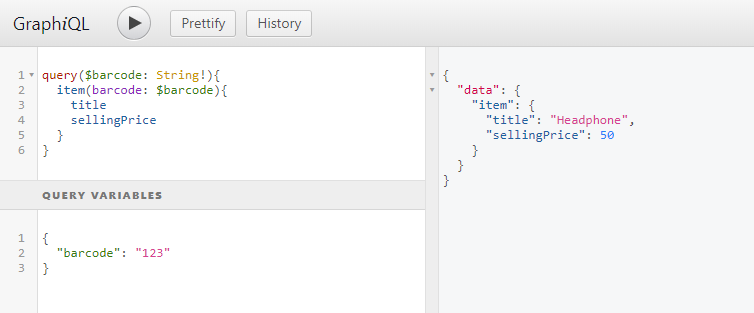
数据正常从数据库中读取成功。下一章我们将讲解在ASP.NET Core中如何使用GraphQL添加修改数据。
本文源代码: https://github.com/lamondlu/GraphQL_Blogs/tree/master/Part%20VI
ASP.NET Core中使用GraphQL - 第六章 使用EF Core作为持久化仓储的更多相关文章
- ASP.NET Core中使用GraphQL - 第七章 Mutation
ASP.NET Core中使用GraphQL - 目录 ASP.NET Core中使用GraphQL - 第一章 Hello World ASP.NET Core中使用GraphQL - 第二章 中间 ...
- ASP.NET Core中使用GraphQL - 第四章 GraphiQL
ASP.NET Core中使用GraphQL ASP.NET Core中使用GraphQL - 第一章 Hello World ASP.NET Core中使用GraphQL - 第二章 中间件 ASP ...
- ASP.NET Core中使用GraphQL - 第五章 字段, 参数, 变量
ASP.NET Core中使用GraphQL ASP.NET Core中使用GraphQL - 第一章 Hello World ASP.NET Core中使用GraphQL - 第二章 中间件 ASP ...
- ASP.NET Core中使用GraphQL - 第三章 依赖注入
ASP.NET Core中使用GraphQL ASP.NET Core中使用GraphQL - 第一章 Hello World ASP.NET Core中使用GraphQL - 第二章 中间件 SOL ...
- ASP.NET Core中使用GraphQL - 最终章 Data Loader
ASP.NET Core中使用GraphQL - 目录 ASP.NET Core中使用GraphQL - 第一章 Hello World ASP.NET Core中使用GraphQL - 第二章 中间 ...
- ASP.NET Core中使用GraphQL - 第八章 在GraphQL中处理一对多关系
ASP.NET Core中使用GraphQL - 目录 ASP.NET Core中使用GraphQL - 第一章 Hello World ASP.NET Core中使用GraphQL - 第二章 中间 ...
- ASP.NET Core中使用GraphQL - 第九章 在GraphQL中处理多对多关系
ASP.NET Core中使用GraphQL ASP.NET Core中使用GraphQL - 第一章 Hello World ASP.NET Core中使用GraphQL - 第二章 中间件 ASP ...
- ASP.NET Core中使用GraphQL - 第一章 Hello World
前言 你是否已经厌倦了REST风格的API? 让我们来聊一下GraphQL. GraphQL提供了一种声明式的方式从服务器拉取数据.你可以从GraphQL官网中了解到GraphQL的所有优点.在这一系 ...
- ASP.NET Core中使用GraphQL - 第二章 中间件
前文:ASP.NET Core中使用GraphQL - 第一章 Hello World 中间件 如果你熟悉ASP.NET Core的中间件,你可能会注意到之前的博客中我们已经使用了一个中间件, app ...
随机推荐
- CentOS7.3上部署简单的网站(Tomcat)
本文转载自:沙师弟专栏 https://blog.csdn.net/u014597198/article/details/79649219 [ 感谢郭大大 ] 服务器版本:CentOS 7.3 64 ...
- CISP-PTE注册信息安全专业人员渗透测试工程师知识体系大纲
CISP-PTE注册信息安全专业人员渗透测试工程师知识体系大纲 都是图.. 不足之处,欢迎补充
- 好几个div(元素)找到最后一个
<div> <div></div> <div></div> <div></div> </div> //找 ...
- mysql怎样配置ODBC数据源
一个基于ODBC的应用程序对数据库的操作不依赖任何DBMS,不直接与DBMS打交道,所有的数据库操作由对应的DBMS的ODBC驱动程序完成.所以说mysql配置ODBC数据源也很重要. 工具/原料 ...
- csdn阅读更多需要注册登录csdn
csdn目前设置每日使用5次后必须登录才能看到阅读更多的内容,异常恶心.因此搜罗了方法去解决这个问题 方法一 打开想看的csdn后,在console里边执行以下代码: $("div.arti ...
- java游戏开发杂谈 - 游戏编程浅析
每个游戏,你所看到的它的一切,都是计算机画出来的! 地图是画出来,人物是画出来的,树木建筑是画出来的,菜单按钮是画出来的,滚动的文字.闪烁的图标.云雾烟火,都是画出来的. 游戏编程,所要做的,就是控制 ...
- ajax异步请求302分析
1.前言 遇到这样一种情况,打开网页两个窗口a,b(都是已经登录授权的),在a页面中退出登录,然后在b页面执行增删改查,这个时候因为授权原因,b页面后端的请求肯定出现异常(对这个异常的处理,进行内部跳 ...
- css属性分类介绍
css属性分类介绍 CSS分类目录 文本/字体/颜色 文本相关 字体相关 颜色相关 背景相关 大小/布局 大小属性 margin 外边距 padding 内边距 border 边框 position ...
- 轻量级原生 ajax 函数,支持 get/array post/array post/json
原生js封装 function ajaxRequest(type, url, data, callback, failCallBack, header, dataType) { var url_enc ...
- [翻译 EF Core in Action 1.10] 应该在项目中使用EF Core吗?
Entity Framework Core in Action Entityframework Core in action是 Jon P smith 所著的关于Entityframework Cor ...