
MiniProfiler使用点滴记录-2017年6月23日11:08:23
1.看似针对同样一段查询表ef达式,重复执行却没有被记录下来。其实这是正常情况,因为ef并没有重复去执行 相同sql查询。
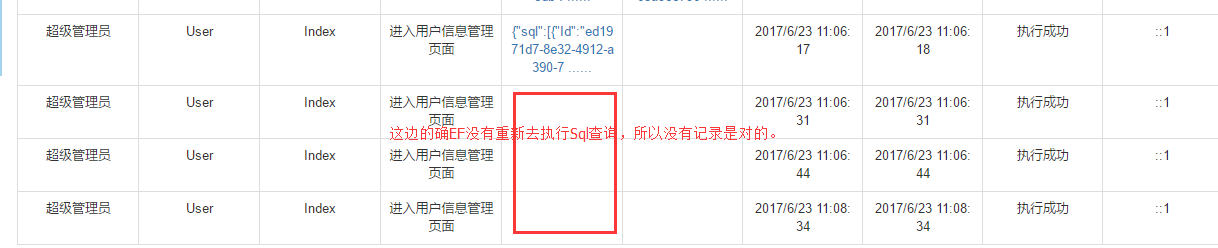
2.MiniProfiler结合MVC过滤器进行 拦截记录Sql,示例代码:
using Mobile360.Core;

using Mobile360.Core.Interfaces;

using Mobile360.Core.Models;

using Mobile360.Web.Common;

using Newtonsoft.Json.Linq;

using StackExchange.Profiling;

using StackExchange.Profiling.Storage;

using System;

using System.Collections.Generic;

using System.Collections.Specialized;

using System.Configuration;

using System.Linq;

using System.Text;

using System.Web;

using System.Web.Helpers;

using System.Web.Mvc;

namespace Mobile360.Web

{

    [AttributeUsage(AttributeTargets.Method, AllowMultiple = true, Inherited = false)]

    public class OperationHandlerAttribute : FilterAttribute,IActionFilter, IExceptionFilter

    {

        private IRepository repo;

        /// <summary>

        /// 模块描述

        /// </summary>

        public string ModuleName { get; set; }

        /// <summary>

        /// 方法名称

        /// </summary>

        public string ActionName { get; set; }

        /// <summary>

        /// 方法描述

        /// </summary>

        public string ActionDescription { get; set; }

        /// <summary>

        /// 控制器名称

        /// </summary>

        public string ControllerName { get; set; }

        /// <summary>

        /// 方法参数

        /// </summary>

        public string ActionParameters { get; set; }

        /// <summary>

        /// 访问时间

        /// </summary>

        public DateTime AccessDate { get; set; }

        /// <summary>

        /// 操作备注

        /// </summary>

        public string OperationRemark { get; set; }

        /// <summary>

        /// 是否记录入库

        /// </summary>

        public bool IsLog { get; set; }

        /// <summary>

        /// 操作人id

        /// </summary>

        public int OperatorId { get; set; }

        /// <summary>

        /// 操作人名

        /// </summary>

        public string OperatorName { get; set; }

        public OperationHandlerAttribute()

        {

            this.AccessDate = DateTime.Now;

            this.IsLog = true;

            this.repo = DependencyResolver.Current.GetService<IRepository>();

        }

        /// <summary>

        /// 操作日志记录

        /// </summary>

        /// <param name="option">操作动作描述</param>

        /// <param name="remark">其他备注</param>

        public OperationHandlerAttribute(string actionDescription , string remark = "")

        {

            this.AccessDate = DateTime.Now;

            this.IsLog = true;

            //this.ModuleName = moduleName;

            this.OperationRemark = remark;

            this.ActionDescription = actionDescription;

            this.repo = DependencyResolver.Current.GetService<IRepository>();

        }

        void IActionFilter.OnActionExecuting(ActionExecutingContext filterContext)

        {

            if (this.IsLog)

            {

                MiniProfiler.Start();

                this.OperatorName =  filterContext.HttpContext.User.Identity.Name;

                this.ActionName = filterContext.ActionDescriptor.ActionName;

                this.ControllerName = filterContext.ActionDescriptor.ControllerDescriptor.ControllerName;

                IDictionary<string, object> dic = filterContext.ActionParameters;

                var parameters = new System.Text.StringBuilder();

                foreach (var item in dic)

                {

                    parameters.Append(item.Key + "=" +  Json.Encode(item.Value) + "|");

                }

                this.ActionParameters = parameters.ToString();

            }

        }

        void IActionFilter.OnActionExecuted(ActionExecutedContext context)

        {

            if (this.IsLog)

            {

                MiniProfiler.Stop();

                string efSqlStr2Json = MiniProfiler.Current.Root.CustomTimingsJson;

                AuditLog log = new AuditLog();

                log.AuditAccount = string.IsNullOrEmpty(this.OperatorName)?"(未登录用户)": this.OperatorName;

                log.Action = this.ActionName;

                log.ActionDescription = this.ActionDescription;

                log.Controller = this.ControllerName;

                log.Parameters = this.ActionParameters;

                log.StartTime = this.AccessDate;

                log.SqlQuery = efSqlStr2Json;

                log.EndTime = DateTime.Now;

                log.Result = true;

                log.IP = IPHelper.GetRealIP();

                repo.Insert<AuditLog>(log);

                repo.SaveChanges();

            }

        }

        #region IExceptionFilter 成员

        void IExceptionFilter.OnException(ExceptionContext context)

        {

            if (ConfigurationManager.AppSettings["IsDev"] == "true")

            {

                throw new Exception(context.Exception.Message, context.Exception);

            }

            SystemLog slog = new SystemLog();

            slog.Action = this.ActionName;

            slog.Level = (int)SystemLogType.ERROR;

            slog.LoginAccount = this.OperatorName;

            slog.Message = BuildExceptionInfo(context);

            slog.OccurTime = DateTime.Now;

            repo.Insert<SystemLog>(slog);

            repo.SaveChanges();

            JObject jsonResult = new JObject(); //返回的json数据

            jsonResult.Add(new JProperty("Code", -));

            jsonResult.Add(new JProperty("Msg", "系统发生异常,请查看内部日志"));

            ContentResult cr = new ContentResult();

            cr.Content = jsonResult.ToString();

            cr.ContentType = "application/json";

            context.Result = cr;

            context.ExceptionHandled = true;

        }

        private string BuildExceptionInfo(ExceptionContext context)

        {

            var sb = new StringBuilder();

            var req = context.HttpContext.Request;

            sb.AppendLine(String.Format("处理对“{0}”的“{1}”请求时发生了异常", req.RawUrl, req.HttpMethod));

            sb.AppendLine("以下是参数的信息:");

            this.AppendRequestLine(sb, req.QueryString);

            this.AppendRequestLine(sb, req.Form);

            sb.AppendLine("以下是异常的信息:");

            sb.AppendLine(context.Exception.ToString());

            //sb.AppendLine(context.Exception.StackTrace.ToString());

            return sb.ToString();

        }

        private void AppendRequestLine(StringBuilder sb, NameValueCollection coll)

        {

            for (int i = ; i < coll.Count; i++)

            {

                sb.AppendFormat("{0}: {1}", coll.Keys[i], coll[i]);

                sb.AppendLine();

            }

        }

        #endregion

    }

}
3.以上的miniprofiler并不能 拦截到 sql语句查询,需要使用 minprofiler 封装的ado.net对象。
 /// <summary>

        /// 执行自定义SQL(创建、更新、删除操作)

        /// </summary>

        /// <typeparam name="TEntity"></typeparam>

        /// <param name="commandText"></param>

        /// <param name="parameters"></param>

        /// <returns></returns>

        public async Task<int> ExecuteSqlCommandAsync(string commandText, params object[] parameters)

        {

            var connection1 = this.Database.Connection;//使用EF的sql连接对象。统一管理。

            if (connection1 != null)

            {

                DbCommand command = new SqlCommand();

                ProfiledDbCommand prcommand = new ProfiledDbCommand(command, connection1, MiniProfiler.Current);

                prcommand.CommandType = CommandType.Text;

                prcommand.CommandText = commandText;

                prcommand.Parameters.AddRange(parameters);

                prcommand.Connection = connection1;

                if (connection1.State == ConnectionState.Closed)

                    connection1.Open();

                return await prcommand.ExecuteNonQueryAsync();

            }

            return ;

        }
ProfiledDbCommand,
ProfiledDbConnection等对象都是MiniProfiler的对象。这样才能抓到 Sql语句。

4.由于miniprofiler是用来性能调优的,用来做审计日志记录(包括哪个用户最终生成的sql查询)看似并不合适,非常耗性能。
所以,我们并没有准备去使用它来获取Sql语句。

运用在
Application_BeginRequest和
Application_EndRequest
期间用EF6.0版本以上才有的 拦截器接口
DbCommandInterceptor
拦截的所有sql语句作为一次请求的sql查询语句 来作为尝试,不知道这样有啥劣势不? 希望有尝试过的 前辈 指点。
MiniProfiler使用点滴记录-2017年6月23日11:08:23的更多相关文章
- 读C#开发实战1200例子记录-2017年8月14日11:20:38获取汉字编码值
try { char chr = textBox1.Text[0]; byte[] gb2312_bt = Encoding.GetEncoding("gb2312").GetBy ...
- 读C#开发实战1200例子记录-2017年8月14日10:03:55
C# 语言基础应用,注释 "///"标记不仅仅可以为代码段添加说明,它还有一项更重要的工作,就是用于生成自动文档.自动文档一般用于描述项目,是项目更加清晰直观.在VisualStu ...
- 猖獗的假新闻:2017年1月1日起iOS的APP必须使用HTTPS
一.假新闻如此猖獗 刚才一位老同事 打电话问:我们公司还是用的HTTP,马上就到2017年了,提交AppStore会被拒绝,怎么办? 公司里已经有很多人问过这个问题,回答一下: HTTP还是可以正常提 ...
- [转载]Ubuntu17.04(Zesty Zapus)路线图发布:2017年4月13日发布
Canonical今天公布了Ubuntu 17.04(Zesty Zapus)操作系统的发布路线图,该版本于今年10月24日上线启动,toolchain已经上传且首个daily ISO镜像已经生成.面 ...
- 2017年1月5日 星期四 --出埃及记 Exodus 21:31
2017年1月5日 星期四 --出埃及记 Exodus 21:31 This law also applies if the bull gores a son or daughter.牛无论触了人的儿 ...
- 2017年1月4日 星期三 --出埃及记 Exodus 21:30
2017年1月4日 星期三 --出埃及记 Exodus 21:30 However, if payment is demanded of him, he may redeem his life by ...
- 2017年1月3日 星期二 --出埃及记 Exodus 21:29
2017年1月3日 星期二 --出埃及记 Exodus 21:29 If, however, the bull has had the habit of goring and the owner ha ...
- 2017年1月2日 星期一 --出埃及记 Exodus 21:28
2017年1月2日 星期一 --出埃及记 Exodus 21:28 "If a bull gores a man or a woman to death, the bull must be ...
- 2017年1月1日 星期日 --出埃及记 Exodus 21:27
2017年1月1日 星期日 --出埃及记 Exodus 21:27 And if he knocks out the tooth of a manservant or maidservant, he ...
随机推荐
- Java AOP (1) compile time weaving 【Java 切面编程 (1) 编译期织入】
According to wikipedia aspect-oriented programming (AOP) is a programming paradigm that aims to inc ...
- A*算法的理解与简单实现
基本定义 一种寻路算法,特点是:启发式的,效率高,基本思路比较简单. 用途 寻路.在指定的地图上,考虑到地图上的移动代价,找到最优的路径. 核心概念 开表,闭表,估值函数. 开表 开表,记录了当前需要 ...
- 使用Maven管理Oracle驱动包
由于Oracle授权问题,Maven3不提供Oracle JDBC driver,为了在Maven项目中应用Oracle JDBC driver,必须手动添加到本地仓库. 手动添加到本地仓库需要本地有 ...
- java内存模型7-处理器内存模型
处理器内存模型 顺序一致性内存模型是一个理论参考模型,JMM和处理器内存模型在设计时通常会把顺序一致性内存模型作为参照.JMM和处理器内存模型在设计时会对顺序一致性模型做一些放松,因为如果完全按照顺序 ...
- mybatis中传入一个List集合作为查询条件的参数
如果有一个查询参数有多个,用一个List集合传进去,这个mapper文件可以这么写 <select id="queryList04" resultType="map ...
- Charles安装破解及使用
摘要 在发开过程中,追踪请求和监控请求与返回数据是我们经常会需要的一个需求,在Mac端,Charles是一款非常易用的抓包工具. Mac端的优秀抓包工具--Charles使用 一.简介 Charles ...
- 026 hibernate操作树形结构
树形结构:也就是目录结构,有父目录.子目录.文件等信息,而在程序中树形结构只是称为节点. 一棵树有一个根节点,而根节点也有一个或多个子节点,而一个子节点有且仅有一个父节点(当前除根节点外),而且也存在 ...
- PC端网页的基本构成
首先,一个前端最基本的就是排网页,有人会看不起拍页面,认为不就是排一个页面嘛,有啥的,分分钟的事,可是他不知道的是,一个网页中也包含了很多内容,像我们如果不理解margin,padding,会经常对我 ...
- 对clear float 的理解
之前自己对于清除浮动的用法比较模糊 ,如果用到的话,一般都是采用简单粗暴的方式解决,就是直接用overflow:hidden,但是越用久就会发现其实有BUG,这个BUG正是overflow:hidde ...
- SmartCoder每日站立会议10
站立会议内容: 准备为上交第一阶段项目进行加班,将各个页面联系起来,静态地图变为动态转换,考虑地图全屏或者是小屏即消息展示方式 1.站立会议照片: 2.任务展板: 3.燃尽图: