
Spring Boot的properties配置文件读取
我在自己写点东西玩的时候需要读配置文件,又不想引包,于是打算扣点Spring Boot读取配置文件的代码出来,当然只是读配置文件没必要这么麻烦,不过反正闲着也是闲着,扣着玩了。
具体启动过程以前的博客写过Spring Boot启动过程(一),这次入口在SpringApplication类中:
    private ConfigurableEnvironment prepareEnvironment(

            SpringApplicationRunListeners listeners,

            ApplicationArguments applicationArguments) {

        // Create and configure the environment

        ConfigurableEnvironment environment = getOrCreateEnvironment();

        configureEnvironment(environment, applicationArguments.getSourceArgs());

    //此处读取

        listeners.environmentPrepared(environment);

        if (isWebEnvironment(environment)

                && this.webApplicationType == WebApplicationType.NONE) {

            environment = convertToStandardEnvironment(environment);

        }

        return environment;

    }
关于监听器的过程在开头说的那篇的一系列中也说的挺细的,这里不介绍了:
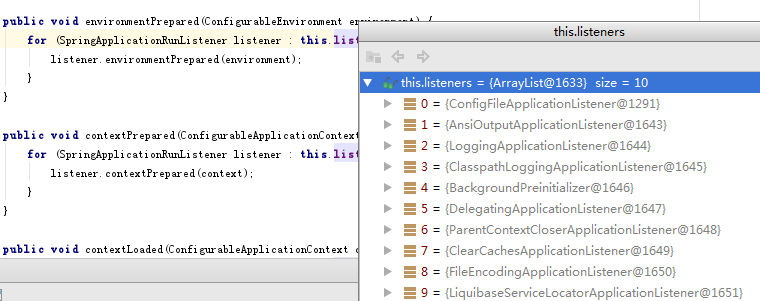
都是监听器相关的部分,略了,SpringApplicationRunListeners类中:
    public void environmentPrepared(ConfigurableEnvironment environment) {

        for (SpringApplicationRunListener listener : this.listeners) {

            listener.environmentPrepared(environment);

        }

    }
EventPublishingRunListener:
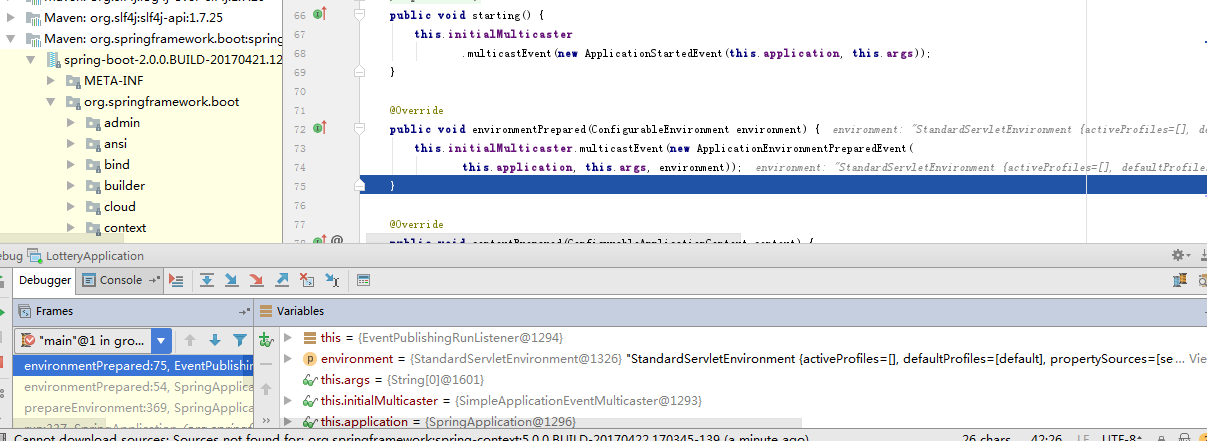
onApplicationEnvironmentPreparedEvent事件触发org\springframework\boot\spring-boot\2.0.0.BUILD-SNAPSHOT\spring-boot-2.0.0.BUILD-20170421.122111-547-sources.jar!\org\springframework\boot\context\config\ConfigFileApplicationListener.java监听器执行:
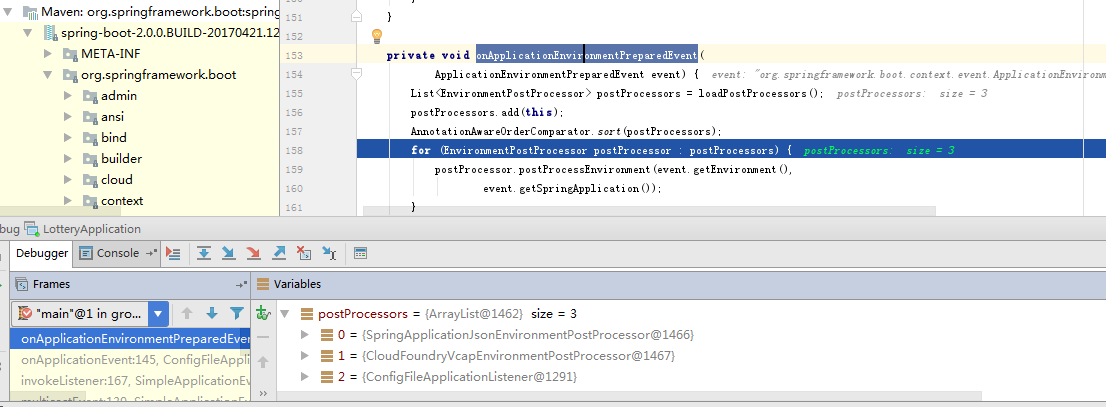
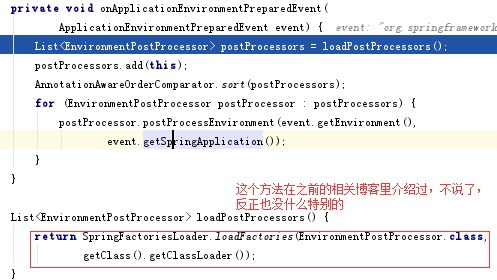
现在这个postProcessors中包含Json之类其他的监听器,不过我现在只想扣出properties的代码,别的先略过,反正其实也没什么,本来也是想看看它的思路,扣着玩,不要太在意。

    protected void addPropertySources(ConfigurableEnvironment environment,

            ResourceLoader resourceLoader) {

        RandomValuePropertySource.addToEnvironment(environment);

        new Loader(environment, resourceLoader).load();

    }

        Loader(ConfigurableEnvironment environment, ResourceLoader resourceLoader) {

            this.environment = environment;

            this.resourceLoader = resourceLoader == null ? new DefaultResourceLoader()

                    : resourceLoader;

        }
        this.classLoader = ClassUtils.getDefaultClassLoader();

        //其实也就是Thread.currentThread().getContextClassLoader();
下面就是真正加载了配置文件的load方法了,先是初始化PropertySourcesLoader和一些临时的集合:
            this.propertiesLoader = new PropertySourcesLoader();

            this.activatedProfiles = false;

            this.profiles = Collections.asLifoQueue(new LinkedList<Profile>());

            this.processedProfiles = new LinkedList<>();

            // Pre-existing active profiles set via Environment.setActiveProfiles()

            // are additional profiles and config files are allowed to add more if

            // they want to, so don't call addActiveProfiles() here.

            Set<Profile> initialActiveProfiles = initializeActiveProfiles();

            this.profiles.addAll(getUnprocessedActiveProfiles(initialActiveProfiles));
这些集合其实如果没配置Profile基本是没用的,这东西现在已经很少用到了,这个环境当然是没配的:

主要是下面这部分:
                for (String location : getSearchLocations()) {

                    if (!location.endsWith("/")) {

                        // location is a filename already, so don't search for more

                        // filenames

                        load(location, null, profile);

                    }

                    else {

                        for (String name : getSearchNames()) {

                            load(location, name, profile);

                        }

                    }

                }
就是去指定目录下去找各种以application为名字的指定类型的配置文件:
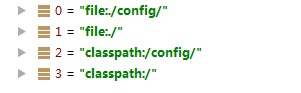

我只关心application.properties,它是上面循环中的一次,走进了doLoadIntoGroup方法的下面那句:



    private Map<String, ?> loadProperties(Resource resource) throws IOException {

        String filename = resource.getFilename();

        if (filename != null && filename.endsWith(XML_FILE_EXTENSION)) {

            return (Map) PropertiesLoaderUtils.loadProperties(resource);

        }

        return new OriginTrackedPropertiesLoader(resource).load();

    }
这个resource其实只是封装了一下InputStream,具体的读取。。。反正也没啥特别的读法:
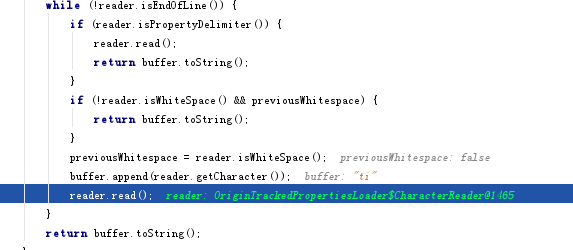
读出的key和value放在Map<String, OriginTrackedValue>:
    private void put(Map<String, OriginTrackedValue> result, String key,

            OriginTrackedValue value) {

        if (!key.isEmpty()) {

            result.put(key, value);

        }

    }
以上。
==========================================================
咱最近用的github:https://github.com/saaavsaaa
微信公众号:

Spring Boot的properties配置文件读取的更多相关文章
- spring boot 项目从配置文件中读取maven 的pom.xml 文件标签的内容。
需求: 将pom.xml 文件中的版本号读取到配置文件并打印到日志中. 第一步: 在pom.xml 中添加以下标签. 第二步: 将version 标签的值读取到配置文件中 这里使用 @@ 而不是 ...
- spring boot(5)-properties参数配置
application.properties application.properties是spring boot默认的配置文件,spring boot默认会在以下两个路径搜索并加载这个文件 s ...
- 【转】spring boot application.properties 配置参数详情
multipart multipart.enabled 开启上传支持(默认:true) multipart.file-size-threshold: 大于该值的文件会被写到磁盘上 multipart. ...
- Inspection info: Checks Spring Boot application .properties configuration files. Highlights unresolved and deprecated configuration keys and in
Cannot resolve class or package ‘jdbc’ less… (Ctrl+F1) Inspection info: Checks Spring Boot applicati ...
- Spring boot application.properties 配置
原文链接: http://docs.spring.io/spring-boot/docs/current/reference/html/common-application-properties.ht ...
- @Value和@PropertySource实现*.properties配置文件读取过程和实现原理
@Value和@PropertySource实现*.properties 配置文件读取过程和实现原理 1 配置使用步骤 (1)右击resource目录添加*.prooerties配置文件
- Spring Boot 的核心配置文件有哪几个?它们的区别是什么?
Spring Boot 的核心配置文件是 application 和 bootstrap 配置文件.application 配置文件这个容易理解,主要用于 Spring Boot 项目的自动化配置.b ...
- Spring Boot中注入配置文件application.properties中的list 对象参数
例如要注入下列参数: dyn.spring.datasources[0].name=branchtadyn.spring.datasources[0].driverClassName=oracle.j ...
- spring boot application.properties 属性详解
2019年3月21日17:09:59 英文原版: https://docs.spring.io/spring-boot/docs/current/reference/html/common-appli ...
随机推荐
- PAT 1047
1049. Counting Ones (30) The task is simple: given any positive integer N, you are supposed to count ...
- java复习(7)---集合类、泛型
本节主要结合用例讲述Java中Map类.Set类.List类如何使用. Java中有封装好的集合类,常用的有Map类.Set类.List类,简单说明一下他们的用法. List类,常用有ArrayLis ...
- 【Windows 10 应用开发】输入模拟
---恢复内容开始--- Input Injection 直译为:输入注入.通俗的译法为:模拟输入.此注入行为可以模拟以下几种输入行为: 1.键盘按键. 2.鼠标. 3.触控. 4.书写笔输入. 5. ...
- 分享一个随机更改 MAC地址 软件
有些软件 是根据 MAC地址 来判断 是不是 已经 安装过 这个 软件 (针对 有些软件是 可以 免费 使用的 ) 要想 一直 使用 的话 只需要 修改一下 mac地址 就可以 继续 使用! 在百度中 ...
- Windows 和 Mac 系统下安装git 并上传,修改项目
首先在MAC上怎么操作. 在gitHub创立一个账户,在创立一个项目,这就不用我说了对吧. 创建完之后是这样的: 接下来,我们打开https://brew.sh 这是下载homebrew的网站,hom ...
- 局域网内补丁更新80072EE2错误
在公网中,80072ee2通常是在进行自动更新时遇到的连接性错误.通常由于三防杀毒软件或者浏览器,代理服务器设置不正确而导致的.那么如果是在局域网中遇到该问题,该如何解决呢? 错误截图: 1.首先确认 ...
- bzoj4785 [Zjoi2017]树状数组
Description 漆黑的晚上,九条可怜躺在床上辗转反侧.难以入眠的她想起了若干年前她的一次悲惨的OI 比赛经历.那是一道基础的树状数组题.给出一个长度为 n 的数组 A,初始值都为 0,接下来进 ...
- 人生苦短,我用Python
Life is short, You need Python. 工作中常常要用到脚本来完成许多重复性的工作,刚开始是查数据库的时候,也曾用shell 来写脚本,但终于还是觉得shell太艰涩, 一行命 ...
- Hadoop集群
你可以用以下三种支持的模式中的一种启动Hadoop集群: 单机模式 伪分布式模式 完全分布式模式 单机模式的操作方法 默认情况下,Hadoop被配置成以非分布式模式运行的一个独立Java进程.这对调试 ...
- ABP文档 - 对象与对象之间的映射
文档目录 本节内容: 简介 IObjectMapper 接口 集成 AutoMapper 安装 创建映射 自动映射的特性 自定义映射 扩展方法 MapTo 单元测试 预定义的映射 Localizabl ...