
Ionic 新闻类别菜单
1.效果图
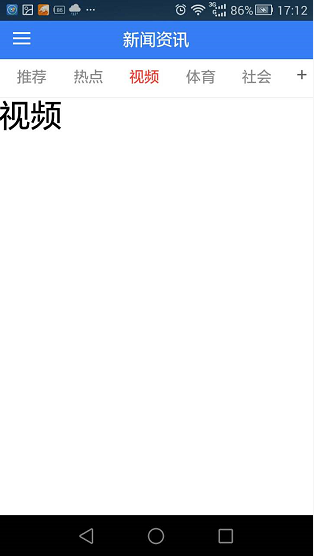

2.controller .js
 .controller("ProductCtrl", function ($scope,$ionicModal,$ionicScrollDelegate,$ionicSlideBoxDelegate,Storage, $state,$ionicLoading) {

      $scope.ProductListData=[

        {id:0,title:'推荐'},

        {id:1,title:'热点'},

        {id:2,title:'视频'},

        {id:3,title:'体育'},

        {id:4,title:'社会'},

        {id:5,title:'娱乐'},

        {id:6,title:'图片'},

        {id:7,title:'军事'},

      ];

     $scope.categoryListOtherData= [

       {id:1,title:'行尸走肉'},

       {id:2,title:'金蝉脱壳'},

       {id:3,title:'百里挑一'},

       {id:4,title:'天上人间'},

       {id:5,title:'不吐不快'}

     ];

     $scope.categoryListMyData=[

       {id:6,title:'金玉满堂'},

       {id:7,title:'背水一战'},

       {id:8,title:'霸王别姬'},

       {id:9,title:'海阔天空'},

       {id:10,title:'情非得已'}

     ];

     $ionicModal.fromTemplateUrl('templates/category.html', {

       scope: $scope

     }).then(function(modal) {

       $scope.categoryModal = modal;

     });

     $scope.openCategoryModal = function() {

       $scope.categoryModal.show();

     };

     $scope.closeCategoryModal = function() {

       $scope.categoryModal.hide();

     };

     $scope.is_close=false;

     var w=window.innerWidth   //获取屏幕的宽度

       || document.documentElement.clientWidth

       || document.body.clientWidth;

     $scope.subTitle="";

     $scope.changeTab=function(id){

       angular.forEach($scope.ProductListData, function (data ,index,arry) {

       }

       );

       angular.forEach($scope.ProductListData, function (data ,index,arry) {

         if(data.id==id){

           $scope.subTitle=data.title;

           document.getElementById("but_"+id).className="button button-clear activebutton";

         }else{

           document.getElementById("but_"+data.id).className="button button-clear";

         }

       })

     }

     $scope.deltab=function(id){

       delorAdditem($scope.categoryListMyData,id,$scope.categoryListOtherData)

     }

     $scope.addtab=function(id){

       delorAdditem($scope.categoryListOtherData,id,$scope.categoryListMyData)

     }

     var all_cate_width=8; //定义默认的导航数量

     all_cate_width=$scope.categoryListMyData.length;

     $scope.all_cate_width=all_cate_width*30+'%';

     var delorAdditem =function(objarry ,id,targetarry){

       angular.forEach(objarry, function (data,index,arry) {

           if(data.id==id){

             targetarry.push(data);

             objarry.splice(index,1);

           }

       })

     }

   });
3.html
<ion-view title="新闻资讯">

  <ion-nav-buttons side="left">

    <button menu-toggle="left" class="button button-icon icon ion-navicon"></button>

  </ion-nav-buttons>

  <div class="bar bar-subheader">

    <ion-scroll direction="x"  scrollbar-x="false"  delegate-handle="s_header"  style="width: 100%;margin-right: 5px;">

      <div class="button-bar sub_header_catgorylist" id="sub_header_list"   style="width:{{all_cate_width}}; ">

        <a ng-repeat="r in ProductListData" ng-click="changeTab(r.id)"  id="but_{{r.id}}"  class="button button-clear">{{r.title}}</a>

      </div>

    </ion-scroll>

   <div class="ion-plus subheader_r_icon" ng-click="openCategoryModal($event);"></div>

</div>

  <ion-content class="has-subheader">

    <div>

      <h1>{{subTitle}}</h1>

    </div>

  </ion-content>

</ion-view>
<div class="modal">

  <ion-header-bar class="bar-positive">

    <h1 class="title">我的频道</h1>

    <div class="buttons">

      <i class="icon ion-ios-close-empty" ng-click="closeCategoryModal()"
      style="width: 36px; height: 36px; line-height: 36px; text-align: center; font-size: 34px;" />

    </div>

  </ion-header-bar>

  <ion-content class="category-content">

    <div class="category_title">

      我的频道

      <span ng-if="!is_close">(点击删除频道)</span>

    </div>

    <div class="category_list">

      <ion-list ng-class="{'ion_list_no_rorder':!is_close}"   >

        <div ng-if="!is_close">

          <ion-item ng-repeat="(key,cate) in categoryListMyData"  on-tap="cateChangeTab(cate.id,key)" >

            {{cate.title}}

            <div class="float_icon" ng-click="deltab(cate.id)"></div>

            <ion-delete-button class="ion-minus-circled" ></ion-delete-button>

            <ion-reorder-button class="ion-navicon" on-reorder="move_item(item,$fromIndex,$toIndex)"></ion-reorder-button>

          </ion-item>

        </div>

      </ion-list>

    </div>

    <div ng-if="!is_close" class="category_title">

      点击添加到我的频道

    </div>

    <div ng-if="!is_close" class="category_list">

      <ul>

        <li ng-repeat="(key,cate) in categoryListOtherData"  on-tap="addtab(cate.id)">

          <a href="javascript:void(0);">{{cate.title}}</a>

        </li>

      </ul>

    </div>

  </ion-content>

</div>
4.css
body, .ionic-body{font-family: 微软雅黑, Arial, Helvetica, sans-serif;}

.bar .sub_header_list .button.button-clear{

  border-bottom: 1px solid #eee;

}

.sub_header_list .button{

  width: 50%;

  color:#666;

}

.bar .sub_header_list .button.sub_button_select{

  border-bottom:2px solid #387ef5;

  position:relative;

}

.bar-subheader{

  border-bottom: none;

}

.red{

  color:red;

}

.comm button{height:32px !important;width:100%;font-size:12px !important;color:#1DACE3 !important;}

.subheader_r_icon{

  position: absolute;

  right: 0px;

  width: 26px;

  height: 36px;

  line-height: 38px;

  top: 0px;

  text-align: center;

  background: #fff;

  color:#666;

}

.sub_header_catgorylist .button{

  width: 25%;

  color:#8f8f8f;

}

.sub_header_catgorylist .activebutton{

  color:#ff3b30;

  padding:0 16px;

}

/********************************类别样式***************************************************/

.category-content .category_title{

  padding-top: 8px;

  padding-bottom: 8px;

  color: #666;

  padding-left: 3.4%;

  padding-right: 3.4%;

  background: #eee;

}

.category-content .category_title .button{

  min-height: 20px;

  line-height: 20px;

}

.category-content .category_list ul li{

  height: 36px;

  line-height: 36px;

  border-color: #b2b2b2;

  background-color: #f8f8f8;

  color: #444;

  display: inline-block;

  border-width: 1px;

  border-style: solid;

  border-radius: 6px;

  vertical-align: top;

  text-align: center;

  text-overflow: ellipsis;

  font-size: 14px;

  cursor: pointer;

  width: 20%;

  margin-top: 10px;

  margin-bottom: 10px;

  margin-left: 3.4%;

  position: relative;

}

.category-content .category_list ul li a{

  text-decoration:none;

  color: #444;

}

.category-content .category_list ul li .close{

  position: absolute;

  left: -5px;

  top: -5px;

  width: 12px;

  height: 12px;

  line-height: 12px;

  border-radius: 12px;

  color: #fff;

  background: #222222;

  font-size: 12px;

}

.category-content .category_list .ion_list_no_rorder ion-item{

  height: 36px;

  line-height: 36px;

  border-color: #b2b2b2;

  background-color: #f8f8f8;

  color: #444;

  display: inline-block;

  border-width: 1px;

  border-style: solid;

  border-radius: 6px;

  vertical-align: top;

  text-align: center;

  text-overflow: ellipsis;

  font-size: 14px;

  cursor: pointer;

  width: 20%;

  margin-top: 10px;

  margin-bottom: 10px;

  margin-left: 3.4%;

  position: relative;

}

.category-content .category_list .ion_list_no_rorder ion-item a{

  text-decoration:none;

  color: #444;

}

.category-content .category_list .ion_list_no_rorder ion-item .close{

  position: absolute;

  left: -5px;

  top: -5px;

  width: 12px;

  height: 12px;

  line-height: 12px;

  border-radius: 12px;

  color: #fff;

  background: #222222;

  font-size: 12px;

}

.ion_list_no_rorder .item-complex .item-content,.ion_list_no_rorder .item-radio .item-content{

  padding: 0px;

}

.float_icon{

  position:absolute;

  width:16px;

   height: 16px;

  border: 0px solid #6b46e5;

  float:right;

  z-index:;

  right:;/*   定位到右上   */

  top:;

  background-image: url('../img/sc.png');

}

/********************************类别样式***************************************************/
5.如果无法用手指滚动,需要配置app config 配置:
$ionicConfigProvider.scrolling.jsScrolling(true); 1.2++之后都向原生方向发展,所有没有滚动了
Ionic 新闻类别菜单的更多相关文章
- [转]教你一招 - 如何给nopcommerce增加新闻类别模块
本文转自:http://www.nopchina.net/post/nopchina-teach-newscategory.html nopcommerce的新闻模块一直都没有新闻类别,但是很多情况下 ...
- sql查询统计,根据新闻类别ID统计,没有数据显示0
有两张表,新闻信息表MessageInfo和新闻类别表MessageType.表结构如下: 然后需要实现下面这种查询结果: 这个是我面试时遇到的,上面的新闻类型是乱写的.当时没有做出来,然后回来又研究 ...
- 案例19-页面使用ajax显示类别菜单
1 版本一 版本只能在首页显示类别,当切换到了其它页面就不会显示 1 web层IndexServlet代码 package www.test.web.servlet; import java.io.I ...
- ionic-Javascript:ionic 上拉菜单(ActionSheet)
ylbtech-ionic-Javascript:ionic 上拉菜单(ActionSheet) 1.返回顶部 1. ionic 上拉菜单(ActionSheet) 上拉菜单(ActionSheet) ...
- ionic第二坑——ionic 上拉菜单(ActionSheet)安卓样式坑
闲话不说,先上图: 这是IOS上的显示效果,代码如下: HTML部分: <body ng-app="starter" ng-controller="actionsh ...
- 利用jquery实现百度新闻导航菜单滑动动画
前言 前两天,群里有人问百度新闻导航是如何实现的,当时由于忙于工作,没有来得及细看,恰好今天有空闲时间,索性就实现一下这个效果吧: 思路与步骤 1.利用UL创建简单横向导航: <!DOCTYPE ...
- ionic 侧栏菜单用法
第一步: 引入js和css文件我这里是直接引入的cdn,ionic是基于angular的,bundle.min.js把常用angular的js已经压缩到一起,可以直接引入.bundle.min.js, ...
- 【Web】利用jquery实现百度新闻导航菜单滑动动画
前言 前两天,群里有人问百度新闻导航是如何实现的,当时由于忙于工作,没有来得及细看,恰好今天有空闲时间,索性就实现一下这个效果吧: 思路与步骤 1.利用UL创建简单横向导航: <!DOCTYPE ...
- ionic 上拉菜单(ActionSheet)安装和iOS样式不一样
ISO中的界面是这样的: 然而,Android中的界面是这样的: 代码如下: HTML部分: <body ng-app="starter" ng-controller=&qu ...
随机推荐
- thinkphp 标签嵌套
模板引擎支持标签的多层嵌套功能,可以对标签库的标签指定可以嵌套. 直线电机价格 系统内置的标签中,volist.switch.if.elseif.else.foreach.compare(包括所有的比 ...
- thinkphp 操作绑定到类
定义 ThinkPHP3.2版本提供了把每个操作方法定位到一个类的功能,可以让你的开发工作更细化,可以设置参数ACTION_BIND_CLASS,例如: 'ACTION_BIND_CLASS' =&g ...
- duilib库分析3.DUILibxml配置
我这里是借用网友colin3dmax整理的关于duilib的分析哈,感谢他的分享,我觉得很有必要贴出来让大家都学习观摩下 DUILibxml配置项根节点 子类 属性 ...
- [TJOI 2018]游园会
题意:求NOI的合法串... 思路: 首先这个似乎和后缀自动机没关系(话说TJ不考后缀自动机??),其实就是一个\(DP\)套\(DP\),考虑如果不看兑奖串就是一个LCS,当出现时多记一维即可. # ...
- VS2010-MFC(对话框:一般属性页对话框的创建及显示)
转自:http://www.jizhuomi.com/software/169.html 属性页对话框包括向导对话框和一般属性页对话框两类,上一节演示了如何创建并显示向导对话框,本节将继续介绍一般属性 ...
- c++ const的用法
1.修饰成员变量 int value=0; int *p=&value; const int *p_c=&value;//指针指向常量,但是指针所指向的地址可以修改(int const ...
- 6_4.springboot2.x数据整合springData介绍
介绍 Spring Data 项目的目的是为了简化构建基于Spring 框架应用的数据访问技术,包括非关系数据库.Map-Reduce 框架.云数据服务等等:另外也包含对关系数据库的访问支持. spr ...
- Activiti业务键(businessKey)
问题:如何让业务对象和对应的流程 关联? 发现ProcessInstance 有个方法getBusinessKey()可以得到一个businessKey. ProcessInstance 对应数据库中 ...
- 关于公式文件.eqn
建议默认打开该选项
- CTO职场解惑指南系列(一)
基于科技能够改变世界的事实,几乎每个公司的程序员都自带闪光灯.程序员的手和普通人的手自然是有区别的,“我们可是用双手改变了世界” .(码农真的是靠双手吃饭,呵呵) 这个世界上但凡靠双手吃饭就会特别不容 ...