
Android Studio列表用法之一:ListView图文列表显示(实例)
前言:
ListView这个列表控件在Android中是最常用的控件之一,几乎在所有的应用程序中都会使用到它。
目前正在做的一个记账本APP中就用到了它,主要是用它来呈现收支明细,是一个图文列表的呈现方式,下面就讲讲具体是如何实现的。
效果图:
该功能是在另一篇博文【Android Studio 使用ViewPager + Fragment实现滑动菜单Tab效果 --简易版】的基础上进行添加的
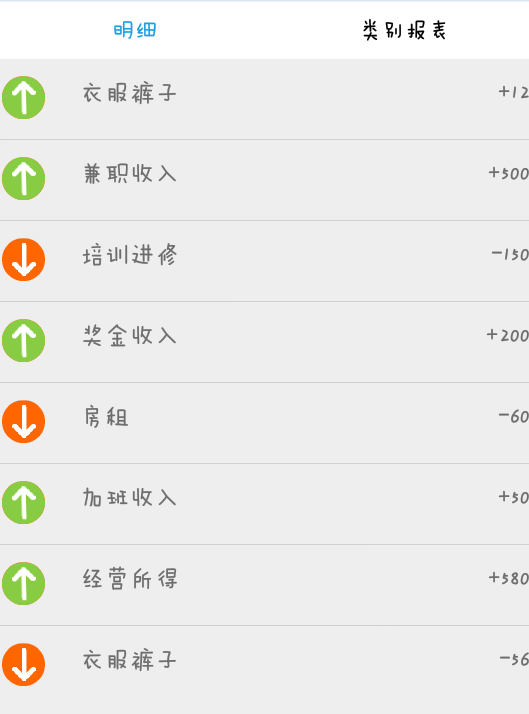
实现的思路:
1、该功能是用fragment来做布局的,首先创建一个fragment.xml布局文件,在里面添加一个ListView控件;
2、由于List里面既要呈现图片,也要呈现文字,所以再创建一个fragment_item.xml布局文件,在里面添加ImageView、TextView,用来显示图片和文字;
3、使用SimpleAdapter来绑定数据;
具体实现逻辑:
1、创建fragment_one.xml
 <ListView

     android:id="@+id/lv_expense"

     android:layout_width="match_parent"

     android:layout_height="wrap_content">

 </ListView>
2、创建fragment_one_item.xml
 <ImageView

     android:id="@+id/image_expense"

     android:layout_width="wrap_content"

     android:layout_height="wrap_content"

     android:paddingTop="10dp"

     android:paddingRight="10dp"

     android:paddingBottom="10dp"

     android:adjustViewBounds="true"

     android:maxWidth="72dp"

     android:maxHeight="72dp"/>

 <TextView

     android:id="@+id/tv_expense_category"

     android:layout_width="wrap_content"

     android:layout_height="wrap_content"

     android:layout_weight="1"

     android:padding="10dp"/>

 <TextView

     android:id="@+id/tv_expense_money"

     android:layout_width="wrap_content"

     android:layout_height="wrap_content"

     android:text="10.0000"/>
3、主逻辑OneFragment.java
 List<Map<String, Object>> listitem = new ArrayList<Map<String, Object>>(); //存储数据的数组列表

 //写死的数据,用于测试

 int[] image_expense = new int[]{R.mipmap.detail_income, R.mipmap.detail_payout }; //存储图片

 String[] expense_category = new String[] {"发工资", "买衣服"};

 String[] expense_money = new String[] {"30000.00", "1500.00"};

 for (int i = 0; i < image_expense.length; i++)

 {

     Map<String, Object> map = new HashMap<String, Object>();

     map.put("image_expense", image_expense[i]);

     map.put("expense_category", expense_category[i]);

     map.put("expense_money", expense_money[i]);

     listitem.add(map);

 }

 //创建适配器

 // 第一个参数是上下文对象

 // 第二个是listitem

 // 第三个是指定每个列表项的布局文件

 // 第四个是指定Map对象中定义的两个键(这里通过字符串数组来指定)

 // 第五个是用于指定在布局文件中定义的id(也是用数组来指定)

 SimpleAdapter adapter = new SimpleAdapter(getActivity()

         , listitem

         , R.layout.fragment_one_item

         , new String[]{"expense_category", "expense_money", "image_expense"}

         , new int[]{R.id.tv_expense_category, R.id.tv_expense_money, R.id.image_expense});

 ListView listView = (ListView) v.findViewById(R.id.lv_expense);

 listView.setAdapter(adapter);
以上就是整个功能实现的逻辑,本文代码中,List中呈现的数据是写死的,从数据库中获取源数据的方式可以参考我的源代码,且使用的数据库是SQLite。
源代码:https://github.com/AnneHan/ListViewDemo
SQLite数据库的使用:Android Studio 通过一个登录功能介绍SQLite数据库的使用
Android Studio列表用法之一:ListView图文列表显示(实例)的更多相关文章
- 解决 RecyclerView 在Android Studio已经导入情况下还无法实例引用问题
系统:Windows 10 IDE::android studio 1. 问题:RecyclerView 在Android Studio已经导入情况下还无法实例引用问题 由于RecyclerView是 ...
- .Net 转战 Android 4.4 日常笔记(6)--Android Studio DDMS用法
Android Studio DDMS与Eclipse DDMS大同小异,下面了解DDMS的使用 DDMS(Dalvik Debug Monitor Service )Dalvik调试监控服务 DDM ...
- Android 开发之Windows环境下Android Studio安装和使用教程(图文详细步骤)
鉴于谷歌最新推出的Android Studio备受开发者的推崇,所以也跟着体验一下. 一.介绍Android Studio Android Studio 是一个Android开发环境,基于Intel ...
- Android Studio下载安装及配置图文教程
原文 http://jingyan.baidu.com/article/9c69d48f56835e13c9024e95.html AndroidStudio下载地址:https://develope ...
- Android Studio RecyclerView用法
首先创建一个布局 里面放一个文本 <TextView android:id="@+id/textView" android:layout_width="60dp&q ...
- Android Studio 一个完整的APP实例(附源码和数据库)
前言: 这是我独立做的第一个APP,是一个记账本APP. This is the first APP, I've ever done on my own. It's a accountbook APP ...
- 《Android Studio实战 快速、高效地构建Android应用》--五、备忘录实验(1/2)
通过开发App熟悉Android Studio的用法 开发一款用于管理备忘事项列表的App,核心功能: 创建.删除备忘 将某些备忘标记为重要(左侧带颜色标签突出显示) 涉及:操作栏菜单.上下文菜单.用 ...
- Android Studio导入github下载的工程
现在从github上面现在的项目大部分都是Android Studio工程,那么问题来了,从github上面down一个工程下来,怎么导入android studio呢? 对刚从eclipse转And ...
- Windows环境下Android Studio安装和使用教程
Windows环境下Android Studio安装和使用教程 来源: http://www.cnblogs.com/liuhongfeng/archive/2015/12/30/5084896.ht ...
随机推荐
- Archive required for library “xxx” cannot be read or is not a valid zip file报错解决
在项目中导入别人的maven项目时报错:Archive required for library “xxx” cannot be read or is not a valid zip file 网上查 ...
- Info - 信息获取途径汇总
目的驱动 大多数情况下,都是为了解决某个问题或完成某项任务,才需要进行针对性的.大范围的.细致化的信息获取. 那么,信息获取的方式和来源,就应该紧紧围绕这个"问题和任务"本身来确定 ...
- LeetCode:94_Binary Tree Inorder Traversal | 二叉树中序遍历 | Medium
题目:Binary Tree Inorder Traversal 二叉树的中序遍历,和前序.中序一样的处理方式,代码见下: struct TreeNode { int val; TreeNode* l ...
- Python模块——HashLib与base64
摘要算法(hashlib) Python的hashlib提供了常见的摘要算法,如MD5,SHA1等等. 什么是摘要算法呢?摘要算法又称哈希算法.散列算法.它通过一个函数,把任意长度的数据转换为一个长度 ...
- VSCode配置Git随记
VSCode配置Git随记 2018年05月29日 10:14:24 Dominic- 阅读数:4096 vscode中对git进行了集成,很多操作只需点击就能操作,无需写一些git指令. 不过这 ...
- js按钮 防重复提交
给html 按钮加id属性 例: <button id="addBtn" onclinck="check()"> </button&g ...
- centos6.6 安装adb环境
a.安装JDK环境 centos linux JAVA(openjdk)软件包名 1.java-1.7.0-openjdk (OpenJDK Runtime Environment) 2.java-1 ...
- 深入浅出分析MySQL MyISAM与INNODB索引原理、优缺点分析
本文浅显的分析了MySQL索引的原理及针对主程面试的一些问题,对各种资料进行了分析总结,分享给大家,希望祝大家早上走上属于自己的"成金之路". 学习知识最好的方式是带着问题去研究所 ...
- java学习-消息队列rabbitmq的组成
rabbitMQ组成部分 rabbitmq有以下组成部分,分别为: 1. Server(broker)接受客户端连接,实现AMQP消息队列和路由功能的进程 2.虚拟主机virtual host虚拟主机 ...
- Elasticsearch从入门到精通之Elasticsearch基本概念
导读 在上一章节我们介绍Elasticsearch前世今生,今天我们继续进行本章内容,Elasticsearch的核心概念.从一开始就理解这些概念将极大地帮助简化学习过程. 近实时(NRT) Elas ...