
[ES6] 01. Intro to ES6 and traceur compiler
---恢复内容开始---
ES6 is ECMAScript version 6, which JavaScript is based on. The next version of JavaScript is going to be based on version 6 of ECMAScript.
Tracer is a way to compile that next version of JavaScript back into JavaScript of today, meaning that you can write the next version of JavaScript and have it compiled down to JavaScript you can use today, because ES6 isn't supported completely and not standardized completely across all the browsers, in Note and everything.
While ES6 is still being standardized and all the browsers are still working on supporting all the different features, it's worth getting a head start because Angular 2.0 will be based on ECMAScript 6 in the future when it's released. Thanks to Tracer, we can start playing around with ES6 features today as well as some of the things that Angular has started releasing, like DI, that already use ES6.
In the future, we'll also get to the ECMAScript 6+ that AngularJS 2.0 will work with, which adds things like annotations and some sort of typing. It's kind of what like TypeScriptdoes by compiling the static-type JavaScript down to JavaScript.
After you install Tracer using npm install Tracer using the -g global flag or not. Here I did and I just used Tracer to output this file, which is an ES6 file, to this Tracer-compiled file. Again, this is the JavaScript of today, the one that's being output, and this is ES6.
npm install tracer -g

Now, the file that this outputs is the file you'll want to use with the Tracer runtime, so you'll include the Tracer runtime first and then include the output file. Then the browser will be able to use this file just fine. Again, you're not using the ES6 file. You're using the output Tracer-compiled file. Then loading the Tracer runtime and then loading your own compiled file.
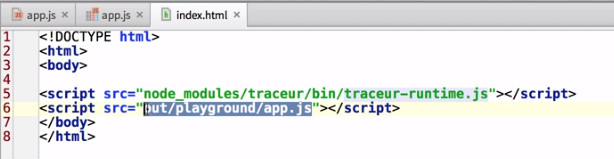
If instead of using the browser, you want to invoke that file with node, simply use Tracer, and instead of using it to compile you can use it to run the output file and then run through the Tracer-compiled file using Tracer as the "runtime."
While installing Tracer is as easy as npm install Tracer, if you want to jump right in, you can just open ES6 Fiddle in your browser and load one of the examples. Then hit run and you can begin playing with ES6 right away.
Basically behind the scenes, this is compiling this to a Tracer-compiled file and then running it through Tracer to give you what the output of the console is.
[ES6] 01. Intro to ES6 and traceur compiler的更多相关文章
- 石川es6课程---1-2、ES6简介
石川es6课程---1-2.ES6简介 一.总结 一句话总结: 从ECMAScript的历史发展来看,太顺了的时候总会遇到一挫折,比如ecma4 1.ECMAScript 和 JavaScript关系 ...
- React与ES6(四)ES6如何处理React mixins
React与ES6系列: React与ES6(一)开篇介绍 React和ES6(二)ES6的类和ES7的property initializer React与ES6(三)ES6类和方法绑定 React ...
- React与ES6(三)ES6类和方法绑定
React与ES6系列: React与ES6(一)开篇介绍 React和ES6(二)ES6的类和ES7的property initializer React与ES6(三)ES6类和方法绑定 React ...
- React和ES6(二)ES6的类和ES7的property initializer
React与ES6系列: React与ES6(一)开篇介绍 React和ES6(二)ES6的类和ES7的property initializer React与ES6(三)ES6类和方法绑定 React ...
- ES6入门一:ES6简介及Babel转码器
ES6简介 Babel转码器 Nodejs中使用ES6 WebPack中使用ES6及Babel转码插件 一.ES6简介与转码 1.1一个常见的问题,ECMAScript和JavaScript到底是什 ...
- 石川es6课程---18、ES6 复习
石川es6课程---18.ES6 复习 一.总结 一句话总结: 无论在讲课和学习中,复习总结都是很重要 二.ES6 复习 变量 let const 声明方式 能否重复声明 作用域 类型 是否支持变量提 ...
- ES6 第七节 ES6中新增的数组知识(1)
目录 ES6 第七节 ES6中新增的数组知识(1) 第七节 ES6中新增的数组知识(1) JSON数组格式转换 Array.of()方法: find()实例方法: ES6 第七节 ES6中新增的数组知 ...
- [ES6] 02. Traceur compiler and Grunt
Local Install: npm install -g traceur npm install grunt-contrib-watch npm install grunt-traceur-lat ...
- ES6 实战项目构建 ES6+glup+express
ES6推出已经有几个年头了,平时也有学过一些基本语法,无奈实践经验太少.而且前端早已脱离了刀耕火种的时代,一些自动化构建工具像gulp.webpack等也需要熟练掌握.最近刚签了三方,闲暇之余就找了个 ...
随机推荐
- 关联的CURD
在保存的前面必须先建立好关联.但是默认情况下还是不会自动保存,如果保存会出错. Cascade all所有关联的所有持久化都是级联到另一个对象.保存这个对象的时候关联的对象自动保存. Cascade只 ...
- 创建模态提醒窗口(UIAlertView)
UIAlertView类创建一个简单的模态提醒窗口,可能包含消息.按钮以及文本框.模态UI元素要求用户必须与之交互(通常是按下按钮)后才能做其它事情.它们通常位于其他窗口前面,在可见时禁止用户与其他任 ...
- python 学习笔记 - Queue & Pipes,进程间通讯
上面写了Python如何创建多个进程,但是前面文章中创建的进程都是哑巴和聋子,自己顾自己执行,不会相互交流.那么如何让进程间相互说说话呢?Python为我们提供了一个函数multiprocessing ...
- git实现github仓库和本地仓库同步
配置git 安装git以后,打开git bash,首先要对git进行配置,输入 git config --global username "你的名字" git config --g ...
- hibernate 基于主键的单向一对一关联映射
1.设计表结构 表结构对于基于外键的关联关系来说就少了外键的关联列,并且两张表共用同一个ID,表示一对一. 2.创建Person对象 3.创建IdCard对象 4.写hbm.xml文件 5.生成数据库 ...
- 欧拉回路 uoj117
写了一道欧拉回路的模板题.先判断是否是欧拉回路,有向图和无向图有一点点不同,然后就是特判独立点的存在. 之后是输出路径,和dls学的dfs,利用last数组的更新可以做到线性的复杂度,否则一不小心就会 ...
- 「2017 山东一轮集训 Day4」基因
设置 \(\sqrt{n}\) 个关键点,维护出关键点到每个右端点之间的答案以及Pam的左指针,每次暴力向左插入元素即可,为了去重,还需要记录一下Pam上每个节点在每个关键点为左端点插入到时候到最左边 ...
- AHOI2018训练日程(3.10~4.12)
(总计:共90题) 3.10~3.16:17题 3.17~3.23:6题 3.24~3.30:17题 3.31~4.6:21题 4.7~4.12:29题 ZJOI&&FJOI(6题) ...
- 【最小割】BZOJ3894-文理分科
[题目大意] 给定一个m*n的矩阵,每个格子的人可以学文或者学理,学文和学理各有一个满意度,如果以某人为中心的十字内所有人都学文或者学理还会得到一个额外满意度,求最大满意度之和. [思路] 发现这道题 ...
- Mac下配置Idea的Maven
环境版本: Mac OS: 10.13.4 JDK: 1.8 Idea: 2018.3 Maven: 3.6.0 Maven 相关配置: Maven 下载: http://maven.apache.o ...