
led的进化
- 1.一个led亮100ns,灭400ns,循环
- 2.一个led亮2500ns,灭5000ns,亮7500ns,灭10000ns循环
- 3.以2500ns为变化周期,20000ns为一个循环,每个周期的亮灭模式由用户设置。
- 4.以tim*20/8 ns为变化周期,tim*20 ns为一个循环,每个周期的亮灭模式,tim由用户设置。
- 5.1最小周期相同(由用户指定),由多个ctrl控制多个led在其周期内循环亮灭
- 5.2最小周期相同(由用户指定),由多个ctrl控制多个led在其周期内循环亮灭,用例化模块的方法
- 6.每隔Tim秒,led的一个8状态周期tim循环一次,Tim>tim,两个参数都由用户设置。
module led_change1(      //1.一个led亮100ns,灭400ns,循环

    clk,

    reset,

    led

    );

    input clk;

    input reset;

    output reg led = 1'd1;

    reg [4:0]counter0;

    always@( posedge clk or negedge reset )

    begin

    if ( reset == 0 )

    counter0 <= 5'b0 ;

    else if (counter0 == 24 )

    counter0 <= 0 ;

    else

    counter0 <= counter0 + 1'd1;

    end

    always@( posedge clk or negedge reset )

    begin

    if ( reset == 0 )

    led <= 0 ;

    else if (counter0 == 4 )

    led <= ! led ;

    else if (counter0 == 24 )

    led <= ! led ;

    else

    led <= led;//记得

    end

endmodule
module led_change2(      //2.一个led亮2500ns,灭5000ns,亮7500ns,灭10000ns循环

    clk,

    reset,

    led

    );

    input clk;

    input reset;

    output reg led = 1'd1;

    reg [11:0]counter0;

    parameter  mcnt = 1250 ;

    always@( posedge clk or negedge reset )

    begin

    if ( reset == 0 )

    counter0 <= 5'b0 ;

    else if (counter0 == mcnt - 1 )

    counter0 <= 0 ;

    else

    counter0 <= counter0 + 1'd1;

    end

//    always@( posedge clk or negedge reset )

//    begin

//    if ( reset == 0 )

//    led <= 0 ;

//    else if (counter0 == mcnt * 1 / 10 - 1 )

//    led <= ! led ;

//    else if (counter0 == mcnt * 3 / 10 - 1 )

//    led <= ! led ;

//    else if (counter0 == mcnt * 6 / 10 - 1 )

//    led <= ! led ;

//    else if (counter0 == mcnt * 10 / 10 - 1 )

//    led <= ! led ;

//    else

//    led <= led;//记得

//    end

 always@( posedge clk or negedge reset )

    begin

        if ( reset == 0 )

        led <= 0 ;

        else case( counter0 )

        mcnt * 1 / 10 - 1 : led <= ! led ;

        mcnt * 3 / 10 - 1 : led <= ! led ;

        mcnt * 6 / 10 - 1 : led <= ! led ;

        mcnt * 10 / 10 - 1 : led <= ! led ;

        endcase

    end

endmodule
module led_change3(      //3.以2500ns为变化周期,20000ns为一个循环,每个周期的亮灭模式由用户设置。

    clk,

    reset,

    ctrl,

    led

    );

    input clk;

    input reset;

    input [7:0]ctrl;

    output reg led ;

    reg [9:0]counter0;

    parameter  mcnt = 1000 ;

    always@( posedge clk or negedge reset )

    begin

        if ( reset == 0 )

        counter0 <= 11'b0 ;

        else if (counter0 == mcnt - 1 )

        counter0 <= 0 ;

        else

        counter0 <= counter0 + 1'd1;

    end

    always@( posedge clk or negedge reset )

    begin

        if ( reset == 0 )

        led <= 0 ;

        else case( counter0 )

        mcnt * 1 / 8 - 1 : led <= ctrl[0] ;

        mcnt * 2 / 8 - 1 : led <= ctrl[1] ;

        mcnt * 3 / 8 - 1 : led <= ctrl[2] ;

        mcnt * 4 / 8 - 1 : led <= ctrl[3] ;

        mcnt * 5 / 8 - 1 : led <= ctrl[4] ;

        mcnt * 6 / 8 - 1 : led <= ctrl[5] ;

        mcnt * 7 / 8 - 1 : led <= ctrl[6] ;

        mcnt * 8 / 8 - 1 : led <= ctrl[7] ;

        default led <= led ;

        endcase

    end

endmodule
module led_change4(      //4.以tim*20/8 ns为变化周期,tim*20 ns为一个循环,每个周期的亮灭模式,tim由用户设置。.

    clk,

    reset,

    ctrl,

    tim,

    led

    );

    input clk;

    input reset;

    input [7:0]ctrl;

    input [9:0]tim;

    output reg led ;

    reg [9:0]counter0;

    always@( posedge clk or negedge reset )

    begin

        if ( reset == 0 )

        counter0 <= 11'b0 ;

        else if (counter0 == tim - 1 )

        counter0 <= 0 ;

        else

        counter0 <= counter0 + 1'd1;

    end

    always@( posedge clk or negedge reset )

    begin

        if ( reset == 0 )

        led <= 0 ;

        else case( counter0 )                   //可以用第二个计数器的方法来设置判断条件

        tim * 1 / 8 - 1 : led <= ctrl[0] ;

        tim * 2 / 8 - 1 : led <= ctrl[1] ;

        tim * 3 / 8 - 1 : led <= ctrl[2] ;

        tim * 4 / 8 - 1 : led <= ctrl[3] ;

        tim * 5 / 8 - 1 : led <= ctrl[4] ;

        tim * 6 / 8 - 1 : led <= ctrl[5] ;

        tim * 7 / 8 - 1 : led <= ctrl[6] ;

        tim * 8 / 8 - 1 : led <= ctrl[7] ;

        default led <= led ;

        endcase

    end

endmodule
module led_change4(      //5.1以tim*20/8 ns为变化周期,tim*20 ns为一个循环,每个周期的亮灭模式,tim由用户设置。.

    clk,

    reset,

    ctrl,

    tim,

    led

    );

    input clk;

    input reset;

    input [7:0]ctrl;

    input [9:0]tim;

    output reg led ;

    reg [9:0]counter0;

    always@( posedge clk or negedge reset )

    begin

        if ( reset == 0 )

        counter0 <= 11'b0 ;

        else if (counter0 == tim - 1 )

        counter0 <= 0 ;

        else

        counter0 <= counter0 + 1'd1;

    end

    always@( posedge clk or negedge reset )

    begin

        if ( reset == 0 )

        led <= 0 ;

        else case( counter0 )                   //可以用第二个计数器的方法来设置判断条件

        tim * 1 / 8 - 1 : led <= ctrl[0] ;

        tim * 2 / 8 - 1 : led <= ctrl[1] ;

        tim * 3 / 8 - 1 : led <= ctrl[2] ;

        tim * 4 / 8 - 1 : led <= ctrl[3] ;

        tim * 5 / 8 - 1 : led <= ctrl[4] ;

        tim * 6 / 8 - 1 : led <= ctrl[5] ;

        tim * 7 / 8 - 1 : led <= ctrl[6] ;

        tim * 8 / 8 - 1 : led <= ctrl[7] ;

        default led <= led ;

        endcase

    end

endmodule
module led_change5_M(      //5.2最小周期相同(由用户指定),由多个ctrl控制多个led在其周期内循环亮灭,用例化模块的方法

    clk,

    reset,

    ctrlA,

    ctrlB,

    tim,

    led

    );

    input clk;

    input reset;

    input [7:0]ctrlA,ctrlB;

    input [9:0]tim;

    output wire [1:0]led ;

    led_change4 led_change4_sim0(      //以tim*20/8 ns为变化周期,tim*20 ns为一个循环,每个周期的亮灭模式,tim由用户设置。

    .clk(clk),

    .reset(reset),

    .ctrl(ctrlA),

    .tim(tim),

    .led(led[0])

    );

    led_change4 led_change4_sim1(      //以tim*20/8 ns为变化周期,tim*20 ns为一个循环,每个周期的亮灭模式,tim由用户设置。

    .clk(clk),

    .reset(reset),

    .ctrl(ctrlB),

    .tim(tim),

    .led(led[1])

    );

endmodule
module led_change6(      //6.每隔Tim秒,led的一个8状态周期tim循环一次,Tim>tim,两个参数都由用户设置。

    clk,

    reset,

    ctrl,

    tim,

    Tim,

    led

    );

    input clk;

    input reset;

    input [7:0]ctrl;

    input [9:0]tim;

    input [10:0]Tim;

    output reg led ;

    reg [10:0] counter0;

    always@( posedge clk or negedge reset )

    begin

        if ( reset == 0 )

        counter0 <= 9'b0 ;

        else if (counter0 == Tim -1  )

        counter0 <= 0 ;

        else

        counter0 <= counter0 + 1'd1;

    end

    always@( posedge clk or negedge reset )

    begin

        if ( reset == 0 )

        led <= 0 ;

        else case( counter0 )                   //可以用第二个计数器的方法来设置判断条件

        tim * 1 / 8 - 1 : led <= ctrl[0] ;

        tim * 2 / 8 - 1 : led <= ctrl[1] ;

        tim * 3 / 8 - 1 : led <= ctrl[2] ;

        tim * 4 / 8 - 1 : led <= ctrl[3] ;

        tim * 5 / 8 - 1 : led <= ctrl[4] ;

        tim * 6 / 8 - 1 : led <= ctrl[5] ;

        tim * 7 / 8 - 1 : led <= ctrl[6] ;

        tim * 8 / 8 - 1 : led <= ctrl[7] ;

        tim * 9 / 8 - 1 : led <= 0 ;

        default led <= led ;

        endcase

    end

endmodule
注意:
1.需要用户指定的便需要设置输入端口,这是一个变量。
2.用if语句时可以用else 罗列其他没有写出的情况。而用case语句时应该用default xxxxx。语句实现,见上面3和4。同时,可以用if先列出复位信号的情况,再用else case罗列时钟信号的情况。
3.工程包含多个文件时,用set as top来激活指定要操作的文件。
4.乘除可以使用左右移位来实现,节省乘法器。
5.用顶层中例化模块的方法十分便捷有效,只需要把顶层的引脚分别分配给多个例化模块就可以了。要学会这么用,很快很好用。
6.多位宽既可以用来表示多个输出端口,也可以用来表示一个端口的不同时期的多个状态。
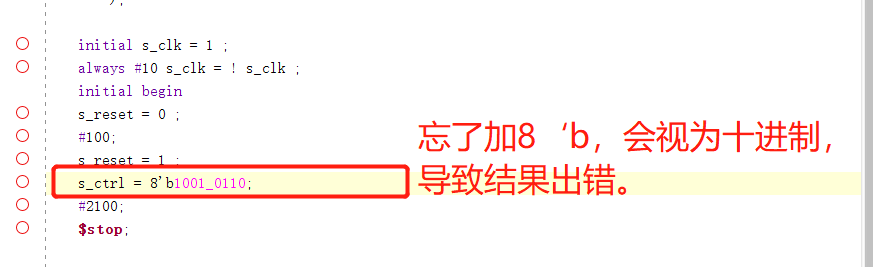
7.参数赋值时,要明确指定进制,不然会默认是十进制,有时候不注意就会出错。养成良好习惯。
8.错误:counter设定位宽太小,导致计数不到第二个else if就已经溢出,成为0,波形一直在重复前面的结果,后面的结果没有出现,难以看出错误。所以遇到我们设置的有些预期结果没有出现的情况,要检查一下计时器的位宽设置有没有出错。因为溢出不报错,但影响结果。
9.记住:仿真设置的例化module参数的位宽必须与原来module的参数位宽保持一致,不然虽然没有报错,但是输出会出错。
10.再次记忆:顶层设计时的输出端写为wire,底层是reg。顶层写reg会报错。
led的进化的更多相关文章
- Atitit 软件架构方法的进化与演进cs bs soa roa msa attilax总结
Atitit 软件架构方法的进化与演进cs bs soa roa msa attilax总结 1.1. 软件体系架构是沿着单机到 CS 架构,再到 BS 的三层架构甚至多层架构逐步发展过来的,关于 ...
- Atitit 编程语言编程方法的进化演进 sp COP ,AOP ,SOP
Atitit 编程语言编程方法的进化演进 sp COP ,AOP ,SOP 1.1. Sp oop>>COP ,AOP ,SOP1 1.2. Sp oop 结构化方法SP(Stru ...
- js生成一个不重复的ID的函数的进化之路
在MongoDB中的ObjectID,可以理解为是一个不会重复的ID,这里有个链接http://blog.csdn.net/xiamizy/article/details/41521025感兴趣可以去 ...
- linux输入子系统(input subsystem)之按键输入和LED控制
实验现象:在控制台打印按键值,并且通过按键控制相应的LED亮灭. 1.代码 input_subsys_drv.c #include <linux/module.h> #include &l ...
- FPGA与simulink联合实时环路系列——实验二LED
实验二LED 实验内容 在实验一的基础上,将simulink产生的测试信号输出到FPGA开发板上的LED灯进行显示,这里要在生成的硬件模型上进行修改,将传送到FPGA的信号输出到8个LED灯上,并且对 ...
- 差分进化算法 DE-Differential Evolution
差分进化算法 (Differential Evolution) Differential Evolution(DE)是由Storn等人于1995年提出的,和其它演化算法一样,DE是一种模拟生物进化 ...
- [Evolutionary Algorithm] 进化算法简介
进化算法,也被成为是演化算法(evolutionary algorithms,简称EAs),它不是一个具体的算法,而是一个“算法簇”.进化算法的产生的灵感借鉴了大自然中生物的进化操作,它一般包括基因编 ...
- 嵌入式Linux学习入门:控制LED灯
记录自己linux学习过程,让自己能够一直坚持下去 1.原理图分析: nLED_1, nLED_2, nLED_4, 给低电平则对应LED灯亮,高电平则对应LED灯灭, S3C2440芯片GPF4-G ...
- 单片机与控制实验(2)——LED点阵显示屏
一.实验目的和要求 了解LED点阵显示的基本原理和实现方法.掌握点阵汉字库的编码和从标准字库中提取汉字编码的方法. 二.实验设备 单片机测控实验系统 LED点阵显示器实验模块 Keil开发环境 STC ...
随机推荐
- hashib加密模块、logging模块
hashib加密模块 # 加密模块 1.什么是加密 将明文的数据通过一些手段变成能密文数据 密文数据的表现形式一般都是一串没有规则的字符串 2.加密算法 加密算法有很多>>>(讲文明 ...
- CSAPP 之 ShellLab 详解
前言 本篇博客将会详细介绍 CSAPP 之 ShellLab 的完成过程,实现一个简易(lou)的 shell.tsh 拥有以下功能: 可以执行外部程序 支持四个内建命令,名称和功能为: quit:退 ...
- 使用instanceof操作符判断对象类型及方法的重载
学习内容: 一.使用instanceof操作符判断对象类型 1.instanceof操作符可以判断一个实例对象是否属于一个类. 语法:对象名 instanceof 类名 2.使用instanceof表 ...
- vue上传图片的3种方式
https://blog.csdn.net/q3254421/article/details/88250968?utm_medium=distribute.pc_relevant.none-task- ...
- USACO 刷题小记
\(\text{High Card Low Card}\) USACO2015DEC Platinum T2 贝西和艾尔西在玩游戏.有 \(2n\) 张牌,牌上的数字是 \(1\) 到 \(2n\) ...
- 论文阅读 Dynamic Network Embedding by Modeling Triadic Closure Process
3 Dynamic Network Embedding by Modeling Triadic Closure Process link:https://scholar.google.com.sg/s ...
- Excel导表工具-开源
功能 支持int.float.bool.string基础类型 支持数组 支持kv 支持枚举 支持unity类型vector3,vector2,color 自动生成csharp类 单个excel中多个s ...
- Tomcat启动失败:java.lang.NoSuchMethodError: org.apache.tomcat.util.res.StringManager.getManager(Ljava/lang/Class;)Lorg/apache/tomcat/util/res/StringManager
项目开发中发现服务器上Tomcat启动失败 开始定位 第一步:打开tomcat日志catalina.log: 2017-07-25 17:02:43,799 [Catalina-startStop-1 ...
- 33个非常实用的JavaScript一行代码
33个非常实用的JavaScript一行代码 一.日期处理 1. 检察日期是否有效 该方法用于检测给出的日期是否有效: const isDateValid = (...val) => !Numb ...
- 使用 KubeKey 搭建 Kubernetes/KubeSphere 环境的"心路(累)历程"
目录 今天要干嘛? 在哪里干? 从哪里开始干? 快速开干! 解决依赖问题再继续干! 如何干翻重来? 连着 KubeSphere 一起干! 干不过,输了. 重整旗鼓,继续干! 再次重整旗鼓,继续干! 一 ...