
一步一步学Silverlight 2系列(24):与浏览器交互相关辅助方法
概述
Silverlight 2 Beta 1版本发布了,无论从Runtime还是Tools都给我们带来了很多的惊喜,如支持框架语言Visual Basic, Visual C#, IronRuby, Ironpython,对JSON、Web Service、WCF以及Sockets的支持等一系列新的特性。《一步一步学Silverlight 2系列》文章将从Silverlight 2基础知识、数据与通信、自定义控件、动画、图形图像等几个方面带您快速进入Silverlight 2开发。
本文是Silverlight 2与浏览器交互的最后一篇,将介绍相关的辅助类方法。
获取浏览器信息
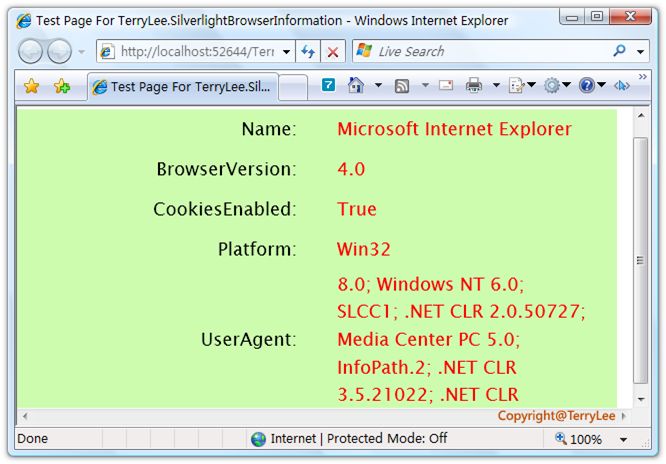
在Silverlight 2中提供了获取浏览器信息的一个类BrowserInformation,可供我们直接调用,如获取浏览器名称及浏览器版本,是否禁用Cookies等信息。做一个简单的示例,定义XAML如下:
<Grid x:Name="LayoutRoot" Background="#CDFCAE">

    <Grid.RowDefinitions>

        <RowDefinition Height="40"></RowDefinition>

        <RowDefinition Height="40"></RowDefinition>

        <RowDefinition Height="40"></RowDefinition>

        <RowDefinition Height="40"></RowDefinition>

        <RowDefinition Height="140"></RowDefinition>

    </Grid.RowDefinitions>

    <Grid.ColumnDefinitions>

        <ColumnDefinition Width="300"></ColumnDefinition>

        <ColumnDefinition Width="300"></ColumnDefinition>

    </Grid.ColumnDefinitions>

    <TextBlock Text="Name:" Style="{StaticResource title}"

               Grid.Row="0" Grid.Column="0"></TextBlock>

    <TextBlock x:Name="Name" Style="{StaticResource content}"

               Grid.Row="0" Grid.Column="1"></TextBlock>

    <TextBlock Text="BrowserVersion:" Style="{StaticResource title}"

               Grid.Row="1" Grid.Column="0"></TextBlock>

    <TextBlock x:Name="BrowserVersion" Style="{StaticResource content}"

               Grid.Row="1" Grid.Column="1"></TextBlock>

    <TextBlock Text="CookiesEnabled:" Style="{StaticResource title}"

               Grid.Row="2" Grid.Column="0"></TextBlock>

    <TextBlock x:Name="CookiesEnabled" Style="{StaticResource content}"

               Grid.Row="2" Grid.Column="1"></TextBlock>

    <TextBlock Text="Platform:" Style="{StaticResource title}"

               Grid.Row="3" Grid.Column="0"></TextBlock>

    <TextBlock x:Name="Platform" Style="{StaticResource content}"

               Grid.Row="3" Grid.Column="1"></TextBlock>

    <TextBlock Text="UserAgent:" Style="{StaticResource title}"

               Grid.Row="4" Grid.Column="0"></TextBlock>

    <TextBlock x:Name="UserAgent" Style="{StaticResource content}"

               Grid.Row="4" Grid.Column="1" TextWrapping="Wrap"></TextBlock>

</Grid>
在Loaded事件中获取相关信息:
private void UserControl_Loaded(object sender, RoutedEventArgs e)

{

    BrowserInformation browser = HtmlPage.BrowserInformation;

    Name.Text = browser.Name;

    BrowserVersion.Text = browser.BrowserVersion.ToString();

    CookiesEnabled.Text = browser.CookiesEnabled.ToString();

    Platform.Text = browser.Platform;

    UserAgent.Text = browser.UserAgent;

}
运行之后,如下图所示:
HttpUtility方法
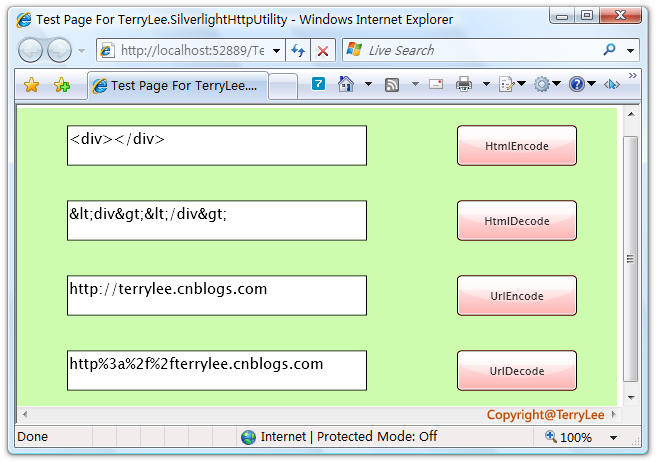
类似于WebForm开发中一样,在Silverlight 2中同样提供了一一些HttpUtility方法,共有四个HtmlEncode、HtmlDecode、UrlEncode、UrlDecode,看一个简单的例子:
<Grid x:Name="LayoutRoot" Background="#CDFCAE">

    <Grid.RowDefinitions>

        <RowDefinition Height="75"></RowDefinition>

        <RowDefinition Height="75"></RowDefinition>

        <RowDefinition Height="75"></RowDefinition>

        <RowDefinition Height="75"></RowDefinition>

    </Grid.RowDefinitions>

    <Grid.ColumnDefinitions>

        <ColumnDefinition Width="400"></ColumnDefinition>

        <ColumnDefinition Width="200"></ColumnDefinition>

    </Grid.ColumnDefinitions>

    <TextBox x:Name="txtHtmlEncode" Grid.Row="0" Grid.Column="0"

             Width="300" Height="40"></TextBox>

    <Button x:Name="btnHtmlEncode" Grid.Row="0" Grid.Column="1"

            Background="Red" Width="120" Height="40" Content="HtmlEncode"

            Click="btnHtmlEncode_Click"></Button>

    <TextBox x:Name="txtHtmlDecode" Grid.Row="1" Grid.Column="0"

             Width="300" Height="40"></TextBox>

    <Button x:Name="btnHtmlDecode" Grid.Row="1" Grid.Column="1"

            Background="Red" Width="120" Height="40" Content="HtmlDecode"

            Click="btnHtmlDecode_Click"></Button>

    <TextBox x:Name="txtUrlEncode" Grid.Row="2" Grid.Column="0"

             Width="300" Height="40"></TextBox>

    <Button x:Name="btnUrlEncode" Grid.Row="2" Grid.Column="1"

            Background="Red" Width="120" Height="40" Content="UrlEncode"

            Click="btnUrlEncode_Click"></Button>

    <TextBox x:Name="txtUrlDecode" Grid.Row="3" Grid.Column="0"

             Width="300" Height="40"></TextBox>

    <Button x:Name="btnUrlDecode" Grid.Row="3" Grid.Column="1"

            Background="Red" Width="120" Height="40" Content="UrlDecode"

            Click="btnUrlDecode_Click"></Button>

</Grid>
编写按钮处理事件:
private void btnHtmlEncode_Click(object sender, RoutedEventArgs e)

{

    this.txtHtmlDecode.Text = HttpUtility.HtmlEncode(this.txtHtmlEncode.Text);

}

private void btnHtmlDecode_Click(object sender, RoutedEventArgs e)

{

    this.txtHtmlEncode.Text = HttpUtility.HtmlDecode(this.txtUrlDecode.Text);

}

private void btnUrlEncode_Click(object sender, RoutedEventArgs e)

{

    this.txtUrlDecode.Text = HttpUtility.UrlEncode(this.txtUrlEncode.Text);

}

private void btnUrlDecode_Click(object sender, RoutedEventArgs e)

{

    this.txtUrlEncode.Text = HttpUtility.UrlDecode(this.txtUrlDecode.Text);

}
运行后测试如下:
结束语
本文简单介绍了Silverlight 2与浏览器交互的相关辅助类方法。
出处:http://terrylee.cnblogs.com
本文版权归作者和博客园共有,欢迎转载,但未经作者同意必须保留此段声明,且在文章页面明显位置给出原文连接,否则保留追究法律责任的权利。
一步一步学Silverlight 2系列(24):与浏览器交互相关辅助方法的更多相关文章
- 一步一步学Silverlight 2系列文章
概述 由TerryLee编写的<Silverlight 2完美征程>一书,已经上市,在该系列文章的基础上补充了大量的内容,敬请关注.官方网站:http://www.dotneteye.cn ...
- 一步一步学Silverlight 2系列(32):图形图像综合实例—“功夫之王”剧照播放
概述 Silverlight 2 Beta 1版本发布了,无论从Runtime还是Tools都给我们带来了很多的惊喜,如支持框架语言Visual Basic, Visual C#, IronRuby, ...
- 一步一步学Silverlight 2系列(31):图形图像综合实例—实现水中倒影效果
概述 Silverlight 2 Beta 1版本发布了,无论从Runtime还是Tools都给我们带来了很多的惊喜,如支持框架语言Visual Basic, Visual C#, IronRuby, ...
- 一步一步学Silverlight 2系列(30):使用Transform实现更炫的效果(下)
概述 Silverlight 2 Beta 1版本发布了,无论从Runtime还是Tools都给我们带来了很多的惊喜,如支持框架语言Visual Basic, Visual C#, IronRuby, ...
- 一步一步学Silverlight 2系列(29):使用Transform实现更炫的效果(上)
概述 Silverlight 2 Beta 1版本发布了,无论从Runtime还是Tools都给我们带来了很多的惊喜,如支持框架语言Visual Basic, Visual C#, IronRuby, ...
- 一步一步学Silverlight 2系列(28):图片处理
概述 Silverlight 2 Beta 1版本发布了,无论从Runtime还是Tools都给我们带来了很多的惊喜,如支持框架语言Visual Basic, Visual C#, IronRuby, ...
- 一步一步学Silverlight 2系列(27):使用Brush进行填充
概述 Silverlight 2 Beta 1版本发布了,无论从Runtime还是Tools都给我们带来了很多的惊喜,如支持框架语言Visual Basic, Visual C#, IronRuby, ...
- 一步一步学Silverlight 2系列(26):基本图形
概述 Silverlight 2 Beta 1版本发布了,无论从Runtime还是Tools都给我们带来了很多的惊喜,如支持框架语言Visual Basic, Visual C#, IronRuby, ...
- 一步一步学Silverlight 2系列(25):综合实例之Live Search
概述 Silverlight 2 Beta 1版本发布了,无论从Runtime还是Tools都给我们带来了很多的惊喜,如支持框架语言Visual Basic, Visual C#, IronRuby, ...
随机推荐
- 转 STL之vector的使用
http://www.cnblogs.com/caoshenghe/archive/2010/01/31/1660399.html 第一部分 使用入门 vector可用于代替C中的数组,或者MFC中的 ...
- HDU 4022 stl multiset
orz kss太腻害了. 一.set和multiset基础 set和multiset会根据特定的排序准则,自动将元素进行排序.不同的是后者允许元素重复而前者不允许. 需要包含头文件: #include ...
- mysql workbench 导出建表语句
导出建表语句和数据 server—–>data export—–>选中表 注意,export to dump project folder,这种方式是每个表对应一个sql文件. 导出建 ...
- noip2013华容道
题目描述 [问题描述] 小 B 最近迷上了华容道,可是他总是要花很长的时间才能完成一次.于是,他想到用编程来完成华容道:给定一种局面, 华容道是否根本就无法完成,如果能完成, 最少需要多少时间. 小 ...
- 7.Java web—tomcat9部署
1)安装 在此之前要安装 好jdk和jre 下载绿色版 http://tomcat.apache.org/ 解压至:D:\Program Files (x86)\tomcat9 环境变更path添加两 ...
- xgboost调参
The overall parameters have been divided into 3 categories by XGBoost authors: General Parameters: G ...
- UI_Target/action 设计模式
RootView.m 中 UIButton *button = [UIButton buttonWithType:UIButtonTypeSystem]; button.frame = CGRectM ...
- PHP接收参数的几种方式
PHP5在默认的情况下接收参数是需要使用 $_GET['value']; $_POST['value']; 还可以在PHP.ini 文件中的 将register_globals = Off 改re ...
- Unicode解码转换为中文
Unicode转中文2:Regex.Unescape(string str);str格式:"\uxxxx" ,举例:"\u300d"
- 【转载】读懂IL代码就这么简单 (一)
一前言 感谢 @冰麟轻武 指出文章的错误之处,现已更正 对于IL代码没了解之前总感觉很神奇,初一看完全不知所云,只听高手们说,了解IL代码你能更加清楚的知道你的代码是如何运行相互调用的,此言一出不明觉 ...