
WPF Modern UI 主题更换原理
WPF Modern UI 主题更换原理
一 . 如何更换主题?
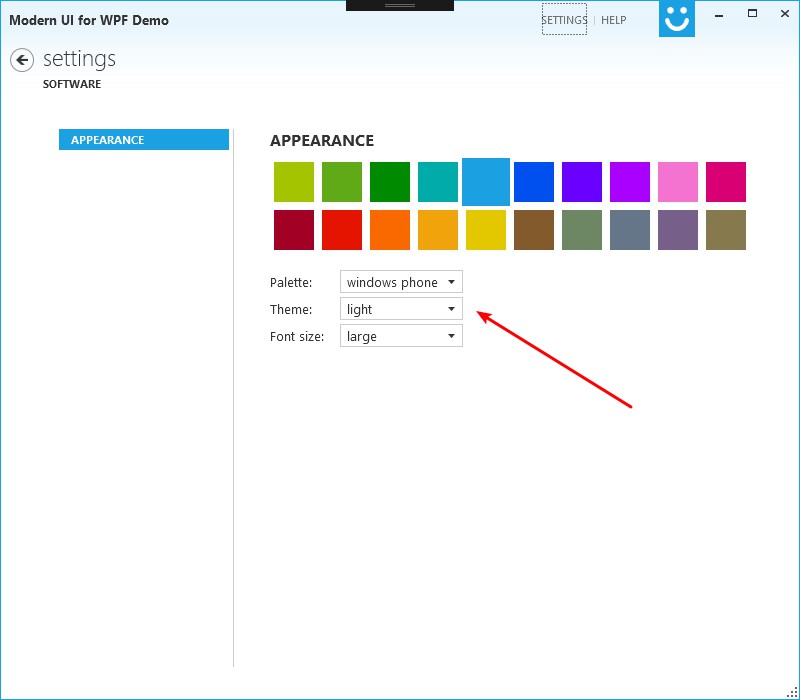
二 . 代码分析
代码路径 : FirstFloor.ModernUI.App / Content / SettingsAppearance.xaml
1.关键 XAML 代码
<ComboBox Grid.Row="1" Grid.Column="1" ItemsSource="{Binding Themes}" SelectedItem="{Binding SelectedTheme, Mode=TwoWay}" DisplayMemberPath="DisplayName" VerticalAlignment="Center" Margin="0,0,0,4" />形如 Property = "{ Binding fieldname }" 这种格式的绑定,都是将控件属性绑定到当前 用户控件 DataContext 属性的对象中的。
那我们再打开 SettingsAppearance.cs 文件看一看后台代码:
public partial class SettingsAppearance : UserControl
{
    public SettingsAppearance()
    {
        InitializeComponent();
        // a simple view model for appearance configuration
        this.DataContext = new SettingsAppearanceViewModel();
    }
}
很显然,控件的 DataContext 属性引用到了 new SettingsAppearanceViewModel();
那再F12进去分析一下 SettingsAppearanceViewModel 这个类有哪些相关的东西:
2. Themes
首先看一下 Themes 这个属性 ,它是一个 LinkCollection 对象,并返回了 themes 字段:
public LinkCollection Themes
{
    get { return this.themes; }
}
LinkCollection 继承自 ObservableCollection<Link> ,百度一下 ObservableCollection这个类,就知道它其实也是用来实现数据绑定的,当集合内的元素发生变化时,集合就会通知外部调用者,此处不多赘述。
此外,SettingsAppearance 类的构造函数中向 themes 添加了一些主题,这里就不贴代码了。
3. SelectedTheme
public Link SelectedTheme
{
    get { return this.selectedTheme; }
    set
    {
        if (this.selectedTheme != value) {
            this.selectedTheme = value;
            OnPropertyChanged("SelectedTheme");
            // and update the actual theme
            AppearanceManager.Current.ThemeSource = value.Source;
        }
    }
}
当 SelectedTheme 更改时,set 方法会更改当前的主题源。
对 ThemeSource 这个属性一直F12下去,会找到一个方法
SetThemeSource:
private void SetThemeSource(Uri source, bool useThemeAccentColor)
{
    if (source == null) {
        throw new ArgumentNullException("source");
    }

    var oldThemeDict = GetThemeDictionary();
    var dictionaries = Application.Current.Resources.MergedDictionaries;
    var themeDict = new ResourceDictionary { Source = source };

    // if theme defines an accent color, use it
    var accentColor = themeDict[KeyAccentColor] as Color?;
    if (accentColor.HasValue) {
        // remove from the theme dictionary and apply globally if useThemeAccentColor is true
        themeDict.Remove(KeyAccentColor);

        if (useThemeAccentColor) {
            ApplyAccentColor(accentColor.Value);
        }
    }

    // add new before removing old theme to avoid dynamicresource not found warnings
    dictionaries.Add(themeDict);

    // remove old theme
    if (oldThemeDict != null) {
        dictionaries.Remove(oldThemeDict);
    }

    OnPropertyChanged("ThemeSource");
}
看一下第一个函数 GetThemeDictionary:
private ResourceDictionary GetThemeDictionary()
{
    // determine the current theme by looking at the app resources and return the first dictionary having the resource key 'WindowBackground' defined.
    return (from dict in Application.Current.Resources.MergedDictionaries
            where dict.Contains("WindowBackground")
            select dict).FirstOrDefault();
}
这个函数使用 LINQ 从 App.xaml 定义的 MergedDictionaries 中搜索主题资源
看一下 App.xaml 里面的代码:
<Application x:Class="FirstFloor.ModernUI.App.App"
             xmlns="http://schemas.microsoft.com/winfx/2006/xaml/presentation"
             xmlns:x="http://schemas.microsoft.com/winfx/2006/xaml"
             StartupUri="MainWindow.xaml">
    <Application.Resources>
        <ResourceDictionary>
            <ResourceDictionary.MergedDictionaries>
                <ResourceDictionary Source="/FirstFloor.ModernUI;component/Assets/ModernUI.xaml" />
                <ResourceDictionary Source="/FirstFloor.ModernUI;component/Assets/ModernUI.Light.xaml" />
            </ResourceDictionary.MergedDictionaries>
        </ResourceDictionary>
    </Application.Resources>
</Application>
这里面预定义了两个资源,去相应的地方找到这两个资源文件,其中 ModernUI.Light.xaml 内有大量包含 "WindowBackground" 字符串的 Key ,那这个显然就是主题资源文件了。
接下来的逻辑就比较好理解了:调整 AccentColor ,加入新的主题,移除旧的主题,最后通知属性更改。
4. 动画
那主题更改的渐变动画效果是在哪里触发的呢?
看一下 MainWindon 的基类 MorderWindow , 这里面监听了 AppearanceManager.Current.PropertyChanged 事件:
/// <summary>
/// Initializes a new instance of the <see cref="ModernWindow"/> class.
/// </summary>
public ModernWindow()
{
    // 其他代码
    ...
    // listen for theme changes
    AppearanceManager.Current.PropertyChanged += OnAppearanceManagerPropertyChanged;
}

...

private void OnAppearanceManagerPropertyChanged(object sender, PropertyChangedEventArgs e)
{
    // start background animation if theme has changed
    if (e.PropertyName == "ThemeSource" && this.backgroundAnimation != null) {
        this.backgroundAnimation.Begin();
    }
}
再找一下 backgroundAnimation 赋值的地方
/// <summary>
/// When overridden in a derived class, is invoked whenever application code or internal processes call System.Windows.FrameworkElement.ApplyTemplate().
/// </summary>
public override void OnApplyTemplate()
{
    base.OnApplyTemplate();

    // retrieve BackgroundAnimation storyboard
    var border = GetTemplateChild("WindowBorder") as Border;
    if (border != null) {
        this.backgroundAnimation = border.Resources["BackgroundAnimation"] as Storyboard;

        if (this.backgroundAnimation != null) {
            this.backgroundAnimation.Begin();
        }
    }
}
backgroundAnimation 其实是从资源文件中加载的,找到 ModernWindow.xaml 文件,相关代码:
<Border.Resources>
    <Storyboard x:Key="BackgroundAnimation">
        <ColorAnimation Storyboard.TargetName="WindowBorderBackground" Storyboard.TargetProperty="Color" To="{DynamicResource WindowBackgroundColor}" Duration="0:0:.6" />
    </Storyboard>
</Border.Resources>
到这里整个主题更换的流程就很明朗了。
三 、总结
总结一下主题更换的简要流程:
- ComboBox 绑定 SettingsAppearanceViewModel 类中的 Themes 和 SelectedTheme 两个字段。
- SettingsAppearanceViewModel.SelectedTheme在 set 的时候更改 AppearanceManager.Current.ThemeSource的值。
- AppearanceManager.Current.ThemeSource 被更改时进行主题资源的置换以及其他一系列操作,最后触发 AppearanceManager.Current.PropertyChanged 事件
- ModernWindow 中绑定到 AppearanceManager.Current.PropertyChanged 事件的函数 OnAppearanceManagerPropertyChanged 被触发,打开 backgroundAnimation 动画。
四、下一篇参考本流程来自己实现一个简单的主题更换功能
WPF Modern UI 主题更换原理的更多相关文章
- (转)基于 WPF + Modern UI 的 公司OA小助手 开发总结
原文地址:http://www.cnblogs.com/rainlam163/p/3365181.html 前言: 距离上一篇博客,整整一个月的时间了.人不能懒下来,必须有个阶段性的总结,算是对我这个 ...
- 基于 WPF + Modern UI 的 公司OA小助手 开发总结
前言: 距离上一篇博客,整整一个月的时间了.人不能懒下来,必须有个阶段性的总结,算是对我这个阶段的一个反思.人只有在总结的过程中才会发现自己的不足. 公司每天都要在OA系统上上班点击签到,下班点击签退 ...
- WPF实现主题更换的简单DEMO
WPF实现主题更换的简单DEMO 实现主题更换功能主要是三个知识点: 动态资源 ( DynamicResource ) INotifyPropertyChanged 接口 界面元素与数据模型的绑定 ( ...
- WPF动态改变主题颜色
原文:WPF动态改变主题颜色 国内的WPF技术先行者周银辉曾介绍过如何动态改变应用程序的主题样式,今天我们来介绍一种轻量级的改变界面风格的方式--动态改变主题色. 程序允许用户根据自己的喜好来对界面进 ...
- WPF的UI虚拟化
许多时候,我们的界面上会呈现大量的数据,如包含数千条记录的表格或包含数百张照片的相册.由于呈现UI是一件开销比较大的动作,一次性呈现数百张照片就目前的电脑性能来说是需要占用大量内存和时间的.因此需要对 ...
- WPF相关UI库
免费控件库: 1.Extended WPF Toolkit 官方拓展控件 http://wpftoolkit.codeplex.com/ 2.avalondock 可停靠布局(wpf toolkit包 ...
- 使用AsyncTask异步更新UI界面及原理分析
概述: AsyncTask是在Android SDK 1.5之后推出的一个方便编写后台线程与UI线程交互的辅助类.AsyncTask的内部实现是一个线程池,所有提交的异步任务都会在这个线程池中的工作线 ...
- WPF多线程UI更新——两种方法
WPF多线程UI更新——两种方法 前言 在WPF中,在使用多线程在后台进行计算限制的异步操作的时候,如果在后台线程中对UI进行了修改,则会出现一个错误:(调用线程无法访问此对象,因为另一个线程拥有该对 ...
- 2D UI和3D UI的工作原理
2D UI的工作原理 UI控件的位置在UI Root 的红框(视窗)上,也就是UI控件的z轴,相机的z轴,UI Root的z轴都是0,因为2D UI都是纯粹的2D图片按层次显示,不会不出现三维立体效果 ...
随机推荐
- vs链接错误解决方法
常见引起链接错误的主要原因是由于项目不能找到所需的动态库的路径: 这里介绍一下引用第三方动态库的配置方法: 方法一: vs加载动态库需要先把动态库拷贝到exe所在文件夹,再修改项目属性: 链接器-&g ...
- App设计:消息推送和界面路由跳转
概要 app消息推送.显示通知栏,点击跳转页面是很一般的功能了,下面以个推为例演示push集成,消息处理模块及app内部路由模块的简单设计. 推送 推送sdk集成 集成sdk步骤根据文档一步步做就行了 ...
- 教你一招用 IDE 编程提升效率的骚操作!
阅读本文大概需要 3 分钟. IDEA 有个很牛逼的功能,那就是后缀补全(不是自动补全),很多人竟然不知道这个操作,还在手动敲代码. 这个功能可以使用代码补全来模板式地补全语句,如遍历循环语句(for ...
- 3D轮播图
<!DOCTYPE html> <html lang="en"> <head> <meta charset="UTF-8&quo ...
- Python - Fabric简介
1 - Fabric Fabric是一个Python的库,提供了丰富的同SSH交互的接口,可以用来在本地或远程机器上自动化.流水化地执行Shell命令. 非常适合用来做应用的远程部署及系统维护.简单易 ...
- [学习笔记]利用e-debug和GetWindowTextA破解CM课件
本课是针对注册时候的报错弹窗不是信息框MessageBox,而是窗体的情况 首先打开课件看一下 既然课件是个易语言程序,那使用E-DEBUG试试 E-DEBUG打开课件,点击“start”,课件弹出登 ...
- Activity的生命周期函数
前言: 上一篇文章写了关于Activity生命周期和生命周期状态的介绍,这一篇文章给大家聊聊Activity生命周期函数. 主Activity: 应用程序的入口一般都是桌面应用程序图标,用户点击应用图 ...
- Google的java工具类Guava
前言 google开发java项目肯定也不想重复造轮子,所以肯定也有工具类,就是它了:Guava 我将举例几个实际的例子,发挥这个工具类好用的功能.更多的方法和功能,还有内部的实现可以直接参考http ...
- SpringCloud学习6-如何创建一个服务消费者consumer
上一节如何创建一个服务提供者provider已经启动了一个provider的server,提供用户信息查询接口.接下来,我们启动另一个provider,由于是同一台机器本地测试,我们换一个端口 --s ...
- MySQL索引建立和使用的基本原则
合理设计和使用索引 在关键字段的索引上,建与不建索引,查询速度相差近100倍. 差的索引和没有索引效果一样. 索引并非越多越好,因为维护索引需要成本. 每个表的索引应在5个以下,应合理利用 ...