
(转载)Eclipse报错:java.lang.ClassNotFoundException: ContextLoaderListener
转载自:http://www.cnblogs.com/love540376/p/5527757.html
Eclipse中tomcat部署工程启动后报错:
- 严重: Error configuring application listener of class org.springframework.web.context.ContextLoaderListener
- java.lang.ClassNotFoundException: org.springframework.web.context.ContextLoaderListener
- at org.apache.catalina.loader.WebappClassLoader.loadClass(WebappClassLoader.java:1678)
- at org.apache.catalina.loader.WebappClassLoader.loadClass(WebappClassLoader.java:1523)
- at org.apache.catalina.core.DefaultInstanceManager.loadClass(DefaultInstanceManager.java:415)
- at org.apache.catalina.core.DefaultInstanceManager.loadClassMaybePrivileged(DefaultInstanceManager.java:397)
- at org.apache.catalina.core.DefaultInstanceManager.newInstance(DefaultInstanceManager.java:118)
- at org.apache.catalina.core.StandardContext.listenerStart(StandardContext.java:4660)
- at org.apache.catalina.core.StandardContext$1.call(StandardContext.java:5226)
- at org.apache.catalina.core.StandardContext$1.call(StandardContext.java:5221)
- at java.util.concurrent.FutureTask$Sync.innerRun(FutureTask.java:303)
- at java.util.concurrent.FutureTask.run(FutureTask.java:138)
- at java.util.concurrent.ThreadPoolExecutor$Worker.runTask(ThreadPoolExecutor.java:886)
- at java.util.concurrent.ThreadPoolExecutor$Worker.run(ThreadPoolExecutor.java:908)
- at java.lang.Thread.run(Thread.java:662)
问题背景:
工程为maven工程,ContextLoaderListener类位于spring-web-3.1.0.RELEASE.jar包中。检查了maven的pom.xml,依赖引入正常。在工程Maven Dependencies视图中也能看到spring-web-3.1.0.RELEASE.jar包被正常引入进来了。
错误原因:
进入到tomcat的部署路径.metadata\.plugins\org.eclipse.wst.server.core\tmp0\wtpwebapps\下检查了一下,发现工程部署后在WEB-INF文件夹下没有生成lib目录,正常情况下,会生成lib目录并把工程的所有依赖jar包都部署到该目录下。
解决方案:
1.右键点击项目--选择Properties
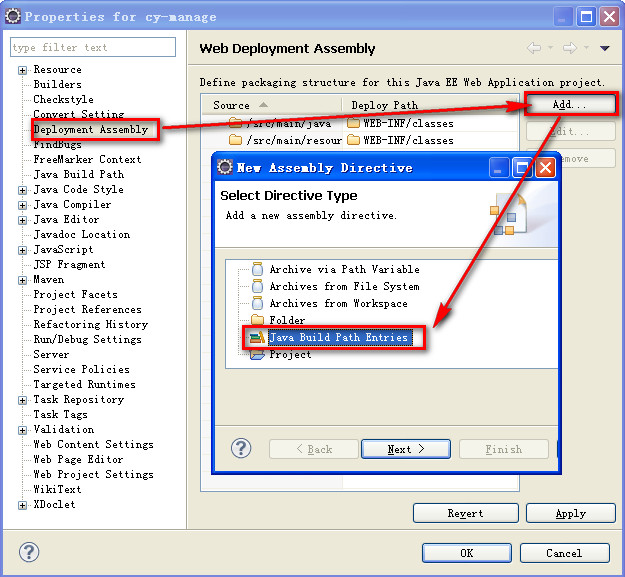
选择Deployment Assembly,在右边点击Add按钮,在弹出的窗口中选择Java Build Path Entries。如下图所示:
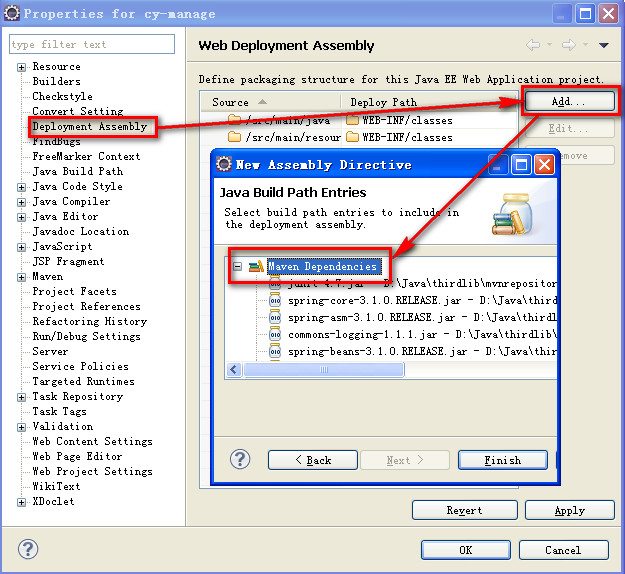
2.点击Next,选择Maven Dependencies
3.点击Finish,然后可以看到已经把Maven Dependencies添加到Web应用结构中了
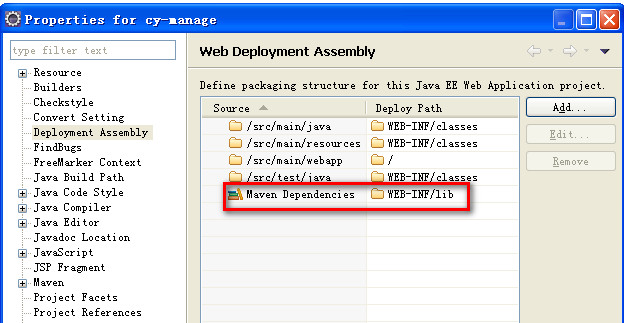
操作完后,重新部署工程,不再报错了。然后我们再到.metadata\.plugins\org.eclipse.wst.server.core\tmp0\wtpwebapps\目录下,发现工程WEB-INF目录下自动生成了lib目录,并且所有的依赖jar包也都已经部署进来。问题因此解决。
(转载)Eclipse报错:java.lang.ClassNotFoundException: ContextLoaderListener的更多相关文章
- 【ContextLoaderListener】Web项目启动报错java.lang.ClassNotFoundException: ContextLoaderListener
错误原因: 进入到tomcat的部署路径.metadata\.plugins\org.eclipse.wst.server.core\tmp0\wtpwebapps\下检查了一下,发现工程部署后在WE ...
- maven web 项目中启动报错 Java.lang.ClassNotFoundException: org.springframework.web.servlet.DispatcherServlet
主要原因是maven项目里面的jar包吗,没有导入到项目中 maven web 项目中启动报错 Java.lang.ClassNotFoundException: org.springframewor ...
- 项目报错java.lang.ClassNotFoundException: org.common.SessionListener
现象:项目报错java.lang.ClassNotFoundException: org.common.SessionListener,并且myeclipse左侧Package Explorer中项目 ...
- 报错:java.lang.ClassNotFoundException: io.opentracing.util.GlobalTracer
报错:java.lang.ClassNotFoundException: io.opentracing.util.GlobalTracer 近来在做一个在线教育的项目,课程信息放在数据库,而视频放在阿 ...
- idea数据库报错java.lang.ClassNotFoundException: com.mysql.jdbc.Driver
通过idea操作数据库,进行数据的增加,运行时报错java.lang.ClassNotFoundException: com.mysql.jdbc.Driver 原因:没有导入mysql-connec ...
- maven 项目启动tomcat报错 java.lang.ClassNotFoundException: org.springframework.web.context.ContextLoaderListener
maven项目启动tomcat报错: java.lang.ClassNotFoundException: org.springframework.web.context.ContextLoaderLi ...
- eclipse中启动tomcat报错 java.lang.ClassNotFoundException
之前启动还好好的,某次启动tomcat就莫名其妙的报了这个java.lang.ClassNotFoundException的错. 检查maven依赖包,发现这个类是存在的. 然后一通clean操作 ...
- maven创建spring项目之后,启动报错java.lang.ClassNotFoundException: org.springframework.web.context.ContextLoaderListener
出错情景:maven中已经加载了spring的核心包,但是项目启动时,报错: org.apache.catalina.core.StandardContext listenerStart严重: Err ...
- 【web.xml】报错java.lang.ClassNotFoundException: org.springframework.web.context.ContextLoaderListener
今天搭建新的项目,虽然在web.xml中配置了ContextLoaderListener以及IntrospectorCleanupListener 如下: web.xml中部分代码: <!-- ...
- eclipse下执行maprdeuc程序报错 java.lang.ClassNotFoundException
最近遇到一个问题,不知怎么突然运行hadoop的map程序报错,困扰了我很久,现在来给大家分享分享.. 错误信息 2017-05-18 21:34:22,104 INFO [main] client. ...
随机推荐
- 修复 Xcode 错误 “The identity used to sign the executable is no longer valid”
如图: 解决方法来自:http://stackoverflow.com/questions/7088441/the-identity-used-to-sign-the-executable-is-no ...
- New Concept English three (59)
24 45 People tend to amass possessions, sometimes without being aware of doing so. Indeed they can h ...
- FMDB的操作(转),这篇比我写的好
直接看吧 http://blog.devtang.com/blog/2012/04/22/use-fmdb/
- 网络基础之网络协议篇---CS架构--网络通信--osi 协议---套接字socket--粘包
1 C\S 客户端/服务器架构: .硬件 C/S架构 (打印机) .软件 C/S 架构 互联网中处处是C/S架构 如黄色网站是服务端,你的浏览器是客户端(B/S架构也是C/S架构的一种) 腾讯作为服务 ...
- spring学习-3
spring的自动装配 spring IOC容器可以自动装配bean,只需要在bean的autowire属性指定自动装配的模式. 模式: 1.byType:根据类型自动装配.根据bean的类型和当前b ...
- xdebug的安装测试
1.下载 php -version PHP 7.2.0 (cli) (built: Dec 7 2017 23:07:46) ( NTS DEBUG ) 如果PHP版本是7.2以上的必须要下载Xdeb ...
- 修改vmware中的FreeBSD配置
在运行虚拟机之前,将操作系统安装文件挂载到CD-ROM中,然后,启动虚拟机,并用root用户进入操作系统.做如下操作: 1:挂载光盘文件: #mount /cdrom 2:运行系统安装程序,就可以显示 ...
- POJ - 3150 :Cellular Automaton(特殊的矩阵,降维优化)
A cellular automaton is a collection of cells on a grid of specified shape that evolves through a nu ...
- Yii的常用URL和渲染方法
当前页面url Yii::app()->request->url;跳转前一个页面url $this->redirect(Yii::app()->request->url ...
- centos安装yum源
网易(163)yum源是国内最好的yum源之一 ,无论是速度还是软件版本,都非常的不错,将yum源设置为163yum,可以提升软件包安装和更新的速度,同时避免一些常见软件版本无法找到.具体设置方法如下 ...