
Using Fetch to rewrite JSON
截图如下:
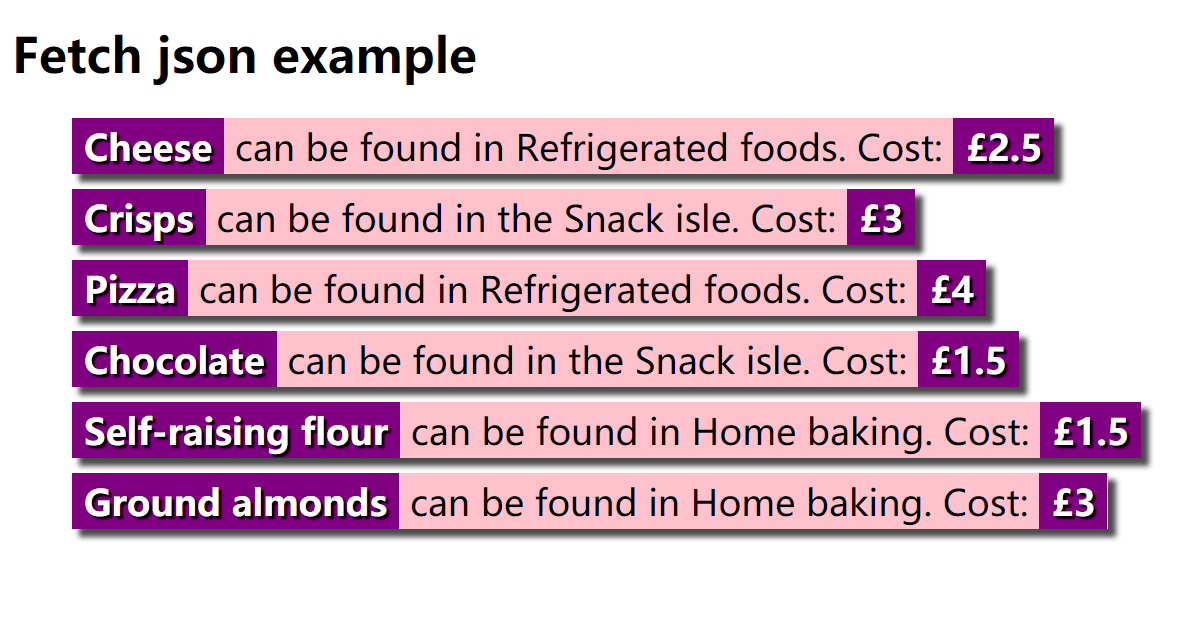
html代码如下:
 <!DOCTYPE html>

 <html>

   <head>

     <meta charset="utf-8">

     <meta http-equiv="X-UA-Compatible" content="IE=edge,chrome=1">

     <meta name="viewport" content="width=device-width">

     <title>Fetch json example</title>

 <style type="text/css">

 html {

   font-family: sans-serif;

 }

 ul {

   list-style-type: none;

   display: flex;

   flex-flow: column;

   align-items: flex-start;

 }

 li {

   margin-bottom: 10px;

   background-color: pink;

   font-size: 150%;

   border-top: 3px solid pink;

   border-bottom: 3px solid pink;

   box-shadow: 5px 5px 5px rgba(0,0,0,0.7);

 }

 strong {

   background-color: purple;

   color: white;

   padding: 0 8px;

   border-top: 3px solid purple;

   border-bottom: 3px solid purple;

   text-shadow: 2px 2px 1px black;

 }

 </style>

     <!--[if lt IE 9]>

       <script src="//html5shiv.googlecode.com/svn/trunk/html5.js"></script>

     <![endif]-->

   </head>

   <body>

     <h1>Fetch json example</h1>

     <ul>

     </ul>

   </body>

   <script>

     var myList = document.querySelector('ul');

     fetch('https://raw.githubusercontent.com/KylinBio-healthTechnology/lw/master/x.json')

     .then(function(response) {

       if (!response.ok) {

         throw new Error("HTTP error, status = " + response.status);

       }

       return response.json();

     })

     .then(function(json) {

       for(var i = 0; i < json.products.length; i++) {

         var listItem = document.createElement('li');

         listItem.innerHTML = '<strong>' + json.products[i].Name + '</strong>';

         listItem.innerHTML +=' can be found in ' + json.products[i].Location + '.';

         listItem.innerHTML +=' Cost: <strong>£' + json.products[i].Price + '</strong>';

         myList.appendChild(listItem);

       }

     })

     .catch(function(error) {

       var p = document.createElement('p');

       p.appendChild(

         document.createTextNode('Error: ' + error.message)

       );

       document.body.insertBefore(p, myList);

     });

   </script>

 </html>
json文件如下:https://raw.githubusercontent.com/KylinBio-healthTechnology/lw/master/x.json
 { "products" : [

   { "Name": "Cheese", "Price" : 2.50, "Location": "Refrigerated foods"},

   { "Name": "Crisps", "Price" : 3, "Location": "the Snack isle"},

   { "Name": "Pizza", "Price" : 4, "Location": "Refrigerated foods"},

   { "Name": "Chocolate", "Price" : 1.50, "Location": "the Snack isle"},

   { "Name": "Self-raising flour", "Price" : 1.50, "Location": "Home baking"},

   { "Name": "Ground almonds", "Price" : 3, "Location": "Home baking"}

 ]}
Using Fetch to rewrite JSON的更多相关文章
- Rewrite JSON with Fetch
1.重写json请求部分:HTML文件代码如下:<html>......<script> var myList = document.querySelector(‘ul‘); ...
- Rewrite JSON project with Fetch
上传 JSON 数据 使用fetch()来发布json编码的数据. var url = 'https://example.com/profile'; var data = {username: 'ex ...
- Rewrite json
<!DOCTYPE html> <html> <head> <meta charset="utf-8"> <meta http ...
- express后端和fetch前端的json数据传递
在使用express做后端,前端使用fetch API来请求后端时,一般都是用 JSON 数据进行通信的. 下面是一个简单的例子: 前端: if (up) { var passwordAgain = ...
- react之fetch请求json数据
Fetch下载 npm install whatwg-fetch -S Fetch请求json数据 json文件要放在public内部才能被检索到
- react 项目实战(二)创建 用户添加 页面 及 fetch请求 json-server db.json -w -p 8000
1.安装 路由 npm install -S react-router@3.x 2.新增页面 我们现在的应用只有一个Hello React的页面,现在需要添加一个用于添加用户的页面. 首先在/src目 ...
- [Angular-Scaled Web] 8. Using $http to load JSON data
Using the $http service to make requests to remote servers. categories-model.js: angular.module('egg ...
- 你不需要jQuery(三):新AJAX方法fetch()
XMLHttpRequest来完成ajax有些老而过时了. fetch()能让我们完成类似 XMLHttpRequest (XHR) 提供的ajax功能.它们之间的主要区别是,Fetch API 使用 ...
- 腾讯IVWEB团队:前端 fetch 通信
欢迎大家关注腾讯云技术社区-博客园官方主页,我们将持续在博客园为大家推荐技术精品文章哦~ 作者:villainthr 文章摘自: 前端小吉米 随着前端异步的发展, XHR 这种耦合方式的书写不利于前端 ...
随机推荐
- ssh服务的最佳实践
工作中ssh的最佳实践: 不要使用默认端口 禁止使用protocol version 1 (默认centos6/7已经禁止使用第一版了,但是centos5可能还有在用第一版本) 限制可登陆用户 设定空 ...
- python数据库编程小应用
python DB api 数据库连接对象connection数据库交互对象cursor数据库异常类exceptions 流程:开始创建connection获取cursor执行查询.执行命令.获取数据 ...
- Linux驱动模块的Makefile分析【转】
本文转载自:http://blog.chinaunix.net/uid-29307109-id-3993784.html 1. 获取内核版本 当设备驱动需要同时支持不同版本内核时,在编译阶段,内核模块 ...
- ADT Bundle下载和安装
下载官方adt集成包(即ADT Bundle)并安装. Android官方已经推出adt集成包,包含了eclipse.sdk和SDK Manager,只需解压出来,然后就能运行Eclipse. 官方集 ...
- 调试工具--console用法收藏
1.使用console进行性能测试和计算代码运行时间:http://www.cnblogs.com/0603ljx/p/4387628.html 2.console命令详解:http://www.cn ...
- Springboot2.x 拦截器
一,单个拦截器,实现接口 HandlerInterceptor @Component public class MyInterceptor1 implements HandlerIntercepto ...
- 【第三十八章】 springboot+docker(maven)
回顾上一章的整个部署过程: 使用"mvn install"进行打包jar 将jar移动到与Dockerfile文件相同的文件夹下 编写Dockerfile文件 使用"do ...
- .Net页面局部更新的思考
最近在修改以前做的模块,添加一个新功能.整理了下才发现重用率很低,大部分的东西还是需要重新写.功能里用到了局部更新,所有整理一下一路来实现局部更新的解决方案及改进. 我接触的项目开发大多是以Asp.n ...
- HDU 6127 Hard challenge(扫描线)
http://acm.hdu.edu.cn/showproblem.php?pid=6127 题意: 有n个点,每个点有一个$(x,y)$坐标和一个权值,任意两点之间都有连线,并且连线的权值为两个顶点 ...
- Parallel.For with await and wait()
static void Parallel2() { ParallelLoopResult result = Parallel.For(, , i => { Log($"S:{i} &q ...