
c#引用c++dll和c++导出类出现的各种问题
最近对一些第三方类库进行c++托管以便c#调用 因为之前没弄过,出现各种各样的问题
fatal error LNK1104: 无法打开文件“xxx.lib”或者xxx.dll 等等等
总结:
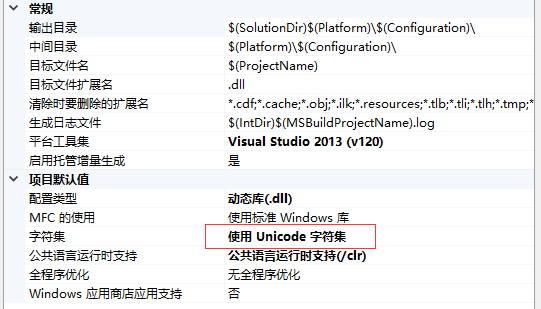
1.字符集:设置一样
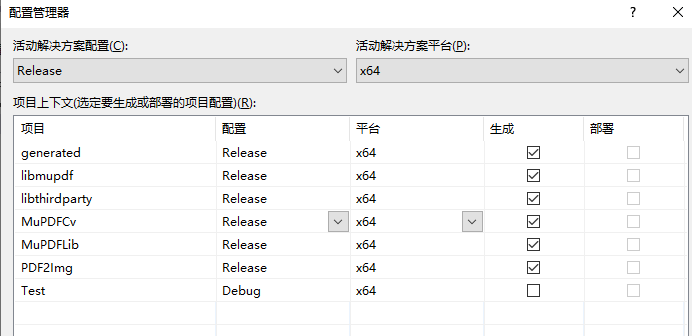
2.平台:设置一样,比如32位 就都设置32位,这里千万要注意:设置平台的时候要一个个看清楚才行 不然在上面设置了解决方案,下面项目有些没反应(新建的)
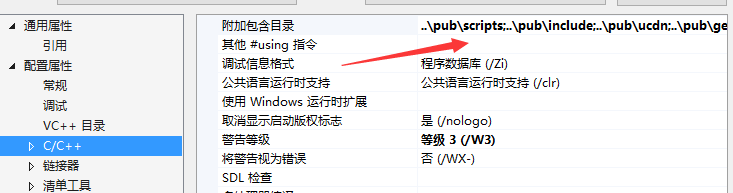
3.引用进来的dll还有头文件,如果头文件中引用了其他的文件,记得通通给它导进来了
4.这样还不一定行,还会出现各种未识别,未能解析提示,看你的要引用的头文件是不是需要引用其他的.lib文件 ,都引用进来试试

5.好了,没报错 但是你创建的c#引用c++dll报错了,未能加载dll,那你要看看托管的工程dll和托管要包装的dll有没有复制到c#项目运行目录下了
6.如果还是不行 c#的项目平台是不是都是一样的
7.还是不行,用管理员运行你的vs 或者可以先用管理员运行exe看行不行。

类型转换
c++
// ClassLibrary1.h

#pragma once

#pragma comment (lib,"libthirdparty.lib")

#pragma comment (lib,"libmupdf.lib")

#pragma comment (lib,"MuPDFLib-x64.lib")

#include"..\MuPDFlib\MuPDFClass.h"

using namespace System;

namespace MuPDFCv {

    public ref class MuPDFLG

    {

        // TODO:  在此处添加此类的方法。

    public:

        MuPDFLG();

        int TLoadPdf(String ^ filename, String ^ password);

        int TLoadPage(int pageNumber);

        int TGetCount();

        unsigned char * TGetBitmap(int  width, int  height, float dpiX, float dpiY, int rotation, int colorspace, bool rotateLandscapePages, bool convertToLetter, int & pnLength, int maxSize);

        int Test(int  width);

    private:

        MuPDFClass * m_pMuPDFClass;

    };

}
// 这是主 DLL 文件。

#include "stdafx.h"

#include "MuPDFCv.h"

using namespace System::Runtime::InteropServices;

//#include <msclr\marshal.h>

//using namespace msclr::interop;

#include <vcclr.h>

MuPDFCv::MuPDFLG::MuPDFLG()

{

    m_pMuPDFClass = new MuPDFClass();

}

int MuPDFCv::MuPDFLG::Test(int width)

{

    width++;

    return ;

}

unsigned char * MuPDFCv::MuPDFLG::TGetBitmap(int width, int  height, float dpiX, float dpiY, int rotation, int colorspace, bool rotateLandscapePages, bool convertToLetter, int & pnLength, int maxSize)

{

    unsigned char *pData =

        m_pMuPDFClass->GetBitmap(width, height, dpiX, dpiY, rotation, colorspace, rotateLandscapePages, convertToLetter, pnLength, maxSize);

    return pData;

}

int MuPDFCv::MuPDFLG::TLoadPdf(String ^ filename, String ^ password)

{

    // 将string转换成C++能识别的指针

    /*char* strFilename = marshal_as<char*>(filename);

    char* strPassword = marshal_as<char*>(password);*/

    char* strFilename = (char*)(void*)Marshal::StringToHGlobalAnsi(filename);

    char* strPassword = (char*)(void*)Marshal::StringToHGlobalAnsi(password);

    //Ptr

    return m_pMuPDFClass->LoadPdf(strFilename, strPassword);

}

int MuPDFCv::MuPDFLG::TLoadPage(int pageNumber)

{

    return m_pMuPDFClass->LoadPage(pageNumber);

}

int MuPDFCv::MuPDFLG::TGetCount()

{

    return m_pMuPDFClass->_PageCount;

}
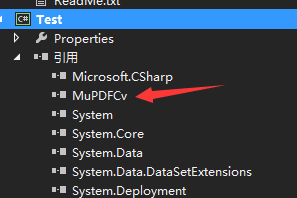
c# 怎么引用的:先直接引用dll
代码:
using MuPDFCv;

using System;

using System.Collections.Generic;

using System.ComponentModel;

using System.Data;

using System.Drawing;

using System.Linq;

using System.Runtime.InteropServices;

using System.Text;

using System.Threading.Tasks;

using System.Windows.Forms;

namespace Test

{

    public partial class Form1 : Form

    {

        public Form1()

        {

            InitializeComponent();

        }

        DateTime _StartDateTime;

        private void button1_Click(object sender, EventArgs e)

        {

            _StartDateTime = DateTime.Now;

            int j;

            //"d:\\1.pdf"

            string path = @"D:\test\pdf\45x20 number without hologram.pdf";

            MuPDFLG mup = new MuPDFLG();

            mup.TLoadPdf(path, null);

            int count = mup.TGetCount();

            mup.TLoadPage();

            int h = ; //CPdf.GetHeight();//得到pdf默认高度

            int w = ; //CPdf.GetWidth();

            //CPdf.SetAlphaBits(4);

            //int iLength = 0;//总字节数w*h*(ch+alph)

            float iDipX = ;//如果指定了w,不起作用

            float iDipY = ;//如果指定了h,不起作用

            int rot = ;//-90,90,180

            int color = ;//0:rgba   1:ga

            byte[] date;

            unsafe

            {

                int iLength = ;

                byte* intP = mup.TGetBitmap(w, h, iDipX, iDipY, rot, color, false, false, &iLength, );

                date = new byte[iLength];

                //用下面的赋值多200多毫秒

                //for (int i = 0; i < iLength; i++)

                //{

                //    date[i] = *intP;

                //    intP++;

                //}

                //用这个用时较少

                Marshal.Copy((IntPtr)intP, date, , iLength);

                    //Marshal.Copy(intP, date, 0, iLength);

            }

            //mup.TGetBitmap(ref w, ref h, iDipX, iDipY, rot, color, false, false, ref iLength, 1000000);

            //间隔时间

            TimeSpan subTract = DateTime.Now.Subtract(_StartDateTime);

            double _ZhTime = subTract.TotalMilliseconds;

            label1.Text = _ZhTime.ToString();

        }

    }

}
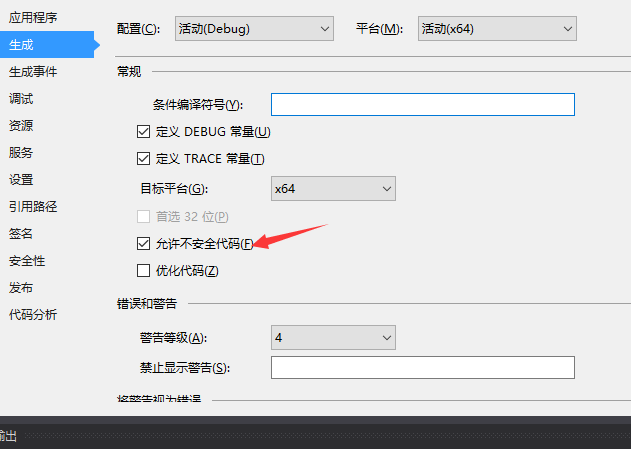
unsafe用这个可以在里面写非托管代码 这里要在项目里设置一下
c#引用c++dll和c++导出类出现的各种问题的更多相关文章
- 如何调用DLL中的导出类
之前在网上一直查不到关于把类打包成dll文件的程序,今天自己写了个测试程序,供大家参考 一.生成类的dll文件 1.我是在vs2008上测试的,建立工程,在选择建立何种类型的工程的时候,勾上appli ...
- DLL导出类避免地狱问题的完美解决方案
DLL动态链接库是程序复用的重要方式,DLL可以导出函数,使函数被多个程序复用,DLL中的函数实现可以被修改而无需重新编译和连接使用该DLL的应用程序.作为一名面向对象的程序员,希望DLL可以导出类, ...
- (转)C++类库开发之导出类设计原则
上一篇博客详细陈述了类库开发的各个知识点(http://blog.csdn.net/z702143700/article/details/45989993),本文将进一步陈述,对于类库开发过程中导出类 ...
- DLL的概念、dll导出类(转贴)
1. DLL的概念DLL(Dynamic Linkable Library),动态链接库,可以向程序提供一些函数.变量或类.这些可以直接拿来使用.静态链接库与动态链接库的区别:(1)静态链接库与动态链 ...
- DLL入门浅析(4)——从DLL中导出类
转载自:http://www.cppblog.com/suiaiguo/archive/2009/07/20/90663.html 前面介绍了怎么从DLL中导出函数和变量,实际上导出类的方法也是大同小 ...
- DLL 导出类
MyMathFun.h #pragma once // #ifdef DLLCLASS_API // #define DLLCLASS_API _declspec(dllimport) // #els ...
- C++ DLL导出类 知识大全
在公司使用C++ 做开发,公司的大拿搭了一个C++的跨平台开发框架.在C++开发领域我还是个新手,有很多知识要学,比如Dll库的开发. 参考了很多这方面的资料,对DLL有一个基本全面的了解.有一个问题 ...
- MinGW dll导入导出类
dll不仅可以导入导出函数,还可以导入导出类.这篇文章就来介绍如何将类导入dll中并导出. 首先我们建立一个名为dll.cpp的文件(又是这种破名字),里面写上: #include <iostr ...
- 实现MFC扩展DLL中导出类和对话框
如果要编写模块化的软件,就要对对动态链接库(DLL)有一定的了解,本人这段时间在修改以前的软件时,决定把重复用的类和对话框做到DLL中,下面就从一个简单的例子讲起,如何实现MFC扩展DLL中导出类和对 ...
随机推荐
- [LeetCode] 281. The Skyline Problem 天际线问题
A city's skyline is the outer contour of the silhouette formed by all the buildings in that city whe ...
- Spring Cloud Zuul记录接口响应数据
系统在生产环境出现问题时,排查问题最好的方式就是查看日志了,日志的记录尽量详细,这样你才能快速定位问题. 如果需要在Zuul中进行详细的日志记录,这两种日志必不可少. API请求信息 API响应信息 ...
- Jquery表单插件使用
一般表单提交都是同步,可以使用$.post进行异步提交,但这样意味着当表单属性很多的时候,要写的js也很多($("#xxx").val()获取属性的值后,在放入$.post第二个参 ...
- Netty FixedChannelPool
如今越来越多的应用采用Netty作为服务端高性能异步通讯框架,对于客户端而言,大部分需求只需和服务端建立一条链接收发消息.但如果客户端需要和服务端建立多条链接的例子就比较少了. 最简单的实现就是一个f ...
- Java8 新特性 Stream 无状态中间操作
无状态中间操作 Java8 新特性 Stream 练习实例 中间无状态操作,可以在单个对单个的数据进行处理.比如:filter(过滤)一个元素的时候,也可以判断,比如map(映射)... 过滤 fil ...
- ReentrantLock和Condition实现生产者和消费者
一个生产者和一个消费者 public class ConditionTest { private static ReentrantLock lock = new ReentrantLock(); pr ...
- 【01】Saltstack:从零开始 Saltstack
写在前面的话 最近一直都在整理以前的乱七八糟的笔记,所以会有很多老旧的东西都会被拉出来重新遛遛.算是再度系统的进行学习. 关于 Saltstack 的一些概念 Saltstack 是基于 Python ...
- 【linux】CentOS 查看系统时间,修改时区
===============CentOS 7.6================ 1.查看系统时间 date 查看当前系统时间以及时区结果是: Mon Jul 8 09:23:31 UTC 2019 ...
- Java-Iterator遍历集合
import java.util.ArrayList; import java.util.HashMap; import java.util.HashSet; import java.util.Ite ...
- 排序算法Java代码实现(六)—— 堆排序
本片内容: 堆排序 堆排序 最大堆: 二叉堆是完全二叉树或者是近似完全二叉树, 当父结点的键值总是大于或等于任何一个子节点的键值时为最大堆.(父节点大于任何一个子节点) 算法思想: 把n个元素建立最大 ...