
Nginx 高级配置--关于favicon.ico
Nginx高级配置-官网logo之favicon.ico
作者:尹正杰
版权声明:原创作品,谢绝转载!否则将追究法律责任。
一.浏览器会默认帮咱们访问官网的图标
1>.浏览器访问网站"http://node101.yinzhengjie.org.cn/"

2>.使用curl命令访问
[root@node108.yinzhengjie.org.cn ~]# curl http://node101.yinzhengjie.org.cn/

<!DOCTYPE html>

<html>

    <head>

        <meta charset="UTF-8">

        <title>字体的样式</title>

        <style>

            .hello{

                color: red;

                font-size: 30px;

                font-family: "curlz mt","华文彩云","arial", "微软雅黑";

            }

        </style>

    </head>

    <body>

        <p class="hello">2019尹正杰到此一游,在这里提前祝大家2020年新年快乐~</p>

    </body>

</html>

[root@node108.yinzhengjie.org.cn ~]#
3>.可以看到后台是有日志输出的
[root@node101.yinzhengjie.org.cn ~]# > /yinzhengjie/softwares/nginx/logs/access_json.log             #在访问之前,建议大家把日志清空,看的比较明显哈~当然,我说的是测试环境。

[root@node101.yinzhengjie.org.cn ~]#

[root@node101.yinzhengjie.org.cn ~]# tail  -10f /yinzhengjie/softwares/nginx/logs/access_json.log        #可以看到浏览器的访问记录被记录了404错误信息,而使用命令行curl访问的确是200正常访问。

{"@timestamp":"2019-12-22T11:10:40+08:00","host":"172.30.1.101","clientip":"172.30.1.254","size":571,"responsetime":0.000,"upstreamtime":"-","upstreamhost":"-","http_host":
"node101.yinzhengjie.org.cn","uri":"/favicon.ico","domain":"node101.yinzhengjie.org.cn","xff":"-","referer":"http://node101.yinzhengjie.org.cn/","tcp_xff":"",
"http_user_agent":"Mozilla/5.0 (Windows NT 10.0; Win64; x64) AppleWebKit/537.36 (KHTML, like Gecko) Chrome/78.0.3904.108 Safari/537.36","status":"404"}
{"@timestamp":"2019-12-22T11:47:35+08:00","host":"172.30.1.101","clientip":"172.30.1.101","size":362,"responsetime":0.000,"upstreamtime":"-","upstreamhost":"-","http_host":

"node101.yinzhengjie.org.cn","uri":"/index.html","domain":"node101.yinzhengjie.org.cn","xff":"-","referer":"-","tcp_xff":"","http_user_agent":"curl/7.29.0","status":"200"}
3>.访问虚拟主机"http://www.yinzhengjie.org.cn/",发现也出现类似的问题

4>.访问虚拟主机"http://mobile.yinzhengjie.org.cn/",发现也出现类似的问题

5>.访问"favicon.ico"依旧会出现问题
favicon.ico文件是浏览器收藏网址时显示的图标,当客户端使用浏览器问页面时,浏览器会自己主动发起请求获取页面的favicon.ico文件,但是当浏览器请求的favicon.ico文件不存在时,服务器会记录404日志,而且浏览器也会显示404报错。
二.关于favicon.ico的解决办法
既然知道favicon.ico是啥了,那就好办了,找一个公司logo放上去就ok啦。
1>.从互联网上下载一个logo咱们自己来用于模拟试验
[root@node101.yinzhengjie.org.cn ~]# ll

total 0

[root@node101.yinzhengjie.org.cn ~]#

[root@node101.yinzhengjie.org.cn ~]# wget https://www.jd.com/favicon.ico

--2019-12-22 12:05:35--  https://www.jd.com/favicon.ico

Resolving www.jd.com (www.jd.com)... 220.194.105.131, 2408:8710:20:1140:8000::3

Connecting to www.jd.com (www.jd.com)|220.194.105.131|:443... connected.

HTTP request sent, awaiting response... 200 OK

Length: 25214 (25K) [image/x-icon]

Saving to: ‘favicon.ico’

100%[==================================================================================================================================>] 25,214      --.-K/s   in 0.002s

2019-12-22 12:05:35 (10.0 MB/s) - ‘favicon.ico’ saved [25214/25214]

[root@node101.yinzhengjie.org.cn ~]#

[root@node101.yinzhengjie.org.cn ~]# ll

total 28

-rw-r--r-- 1 root root 25214 Mar 25  2016 favicon.ico

[root@node101.yinzhengjie.org.cn ~]#

[root@node101.yinzhengjie.org.cn ~]#
[root@node101.yinzhengjie.org.cn ~]# wget https://www.jd.com/favicon.ico #下载京东的logo
[root@node101.yinzhengjie.org.cn ~]# ll

total 28

-rw-r--r-- 1 root root 25214 Mar 25  2016 favicon.ico

[root@node101.yinzhengjie.org.cn ~]#

[root@node101.yinzhengjie.org.cn ~]#

[root@node101.yinzhengjie.org.cn ~]# wget https://img.alicdn.com/tps/i3/T1OjaVFl4dXXa.JOZB-114-114.png

--2019-12-22 12:07:01--  https://img.alicdn.com/tps/i3/T1OjaVFl4dXXa.JOZB-114-114.png

Resolving img.alicdn.com (img.alicdn.com)... 111.206.4.120, 111.206.4.115

Connecting to img.alicdn.com (img.alicdn.com)|111.206.4.120|:443... connected.

HTTP request sent, awaiting response... 200 OK

Length: 4540 (4.4K) [image/png]

Saving to: ‘T1OjaVFl4dXXa.JOZB-114-114.png’

100%[==================================================================================================================================>] 4,540       --.-K/s   in 0s

2019-12-22 12:07:01 (1.07 GB/s) - ‘T1OjaVFl4dXXa.JOZB-114-114.png’ saved [4540/4540]

[root@node101.yinzhengjie.org.cn ~]#

[root@node101.yinzhengjie.org.cn ~]# ll

total 36

-rw-r--r-- 1 root root 25214 Mar 25  2016 favicon.ico

-rw-r--r-- 1 root root  4540 May 29  2017 T1OjaVFl4dXXa.JOZB-114-114.png

[root@node101.yinzhengjie.org.cn ~]#

[root@node101.yinzhengjie.org.cn ~]#
[root@node101.yinzhengjie.org.cn ~]# wget https://img.alicdn.com/tps/i3/T1OjaVFl4dXXa.JOZB-114-114.png #下载淘宝的logo
2>.编辑子配置文件
[root@node101.yinzhengjie.org.cn ~]# cat /yinzhengjie/softwares/nginx/conf.d/https.conf               #我们把京东的logo放在虚拟主机为"www.yinzhengjie.org.cn"中

server {

    listen 80;

    listen 443 ssl;

    server_name www.yinzhengjie.org.cn;

    location / {

       root /yinzhengjie/data/web/nginx/static;

       index index.html;

    }

    location = /favicon.ico {

       root /yinzhengjie/data/web/nginx/images/jd;

    }

}

[root@node101.yinzhengjie.org.cn ~]#

[root@node101.yinzhengjie.org.cn ~]# nginx -t

nginx: the configuration file /yinzhengjie/softwares/nginx/conf/nginx.conf syntax is ok

nginx: configuration file /yinzhengjie/softwares/nginx/conf/nginx.conf test is successful

[root@node101.yinzhengjie.org.cn ~]#

[root@node101.yinzhengjie.org.cn ~]# cat /yinzhengjie/softwares/nginx/conf.d/mobile.conf               #我们将淘宝下载的logo放在虚拟主机为"mobile.yinzhengjie.org.cn"中

server {

    listen 80;

    listen 443 ssl;

    server_name mobile.yinzhengjie.org.cn;

    ssl_certificate /yinzhengjie/softwares/nginx/certs/mobile.yinzhengjie.org.cn.crt;

    ssl_certificate_key /yinzhengjie/softwares/nginx/certs/mobile.yinzhengjie.org.cn.key;

    ssl_session_cache shared:sslcache:20m;

    ssl_session_timeout 10m;

    location / {

       root /yinzhengjie/data/web/nginx/mobile;

       index index.html;

    }

    location /favicon.ico {

       root /yinzhengjie/data/web/nginx/images/taobao;

    }

}

[root@node101.yinzhengjie.org.cn ~]#

[root@node101.yinzhengjie.org.cn ~]# nginx -t

nginx: the configuration file /yinzhengjie/softwares/nginx/conf/nginx.conf syntax is ok

nginx: configuration file /yinzhengjie/softwares/nginx/conf/nginx.conf test is successful

[root@node101.yinzhengjie.org.cn ~]#
3>.将下载的图片放在指定路径中
[root@node101.yinzhengjie.org.cn ~]# mkdir -pv /yinzhengjie/data/web/nginx/images/{jd,taobao{

mkdir: created directory ‘/yinzhengjie/data/web/nginx/images’

mkdir: created directory ‘/yinzhengjie/data/web/nginx/images/jd’

mkdir: created directory ‘/yinzhengjie/data/web/nginx/images/taobao’

[root@node101.yinzhengjie.org.cn ~]#

[root@node101.yinzhengjie.org.cn ~]# ll

total 36

-rw-r--r-- 1 root root 25214 Mar 25  2016 favicon.ico

-rw-r--r-- 1 root root  4540 May 29  2017 T1OjaVFl4dXXa.JOZB-114-114.png

[root@node101.yinzhengjie.org.cn ~]#

[root@node101.yinzhengjie.org.cn ~]# mv favicon.ico /yinzhengjie/data/web/nginx/images/jd/

[root@node101.yinzhengjie.org.cn ~]#

[root@node101.yinzhengjie.org.cn ~]# mv T1OjaVFl4dXXa.JOZB-114-114.png /yinzhengjie/data/web/nginx/images/taobao/favicon.ico

[root@node101.yinzhengjie.org.cn ~]#

[root@node101.yinzhengjie.org.cn ~]# ll

total 0

[root@node101.yinzhengjie.org.cn ~]#

[root@node101.yinzhengjie.org.cn ~]# ll /yinzhengjie/data/web/nginx/images/ -R

/yinzhengjie/data/web/nginx/images/:

total 0

drwxr-xr-x 2 root root 25 Dec 22 12:46 jd

drwxr-xr-x 2 root root 25 Dec 22 12:47 taobao

/yinzhengjie/data/web/nginx/images/jd:

total 28

-rw-r--r-- 1 root root 25214 Mar 25  2016 favicon.ico

/yinzhengjie/data/web/nginx/images/taobao:

total 8

-rw-r--r-- 1 root root 4540 May 29  2017 favicon.ico

[root@node101.yinzhengjie.org.cn ~]#

[root@node101.yinzhengjie.org.cn ~]#
4>.重新加载nginx的配置文件
[root@node101.yinzhengjie.org.cn ~]# netstat -untalp | grep nginx

tcp               0.0.0.0:              0.0.0.0:*               LISTEN      /nginx: master

tcp               0.0.0.0:             0.0.0.0:*               LISTEN      /nginx: master

[root@node101.yinzhengjie.org.cn ~]#

[root@node101.yinzhengjie.org.cn ~]# ps -ef | grep nginx | grep -v grep

root             : ?        :: nginx: master process nginx

nginx        : ?        :: nginx: worker process

nginx        : ?        :: nginx: worker process

nginx        : ?        :: nginx: worker process

nginx        : ?        :: nginx: worker process

[root@node101.yinzhengjie.org.cn ~]#

[root@node101.yinzhengjie.org.cn ~]# nginx -s reload

[root@node101.yinzhengjie.org.cn ~]#

[root@node101.yinzhengjie.org.cn ~]# ps -ef | grep nginx | grep -v grep

root             : ?        :: nginx: master process nginx

nginx        : ?        :: nginx: worker process

nginx        : ?        :: nginx: worker process

nginx        : ?        :: nginx: worker process

nginx        : ?        :: nginx: worker process

[root@node101.yinzhengjie.org.cn ~]#

[root@node101.yinzhengjie.org.cn ~]# netstat -untalp | grep nginx

tcp               0.0.0.0:              0.0.0.0:*               LISTEN      /nginx: master

tcp               0.0.0.0:             0.0.0.0:*               LISTEN      /nginx: master

[root@node101.yinzhengjie.org.cn ~]#

[root@node101.yinzhengjie.org.cn ~]#
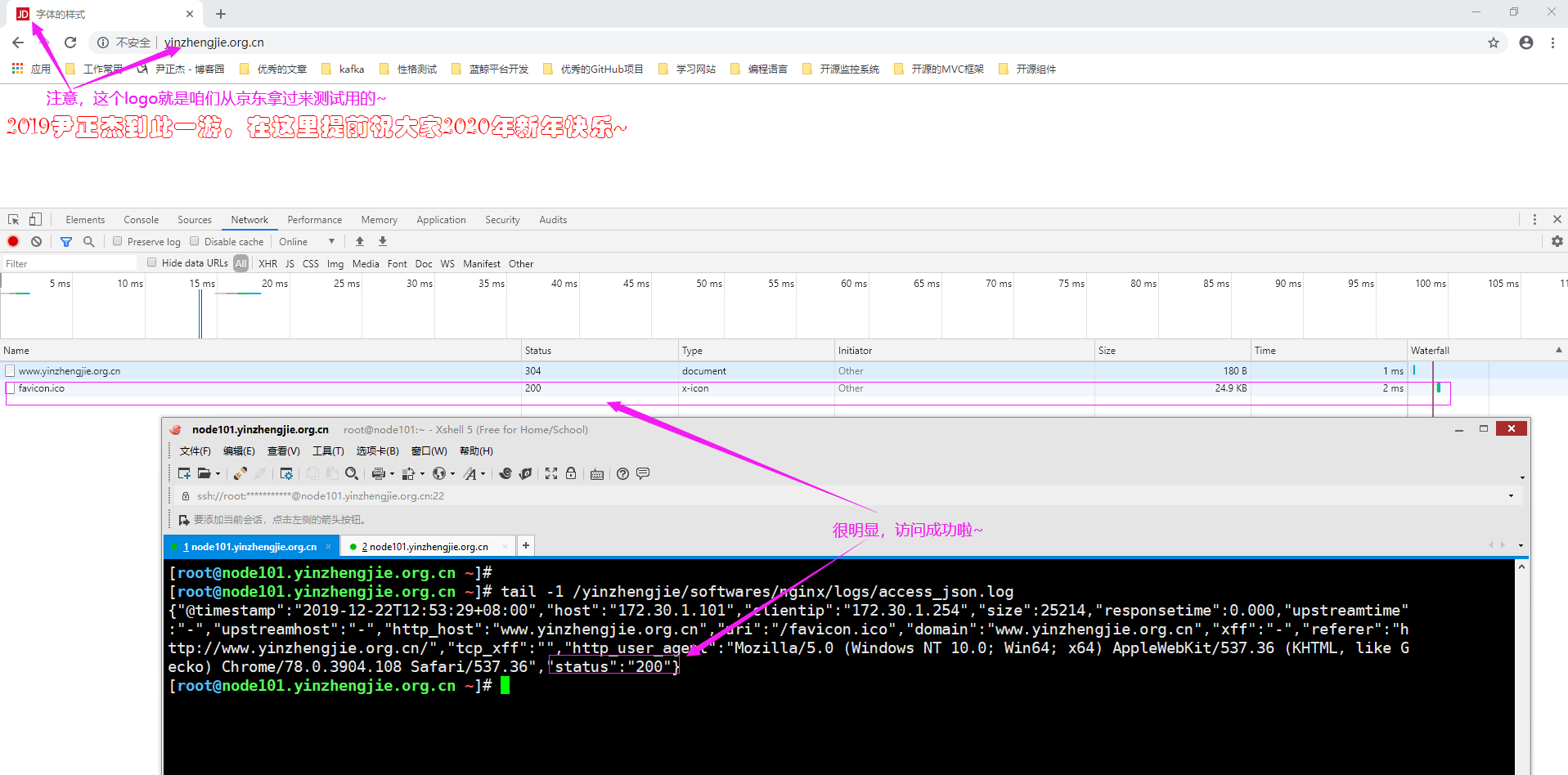
5>.访问虚拟主机"http://www.yinzhengjie.org.cn/",发现logo可以正常显示啦
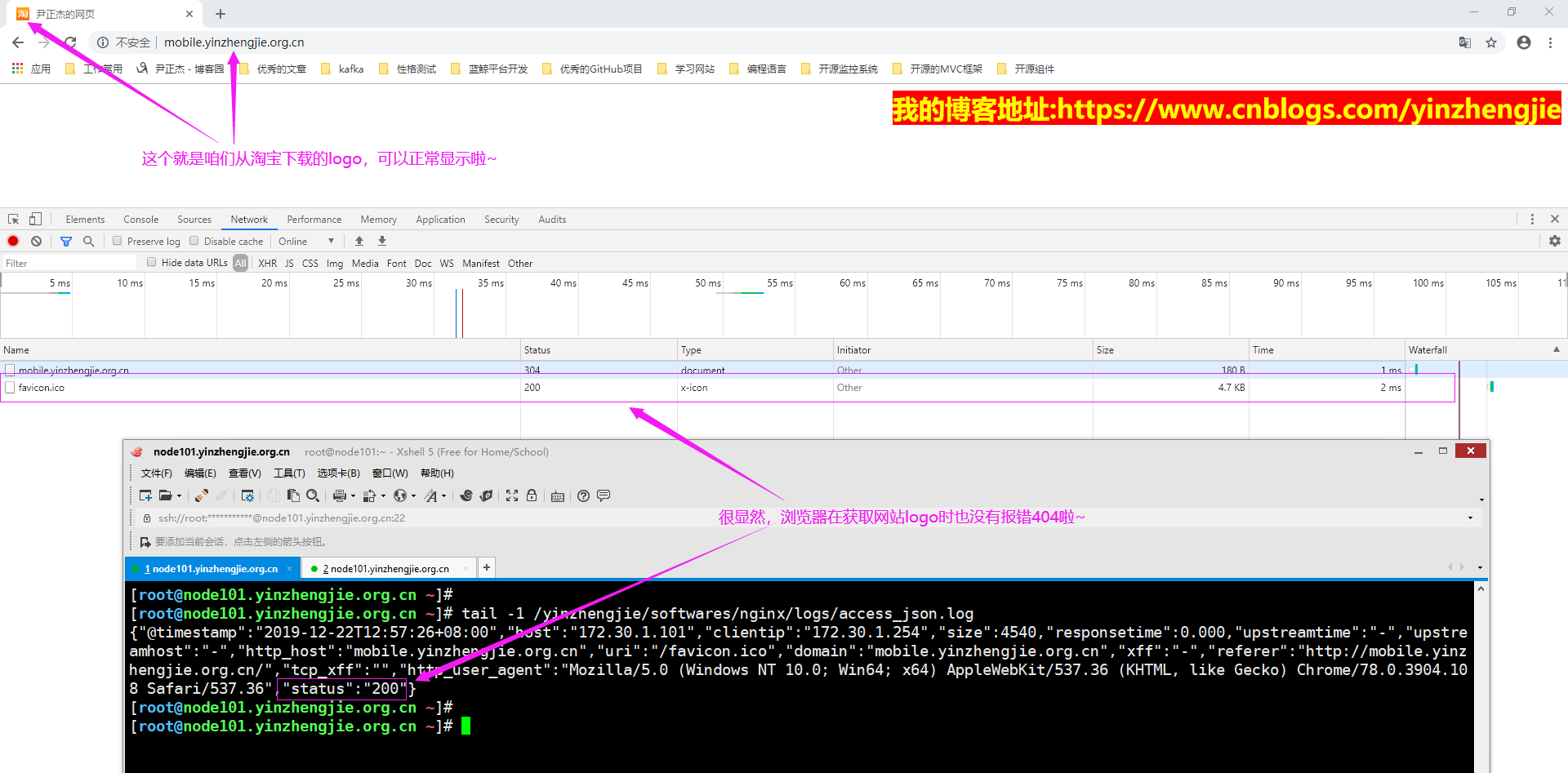
6>.访问虚拟主机"http://mobile.yinzhengjie.org.cn/",发现logo是可以正常显示啦
Nginx 高级配置--关于favicon.ico的更多相关文章
- Nginx 高级配置-实现多域名HTTPS
Nginx 高级配置-实现多域名HTTPS 作者:尹正杰 版权声明:原创作品,谢绝转载!否则将追究法律责任. 一.Nginx支持基于单个IP实现多域名的功能 Nginx支持基于单个IP实现多域名的功能 ...
- Nginx 高级配置-https 功能
Nginx 高级配置-https 功能 作者:尹正杰 版权声明:原创作品,谢绝转载!否则将追究法律责任. 一.HTTPS工作过程 1>.SSL/TLS SSL(Secure Socket Lay ...
- Nginx 高级配置-压缩功能
Nginx 高级配置-压缩功能 作者:尹正杰 版权声明:原创作品,谢绝转载!否则将追究法律责任. 一.Nginx压缩相关参数概述 1>.gzip on | off; Nginx支持对指定类型的文 ...
- Nginx 高级配置-自定义json格式日志
Nginx 高级配置-自定义json格式日志 作者:尹正杰 版权声明:原创作品,谢绝转载!否则将追究法律责任. 在大数据运维工作中,我们经常会使用flume,filebeat相关日志收集工具取收集日志 ...
- Nginx 高级配置-变量使用
Nginx 高级配置-变量使用 作者:尹正杰 版权声明:原创作品,谢绝转载!否则将追究法律责任. nginx的变量可以在配置文件中引用,作为功能判断或者日志等场景使用,变量可以分为内置变量和自定义变 ...
- Nginx 高级配置-第三方模块编译
Nginx 高级配置-第三方模块编译 作者:尹正杰 版权声明:原创作品,谢绝转载!否则将追究法律责任. 第三模块是对nginx 的功能扩展,第三方模块需要在编译安装Nginx 的时候使用参数--add ...
- Nginx 高级配置-状态页配置
Nginx 高级配置-状态页配置 作者:尹正杰 版权声明:原创作品,谢绝转载!否则将追究法律责任. 建议将nginx的监控状态的值通过zabbix或者Open-Falcon之类的监控工具来监控状态,并 ...
- nginx access.log 忽略favicon.ico訪问记录的方法
favicon.ico 文件是浏览器收藏网址时显示的图标,当第一次訪问页面时.浏览器会自己主动发起请求获取页面的favicon.ico文件.当/favicon.ico文件不存在时,服务器会记录404日 ...
- Nginx高级配置,同1台机器部署多个tomcat、配置多个域名,每个域名指向某一个tomcat下的项目,共用Nginx80端口访问;
需求说明: 只有一台服务器和一个公网IP,多个项目部署在这台机器上面,且每个项目使用一个单独的域名访问,域名访问时都通过Nginx的80端口访问.(如下图所示) 配置过程: 一.tomcat的serv ...
随机推荐
- SQL Server 迁移数据库 (二)分离和附加
分离和附加其实比导入和导出,步骤要少一些,但是数据量大的话,跨服务器拷贝数据文件可能要慢一些 1. 分离数据库 这里最好选择断开链接,断开之前要确保你记得数据库的路径,一般默认都是C:\Program ...
- csp考前
T1不会太麻烦,不行心里多说几遍"沙比提,沙比提".就做出来了. 后天就要出发了,可是我感觉不到长进---- 可能又学一年是个不明智的想法,退役预定.
- [LeetCode] 904. Fruit Into Baskets 水果装入果篮
In a row of trees, the i-th tree produces fruit with type tree[i]. You start at any tree of your cho ...
- MySQL学习记录(导入Excel表到数据库,并筛选条件输出)
附上:重置mysql账号密码方法 ubuntu系统下mysql重置密码和修改密码操作 - skh2015java的博客 - CSDN博客(改完重启,登录mysql要root/sudo权限) Cento ...
- tomcat启动项目报404错误
1.请求的时候报404错误,而且我的请求API地址是/account/sendSmsCode,从后台获取到的竟然变成了/account/account/sendSmsCode. 2.后来发现是 ...
- golang ---timeb
golang 提供了以下两种基础类型 - 时间点(Time) - 时间段(Duration) 除此之外 golang 也提供了以下类型,做一些特定的业务 - 时区(Location) - Ticker ...
- C#循环 — break VS continue
一.简介 1.break语句:循环-循环中断并停止,退出当前循环: 流程图: 2.continue:循环-循环下一次迭代继续执行. 流程图: 执行过程:立即结果本次循环,判断循环条件,如果成立,则进入 ...
- php xdebug的配置、调试、跟踪、调优、分析
xdebug 的 profiler 是一个强大的工具,它能分析 PHP 代码,探测瓶颈,或者通常意义上来说查看哪部分代码运行缓慢以及可以使用速度提升.Xdebug 2 分析器输出一种兼容 cacheg ...
- C# 拓展ComboBox设置线条属性(转)
C# 拓展ComboBox设置线条属性目前由于项目需要,要实现线条属性设置的功能,就如Visio中点击线端时,可以弹出一个窗口设置线条的各种属性. 其中线条属性选择时,是在ComboBox控件中,显示 ...
- .NET Core的依赖注入
转自[大内老A] 依赖注入[1]: 控制反转依赖注入[2]: 基于IoC的设计模式依赖注入[3]: 依赖注入模式依赖注入[4]: 创建一个简易版的DI框架[上篇]依赖注入[5]: 创建一个简易版的DI ...