
iOS_AutoLayout自动布局
1、Autolayout的2个核心概念
(1)参照:将某个UI控件作为参照标示,进行确定该控件的位置;
在添加时要注意目标view需要遵循以下规则:
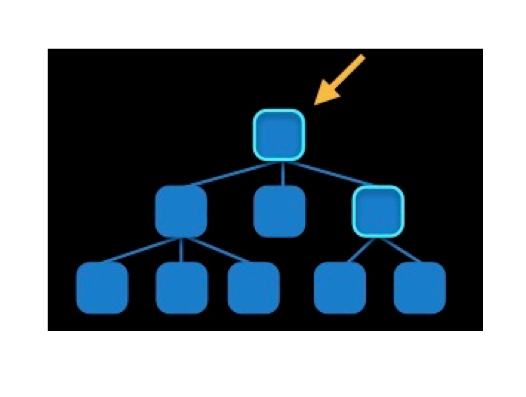
1)对于两个同层级view之间的约束关系,添加到它们的父view上
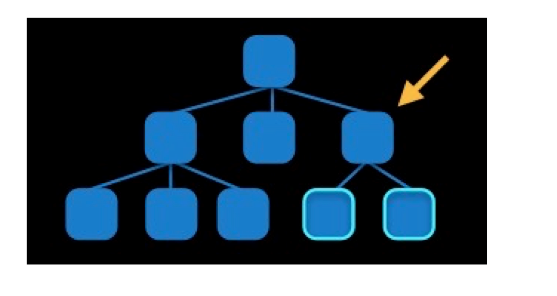
2)对于两个不同层级view之间的约束关系,添加到他们最近的共同父view上
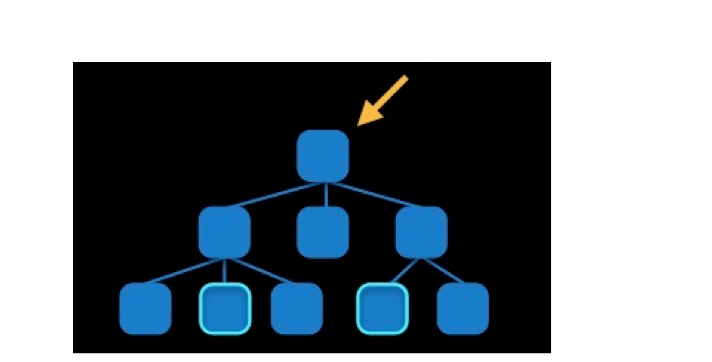
3)对于有层次关系的两个view之间的约束关系,添加到层次较高的父view上
二、创建autoLayout的方法
1、手动布局
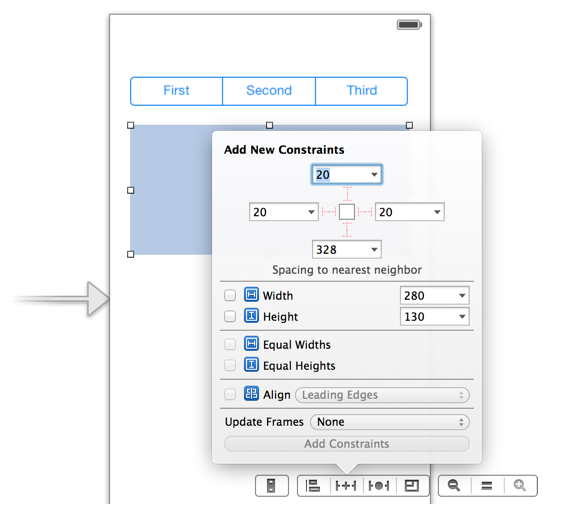
2、纯代码方式
(1)利用NSLayoutConstraint类创建具体的约束对象
(2)添加约束对象到相应的view上
#import "ViewController.h"

@interface ViewController ()

@property(strong,nonatomic)UIView *view1;

@property(strong,nonatomic)UIView *view2;

@end

@implementation ViewController

- (void)viewDidLoad {

    [super viewDidLoad];

    //创建view1

    self.view1 = [[UIView alloc]init];

    self.view1.backgroundColor = [UIColor redColor];

    self.view1.translatesAutoresizingMaskIntoConstraints = NO;

    [self.view addSubview:self.view1];

    //创建view2

    self.view2 = [[UIView alloc]init];

    self.view2.backgroundColor = [UIColor yellowColor];

    self.view2.translatesAutoresizingMaskIntoConstraints = NO;

    [self.view addSubview:self.view2];

    //创建约束

    //设置view1的左边距

    NSLayoutConstraint *lcLeft = [NSLayoutConstraint constraintWithItem:self.view1 attribute:NSLayoutAttributeLeading relatedBy:NSLayoutRelationEqual toItem:self.view attribute:NSLayoutAttributeLeading multiplier:1.0 constant:];

    //设置view1的下边距

    NSLayoutConstraint *lcBottom = [NSLayoutConstraint constraintWithItem:self.view1 attribute:NSLayoutAttributeBottom relatedBy:NSLayoutRelationEqual toItem:self.view attribute:NSLayoutAttributeBottom multiplier:1.0 constant:-];

    //设置view1与view2等宽

    NSLayoutConstraint *lcEqualWidth = [NSLayoutConstraint constraintWithItem:self.view1 attribute:NSLayoutAttributeWidth relatedBy:NSLayoutRelationEqual toItem:self.view2 attribute:NSLayoutAttributeWidth multiplier:1.0 constant:];

    //设置view1与view2等高

    NSLayoutConstraint *lcEqualHeight = [NSLayoutConstraint constraintWithItem:self.view2 attribute:NSLayoutAttributeHeight relatedBy:NSLayoutRelationEqual toItem:self.view1 attribute:NSLayoutAttributeHeight multiplier:1.0 constant:];

    //设置view2的右边距

    NSLayoutConstraint *lcRight = [NSLayoutConstraint constraintWithItem:self.view2 attribute:NSLayoutAttributeTrailing relatedBy:NSLayoutRelationEqual toItem:self.view attribute:NSLayoutAttributeTrailing multiplier:1.0 constant:-];

    //设置view2的下边距

    NSLayoutConstraint *lcBottom2 = [NSLayoutConstraint constraintWithItem:self.view2 attribute:NSLayoutAttributeBottom relatedBy:NSLayoutRelationEqual toItem:self.view attribute:NSLayoutAttributeBottom multiplier:1.0 constant:-];

    //设置view1与view2的间隔

    NSLayoutConstraint *lcGap = [NSLayoutConstraint constraintWithItem:self.view2 attribute:NSLayoutAttributeLeading relatedBy:NSLayoutRelationEqual toItem:self.view1 attribute:NSLayoutAttributeTrailing multiplier:1.0 constant:];

    //添加约束到组

    [self.view addConstraints:@[lcLeft,lcBottom,lcRight,lcBottom2,lcEqualHeight,lcEqualWidth,lcGap]];

    //设置view的高度

    NSLayoutConstraint *lcFixedHeight = [NSLayoutConstraint constraintWithItem:self.view1 attribute:NSLayoutAttributeHeight relatedBy:NSLayoutRelationEqual toItem:nil attribute:NSLayoutAttributeHeight multiplier:1.0 constant:];

    [self.view1 addConstraint:lcFixedHeight];

}

@end
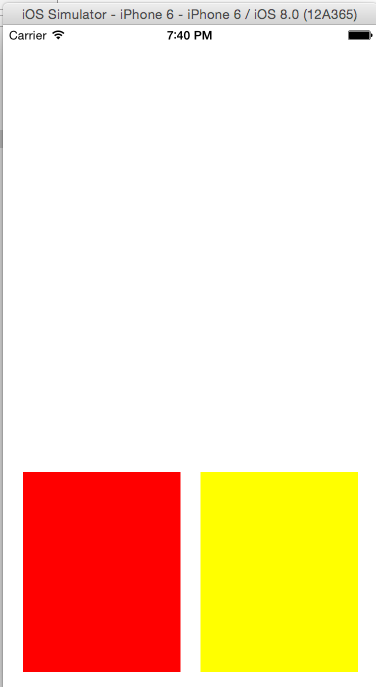
运行效果图,如下所示:
(1)要先禁止autoresizing功能,设置view的下面属性为NO
(2)添加约束之前,一定要保证相关控件都已经在各自的父控件上
(3)不用再给view设置frame
2.3创建约束对象的常用方法
+(id)constraintWithItem:(id)view1 attribute:(NSLayoutAttribute)attr1 relatedBy:(NSLayoutRelation)relation toItem:(id)view2 attribute:(NSLayoutAttribute)attr2 multiplier:(CGFloat)multiplier constant:(CGFloat)c;
参数解析:
(1)view1 :要约束的控件
(2)attr1 :约束的类型(做怎样的约束)
(3)relation :与参照控件之间的关系
(4)view2 :参照的控件
(5)attr2 :约束的类型(做怎样的约束)
(6)multiplier :乘数
(7)c :常量
三、VFL语言
VFL全称是Visual Format Language,翻译过来是“可视化格式语言”,VFL是苹果公司为了简化Autolayout的编码而推出的抽象语言。
1、简单VFL示例:
1.[button]-[textField]
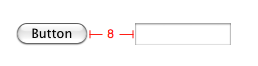
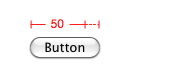
2.[button(>=50)]
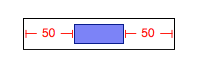
3.|-50-[purpleBox]-50-|
4.V:[topField]-10-[bottomField]

5.[maroonView][blueView]

6.[button(100@20)]

7.[button(==button2)]
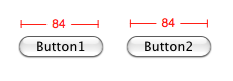
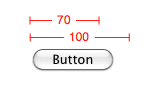
8.[flexibleButton(>=70,<=100)]
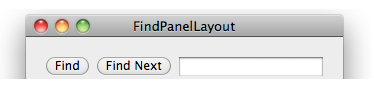
9.|-[find]-[findNext]-[findField(>=20)]-|
2.复杂示例(带说明):
H:[cancelButton(72)]-12-[acceptButton(50)]
说明:canelButton宽72,acceptButton宽50,它们之间间距12
H:[wideView(>=60@700)]
说明:wideView宽度大于等于60point,该约束条件优先级为700(优先级最大值为1000,优先级越高的约束越先被满足)
V:[redBox]-[yellowBox(==redBox)]
说明:竖直方向上,先有一个redBox,其下方紧接一个高度等于redBox高度的yellowBox
H:|-10-[Find]-[FindNext]-[FindField(>=20)]-|
说明:水平方向上,Find距离父view左边缘默认间隔宽度,之后是FindNext距离Find间隔默认宽度;再之后是宽度不小于20的FindField,它和FindNext以及父view右边缘的间距都是默认宽度。(竖线“|”表示superview的边缘)
3.使用VFL来创建约束数组
+ (NSArray *)constraintsWithVisualFormat:(NSString *)format options:(NSLayoutFormatOptions)opts metrics:(NSDictionary *)metrics views:(NSDictionary *)views;
参数说明:
(1)format :VFL语句
(2)opts :约束类型
(3)metrics :VFL语句中用到的具体数值
(4)views :VFL语句中用到的控件
案例分析:通过VFL语句实现上个案例
#import "ViewController.h"

@interface ViewController ()

@property(strong,nonatomic)UIView *view1;

@property(strong,nonatomic)UIView *view2;

@end

@implementation ViewController

- (void)viewDidLoad {

    [super viewDidLoad];

    //创建view1

    self.view1 = [[UIView alloc]init];

    self.view1.backgroundColor = [UIColor redColor];

    self.view1.translatesAutoresizingMaskIntoConstraints = NO;

    [self.view addSubview:self.view1];

    //创建view2

    self.view2 = [[UIView alloc]init];

    self.view2.backgroundColor = [UIColor blueColor];

    self.view2.translatesAutoresizingMaskIntoConstraints = NO;

    [self.view addSubview:self.view2];

    //使用VFL语言添加约束

    NSDictionary *metrics = @{@"gap":@,@"height":@};

    NSDictionary *viewsDic =@{@"view1":self.view1,@"view2":self.view2};

    NSArray *layoutConstraints1 = [NSLayoutConstraint constraintsWithVisualFormat:@"H:|-gap-[view1]-gap-[view2(==view1)]-gap-|" options:NSLayoutFormatDirectionLeftToRight metrics:metrics views:viewsDic];

    NSArray *layoutConstraints2 = [NSLayoutConstraint constraintsWithVisualFormat:@"V:[view1(height)]-gap-|" options:NSLayoutFormatDirectionLeadingToTrailing metrics:metrics views:viewsDic];

     NSArray *layoutConstraints3 = [NSLayoutConstraint constraintsWithVisualFormat:@"V:[view2(==view1)]-gap-|" options:NSLayoutFormatDirectionLeadingToTrailing metrics:metrics views:viewsDic];

    [self.view addConstraints:layoutConstraints1];

    [self.view addConstraints:layoutConstraints2];

    [self.view addConstraints:layoutConstraints3];

}

@end
iOS_AutoLayout自动布局的更多相关文章
- (翻译)开始iOS 7中自动布局教程(二)
这篇教程的前半部分被翻译出来很久了,我也是通过这个教程学会的IOS自动布局.但是后半部分(即本篇)一直未有翻译,正好最近跳坑翻译,就寻来这篇教程,进行翻译.前半部分已经转载至本博客,后半部分即本篇.学 ...
- (转载)开始iOS 7中自动布局教程(一)
这篇教程的前半部分被翻译出来很久了,我也是通过这个教程学会的IOS自动布局.但是后半部分(即本篇)一直未有翻译,正好最近跳坑翻译,就寻来这篇教程,进行翻译.前半部分已经转载至本博客,后半部分即本篇.学 ...
- iOS开发之自定义表情键盘(组件封装与自动布局)
下面的东西是编写自定义的表情键盘,话不多说,开门见山吧!下面主要用到的知识有MVC, iOS开发中的自动布局,自定义组件的封装与使用,Block回调,CoreData的使用.有的小伙伴可能会问写一个自 ...
- IOS开发之自动布局显示网络请求内容
在上一篇博客中详细的介绍了IOS开发中的相对布局和绝对布局,随着手机屏幕尺寸的改变,在App开发中为了适应不同尺寸的手机屏幕,用自动布局来完成我们想要实现的功能和效果显得尤为重要.本人更喜欢使用相对布 ...
- AutoLayout(自动布局)
1. iOS两种自适应布局方式:(修正说明:) -AutoLayout(自动布局) + SizeClasses(尺寸类别) -Autoresizing (自动调整尺寸/弹簧式调整尺寸) 前者 Auto ...
- IE 中单元格的 colspan 属性在某些情况下会影响 TABLE 元素的自动布局
今天在写一个jsp页面时,遇到一个如下的问题:在一个table中写了如下内容,table中定义了4列,在firefox中能正常显示,而在ie8中,显示不正常, 如下如图1:第二,三,四列宽度发生变化, ...
- 【转】iOS学习之Storyboard中的UIScrollView使用自动布局
在使用storyboard和xib时,我们经常要用到ScrollView,还有自动布局AutoLayout,但是ScrollView和AutoLayout 结合使用,相对来说有点复杂.根据实践,我说一 ...
- iOS AutoLayout自动布局&Masonry介绍与使用实践
Masonry介绍与使用实践:快速上手Autolayout http://www.cnblogs.com/xiaofeixiang/p/5127825.html http://www.cocoachi ...
- MFC 对话框控件自动布局
MFC 设计界面程序总是不够智能,没有这样,没有那样. 今天为了加强mfc功能,设计了一个自动布局的类,使用非常简单. 原理: 每个控件都有一个矩形区域,矩形区域就是控件在对话框中的显示位置和大小, ...
随机推荐
- PHP 规划(收藏的一些好博文)
2014-10-15 01:30 36870人阅读 评论(34) 收藏 举报 分类: PHP/DHTML/Other(237) 版权声明:本文为博主原创文章,未经博主允许不得转载. PHP程序员的技术 ...
- Android开发:使用DialogFragment实现dialog自定义布局
使用DialogFragment实现dialog的自定义布局最大的好处是可以更好控制dialog的生命周期. TestFragment的代码: public class TestFragment ex ...
- Assertion (software development) -- 断言
Wiki: In computer programming, an assertion is a predicate (a true–false statement) placed in a prog ...
- IntelliJ IDEA使用手册
开发工具现在转到IDEA了,看到关于该工具很好的入门文档,于是记录一下: IntelliJ IDEA 使用教程
- VS2010程序崩溃- APPCRASH
使用VS2010打开某个项目出现错误,程序崩溃:还不是全部的项目:开始以为是那个项目本身有什么问题,查了很久发现不是这样的 程序崩溃提示 问题签名: 问题事件名称: APPCRASH 应用程序名: d ...
- 关于vue,angularjs1,react之间的对比
1.时间投入的问题:相对于react和angularjs,学习vue的时间成本低,而且容易上手. 2.JSX的可读性比较一般.代码的可读性不如vue,当然,vue也支持jsx,但是vue更提倡temp ...
- 华盟网公开课 office 宏 主讲Alex
powershell github: veil-evasion macroshop unicorn https://github.com/trustedsec/unicorn metasploit ...
- 九度OJ 1357:疯狂地Jobdu序列 (数字特性)
时间限制:1 秒 内存限制:32 兆 特殊判题:否 提交:715 解决:263 题目描述: 阳仔作为OJ的数据管理员,每一周的题目录入都让其很抓狂,因为题目不是他出的,他控制不了出题的速度--在等题目 ...
- 【Python之路】第十五篇--Web框架
Web框架本质 众所周知,对于所有的Web应用,本质上其实就是一个socket服务端,用户的浏览器其实就是一个socket客户端. #!/usr/bin/env python #coding:utf- ...
- Printing tools 自定义模板打印的实现
#ArcGIS for Server 自定义打印两种方法 友好阅读版本: http://gishub.info/2013/09/17/printingtools/ ## 前言使用web打印会遇到中文乱 ...