
CAF(C++ actor framework)使用随笔(延迟发送,消息转发,消息优先级)(四)
e). 消息延迟发送(和前面没太大区别直接上代码)
#include <iostream>

#include "caf/all.hpp"

#include "caf/io/all.hpp"

#include <string>

#include <chrono>

using namespace std;

using namespace caf;

behavior fun(event_based_actor* self){

    return {

        [self](const string& str){

            aout(self)<<str<<endl;

            auto t2 = std::chrono::system_clock::to_time_t(std::chrono::system_clock::now());

            cout<<"dalay time :"<<t2<<endl;

            self->quit();

            }

    };

}

void fun1(event_based_actor* self, actor buddy){

    self->delayed_send(buddy, std::chrono::seconds(), "hi!");

}

int main(){

    auto actor1 = spawn(fun);

    auto t1 = std::chrono::system_clock::to_time_t(std::chrono::system_clock::now());

    cout<<"before delayed_send :"<<t1<<endl;

    auto actor2 = spawn(fun1,actor1);

    caf::await_all_actors_done();

    shutdown();

    return ;

}
结果为

f). 消息前转(消息转发)forward.
贴上代码
#include <iostream>

#include "caf/all.hpp"

#include "caf/io/all.hpp"

#include <string>

#include <chrono>

using namespace std;

using namespace caf;

behavior fun2(event_based_actor* self){

    return {

        [self](const string& str){

            aout(self)<<"C get message return to A"<<endl;

            aout(self)<<"C's address is :"<<self->address()<<endl;

            return "hello, A";

            self->quit();

         }

    };

}

behavior fun1(event_based_actor* self, const actor &buddy){

    return {

        [=](const string& str){

            aout(self)<<"B get message forward to C"<<endl;

            self->forward_to(buddy);

            self->quit();

         }

    };

}

void fun(event_based_actor* self, const actor &buddy){

    self->sync_send(buddy,"hi!").then(

         [=](const string& str) {

             aout(self)<<str<<endl;

             aout(self)<<"A think last_sender is :"<<self->last_sender()<<endl;

         }

    );

    aout(self)<<"A send to B!"<<endl;

}

int main(){

    auto actorC = spawn(fun2);

    auto actorB = spawn(fun1,actorC);

    auto actorA = spawn(fun,actorB);

    caf::await_all_actors_done();

    shutdown();

    return ;

}
结果为

使用了消息优先级,去caf代码里看了发现只有两种级别就是(hige 和normal)
 然后在用户手册上给出的示例代码是
using a_atom = atom_constant<atom("a")>;

using b_atom = atom_constant<atom("b")>;

behavior testee(event_based_actor* self) {

  // send 'b' with normal priority

  self->send(self, b_atom::value);

  // send 'a' with high priority

  self->send(message_priority::high, self, a_atom::value);

  // terminate after receiving a 'b'

  return {

    [=](b_atom) {

      aout(self) << "received 'b' => quit" << endl;

      self->quit();

    },

    [=](a_atom) {

      aout(self) << "received 'a'" << endl;

    },

  };

}

int main() {

  // will print "received 'b' => quit"

  spawn(testee);

  await_all_actors_done();

  // will print "received 'a'" and then "received 'b' => quit"

  spawn<priority_aware>(testee);

  await_all_actors_done();

  shutdown();

}
结果是
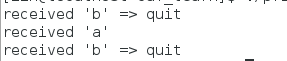 很好理解,因为第一个actor是不认识具有优先级的message的,只受到b消息,第二个就先收到a再收到b,这里有个细节就是当B本来因该是先收到的,但却变成了后收到,和发送的次序无关了。我甚至在两个发送语句之间加usleep(1000000) 都会先收到A后再输出B,这个Actor 感觉自己知道要收到priority 消息。
我还是不罢休,把代码改了改变成

结果为
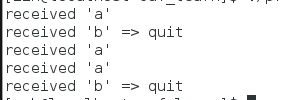
我彻底服了CAF 太牛了把,当Actor不识别优先级时,它会把所有消息当成normal(正常的),当它知道时,就会把所有的优先级消息都接受完了再接受normal的。后来我改写了一些奇怪的语句,这CAF还是要我挺佩服得。
到这里消息都讲完了,之后开始CAF序列化之路。。。
CAF(C++ actor framework)使用随笔(延迟发送,消息转发,消息优先级)(四)的更多相关文章
- Runtime-消息发送和消息转发
消息发送 消息发送举例:下面这个OC代码 [person read:book]; 会被编译成: objc_msgSend(person, @selector(read:), book); objc_m ...
- CAF(C++ actor framework)使用随笔(使用类去构建actor和使用的一些思路)
Class-based actorsA class-based actor is a subtype of event_based_actor and must implement the pure ...
- Android 手机卫士--解析json与消息机制发送不同类型消息
本文地址:http://www.cnblogs.com/wuyudong/p/5900800.html,转载请注明源地址. 1.解析json数据 解析json的代码很简单 JSONObject jso ...
- 【转】C# 重写WndProc 拦截 发送 系统消息 + windows消息常量值(1)
C# 重写WndProc 拦截 发送 系统消息 + windows消息常量值(1) #region 截获消息 /// 截获消息 处理XP不能关机问题 protected ...
- SendMessage发送自定义消息及消息响应
控件向父窗体发送自定义消息,父窗体定义处理此消息的函数 效果描述: 指定哪个类添加自定义消息:(当然这个类必须是CmdTarget的子类,不然不能处理消息) 添加消息 实现消息函数:(wParam ...
- iOS 消息发送与转发详解
Objective-C 是一门动态语言,它将很多静态语言在编译和链接时期做的事情,放到了运行时来处理.之所以能具备这种特性,离不开 Runtime 这个库.Runtime 很好的解决了如何在运行时期找 ...
- ROS_Kinetic_26 使用rosserial_windows实现windows与ROS master发送与接收消息
使用rosserial_windows实现windows与ROS master发送与接收消息(适用版本hydro,indigo,jade,kinetic) 官方wiki地址汇总请参考:http://b ...
- [3] MQTT,mosquitto,Eclipse Paho---怎样使用 Eclipse Paho MQTT工具来发送订阅MQTT消息?
在上两节,笔者主要介绍了 MQTT,mosquitto,Eclipse Paho的基本概念已经怎样安装mosquitto. 在这个章节我们就来看看怎样用 Eclipse Paho MQTT工具来发送接 ...
- C++ Custom Control控件 向父窗体发送对应的消息
向父窗体发送消息 ,这里只讲发送 WM_NOTIFY 消息, 其它消息是相同的 在 控件中的某个函数中 设置发送消息的程序 首先定义一个WM_NOTIFY消息的专用结构. NMHDR nm; nm. ...
随机推荐
- Codeforces Round #329 (Div. 2) B. Anton and Lines 逆序对
B. Anton and Lines Time Limit: 20 Sec Memory Limit: 256 MB 题目连接 http://codeforces.com/contest/593/pr ...
- Codeforces Round #326 (Div. 2) D. Duff in Beach dp
D. Duff in Beach Time Limit: 1 Sec Memory Limit: 256 MB 题目连接 http://codeforces.com/contest/588/probl ...
- C# 强制关闭当前程序进程(完全Kill掉不留痕迹)
C# 强制关闭当前程序进程(完全Kill掉不留痕迹) /// <summary> /// 运行DOS命令 /// DOS关闭进程命令(ntsd -c q -p PID )PID为进程的ID ...
- iOS开发——语法篇&swift经典语法总结
swift经典语法总结 1:函数 1.1 func funcNmae()->(){} 这样就定义了一个函数,它的参数为空,返回值为空,如果有参数和返回值直接写在两个括号里就可以了 1.2 参数需 ...
- JDK 7u60 版本发布下载安装
JDK 7u60 版本发布了,主要改进包括: JavaFX 更新到 2.2.60 Java Mission Control(JMC)更新到 5.3 如果你在一个早期版本的Java中禁用了过期检查功能, ...
- java_java 利用JAX-RS快速开发RESTful 服务
JAX-RS(Java API for RESTful Web Services)同样也是JSR的一部分,详细规范定义见 https://jcp.org/en/jsr/detail?id=311 .从 ...
- [置顶] mybatis的批量新增
开发项目中,总是与数据打交道,有的时候将数据放入到一个集合中,然后在遍历集合一条一条的插入,感觉效率超不好,最近又碰到这个问题,插入50条数据用了将近1s,完全满足不了系统的需求.效率必须加快,然后网 ...
- Redis 性能测试
Redis 性能测试是通过同时执行多个命令实现的. 语法 redis 性能测试的基本命令如下: redis-benchmark [option] [option value] 实例 以下实例同时执行 ...
- selenium python 环境搭建(64位 windows)
之前写了同样的文章,可是后来自己按照给文章再次搭建环境当搭建环境成功后却发现还是无法用.使用from selenium import webdriver,在run的时候却出现ImportError: ...
- html禁止清除input文本输入缓存
多数浏览器默认会缓存input的值,只有使用ctl+F5强制刷新的才可以清除缓存记录. 如果不想让浏览器缓存input的值,有2种方法: 方法一: 在不想使用缓存的input中添加 autocompl ...