
Hadoop生态圈-Flume的组件之拦截器与选择器
Hadoop生态圈-Flume的组件之拦截器与选择器
作者:尹正杰
版权声明:原创作品,谢绝转载!否则将追究法律责任。
本篇博客只是配置的是Flume主流的Interceptors,想要了解更详细的配置信息请参考官网:http://flume.apache.org/FlumeUserGuide.html#flume-interceptors。
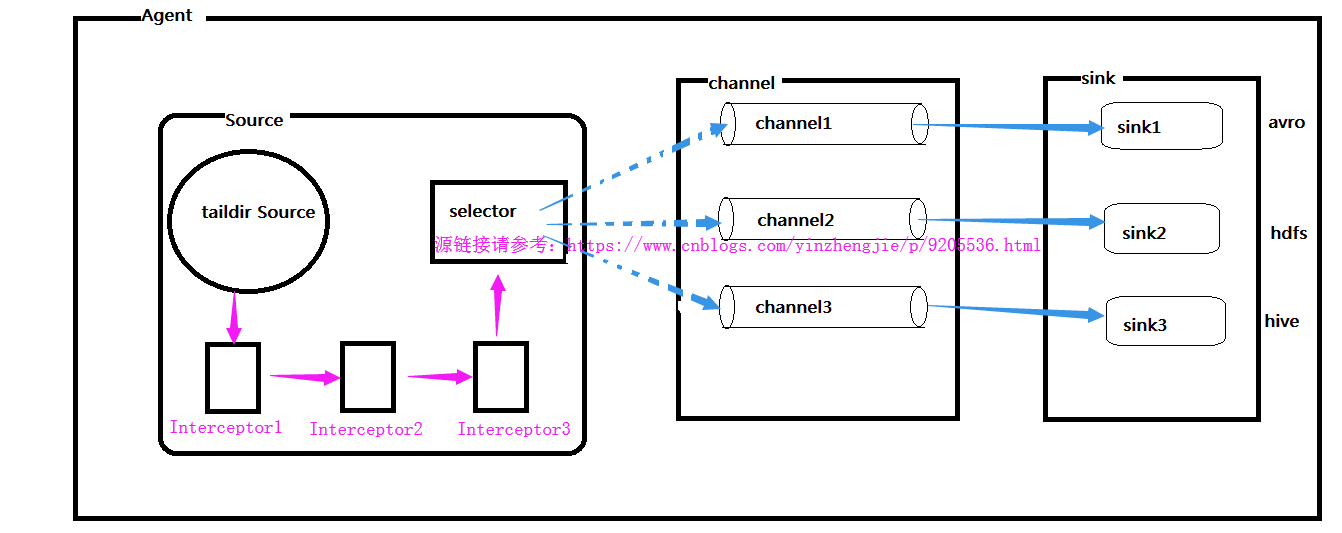
想必大家都知道Flume的组件有Source,channel和sink。其实在Flume还有一些更深层的东西,比如你知道soucre是如何将数据传送给channel的吗?那你有知道channel又是如何将数据发送给sink的吗?对于一个Agent来说,它只能有一个source,但是它可以有多个channel和sink,如下图:
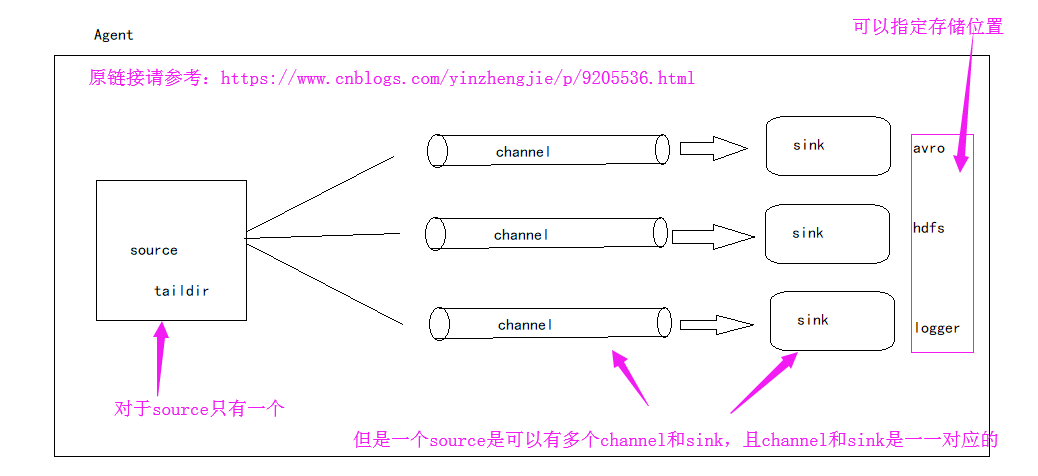
接下来就跟着我一起了了解一下更深层次的知识吧。接下来我们就一起探讨一下source是如何将数据发送到channel中的,以及sink是处理数据的。
一.Source端源码查看
1>.获取一行数据,使用其构建Event

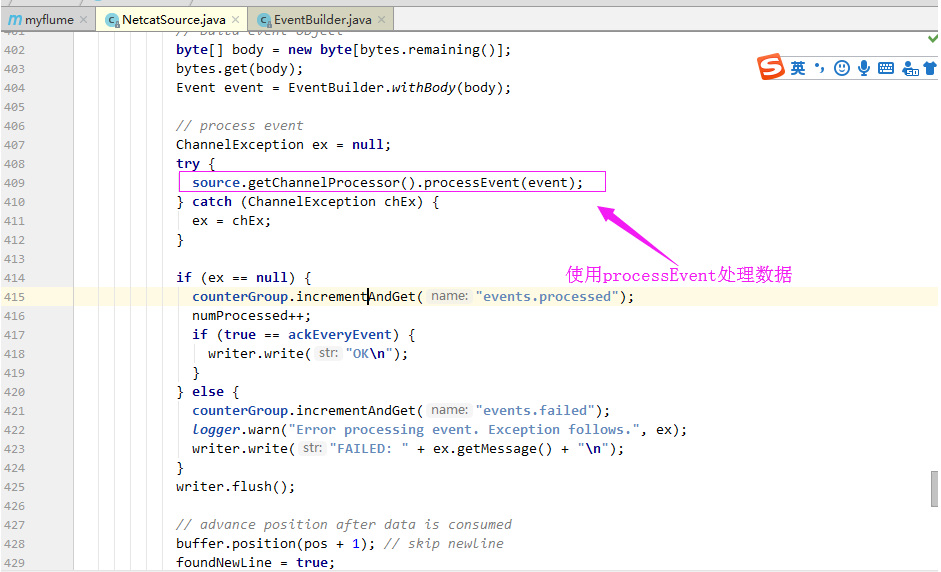
2>.使用processEvent处理数据
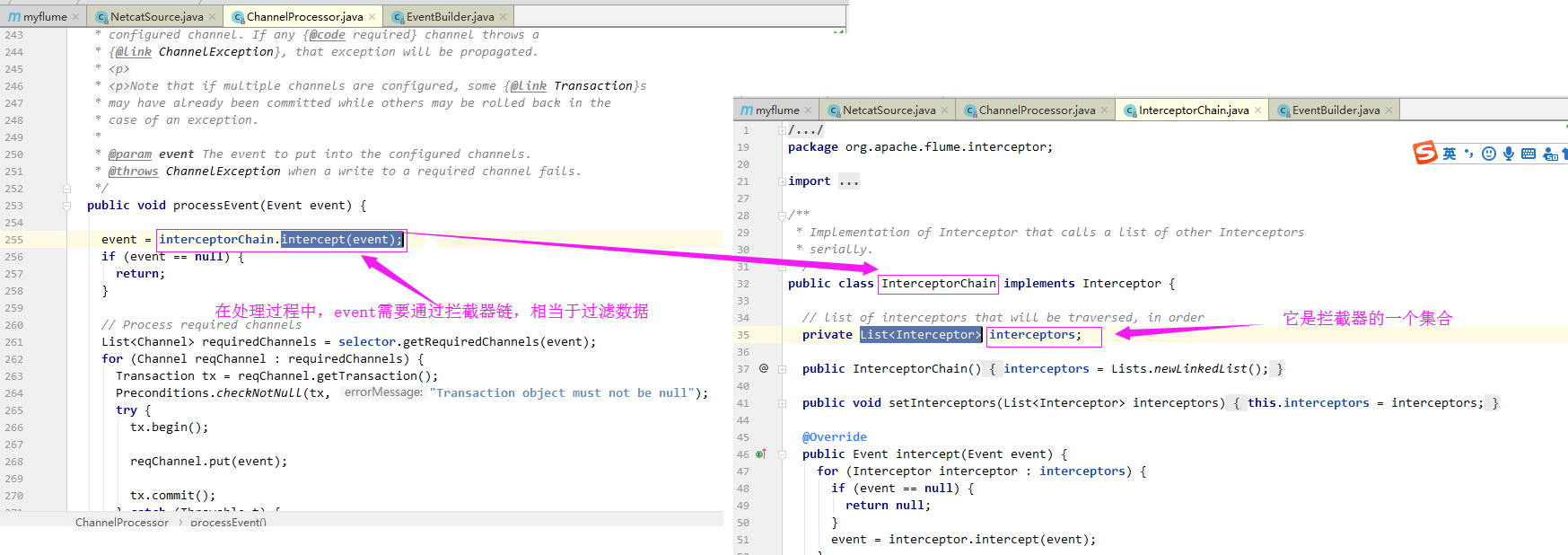
3>.在处理过程中,event需要通过拦截器链,相当于过滤数据
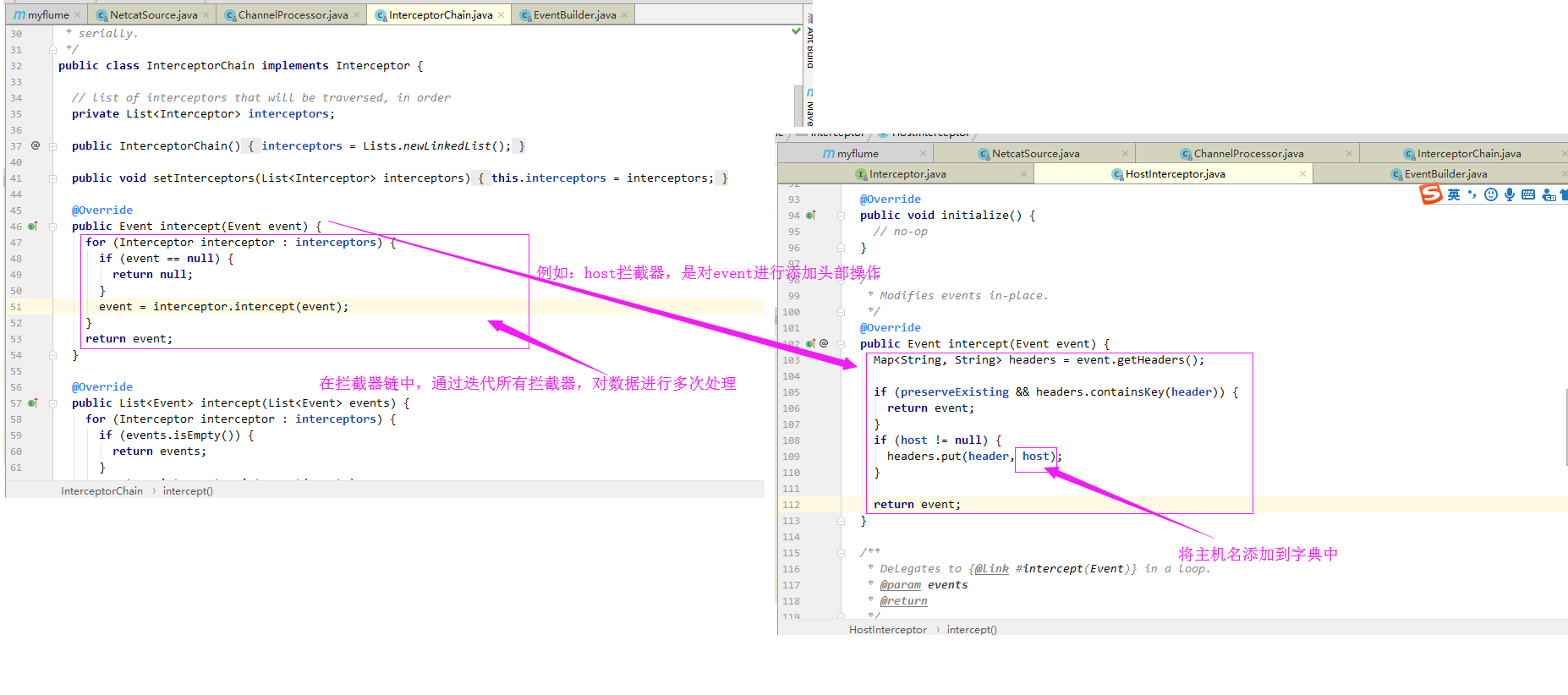
4>.在拦截器链中,通过迭代所有拦截器,对数据进行多次处理(例如:host拦截器,是对event进行添加头部操作)
5>.通过拦截器处理后的event,再次进入到通道挑选器
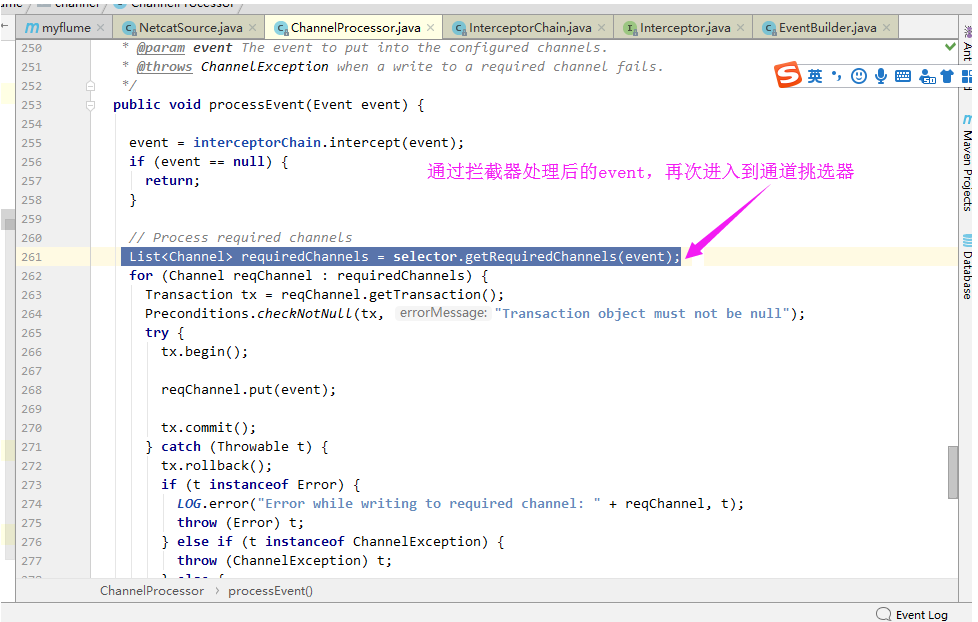
6>.迭代所有channel,将数据放进channel中

通过上面的源码解析,看下面这张图应该就不是什么难事了吧:
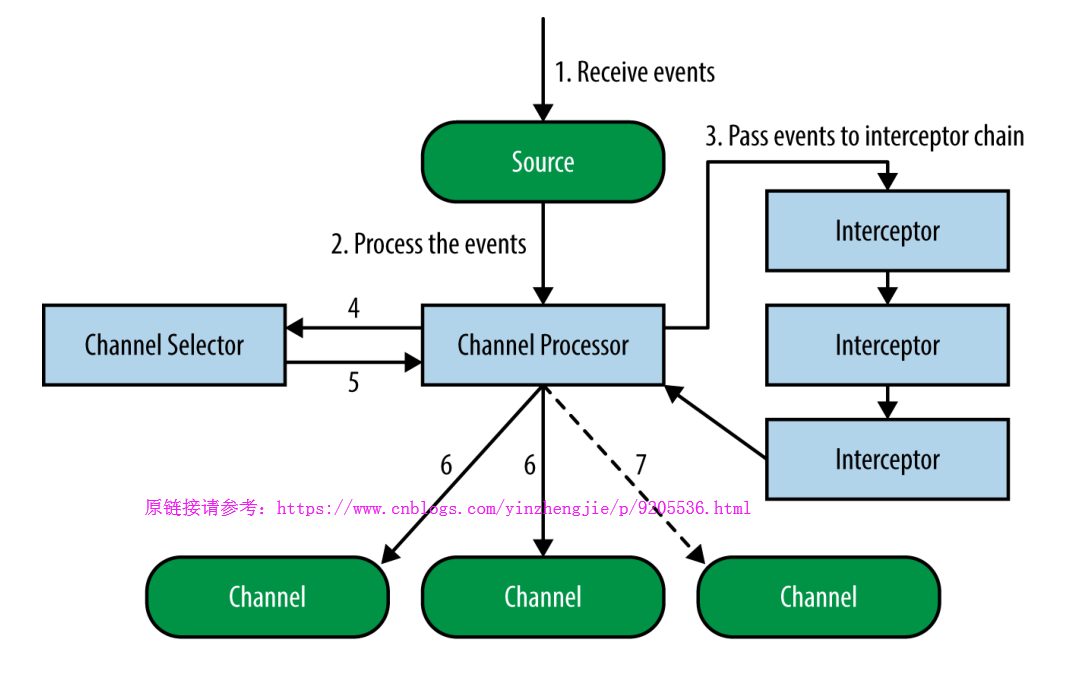
这个时候,你是否绝对第一张图画得并不自信呢?这个时候我们可以把第一张图的Source端流程画得更详细一点,如下:
二.拦截器(Interceptors)
1>.Interceptors 功能
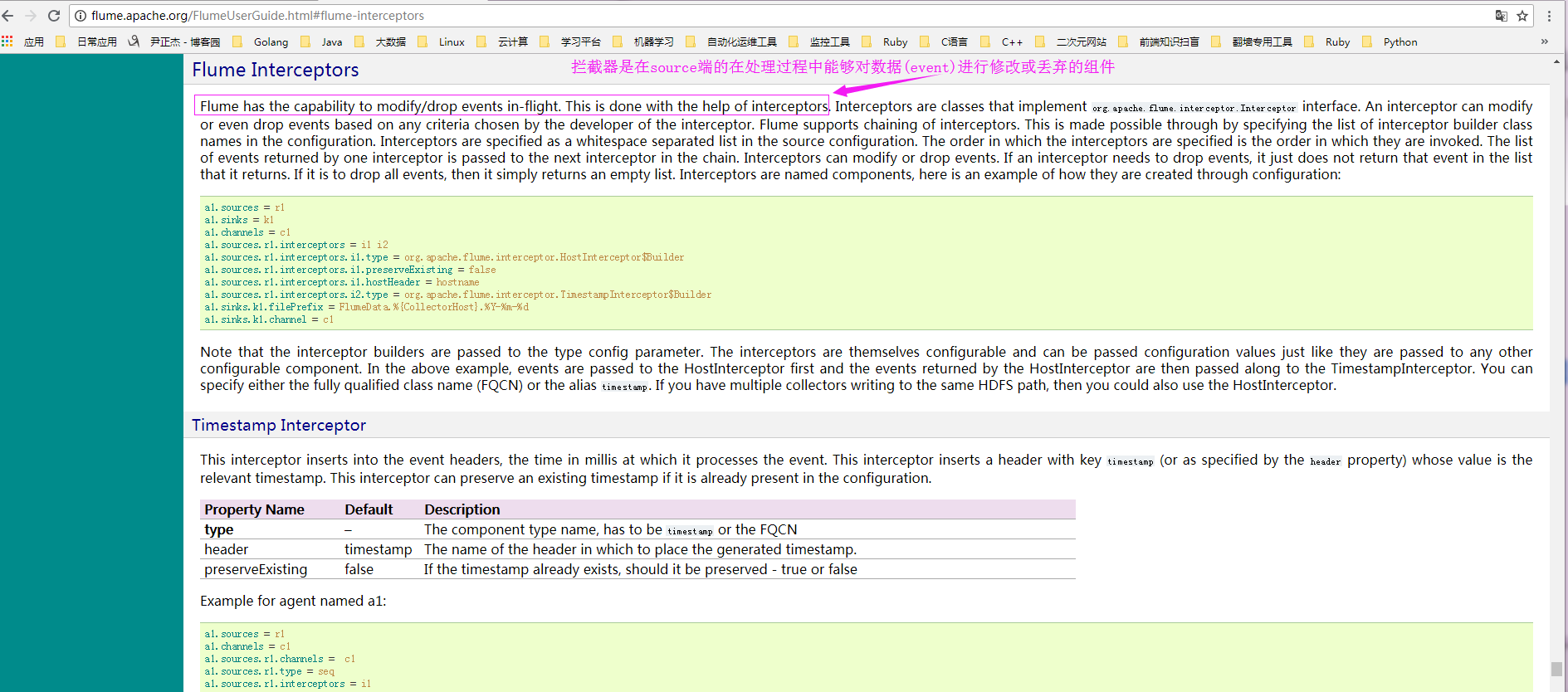
答:拦截器是在source端的在处理过程中能够对数据(event)进行修改或丢弃的组件。
2>.官方文档
3>.host interceptor(将发送的event添加主机名的header)配置案例
a>.实际配置参数:
[yinzhengjie@s101 ~]$ more /soft/flume/conf/yinzhengjie_hostInterceptor.conf

# Name the components on this agent

a1.sources = r1

a1.sinks = k1

a1.channels = c1

# Describe/configure the source

a1.sources.r1.type = netcat

a1.sources.r1.bind = localhost

a1.sources.r1.port =

# 指定添加拦截器

a1.sources.r1.interceptors = i1

a1.sources.r1.interceptors.i1.type = org.apache.flume.interceptor.HostInterceptor$Builder

a1.sources.r1.interceptors.i1.preserveExisting = false

# 指定header的key

a1.sources.r1.interceptors.i1.hostHeader = hostname

# 指定header的value为主机ip

a1.sources.r1.interceptors.i1.useIP = true

# Describe the sink

a1.sinks.k1.type = logger

# Use a channel which buffers events in memory

a1.channels.c1.type = memory

a1.channels.c1.capacity =

a1.channels.c1.transactionCapacity =

# Bind the source and sink to the channel

a1.sources.r1.channels = c1

a1.sinks.k1.channel = c1

[yinzhengjie@s101 ~]$
b>启动agent进程:
c>.source端产生数据(启动nc):
d>.检查sink端数据(检查定义好的目录"/home/yinzhengjie/log2")
4>.static interceptor(静态拦截器,手动指定key-value)配置案例
a>.实际配置参数:
[yinzhengjie@s101 ~]$ more /soft/flume/conf/yinzhengjie_staticInterceptor.conf

# Name the components on this agent

a1.sources = r1

a1.sinks = k1

a1.channels = c1

# Describe/configure the source

a1.sources.r1.type = netcat

a1.sources.r1.bind = localhost

a1.sources.r1.port =

# 指定添加拦截器

a1.sources.r1.interceptors = i1

a1.sources.r1.interceptors.i1.type = static

a1.sources.r1.interceptors.i1.key = name

a1.sources.r1.interceptors.i1.value = yinzhengjie

# Describe the sink

a1.sinks.k1.type = logger

# Use a channel which buffers events in memory

a1.channels.c1.type = memory

a1.channels.c1.capacity =

a1.channels.c1.transactionCapacity =

# Bind the source and sink to the channel

a1.sources.r1.channels = c1

a1.sinks.k1.channel = c1

[yinzhengjie@s101 ~]$
b>启动agent进程:
c>.source端产生数据(启动nc):
d>.检查sink端数据(检查定义好的目录"/home/yinzhengjie/log2")
5>.timestamp interceptor(将发送的event添加时间戳的header)配置案例
a>.实际配置参数:
[yinzhengjie@s101 ~]$ more /soft/flume/conf/yinzhengjie_timestampInterceptor.conf

# Name the components on this agent

a1.sources = r1

a1.sinks = k1

a1.channels = c1

# Describe/configure the source

a1.sources.r1.type = netcat

a1.sources.r1.bind = localhost

a1.sources.r1.port =

# 指定添加拦截器

a1.sources.r1.interceptors = i1

a1.sources.r1.interceptors.i1.type = timestamp

# Describe the sink

a1.sinks.k1.type = logger

# Use a channel which buffers events in memory

a1.channels.c1.type = memory

a1.channels.c1.capacity =

a1.channels.c1.transactionCapacity =

# Bind the source and sink to the channel

a1.sources.r1.channels = c1

a1.sinks.k1.channel = c1

[yinzhengjie@s101 ~]$
b>启动agent进程:
c>.source端产生数据(启动nc):
d>.检查sink端数据(检查定义好的目录"/home/yinzhengjie/log2")
6>.interceptor chain(连接器链)配置案例
a>.实际配置参数:
[yinzhengjie@s101 ~]$ more /soft/flume/conf/yinzhengjie_chainInterceptor.conf

# Name the components on this agent

a1.sources = r1

a1.sinks = k1

a1.channels = c1

# Describe/configure the source

a1.sources.r1.type = netcat

a1.sources.r1.bind = localhost

a1.sources.r1.port =

# 指定添加拦截器

a1.sources.r1.interceptors = i1 i2 i3

a1.sources.r1.interceptors.i1.type = org.apache.flume.interceptor.HostInterceptor$Builder

a1.sources.r1.interceptors.i1.preserveExisting = false

# 指定header的key

a1.sources.r1.interceptors.i1.hostHeader = hostname

# 指定header的value为主机ip

a1.sources.r1.interceptors.i1.useIP = true

# 添加i2拦截器

a1.sources.r1.interceptors.i2.type = timestamp

# 添加i3拦截器

a1.sources.r1.interceptors.i3.type = remove_header

a1.sources.r1.interceptors.i3.withName = timestamp

# Describe the sink

a1.sinks.k1.type = logger

# Use a channel which buffers events in memory

a1.channels.c1.type = memory

a1.channels.c1.capacity =

a1.channels.c1.transactionCapacity =

# Bind the source and sink to the channel

a1.sources.r1.channels = c1

a1.sinks.k1.channel = c1

[yinzhengjie@s101 ~]$
b>启动agent进程:
c>.source端产生数据(启动nc):
d>.检查sink端数据(检查定义好的目录"/home/yinzhengjie/log2")
Hadoop生态圈-Flume的组件之拦截器与选择器的更多相关文章
- Hadoop生态圈-Flume的组件之自定义拦截器(interceptor)
Hadoop生态圈-Flume的组件之自定义拦截器(interceptor) 作者:尹正杰 版权声明:原创作品,谢绝转载!否则将追究法律责任. 本篇博客只是举例了一个自定义拦截器的方法,测试字节传输速 ...
- Hadoop生态圈-Flume的组件之自定义Sink
Hadoop生态圈-Flume的组件之自定义Sink 作者:尹正杰 版权声明:原创作品,谢绝转载!否则将追究法律责任. 本篇博客主要介绍sink相关的API使用两个小案例,想要了解更多关于API的小技 ...
- Hadoop生态圈-Flume的组件之sink处理器
Hadoop生态圈-Flume的组件之sink处理器 作者:尹正杰 版权声明:原创作品,谢绝转载!否则将追究法律责任. 一. 二.
- Hadoop生态圈-Flume的主流source源配置
Hadoop生态圈-Flume的主流source源配置 作者:尹正杰 版权声明:原创作品,谢绝转载!否则将追究法律责任. 本篇博客只是配置的是Flume主流的Source,想要了解更详细的配置信息请参 ...
- Hadoop生态圈-flume日志收集工具完全分布式部署
Hadoop生态圈-flume日志收集工具完全分布式部署 作者:尹正杰 版权声明:原创作品,谢绝转载!否则将追究法律责任. 目前为止,Hadoop的一个主流应用就是对于大规模web日志的分析和处理 ...
- 基于ambari搭建hadoop生态圈大数据组件
Ambari介绍1Apache Ambari是一种基于Web的工具,支持Apache Hadoop集群的供应.管理和监控.Ambari已支持大多数Hadoop组件,包括HDFS.MapReduce.H ...
- Hadoop生态圈-Flume的主流Channel源配置
Hadoop生态圈-Flume的主流Channel源配置 作者:尹正杰 版权声明:原创作品,谢绝转载!否则将追究法律责任. 一. 二. 三.
- Hadoop生态圈-Flume的主流Sinks源配置
Hadoop生态圈-Flume的主流Sinks源配置 作者:尹正杰 版权声明:原创作品,谢绝转载!否则将追究法律责任. 本篇博客只是配置的是Flume主流的Sinks,想要了解更详细的配置信息请参考官 ...
- Flume 拦截器(interceptor)详解
flume 拦截器(interceptor)1.flume拦截器介绍拦截器是简单的插件式组件,设置在source和channel之间.source接收到的事件event,在写入channel之前,拦截 ...
随机推荐
- RxJS v6 学习指南
为什么要使用 RxJS RxJS 是一套处理异步编程的 API,那么我将从异步讲起. 前端编程中的异步有:事件(event).AJAX.动画(animation).定时器(timer). 异步常见的问 ...
- flask_admin 笔记五 内置模板设置
内建模板 Flask-Admin是使用jinja2模板引擎 1)扩展内建的模板 不要完全覆盖内置的模板,最好是扩展它们. 这将使您更容易升级到新的Flask-Admin版本. 在内部,Flask-Ad ...
- (幼儿园毕业)Javascript小学级随机生成四则运算
软件工程第二次结对作业四则运算自动生成器网页版 一.题目要求 本次作业要求两个人合作完成,驾驶员和导航员角色自定,鼓励大家在工作期间角色随时互换,这里会布置两个题目,请各组成员根据自己的爱好任选一题. ...
- 华为测试大牛Python+Django接口自动化怎么写的?
有人喜欢创造世界,他们做了开发者:有的人喜欢开发者,他们做了测试员.什么是软件测试?软件测试就是一场本该在用户面前发生的灾难提前在自己面前发生了,这会让他们生出一种救世主的感觉,拯救了用户,也就拯救者 ...
- AssetBundleMaster
AssetBundleMaster is an integrated solution for build AssetBundle and load assets from AssetBundles ...
- Invalid AABB inAABB UnityEngine.Canvas:SendWillRenderCanvases()的解决办法
我遇到这个问题的情况是, 在Start()中直接使用WWW价值本地图片,可能是加载图片相对比较耗时,就出现了这个错误. 解决的办法是使用协程: // Use this for initializati ...
- 20135202闫佳歆--week4 两种方式使用同一个系统调用--实验及总结
实验四 使用库函数API和C代码中嵌入汇编代码两种方式使用同一个系统调用 在这里我选择的是第20号系统调用,getpid. 1.使用库函数API: 代码如下: /* getpid.c */ #incl ...
- 20135220谈愈敏Blog2_操作系统是如何工作的
操作系统是如何工作的 谈愈敏 原创作品转载请注明出处 <Linux内核分析>MOOC课程http://mooc.study.163.com/course/USTC-1000029000 计 ...
- Beta阶段冲刺-4
一. 每日会议 1. 照片 2. 昨日完成工作 3. 今日完成工作 4. 工作中遇到的困难 杨晨露:热......算不算困难......? 戴志斌:找了好几种框架,改了不少 游舒婷:不能相信开发工具自 ...
- Validform验证时可以为空,否则按照指定格式验证
在使用Validform v5.3.2时(http://validform.rjboy.cn/) 问题:可以为空,但不为空时需要按照指定格式验证数据 查看文档: 5.2.1版本之后,datatype支 ...