
EF Core如何输出日志到Visual Studio的输出窗口
我们在使用EF Core的时候,很多时候需要在Visual Studio的输出窗口中知道EF Core在后台生成的SQL语句是什么,这个需求可以通过自定义EF Core的ILoggerFactory和ILogger类来实现:
首先定义一个实现了ILogger接口的类EFLogger,主要目的是将EF Core生成的Log信息输出到Visual Studio的输出窗口:
using Microsoft.Extensions.Logging;

using System;

using System.Diagnostics;

namespace WebCore.Utils

{

    public class EFLogger : ILogger

    {

        protected string categoryName;

        public EFLogger(string categoryName)

        {

            this.categoryName = categoryName;

        }

        public IDisposable BeginScope<TState>(TState state)

        {

            return null;

        }

        public bool IsEnabled(LogLevel logLevel)

        {

            return true;

        }

        public void Log<TState>(LogLevel logLevel, EventId eventId, TState state, Exception exception, Func<TState, Exception, string> formatter)

        {

            //通过Debugger.Log方法来将EF Core生成的Log信息输出到Visual Studio的输出窗口

            Debugger.Log(, categoryName, "=============================== EF Core log started ===============================\r\n");

            Debugger.Log(, categoryName, formatter(state,exception)+"\r\n");

            Debugger.Log(, categoryName, "=============================== EF Core log finished ===============================\r\n");

        }

    }

}
然后定义一个实现了ILoggerFactory接口的类EFLoggerFactory,用于创建上面定义的EFLogger类的实例:
using Microsoft.Extensions.Logging;

namespace WebCore.Utils

{

    public class EFLoggerFactory : ILoggerFactory

    {

        public void AddProvider(ILoggerProvider provider)

        {

        }

        public ILogger CreateLogger(string categoryName)

        {

            return new EFLogger(categoryName);//创建EFLogger类的实例

        }

        public void Dispose()

        {

        }

    }

}
最后在DbContext的OnConfiguring方法中,调用optionsBuilder.UseLoggerFactory来将EFLoggerFactory类的实例注入给EF Core,这样所有DbContext的Log信息,都会由EFLogger类输出到Visual Studio的输出窗口了。
using System;

using Microsoft.EntityFrameworkCore;

using Microsoft.EntityFrameworkCore.Metadata;

using WebCore.Utils;

namespace WebCore.Entities

{

    public partial class TestDBContext : DbContext

    {

        public TestDBContext()

        {

            this.Database.SetCommandTimeout();//设置SqlCommand永不超时

        }

        public TestDBContext(DbContextOptions<TestDBContext> options)

            : base(options)

        {

        }

        public virtual DbSet<Person> Person { get; set; }

        protected override void OnConfiguring(DbContextOptionsBuilder optionsBuilder)

        {

            if (!optionsBuilder.IsConfigured)

            {

                optionsBuilder.UseLoggerFactory(new EFLoggerFactory());//将EFLoggerFactory类的实例注入给EF Core,这样所有DbContext的Log信息,都会由EFLogger类输出到Visual Studio的输出窗口了

                optionsBuilder.UseSqlServer("Server=localhost;User Id=sa;Password=1qaz!QAZ;Database=TestDB");

            }

        }

        protected override void OnModelCreating(ModelBuilder modelBuilder)

        {

            //省略代码...

        }

    }

}
注意OnConfiguring这个方法是virtual的,所以我们也可以选择在DbContext的子类中来重写这个方法,在子类的OnConfiguring中注入EFLoggerFactory类的实例到DbContext。
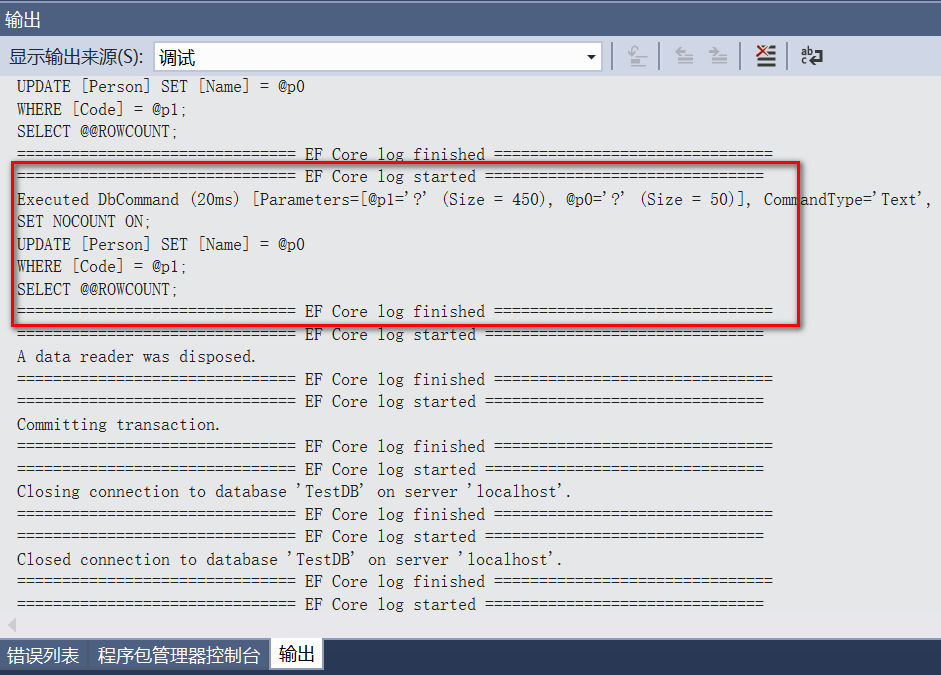
最后我们来看看EF Core日志输出的效果,还是很规整的,最重要的是我们可以实时的得到EF Core在后台生成的SQL语句:
EF Core如何输出日志到Visual Studio的输出窗口的更多相关文章
- Visual Studio的输出窗口上输出调试信息的函数
Visual Studio的输出窗口上输出文字的函数 参考网站:http://www.voidcn.com/blog/u011808175/article/p-2083567.html 当你编写非控制 ...
- 安装软件(名称不记得了)后,系统开机提示 visual studio just-in-time debugger窗口(WINDOWS错误提示框)
出现这种情况,往往是因为原先安装有VS,后来因某些原因(比如:卸载)导致VS无法使用!!当系统中的有些软件出现错误时,会自动调用vs进行调试,但因为VS无法使用,就出现了visual studio j ...
- log4net日志输出配置即输出到文件又输出到visual studio的output窗口
<configuration> <configSections> <section name="log4net" type="log4net ...
- ASP.NET Core + Angular 2 Template for Visual Studio
多个月以来,我和多个Github上的社区贡献者一起建立支持库.包,我们最终的目的是希望完成这样一个作为起点的模板,也就是基于把Typescript代码和Angular2宿主在ASP.NET Core项 ...
- .NET CORE 实践(3)--Visual Studio 2015 Update 3更新之后DotNetCore.1.0.1-VS2015Tools.Preview2.0.2.exe无法正确安装
打开 https://www.microsoft.com/net/core#windows,点击 https://go.microsoft.com/fwlink/?LinkId=691129下载vs2 ...
- .NET 6.0.6 和 .NET Core 3.1.26、Visual Studio 2022 17.2 和 17.3 Preview 2 和 .NET 7.0 Preview 5 同时发布
Microsoft 昨天发布了适用于 .NET 6.0.6 和 .NET Core 3.1.26.NuGet.Visual Studio 2019 和 Visual Studio 2022 17.2 ...
- visual studio code 输出乱码
问题: 解决方法: 首先,这个与VS本身无关,问题是出现在windows的dos显示设置上. 如何解决这个问题? 1.打开运行,输入cmd: 2.界面顶部右键,选择默认值: 3.将437(OEM-美国 ...
- Working with Data » 使用Visual Studio开发ASP.NET Core MVC and Entity Framework Core初学者教程
原文地址:https://docs.asp.net/en/latest/data/ef-mvc/intro.html The Contoso University sample web applica ...
- 【翻译】使用Visual Studio创建Asp.Net Core MVC (一)
This tutorial will teach you the basics of building an ASP.NET Core MVC web app using Visual Studio ...
随机推荐
- Git版本控制工具(1)
学习Git的最佳资料网站: https://www.liaoxuefeng.com/wiki/0013739516305929606dd18361248578c67b8067c8c017b000/ 这 ...
- css3之背景定位
属性: background-position: left top || left bottom || right top || right bottom || center center || 像素 ...
- cf1037E. Trips(图论 set)
题意 题目链接 Sol 倒着考虑!倒着考虑!倒着考虑! 显然,一个能成为答案的子图一定满足,其中任意节点的度数\(>= k\) 那么倒着维护就只用考虑删除操作,如果一个点不合法的话就把它删掉,然 ...
- html发展史简介(摘抄)
1993年,IETF,Internet工程任务组(Internet Engineering Task Force)的简写.IETF又叫互联网工程任务组,成立于1985年底,是全球互联网最具权威的技术标 ...
- chrome调试工具DevTools的使用 以及 localhost在移动端不能访问的问题
1.手机和pc 都需要装 chrome浏览器 2.手机端打开开发者模式和usb调试 (华为nova的手机小坑,需要选择usb 配置为可传输文件的状态) 3.经过以上操作打开chrome://inspe ...
- Office - InfoPath
1. 移除隐藏空间后剩余的空白: http://social.technet.microsoft.com/Forums/sharepoint/zh-TW/3dea3014-f808-428b-b283 ...
- CentOS 7运维管理笔记(5)----源代码安装Apache 2.4,搭建LAMP服务器
########################## 2016-07-07-Thu--20:34 补充 ##################### 编译安装OpenSSL笔记: 如果系统要使用 ...
- Android ImageButton单击切换按钮图片效果
正常状态的效果: 按钮按下的效果图片: 一.在java中为图片按钮增加触摸监听的函数来实现图片切换,代码如下: ImageButton btn = (ImageButton)findViewById( ...
- CFileDialog 多文件选择
CString pathName = _T(""); CString fileName = _T(""); CString strMulfilepath = _ ...
- mysql 免安装版安装(window7)
初次使用mysql免安装版步骤: 1.设置环境变量,将mysql 加压文件路径添加到环境变量path中(作用是不用每次都切换路径) 控制面板>系统和安全>系统>高级系统设置 2.安装 ...