
Ajax-07 基于Ajax实现跨域请求
跨域
跨域名访问,如c1.com域名向c2.com域名发送请求
本质:浏览器存在同源策略机制,同源策略阻止从一个源加载的文档或脚本获取或设置另一个源加载的文档的属性。
django服务端准备
url.py:
from django.conf.urls import url

from hello import views

urlpatterns = [

    url(r'cors/', views.cors, name='cors'),

    url(r'jsonp/', views.jsonp, name='jsonp'),

]
views.py:
#!/usr/bin/env python

# -*- coding: utf-8 -*-

from django.http import HttpResponse

from django.shortcuts import render

from django.views.decorators.csrf import csrf_exempt

@csrf_exempt

def cors(request):

    n1 = request.POST.get('n1')

    n2 = request.POST.get('n2')

    result = int(n1) + int(n2)

    response = HttpResponse(result)

    response['Access-Control-Allow-Origin'] = "*"

    return response

@csrf_exempt

def jsonp(request):

    func_name = request.GET.get('callback')

    n1 = request.GET.get('n1')

    n2 = request.GET.get('n2')

    result = int(n1) + int(n2)

    temp = "%s(%s)" % (func_name, result)

    response = HttpResponse(temp)

    return response
实现Ajax跨域请求
a.跨域资源共享(CORS,Cross-Origin Resource Sharing)
执行流程:
服务端
- 设置响应头
客户端
- XmlHttpRequest 直接发送请求
cors.html:
<!DOCTYPE html>

<html lang="en">

<head>

    <meta charset="UTF-8">

    <title>跨域请求</title>

</head>

<body>

<h1>跨域请求</h1>

<input type="submit" value="XmlSendRequest" onclick="XmlSendRequest();"/>

<input type="submit" value="JqSendRequest_1" onclick="JqSendRequest_1();"/>

<input type="submit" value="JqSendRequest_2" onclick="JqSendRequest_2();"/>

<script type="text/javascript" src="http://cdn.bootcss.com/jquery/3.2.1/jquery.min.js"></script>

<script>

    // 客户端定义回调函数

    function call(arg) {

        console.log('客户端定义回调函数执行:', arg);

    }

    function XmlSendRequest() {

        // 创建script标签

        var tag = document.createElement('script');

        // 指定src

        tag.src = "http://localhost:8000/jsonp/?callback=call&n1=2&n2=4";

        // 添加到head标签中

        document.head.appendChild(tag);

        // 删除script标签

        document.head.removeChild(tag);

    }

    function JqSendRequest_1() {

        $.ajax({

            url: "http://localhost:8000/jsonp/",

            data: {'n1': 22, 'n2': 44},

            type: 'POST', // 虽然是POST方式,但是内部会转换成GET请求

            dataType: 'jsonp',

            success: function (data, statusText, xmlHttpRequest) {

                console.log('success 回调执行:', data);

            }

        })

    }

    function JqSendRequest_2() {

        $.ajax({

            url: "http://localhost:8000/jsonp/",

            data: {'n1': 222, 'n2': 444},

            type: 'GET', // POST 也会自动转换为GET请求

            dataType: 'jsonp',

            jsonp: "callback",

            jsonpCallback: 'call', // 请求成功返回后,客户端执行call函数

            success: function (data, statusText, xmlHttpRequest) {

                // 未指定jsonCallback时,则自定执行方法

                console.log('success 回调执行:', data);

            }

            // 如上请求如 http://localhost:8000/jsonp/?callback=call&n1=222&n2=444

        })

    }

</script>

</body>

</html>
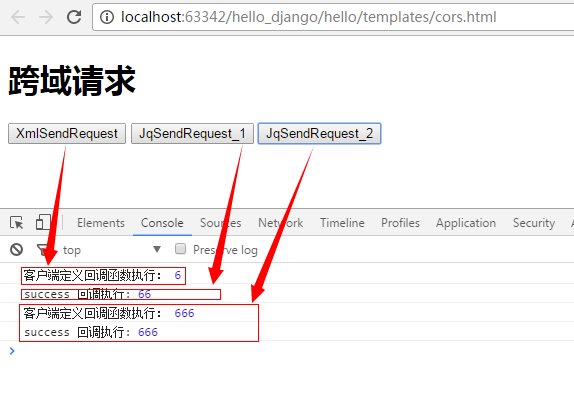
测试结果如:
b.JSONP(JSONP - JSON with Padding是JSON的一种“使用模式”)
本质:利用script标签的src属性(浏览器允许script标签跨域)
(img src, iframe, script 都可以进行跨域)
执行流程:(注意:所有都是GET请求)
服务端:
- 直接返回 回调函数名
客户端:
- 客户端定义回调函数
- 直接发送请求
jsonp.html
<!DOCTYPE html>

<html lang="en">

<head>

    <meta charset="UTF-8">

    <title>跨域请求</title>

</head>

<body>

<h1>跨域请求</h1>

<input type="submit" value="XmlSendRequest" onclick="XmlSendRequest();"/>

<input type="submit" value="JqSendRequest_1" onclick="JqSendRequest_1();"/>

<input type="submit" value="JqSendRequest_2" onclick="JqSendRequest_2();"/>

<script type="text/javascript" src="http://cdn.bootcss.com/jquery/3.2.1/jquery.min.js"></script>

<script>

    // 客户端定义回调函数

    function call(arg) {

        console.log('客户端定义回调函数执行:', arg);

    }

    function XmlSendRequest() {

        // 创建script标签

        var tag = document.createElement('script');

        // 指定src

        tag.src = "http://localhost:8000/jsonp/?callback=call&n1=2&n2=4";

        // 添加到head标签中

        document.head.appendChild(tag);

        // 删除script标签

        document.head.removeChild(tag);

    }

    function JqSendRequest_1() {

        $.ajax({

            url: "http://localhost:8000/jsonp/",

            data: {'n1': 22, 'n2': 44},

            type: 'POST', // 虽然是POST方式,但是内部会转换成GET请求

            dataType: 'jsonp',

            success: function (data, statusText, xmlHttpRequest) {

                console.log('success 回调执行:', data);

            }

        })

    }

    function JqSendRequest_2() {

        $.ajax({

            url: "http://localhost:8000/jsonp/",

            data: {'n1': 222, 'n2': 444},

            type: 'GET', // POST 也会自动转换为GET请求

            dataType: 'jsonp',

            jsonp: "callback",

            jsonpCallback: 'call', // 请求成功返回后,客户端执行call函数

            success: function (data, statusText, xmlHttpRequest) {

                // 未指定jsonCallback时,则自定执行方法

                console.log('success 回调执行:', data);

            }

            // 如上请求如 http://localhost:8000/jsonp/?callback=call&n1=222&n2=444

        })

    }

</script>

</body>

</html>
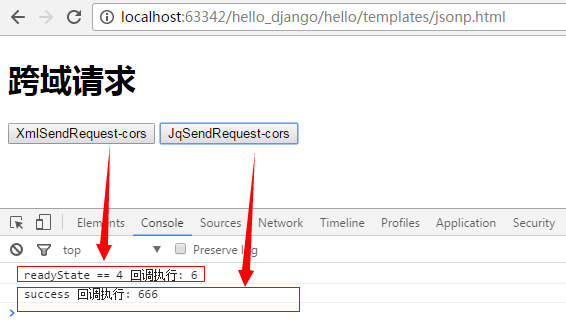
测试结果:
***微信扫一扫,关注“python测试开发圈”,了解更多测试教程!***
Ajax-07 基于Ajax实现跨域请求的更多相关文章
- AJAX(XMLHttpRequest)进行跨域请求方法详解
AJAX(XMLHttpRequest)进行跨域请求方法详解(三) 2010年01月11日 08:48:00 阅读数:24213 注意:以下代码请在Firefox 3.5.Chrome 3.0.Saf ...
- 4 伪ajax:jsonp、cors 跨域请求
一.同源策略 https://www.cnblogs.com/yuanchenqi/articles/7638956.html 同源策略(Same origin policy)是一种约定,它是浏览器最 ...
- AJAX(XMLHttpRequest)进行跨域请求方法详解(三)
注意:以下代码请在Firefox 3.5.Chrome 3.0.Safari 4之后的版本中进行测试.IE8的实现方法与其他浏览不同. 3,带验证信息的请求 身份验证是Web开发中经常遇到的问题,在跨 ...
- AJAX(XMLHttpRequest)进行跨域请求方法详解(二)
注意:以下代码请在Firefox 3.5.Chrome 3.0.Safari 4之后的版本中进行测试.IE8的实现方法与其他浏览不同. 2,预检请求 预检请求首先需要向另外一个域名的资源发送一个 HT ...
- AJAX(XMLHttpRequest)进行跨域请求方法详解(一)
注意:以下代码请在Firefox 3.5.Chrome 3.0.Safari 4之后的版本中进行测试.IE8的实现方法与其他浏览不同. 跨域请求,顾名思义,就是一个站点中的资源去访问另外一个不同域名站 ...
- jquery ajax在IE9以下进行跨域请求时无效的问题
第一步:设置浏览器安全属性,启用[通过域访问数据源]选项: 1.选择Internet选项 2.选择安全---自定义级别 3.找到其他---通过域访问数据源,选择启用,然后确定就可以了. 第二步:调用a ...
- jQuery ajax的jsonp跨域请求
一直在听“跨域跨域”,但是什么是跨域呢?今天做了一些了解.(利用jQuery的jsonp) jQuery使用JSONP跨域 JSONP跨域是利用script脚本允许引用不同域下的js实现的,将回调方法 ...
- CORS——跨域请求那些事儿
在日常的项目开发时会不可避免的需要进行跨域操作,而在实际进行跨域请求时,经常会遇到类似 No 'Access-Control-Allow-Origin' header is present on th ...
- Python-S9—Day85-ORM项目实战之forms组件以及Modelform补充、跨域请求及应用
01 forms组件补充1 02 forms组件补充2 03 ModelForm回顾 04 浏览器的历史 05 jsonop实现跨域请求 06 jsonop实现跨域请求2 07 jsonop实现跨域请 ...
随机推荐
- gophercloud openstack networking 源码分析
1.network 部分 // Package networks contains functionality for working with Neutron network resources. ...
- 【我的Android进阶之旅】解决strings.xml格式化占位符错误: Multiple substitutions specified in non-positional format
今天有一个Android新手使用strings.xml进行格式化的时候报了占位符错误, Multiple substitutions specified in non-positional forma ...
- Linux学习笔记(8)文件搜索与帮助
帮助: (1) man ls (2) info ls (3) whatis ls (4) help 搜索: (1) which ls :查看ls命令所在绝对路径 (2) locate user ...
- tomcat 配置文件 介绍
[root@mysql logs]# cd ../conf/ [root@mysql conf]# ll总用量 228drwxr-x---. 3 root root 4096 11月 15 2018 ...
- 删除pentaho用户和用户文件夹
获取所有用户 http://xxxxxxxx.com:8888/pentaho/api/repo/files/home/children 获取单个用户 http://whfxpt.itestcn.co ...
- oracle external密码验证
什么是external密码验证 当OS user 中存在和DB user 同名的用户时 直接使用和DB user 同名的OS user 可以不输入密码直接登录数据库, [oracle@zxrac1 ...
- mongo常用查询
复杂查询: and: or: lte,gte,=: and+lt: , 逗号表示and, $lt小于写在值当中 查询实例: 找到含有指定数据文档 查找条件spcode有1个字符长度的文档 db.sp ...
- dobbo 简单框架
- ActionScript和js交互
新建的ActionScript项目,默认新建会在“默认包”中创建一个和项目名称相同以as结尾的文件,as项目开始执行时要new一个这样的类在类上方加入一些参数可以为生成的swf初始化一些样式 [SWF ...
- html 基础 表单
一.表单 <form id="" name="" method="post/get" action="负责处理的服务端&qu ...