
12.Android之Tabhost组件学习
TabHost是整个Tab的容器,TabHost的实现有两种方式:
第一种继承TabActivity,从TabActivity中用getTabHost()方法获取TabHost。各个Tab中的内容在布局文件中定义就行了。
第二种方式,不继承TabActivity,在布局文件中定义TabHost即可,但是TabWidget的id必须是@android:id/tabs,FrameLayout的id必须是@android:id/tabcontent。
1)继承TabActivity
如果加载该TabHost画面的类继承TabActivity,并且想通过getTabHost()方法来获取TabHost,getTabWidget()方法获取TabWidget,那么TabHost、TabWidget 、FrameLayout 三者的ID必须是android.R.id.tabhost、android.R.id.tabs、android.R.id.tabcontent, 否则会报运行时异常, 比如提示Your content must have a TabHost whose id attribute is 'android.R.id.tabhost'之类错误
修改主布局activity_main文件:
 <?xml version="1.0" encoding="utf-8"?>

 <TabHost

     xmlns:android="http://schemas.android.com/apk/res/android"

     android:id="@android:id/tabhost"

     android:layout_width="fill_parent"

     android:layout_height="fill_parent"

     android:background="@drawable/back">

     <LinearLayout

         android:orientation="vertical"

         android:layout_width="fill_parent"

         android:layout_height="fill_parent">

         <TabWidget

             android:id="@android:id/tabs"

             android:layout_alignParentBottom="true"

             android:layout_width="fill_parent"

             android:layout_height="wrap_content"/>

         <FrameLayout

             android:id="@android:id/tabcontent"

             android:layout_weight="1"

             android:layout_width="fill_parent"

             android:layout_height="fill_parent" />

     </LinearLayout>

 </TabHost>
再增加自己定义的子TabHost页面布局文件tabhost1如下:
 <?xml version="1.0" encoding="utf-8"?>

 <TabHost

     xmlns:android="http://schemas.android.com/apk/res/android"

     android:id="@+id/mytabhost"

     android:layout_width="match_parent"

     android:layout_height="match_parent">

     <LinearLayout

         android:id="@+id/tab01"

         android:layout_width="match_parent"

         android:layout_height="match_parent"

         android:orientation="vertical">

         <TextView

             android:layout_width="wrap_content"

             android:layout_height="wrap_content"

             android:text="小明"/>

         <TextView

             android:layout_width="wrap_content"

             android:layout_height="wrap_content"

             android:text="小东"/>

     </LinearLayout>

     <LinearLayout

         android:id="@+id/tab02"

         android:layout_width="match_parent"

         android:layout_height="match_parent"

         android:orientation="vertical">

         <TextView

             android:layout_width="wrap_content"

             android:layout_height="wrap_content"

             android:text="小红"/>

         <TextView

             android:layout_width="wrap_content"

             android:layout_height="wrap_content"

             android:text="小紫"/>

     </LinearLayout>

     <LinearLayout

         android:id="@+id/tab03"

         android:layout_width="match_parent"

         android:layout_height="match_parent"

         android:orientation="vertical">

         <TextView

             android:layout_width="wrap_content"

             android:layout_height="wrap_content"

             android:text="小李"/>

         <TextView

             android:layout_width="wrap_content"

             android:layout_height="wrap_content"

             android:text="小北"/>

     </LinearLayout>

 </TabHost>
最后修改下MainActivity.java代码:
 package com.example.administrator.dialog1;

 import android.os.Bundle;

 import android.app.TabActivity;

 import android.view.LayoutInflater;

 import android.widget.TabHost;

 public class MainActivity extends TabActivity {

     TabHost mtabHost = null;

     @Override

     protected void onCreate(Bundle savedInstanceState) {

         super.onCreate(savedInstanceState);

         setContentView(R.layout.activity_main);

         //调用TabActivity的getTabHost()方法获取TabHost对象

         mtabHost = this.getTabHost();

         //设置使用TabHost布局

         LayoutInflater.from(this).inflate(R.layout.tabhost1, mtabHost.getTabContentView(),true);

         //添加第一个标签页

         mtabHost.addTab(mtabHost.newTabSpec("tab01").setIndicator("已接电话").setContent(R.id.tab01));

         //添加第二个标签页,并在其标签上添加一个图片

         mtabHost.addTab(mtabHost.newTabSpec("tab02").setIndicator("未接电话",getResources().getDrawable(R.mipmap.ic_launcher)).setContent(R.id.tab02));

         //添加第三个标签页

         mtabHost.addTab(mtabHost.newTabSpec("tab03").setIndicator("已拨电话").setContent(R.id.tab03));

     }

 }
运行效果:

2) 不继承TabActivity
修改MainActivity.java代码:
 package com.example.administrator.dialog1;

 import android.app.Activity;

 import android.os.Bundle;

 import android.widget.TabHost;

 import android.widget.TabWidget;

 public class MainActivity extends Activity {

     TabHost mtabHost = null;

     TabWidget tabWidget = null;

     @Override

     protected void onCreate(Bundle savedInstanceState) {

         super.onCreate(savedInstanceState);

         setContentView(R.layout.tabhost1);

         //以下三句代码,注意顺序

         mtabHost = (TabHost)findViewById(R.id.mytabhost);

         mtabHost.setup();

         tabWidget = mtabHost.getTabWidget();

         //添加第一个标签页

         mtabHost.addTab(mtabHost.newTabSpec("tab01").setIndicator("已接电话").setContent(R.id.tab01));

         //添加第二个标签页,并在其标签上添加一个图片

         mtabHost.addTab(mtabHost.newTabSpec("tab02").setIndicator("未接电话",getResources().getDrawable(R.mipmap.ic_launcher)).setContent(R.id.tab02));

         //添加第三个标签页

         mtabHost.addTab(mtabHost.newTabSpec("tab03").setIndicator("已拨电话").setContent(R.id.tab03));

         mtabHost.setCurrentTab(0);

     }

 }
再修改下tabhost1布局文件:
 <?xml version="1.0" encoding="utf-8"?>

 <TabHost

     xmlns:android="http://schemas.android.com/apk/res/android"

     android:id="@+id/mytabhost"

     android:layout_width="match_parent"

     android:layout_height="match_parent">

     <TabWidget

         android:id="@android:id/tabs"

         android:layout_width="fill_parent"

         android:layout_height="wrap_content"/>

     <FrameLayout

         android:id="@android:id/tabcontent"

         android:layout_weight="1"

         android:layout_width="fill_parent"

         android:layout_height="fill_parent" >

         <LinearLayout

             android:id="@+id/tab01"

             android:layout_width="match_parent"

             android:layout_height="match_parent"

             android:orientation="vertical">

             <TextView

                 android:layout_width="wrap_content"

                 android:layout_height="wrap_content"

                 android:layout_marginTop="60dp"

                 android:text="小明"/>

             <TextView

                 android:layout_width="wrap_content"

                 android:layout_height="wrap_content"

                 android:layout_marginBottom="60dp"

                 android:text="小东"/>

         </LinearLayout>

         <LinearLayout

             android:id="@+id/tab02"

             android:layout_width="match_parent"

             android:layout_height="match_parent"

             android:orientation="vertical">

             <TextView

                 android:layout_width="match_parent"

                 android:layout_height="wrap_content"

                 android:gravity="center"

                 android:layout_marginTop="60dp"

                 android:text="小红"/>

             <TextView

                 android:layout_width="match_parent"

                 android:layout_height="wrap_content"

                 android:gravity="center"

                 android:layout_marginBottom="60dp"

                 android:text="小紫"/>

         </LinearLayout>

         <LinearLayout

             android:id="@+id/tab03"

             android:layout_width="match_parent"

             android:layout_height="match_parent"

             android:orientation="vertical">

             <TextView

                 android:layout_width="match_parent"

                 android:layout_height="wrap_content"

                 android:gravity="right"

                 android:layout_marginTop="60dp"

                 android:text="小李"/>

             <TextView

                 android:layout_width="match_parent"

                 android:layout_height="wrap_content"

                 android:gravity="right"

                 android:layout_marginBottom="60dp"

                 android:text="小北"/>

         </LinearLayout>

     </FrameLayout>

 </TabHost>
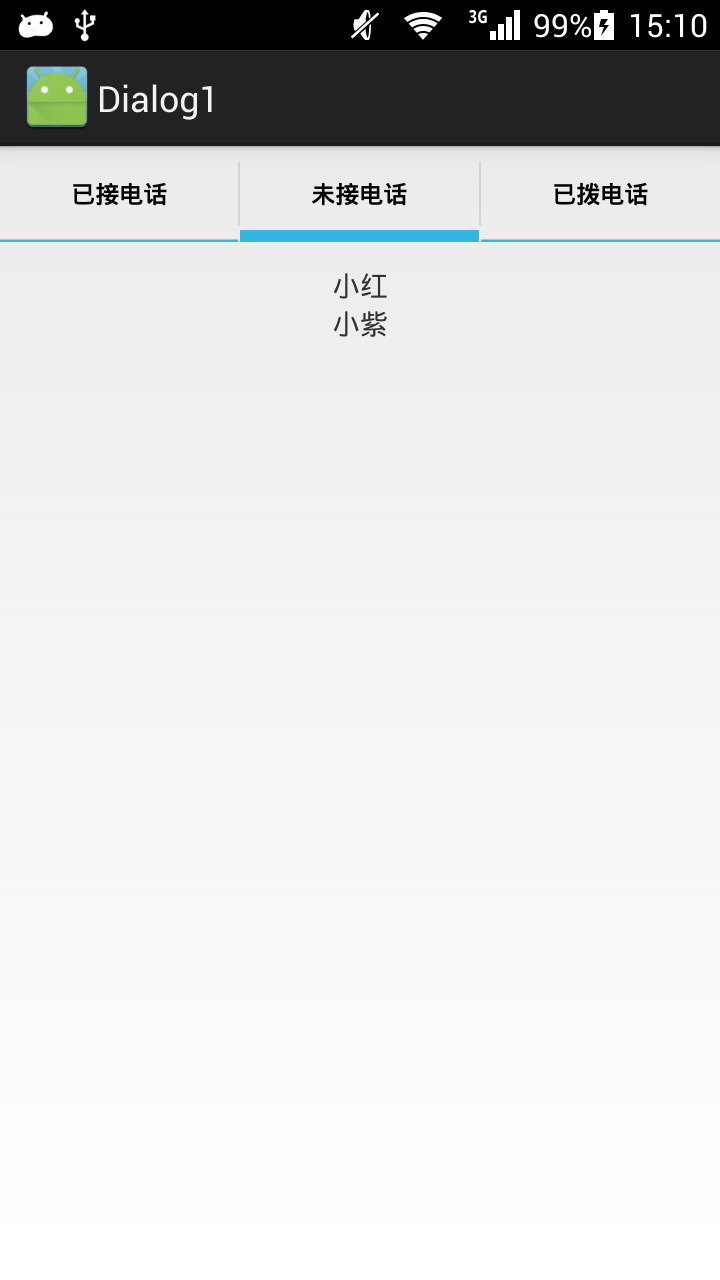
最终运行效果:
12.Android之Tabhost组件学习的更多相关文章
- Android的TabHost组件-android的学习之旅(四十)
TabHost简介 虽然,官方建议用Fagment取代TabHost,但是我们还是大概的介绍一下.TabHost是一种非常简单的组件,TabHost可以很方便的在窗口放置多个标签页,每一个标签页相当于 ...
- Android之EditText组件学习
一.基础学习 1.Button是TextView的一个子类,所以按钮本身是一个特殊的文本,属性和TextView相似 2.EditText类似html里的input type="text&q ...
- Android之TextView组件学习
一.基础学习 1.findViewById返回View类,该类是所有View组件的父类. 2.子类比父类拥有更多的属性和方法,不过子类找不到的话去父类找 3.marquee:华盖,跑马灯效果:orie ...
- Android的四大组件学习
一.Linearlayout : 线性布局 1. android:orientation="vertical" //控件的方向控制,vertical : 垂直布局 , ...
- 从零開始学android<TabHost标签组件.二十九.>
TabHost主要特点是能够在一个窗体中显示多组标签栏的内容,在Android系统之中每一个标签栏就称为一个Tab.而包括这多个标签栏的容器就将其称为TabHost.TabHost类的继承结构例如以下 ...
- Android应用程序组件Content Provider简要介绍和学习计划
文章转载至CSDN社区罗升阳的安卓之旅,原文地址:http://blog.csdn.net/luoshengyang/article/details/6946067 在Android系统中,Conte ...
- Android之TabHost布局(转)
1.概念 盛放Tab的容器就是TabHost.TabHost的实现有两种方式: 第一种继承TabActivity,从TabActivity中用getTabHost()方法获取TabHost.各个Tab ...
- 转-TabHost组件(一)(实现底部菜单导航)
http://www.cnblogs.com/lichenwei/p/3974009.html 什么是TabHost? TabHost组件的主要功能是可以进行应用程序分类管理,例如:在用户使用wind ...
- 转-TabHost组件(二)(实现底部菜单导航)
http://www.cnblogs.com/lichenwei/p/3975095.html 上面文章<安卓开发复习笔记——TabHost组件(一)(实现底部菜单导航)>中提到了利用自定 ...
随机推荐
- [Unity2D]2D Mobile Joystick
效果预览 操作步骤 1.下载素材 http://pan.bai du.com/s/1gdkQz8v 2.新建一个GUITexture(Joystick)及一个Sprite(Nyan) 3.添加背景 ...
- Windows系统安装Oracle 11g客户端
一.下载 http://www.oracle.com/technetwork/database/enterprise-edition/downloads/index.html以下网址来源此官方下载页网 ...
- Volley(五)—— 自定义Request
详细解读Volley(四)—— 自定义Request Volley中提供了几个Request,如果我们有特殊的需求,完全可以自定义Request的,自定义Request自然要继承Request,那么本 ...
- Python-装饰器详解
初学python,装饰器是什么玩意儿? 1:装饰器是函数,只不过该函数可以具有特殊的含义,装饰器用来装饰函数或类,使用装饰器可以在函数执行前和执行后添加相应操作. 2:至少两层函数 方式一: 理解方式 ...
- NSPredicate简单应用
1.筛选纯字符串数组的内容 NSArray *array = [[NSArray alloc]initWithObjects:@"beijing",@"shanghai& ...
- discourse 基于ember.js+rails项目的安装部署
最近公司在讨论做一个ERP运维问答的论坛系统,看了很多开源系统,觉得discourse功能比较完善,灵活.可配置性非常好,部署方便,瀑布流的主题布局模式也很符合未来论坛的趋势,于是在 ucloud 上 ...
- ORACLE SELECT INTO NO_DATA_FOUND问题
存储过程中使用了类似如下语句: SELECT col INTO v_col FROM t_table 当查询不到记录时,会出现“数据未发现”的异常 解决方法: (1)使用MAX函数 SELECT MA ...
- win10快捷键大全 win10常用快捷键
win10快捷键大全大家可以来了解一下,今天小编带来了win10常用快捷键,很多朋友喜欢使用快捷键来操作电脑,那么Windows10系统有哪些新的快捷键呢• 贴靠窗口:Win +左/右> Win ...
- C#脚本引擎 CS-Script 之(二)——性能评测
以下以一个简单的HelloWord程序为例,来分析csscript脚本引擎的性能. class HelloWorld { public void SayHello() { Console.WriteL ...
- PLC梯形图编程练习
在PLC培训软件中完成如下两个练习,并把对应的梯形图程序发表在博客上. 交通灯控制 在如下图的场景中,打开SW1开关后,交通灯控制器开始工作,关闭SW1则控制器停止工作. SW2为控制模式选择开关: ...