
ELK日志分析系统之elasticsearch7.x最新版安装与配置
1、Elasticsearch
1.1、elasticsearch的简介
ElasticSearch是一个基于Lucene的搜索服务器。它提供了一个分布式多用户能力的全文搜索引擎,基于RESTful web接口。Elasticsearch是用Java开发的,并作为Apache许可条款下的开放源码发布,是第二流行的企业搜索引擎。设计用于云计算中,能够达到实时搜索,稳定,可靠,快速,安装使用方便。
1.2、下载地址:https://www.elastic.co/cn/downloads/elasticsearch,到此网页上下开elasticsearch安装包。
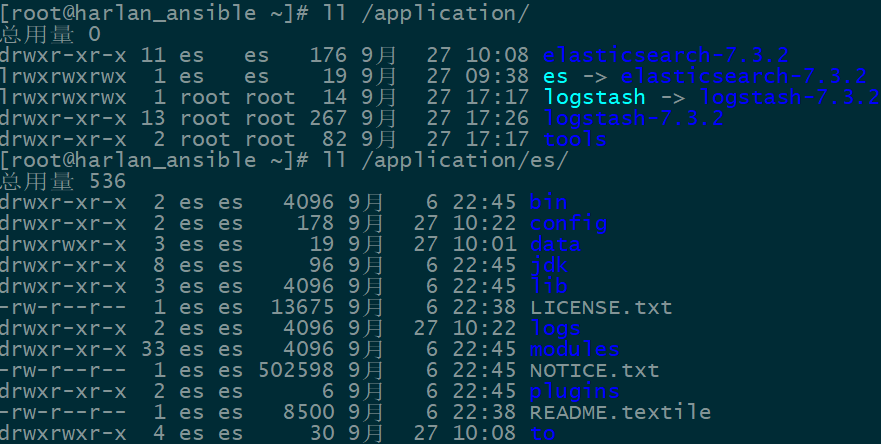
1.3、将下载的.tar包解压到目录/application下。创建软链接es文件。详情如下图所示:
1.4、关于JDK,此安装包里包含有JDK,不用再系统上重新安装其他的版本的JDK。

1.5、将此JDK放到系统变量文件/etc/profile中,在文件最后插入如下配置,详情如下:
#set java environment

export JAVA_HOME=/application/es/jdk

export JRE_HOME=${JAVA_HOME}/jre

export CLASSPATH=.:${JAVA_HOME}/lib/dt.JAVA_HOME/lib/tools.jar:${JRE_HOME}/lib

export PATH=${JAVA_HOME}/bin:${PATH}
1.6、使用source命令,使配置生效
source /etc/profile
1.7、配置elasticsearch的配置文件
[root@harlan_ansible ~]# vim /application/es/config/elasticsearch.yml
# ======================== Elasticsearch Configuration =========================

#

# NOTE: Elasticsearch comes with reasonable defaults for most settings.

#       Before you set out to tweak and tune the configuration, make sure you

#       understand what are you trying to accomplish and the consequences.

#

# The primary way of configuring a node is via this file. This template lists

# the most important settings you may want to configure for a production cluster.

#

# Please consult the documentation for further information on configuration options:

# https://www.elastic.co/guide/en/elasticsearch/reference/index.html

#

# ---------------------------------- Cluster -----------------------------------

#

# Use a descriptive name for your cluster:

#

cluster.name: my-harlan   #配置集群的名称

#

# ------------------------------------ Node ------------------------------------

#

# Use a descriptive name for the node:

#

node.name: harlan_ansible     #本节点的名称,此主机的名称

#

# Add custom attributes to the node:

#

#node.attr.rack: r1

#

# ----------------------------------- Paths ------------------------------------

#

# Path to directory where to store the data (separate multiple locations by comma):

#

path.data: /application/es/to/data      #日志存放地址

#

# Path to log files:

#

path.logs: /application/es/to/logs      #elasticsearch的本地日志

#

# ----------------------------------- Memory -----------------------------------

#

# Lock the memory on startup:

#

#bootstrap.memory_lock: true

#

# Make sure that the heap size is set to about half the memory available

# on the system and that the owner of the process is allowed to use this

# limit.

#

# Elasticsearch performs poorly when the system is swapping the memory.

#

# ---------------------------------- Network -----------------------------------

#

# Set the bind address to a specific IP (IPv4 or IPv6):

#

network.host: 0.0.0.0               #任意IP都可以访问elasticsearch

#

# Set a custom port for HTTP:

#

http.port: 9200                  #elasticsearch的访问端口

#

# For more information, consult the network module documentation.

#

# --------------------------------- Discovery ----------------------------------

#

# Pass an initial list of hosts to perform discovery when this node is started:

# The default list of hosts is ["127.0.0.1", "[::1]"]

#

#discovery.seed_hosts: ["host1", "host2"]

#

# Bootstrap the cluster using an initial set of master-eligible nodes:

#

cluster.initial_master_nodes: ["harlan_ansible"]      #开启集群的节点

#

# For more information, consult the discovery and cluster formation module documentation.

#

# ---------------------------------- Gateway -----------------------------------

#

# Block initial recovery after a full cluster restart until N nodes are started:

#

#gateway.recover_after_nodes:

#

# For more information, consult the gateway module documentation.

#

# ---------------------------------- Various -----------------------------------

#

# Require explicit names when deleting indices:

#

#action.destructive_requires_name: true

http.cors.enabled: true                  #下面这两个,是为了通过外网的浏览器访问

http.cors.allow-origin: "*"
1.8、通过上述配置后,还需要配置启动elasticsearch服务的用户和权限。因为elasticsearch的服务不能使用root用户进行启动。所以需要创建es帐号,并且更改/application/es的所属用户和组。
1.8.1 创建用户es
useradd es
1.8.2 更改/application/es的所属用户和组
chown -R es.es /application/es

chown -R es.es /application/elasticsearch-7.3.
1.9、切换到es帐户,启动elasticsearch服务
[es@harlan_ansible]$ su es
[es@harlan_ansible root]$ /application/es/bin/elasticsearch -d
1.10、查看服务是否已启动
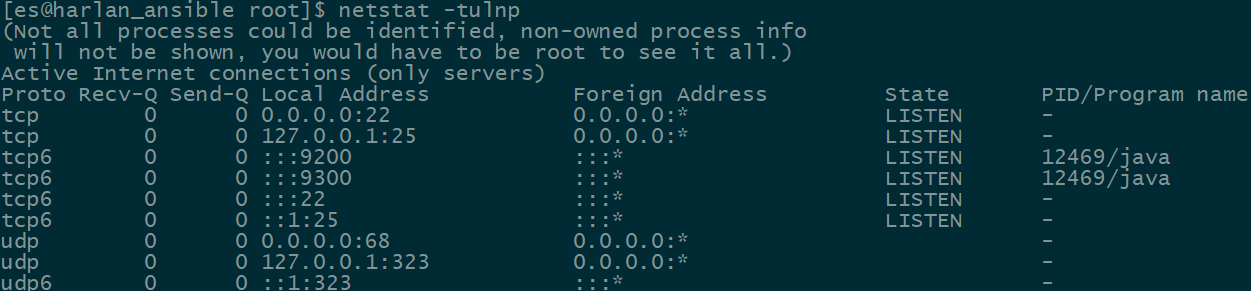
1.11、由上图可知,elasticsearch服务已经启动。
测试:通过浏览器进行访问
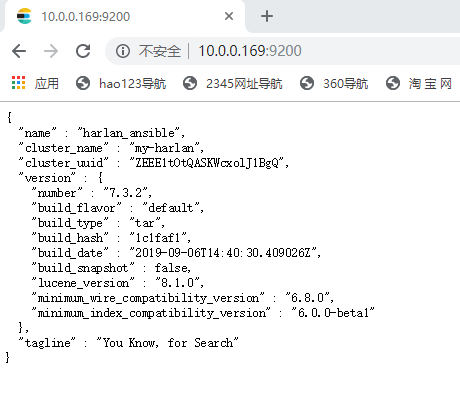
1.12、由图可知,elasticsearch已经安装成功。
ELK日志分析系统之elasticsearch7.x最新版安装与配置的更多相关文章
- ELK日志分析系统之Kibana7.x最新版安装与配置
3.Kibana的简介 Kibana 让您能够自由地选择如何呈现自己的数据.Kibana 核心产品搭载了一批经典功能:柱状图.线状图.饼图.旭日图等等. 3.1.软件包下载地址:https://www ...
- ELK日志分析系统之logstash7.x最新版安装与配置
2 .Logstash的简介 2.1 logstash 介绍 LogStash由JRuby语言编写,基于消息(message-based)的简单架构,并运行在Java虚拟机(JVM)上.不同于分离的代 ...
- ELK日志分析系统简单部署
1.传统日志分析系统: 日志主要包括系统日志.应用程序日志和安全日志.系统运维和开发人员可以通过日志了解服务器软硬件信息.检查配置过程中的错误及错误发生的原因.经常分析日志可以了解服务器的负荷,性能安 ...
- Rsyslog+ELK日志分析系统
转自:https://www.cnblogs.com/itworks/p/7272740.html Rsyslog+ELK日志分析系统搭建总结1.0(测试环境) 因为工作需求,最近在搭建日志分析系统, ...
- 十分钟搭建和使用ELK日志分析系统
前言 为满足研发可视化查看测试环境日志的目的,准备采用EK+filebeat实现日志可视化(ElasticSearch+Kibana+Filebeat).题目为“十分钟搭建和使用ELK日志分析系统”听 ...
- ELK日志分析系统-Logstack
ELK日志分析系统 作者:Danbo 2016-*-* 本文是学习笔记,参考ELK Stack中文指南,链接:https://www.gitbook.com/book/chenryn/kibana-g ...
- elk 日志分析系统Logstash+ElasticSearch+Kibana4
elk 日志分析系统 Logstash+ElasticSearch+Kibana4 logstash 管理日志和事件的工具 ElasticSearch 搜索 Kibana4 功能强大的数据显示clie ...
- 《ElasticSearch6.x实战教程》之实战ELK日志分析系统、多数据源同步
第十章-实战:ELK日志分析系统 ElasticSearch.Logstash.Kibana简称ELK系统,主要用于日志的收集与分析. 一个完整的大型分布式系统,会有很多与业务不相关的系统,其中日志系 ...
- Docker笔记(十):使用Docker来搭建一套ELK日志分析系统
一段时间没关注ELK(elasticsearch —— 搜索引擎,可用于存储.索引日志, logstash —— 可用于日志传输.转换,kibana —— WebUI,将日志可视化),发现最新版已到7 ...
随机推荐
- ssh1
#coding=utf-8 import paramiko ssh = paramiko.SSHClient() #允许链接不在linux上.ssh文件中不在known_hosts文件中的主机 ssh ...
- 13-jQuery事件绑定和常用鼠标事件
# 关于事件 ## 事件绑定 1.**基本绑定** > $(element).click(function(){})>> $(element).dblclick(function() ...
- postgresql Streaming Replication监控与注意事项
一监控Streaming Replication集群 1 pg_stat_replication视图(主库端执行) pid Wal sender process的进程ID usesysid 执行流复制 ...
- Ansible笔记(1)---基本概念
一.ansible的作用以及工作结构 1.1.ansible简介: ansible是新出现的自动化运维工具,基于Python开发,集合了众多运维工具(puppet.cfengine.chef.func ...
- django之项目部署知识点
一:项目部署的框架 nginx和uWSGI在生产服务器上进行的部署 二:什么是nginx? nginx是一个web服务器. 什么是web服务器? web服务器则主要是让客户可以通过浏览器进行访问,处理 ...
- Python---基础---str
#capitalize首字母大写,其余小写,返回字符串 ------------------------------ s = "i LOVE WangXiaoJing"print( ...
- 小记:web安全测试之——固定session漏洞
今天因为项目背景需要,需要检测web接口是否一些安全隐患. 无奈于从未掌握有系统的渗透性知识,只好根据个人对网络协议和 web 的理解,做一些探索,最终发现了一个session fixation at ...
- 【leetcode】1071. Greatest Common Divisor of Strings
题目如下: For strings S and T, we say "T divides S" if and only if S = T + ... + T (T concate ...
- 奇异值分解(SVD)(基础知识)
参考:https://www.cnblogs.com/pinard/p/6251584.html 参考:http://blog.csdn.net/u010099080/article/details/ ...
- python每日练习0801
#有一堆100块的石头,2个人轮流随机从中取1-5块,谁取最后一块就谁win,编程实现 import random stones = 100 count = 0 while stones > 0 ...