
java画图程序_图片用字母画出来_源码发布
在之前写了一篇blog:java画图程序_图片用字母画出来
主要是把一些调试的截图发布出来,现在程序调试我认为可以了(当然,你如果还想调试的话,也可以下载源码自己调试)。
就把源码发布出来。
项目结构:
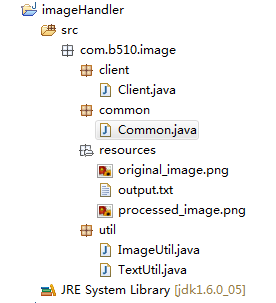
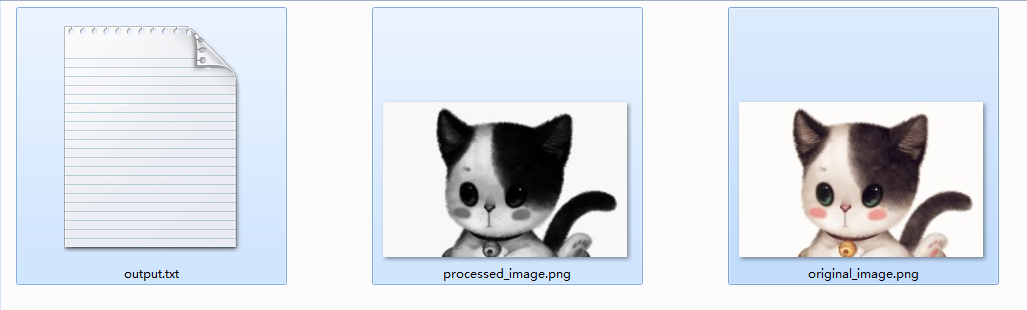
资源文件:
原图:http://images.cnblogs.com/cnblogs_com/hongten/356471/o_imagehandler_resource.png
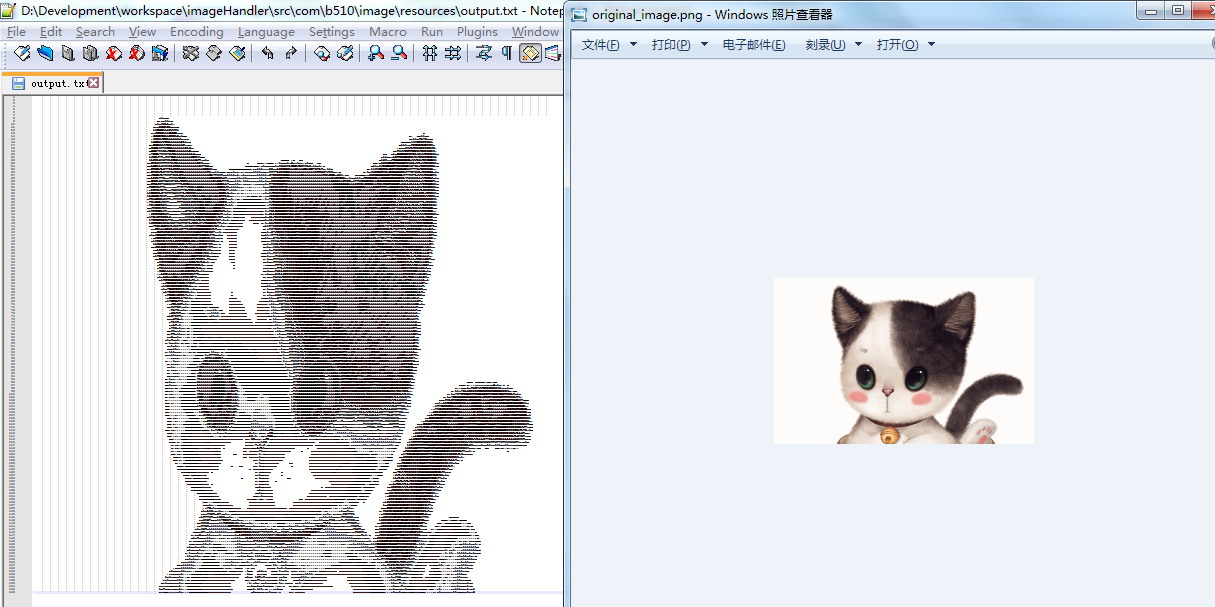
运行效果:
原图:http://images.cnblogs.com/cnblogs_com/hongten/356471/o_imagehandler_cat.png
===================================================
源码部分:
===================================================
/imageHandler/src/com/b510/image/client/Client.java
 /**

  *

  */

 package com.b510.image.client;

 import java.io.File;

 import com.b510.image.common.Common;

 import com.b510.image.util.ImageUtil;

 import com.b510.image.util.TextUtil;

 /**

  * This project is a tool for processing the image. <br>Including TWO functions :

  * <li>Color image to converted black and white picture.

  * <li>Imitating the original image to paint into the TXT file with alphabets.

  * You can change the code according to your requirement.

  *

  * @author Hongten

  * @mail hongtenzone@foxmail.com

  * @created Jul 23, 2014

  */

 public class Client {

     public static void main(String[] args) {

         colorImage2BWPic();

         painting();

     }

     private static void painting() {

         double[][] result = ImageUtil.getImageGRB(Common.ORIGINAL_IMAGE);

         StringBuffer stringBuffer = ImageUtil.getCanvas(result);

         TextUtil.write2File(stringBuffer);

     }

     /**

      * Color image to converted black and white picture.

      */

     private static void colorImage2BWPic() {

         File input = new File(Common.ORIGINAL_IMAGE);

         File out = new File(Common.PROCESSED_IMAGE);

         ImageUtil.colorImage2BlackAndWhitePicture(input, out);

     }

 }
/imageHandler/src/com/b510/image/common/Common.java
 /**

  *

  */

 package com.b510.image.common;

 /**

  * @author Hongten

  * @created Jul 23, 2014

  */

 public class Common {

     public static final String PATH = "src/com/b510/image/resources/";

     public static final String ORIGINAL_IMAGE = PATH + "original_image.png";

     public static final String PROCESSED_IMAGE =  PATH + "processed_image.png";

     public static final String OUTPUT_TXT = PATH + "output.txt";

     public static final String PROCESSED_SUCCESS = "Processed successfully...";

     public static final String PROCESS_ERROR = "Processing encounters error!";

     public static final String R = "R";

     public static final String A = "A";

     public static final String X = "X";

     public static final String M = "M";

     public static final String W = "W";

     public static final String H = "H";

     public static final String E = "E";

     public static final String J = "J";

     public static final String L = "L";

     public static final String C = "C";

     public static final String V = "V";

     public static final String Z = "Z";

     public static final String Q = "Q";

     public static final String T = "T";

     public static final String r = "r";

     public static final String s = "s";

     public static final String w = "w";

     public static final String u = "u";

     public static final String l = "l";

     public static final String i = "i";

     public static final String e = "e";

     public static final String m = "m";

     public static final String a = "a";

     public static final String COMMA = ",";

     public static final String BLANK = " ";

     public static final String NEW_LINE = "\n";

 }
/imageHandler/src/com/b510/image/util/ImageUtil.java
 /**

  *

  */

 package com.b510.image.util;

 import java.awt.Image;

 import java.awt.color.ColorSpace;

 import java.awt.image.BufferedImage;

 import java.awt.image.ColorConvertOp;

 import java.io.File;

 import java.io.FileOutputStream;

 import java.io.IOException;

 import javax.imageio.ImageIO;

 import com.b510.image.common.Common;

 import com.sun.image.codec.jpeg.JPEGCodec;

 import com.sun.image.codec.jpeg.JPEGImageEncoder;

 /**

  * @author Hongten

  * @created Jul 23, 2014

  */

 public class ImageUtil {

     private static int height = 0;

     private static int width = 0;

     /**

      * Color image is converted to black and white picture.

      * @param input

      * @param out

      */

     public static void colorImage2BlackAndWhitePicture(File input, File out) {

         try {

             Image image = ImageIO.read(input);

             int srcH = image.getHeight(null);

             int srcW = image.getWidth(null);

             BufferedImage bufferedImage = new BufferedImage(srcW, srcH, BufferedImage.TYPE_3BYTE_BGR);

             bufferedImage.getGraphics().drawImage(image, 0, 0, srcW, srcH, null);

             bufferedImage = new ColorConvertOp(ColorSpace.getInstance(ColorSpace.CS_GRAY), null).filter(bufferedImage, null);

             FileOutputStream fos = new FileOutputStream(out);

             JPEGImageEncoder encoder = JPEGCodec.createJPEGEncoder(fos);

             encoder.encode(bufferedImage);

             fos.close();

             System.out.println(Common.PROCESSED_SUCCESS);

         } catch (Exception e) {

             throw new IllegalStateException(Common.PROCESS_ERROR, e);

         }

     }

     /**

      * Get the image(*.jpg, *.png.etc) GRB value

      * @param filePath the original image path

      * @return

      */

     public static double[][] getImageGRB(String filePath) {

         File file = new File(filePath);

         double[][] result = null;

         if (!file.exists()) {

             return result;

         }

         try {

             BufferedImage bufImg = readImage(file);

             result = new double[height][width];

             for (int y = 0; y < height; y++) {

                 for (int x = 0; x < width; x++) {

                     double temp = Double.valueOf(bufImg.getRGB(x, y) & 0xFFFFFF);

                     result[y][x] = Math.floor(Math.cbrt(temp));

                 }

             }

         } catch (IOException e) {

             e.printStackTrace();

         }

         return result;

     }

     /**

      * Read the original image to convert BufferedImage

      * @param file Original image path

      * @return

      * @see BufferedImage

      * @throws IOException

      */

     private static BufferedImage readImage(File file) throws IOException {

         BufferedImage bufImg = ImageIO.read(file);

         height = bufImg.getHeight();

         width = bufImg.getWidth();

         return bufImg;

     }

     /**

      * Get the canvas, which is made up of alphabets.

      * @param result

      * @return

      */

     public static StringBuffer getCanvas(double[][] result) {

         StringBuffer stringBuffer = new StringBuffer();

         for (int y = 0; y < height; y++) {

             for (int x = 0; x < width; x++) {

                 fullBlank(result, stringBuffer, y, x);

             }

             stringBuffer.append(Common.NEW_LINE);

         }

         return new StringBuffer(stringBuffer.substring(0, stringBuffer.length() - 1));

     }

     /**

      * Full blank

      * @param result

      * @param stringBuffer

      * @param y

      * @param x

      */

     private static void fullBlank(double[][] result, StringBuffer stringBuffer, int y, int x) {

         if (result[y][x] > 0.0 && result[y][x] < 168.0) {

             fullBlackColor(result, stringBuffer, y, x);

         } else if (result[y][x] >= 168.0 && result[y][x] < 212.0) {

             fullGreyColor(result, stringBuffer, y, x);

         } else {

             fullWhiteColor(result, stringBuffer, y, x);

         }

     }

     /**

      * Full black color, and you can change the alphabet if you need.

      * @param result

      * @param stringBuffer

      * @param y

      * @param x

      */

     private static void fullBlackColor(double[][] result, StringBuffer stringBuffer, int y, int x) {

         if (result[y][x] > 0.0 && result[y][x] < 25.0) {

             stringBuffer.append(Common.R);

         } else if (result[y][x] >= 25.0 && result[y][x] < 50.0) {

             stringBuffer.append(Common.R);

         } else if (result[y][x] >= 50.0 && result[y][x] < 75.0) {

             stringBuffer.append(Common.A);

         } else if (result[y][x] >= 75.0 && result[y][x] < 100.0) {

             stringBuffer.append(Common.X);

         } else if (result[y][x] >= 100.0 && result[y][x] < 125.0) {

             stringBuffer.append(Common.R);

         } else if (result[y][x] >= 125.0 && result[y][x] < 150.0) {

             stringBuffer.append(Common.A);

         } else if (result[y][x] >= 150.0 && result[y][x] < 154.0) {

             stringBuffer.append(Common.X);

         } else if (result[y][x] >= 154.0 && result[y][x] < 158.0) {

             stringBuffer.append(Common.M);

         } else if (result[y][x] >= 158.0 && result[y][x] < 162.0) {

             stringBuffer.append(Common.W);

         } else if (result[y][x] >= 162.0 && result[y][x] < 168.0) {

             stringBuffer.append(Common.M);

         }

     }

     /**

      * Full grey color

      * @param result

      * @param stringBuffer

      * @param y

      * @param x

      */

     private static void fullGreyColor(double[][] result, StringBuffer stringBuffer, int y, int x) {

         if (result[y][x] >= 168.0 && result[y][x] < 172.0) {

             stringBuffer.append(Common.H);

         } else if (result[y][x] >= 172.0 && result[y][x] < 176.0) {

             stringBuffer.append(Common.E);

         } else if (result[y][x] >= 176.0 && result[y][x] < 180.0) {

             stringBuffer.append(Common.H);

         } else if (result[y][x] >= 180.0 && result[y][x] < 184.0) {

             stringBuffer.append(Common.H);

         } else if (result[y][x] >= 184.0 && result[y][x] < 188.0) {

             stringBuffer.append(Common.J);

         } else if (result[y][x] >= 188.0 && result[y][x] < 192.0) {

             stringBuffer.append(Common.L);

         } else if (result[y][x] >= 192.0 && result[y][x] < 196.0) {

             stringBuffer.append(Common.C);

         } else if (result[y][x] >= 196.0 && result[y][x] < 200.0) {

             stringBuffer.append(Common.V);

         } else if (result[y][x] >= 200.0 && result[y][x] < 204.0) {

             stringBuffer.append(Common.Z);

         } else if (result[y][x] >= 204.0 && result[y][x] < 208.0) {

             stringBuffer.append(Common.Q);

         } else if (result[y][x] >= 208.0 && result[y][x] < 212.0) {

             stringBuffer.append(Common.T);

         }

     }

     /**

      * Full white color

      * @param result

      * @param stringBuffer

      * @param y

      * @param x

      */

     private static void fullWhiteColor(double[][] result, StringBuffer stringBuffer, int y, int x) {

         if (result[y][x] >= 212.0 && result[y][x] < 216.0) {

             stringBuffer.append(Common.r);

         } else if (result[y][x] >= 216.0 && result[y][x] < 220.0) {

             stringBuffer.append(Common.s);

         } else if (result[y][x] >= 220.0 && result[y][x] < 224.0) {

             stringBuffer.append(Common.w);

         } else if (result[y][x] >= 224.0 && result[y][x] < 228.0) {

             stringBuffer.append(Common.u);

         } else if (result[y][x] >= 228.0 && result[y][x] < 232.0) {

             stringBuffer.append(Common.l);

         } else if (result[y][x] >= 232.0 && result[y][x] < 236.0) {

             stringBuffer.append(Common.i);

         } else if (result[y][x] >= 236.0 && result[y][x] < 240.0) {

             stringBuffer.append(Common.e);

         } else if (result[y][x] >= 240.0 && result[y][x] < 244.0) {

             stringBuffer.append(Common.COMMA);

         } else if (result[y][x] >= 244.0 && result[y][x] < 248.0) {

             stringBuffer.append(Common.m);

         } else if (result[y][x] >= 248.0 && result[y][x] < 252.0) {

             stringBuffer.append(Common.a);

         } else if (result[y][x] >= 252.0 && result[y][x] < 257.0) {

             stringBuffer.append(Common.BLANK);

         }

     }

 }
/imageHandler/src/com/b510/image/util/TextUtil.java
 /**

  *

  */

 package com.b510.image.util;

 import java.io.BufferedWriter;

 import java.io.File;

 import java.io.FileWriter;

 import java.io.IOException;

 import com.b510.image.common.Common;

 /**

  * @author Hongten

  * @created Jul 23, 2014

  */

 /**

  * @author Hongten

  * @created 2014-7-26

  */

 public class TextUtil {

     /**

      * Write the string to file.

      * @param stringBuffer

      */

     public static void write2File(StringBuffer stringBuffer) {

         File f = new File(Common.OUTPUT_TXT);

         BufferedWriter output = null;

         try {

             output = new BufferedWriter(new FileWriter(f));

             output.write(stringBuffer.toString());

             output.close();

         } catch (IOException e) {

             e.printStackTrace();

         }

     }

 }
源码下载:http://files.cnblogs.com/hongten/imageHandler.rar
========================================================
More reading,and english is important.
I'm Hongten
大哥哥大姐姐,觉得有用打赏点哦!多多少少没关系,一分也是对我的支持和鼓励。谢谢。
Hongten博客排名在100名以内。粉丝过千。
Hongten出品,必是精品。
E | hongtenzone@foxmail.com B | http://www.cnblogs.com/hongten
========================================================
java画图程序_图片用字母画出来_源码发布的更多相关文章
- java画图程序_图片用字母画出来_源码发布_版本二
在上一个版本:java画图程序_图片用字母画出来_源码发布 基础上,增加了图片同比例缩放,使得大像素图片可以很好地显示画在Notepad++中. 项目结构: 运行效果1: 原图:http://imag ...
- java画图程序_图片用字母画出来
最近在研究怎样将图片用字母在文本编辑工具中“画”出来. 你看了这个可能还不知道我想说什么? 我想直接上图,大家一定就知道了 第一张:小猫 原图:http://www.cnblogs.com/hongt ...
- Java界面程序实现图片的放大缩小
Java界面程序实现图片的放大缩小.这个程序简单地实现了图片的打开.保存.放大一倍.缩小一倍和固定缩放尺寸,但是并没有过多的涵盖对图片的细节处理,只是简单地实现了图片大小的放缩. 思维导图如下: 效果 ...
- Java学习-025-类名或方法名应用之一 -- 调试源码
上文讲述了如何获取类名和方法名,敬请参阅: Java学习-024-获取当前类名或方法名二三文 . 通常在应用开发中,调试或查看是哪个文件中的方法调用了当前文件的此方法,因而在实际的应用中需要获取相应的 ...
- Java开源生鲜电商平台-商品表的设计(源码可下载)
Java开源生鲜电商平台-商品表的设计(源码可下载) 任何一个电商,无论是B2C还是B2B的电商,商品表的设计关系到整个系统架构的核心. 1. 商品基本信息表:用单词:goods做为商品表 2. 商品 ...
- Java开源生鲜电商平台-订单表的设计(源码可下载)
Java开源生鲜电商平台-订单表的设计(源码可下载) 场景分析说明: 买家(餐馆)用户,通过APP进行选菜,放入购物车,然后下单,最终支付的流程,我们称为下单过程. 买家可以在张三家买茄子,李四家买萝 ...
- Android 图片加载框架Glide4.0源码完全解析(二)
写在之前 上一篇博文写的是Android 图片加载框架Glide4.0源码完全解析(一),主要分析了Glide4.0源码中的with方法和load方法,原本打算是一起发布的,但是由于into方法复杂性 ...
- Java开源生鲜电商平台-盈利模式详解(源码可下载)
Java开源生鲜电商平台-盈利模式详解(源码可下载) 该平台提供一个联合买家与卖家的一个平台.(类似淘宝购物,这里指的是食材的购买.) 平台有以下的盈利模式:(类似的平台有美菜网,食材网等) 1. 订 ...
- Java开源生鲜电商平台-用户表的设计(源码可下载)
Java开源生鲜电商平台-用户表的设计(源码可下载) 说明:由于该系统属于B2B平台,不设计到B2C的架构. 角色分析:买家与卖家. 由于买家与卖家所填写的资料都不一样,需要建立两站表进行维护,比如: ...
随机推荐
- java-解决业务操可能数据冲突问题
问题提出,由于业务会出现多人同时操作,或者业务人员反复的操作,因此在业务流程中,需要对业务操作数据进行保护,由于使用数据库锁可能会引起一些难以预料的问题,因此考虑使用内存锁,设计思想:在内存中使用一个 ...
- C++ 内联函数笔记
要使用内联函数,必须采取下述措施之一: +在函数声明前加上关键字inline: +在函数定义前加上关键字inline. 通常的做法是省略原型,将整个定义(即函数头和所有函数代码)放在本应提供原型的地方 ...
- Grafana 安装
由于 Grafana 是存静态的,你只需要下载源代码解压,将它部署在 Nginx 上面就可以了,或者可以用 Python 的 SimpleHTTPServer 来跑 $ wget http://gra ...
- ASMCMD命令
安装好用的rlwrap工具,在环境变量里添加如下,就能实现显示当前路径(目录),目录补全的方便功能 alias asmcmd='rlwrap -r -i asmcmd –p' asmcmd>he ...
- ThinkPHP3.2判断手机端访问并设置默认访问模块的方法
ThinkPHP3.2判断是否为手机端访问并跳转到另一个模块的方法 目录结构 公共模块Common,Home模块,Mobile模块 配置Application/Common/Conf/config.p ...
- C++中的链接错误
1.有可能是类的函数实现的时候错误. 如:应该为MVT_PAR1* GpsTcpCallback::GetMUT_PAR1(unsigned char* data,int i), 却写成了MVT_PA ...
- cocos2dx游戏开发——微信打飞机学习笔记(三)——WelcomeScene的搭建
一.场景与层的关系: cocos2dx的框架可以说主要由导演,场景,层,精灵来构成: 1.其中导演,意如其名,就是操控整个游戏的一个单例,管理着整个游戏. 2.场景就像电影的一幕剧情,所以说,懂得如何 ...
- How Kafka’s Storage Internals Work
In this post I'm going to help you understand how Kafka stores its data. I've found understanding th ...
- Loadrunner的字符串函数
String Function包括 lr_advance_param 指向参数文件中参数的下一个值. lr_convert_string_encoding 将字符串转换为其他编码. lr_decryp ...
- Hdu2544 最短路径 四种方法
Problem Description 在每年的校赛里,所有进入决赛的同学都会获得一件很漂亮的t-shirt.但是每当我们的工作人员把上百件的衣服从商店运回到赛场的时候,却是非常累的!所以现在他们想要 ...