
[ipsec][strongswan] 使用wireshark查看strongswan ipsec esp ikev1 ikev2的加密内容
姊妹篇:[https][tls] 如何使用wireshark查看tls/https加密消息
一,编译,启用strongswan的save-keys plugin
./configure --prefix=/root/OUTPUT --exec-prefix=/root/OUTPUT --enable-save-keys CFLAGS="-g -O0"
运行之前验证一下,是否加载了这个插件
[root@T9 OUTPUT]# ./sbin/swanctl --stat |grep save

loaded plugins: charon aes save-keys des rc2 sha2 sha1 md5 mgf1 random nonce x509 revocation constraints pubkey
 pkcs1 pkcs7 pkcs8 pkcs12 pgp dnskey sshkey pem fips-prf gmp curve25519 xcbc cmac hmac attr kernel-netlink
resolve socket-default stroke vici updown xauth-generic counters
二,增加如下配置
charon {

        load_modular = yes

        plugins {

                include strongswan.d/charon/*.conf

                save-keys {

                        esp = yes

                        ike = yes

                        load = yes

                        wireshark_keys = /root/OUTPUT/etc/keys

                }

        }
详细的解释,可以查man手册
       charon.plugins.save-keys.esp [no]

              Whether to save ESP keys.

       charon.plugins.save-keys.ike [no]

              Whether to save IKE keys.

       charon.plugins.save-keys.load [no]

              Whether to load the plugin.

       charon.plugins.save-keys.wireshark_keys []

              Directory  where  the  keys  are  stored  in the format supported by Wireshark. IKEv1 keys are stored in the ikev1_decryption_table file.
              IKEv2 keys are stored in the ikev2_decryption_table file.
              Keys for ESP CHILD_SAs are stored in the esp_sa file.
三,正常运行之后,这个目录下,就会存着key了,同时把包抓下来
./sbin/swanctl --load-all

./sbin/ipsec up net-net
查看保存的key
[root@T9 OUTPUT]# ll etc/keys/

total

-rw-r--r--  root root  Dec  : esp_sa

-rw-r--r--  root root  Dec  : ikev2_decryption_table
四,配置wireshark
IKE:
edit->preferences->protocols->ISAKMP->IKEv2 Decryption Table->Edit
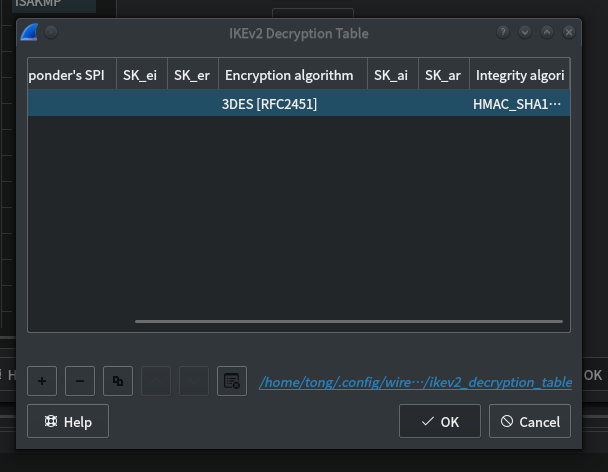
如图,看见这后边有个蓝色的文件名。
用前边获得的那个文件覆盖它。
cp ikev2_decryption_table /home/tong/.config/wireshark/ikev2_decryption_table
ESP:
edit->preferences->protocols->ESP->Edit
然后点加号,编辑
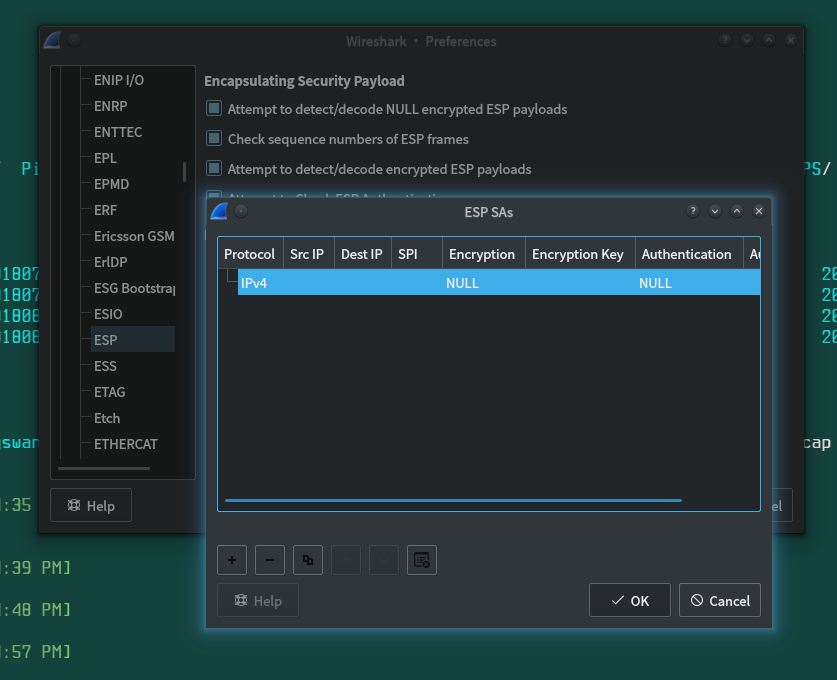
或者。直接cp进去到配置目录
cp esp_sa /home/tong/.config/wireshark/
五。用wirshark再次打开之前抓到的pcap包。
好了。现在的IKEV2和ESP都是解密过的了。

[ipsec][strongswan] 使用wireshark查看strongswan ipsec esp ikev1 ikev2的加密内容的更多相关文章
- [https][tls] 如何使用wireshark查看tls/https加密消息--使用keylog
姊妹篇: [ipsec][strongswan] 使用wireshark查看strongswan ipsec esp ikev1 ikev2的加密内容 [https][tls] 如何使用wiresha ...
- tcpdump抓包和scp导出以及wireshark查看
[命令和工具] tcpdump scp wireshark (1)tcpdump sudo tcpdump -i eth0 -w /home/tcpdump/1.pcap host 10.214.1 ...
- [https][tls] 如何使用wireshark查看tls/https加密消息--使用私钥
之前总结了使用keylog进行https流量分析的方法: [https][tls] 如何使用wireshark查看tls/https加密消息--使用keylog 今天总结一下使用服务器端证书私钥进行h ...
- Wireshark 查看指定进程的网络包
Wireshark 查看指定进程的网络包 打开任务管理器,右键筛选列,选中PID(进程标识符): 找到该进程对应的PID,如1200: 在cmd中执行netstat -ano|findstr 1200 ...
- SQL点点滴滴_查看所有存储过程或视图的位置及内容
代码:select a.name,a.[type],b.[definition] from sys.all_objects a,sys.sql_modules b where a.is_ms_ship ...
- Visual Studio Code 帮助查看器,指定的用于安装帮助内容的位置无效,或者您无权访问该位置
今天有个C# 类库文件里面的属性想要了解下,想到了Vs的帮助文档,其实也就是微软的MSDN:提示帮助查看器,指定的用于安装帮助内容的位置无效,或者您无权访问该位置: 最近两天vs也没有更新,并且也没有 ...
- 下面哪些命令可以查看file1文件的第300-500行的内容?
下面哪些命令可以查看file1文件的第300-500行的内容? cat file1 | tail -n +300 | head -n 200 cat file1| head -n 500 | tail ...
- [ipsec] 特别硬核的ike/ipsec NAT穿越机制分析
〇 前言 这怕是最后一篇关于IKE,IPSEC的文字了,因为不能没完没了. 所以,我一直在想这个标题该叫什么.总的来说可以将其概括为:IKE NAT穿越机制的分析. 但是,同时它也回答了以下问题: ( ...
- Wireshark查看https的通讯
如果有服务端的证书,那我们可以分析web下https的通讯情况,在特别的场景下有一定的用处,如外部审计 如下是在wireshark或tshark中配置查看https的设置 wireshark验证 ts ...
随机推荐
- 干货分享:让你分分钟学会 javascript 闭包(转)
闭包,是javascript中独有的一个概念,对于初学者来讲,闭包是一个特别抽象的概念,特别是ECMA规范给的定义,如果没有实战经验,你很难从定义去理解它.因此,本文不会对闭包的概念进行大篇幅描述,直 ...
- TCP-IP详解笔记3
TCP-IP详解笔记3 地址解析协议 IP协议的设计目标是为跨越不同类型物理网络的分组交换提供互操作. 网络层软件使用的地址和底层网络硬件使用的地址之间进行转换. 对于TCP/IP网络,地址解析协议( ...
- mysql 迁移
背景 这次做oracle数据迁移,也想总结像mysql的数据迁移方式.简单列下吧,因为具体方式网上很多. 方式 可以通过修改mysql.ini的数据文件目录位置方法实现拷贝迁移,此种方式简单 通过备份 ...
- 记录一次Python下Tensorflow安装过程,1.7带GPU加速版本
最近由于论文需要,急需搭建Tensorflow环境,16年底当时Tensorflow版本号还没有过1,我曾按照手册搭建过CPU版本.目前,1.7算是比较新的版本了(也可以从源码编译1.8版本的Tens ...
- [正则表达式]PCRE反向分组引用(语法)
正则表达式中,凡出现圆括号(),括号中的匹配内容就会被认为是一个分组: 根据括号从左边出现的顺序命名分组代号,分组代号由1到n(代号0通常被一些语言用来引用整个表达式匹配的结果,即使这个表达式没有分组 ...
- Python——plot可视化数据,作业8(python programming)
subject1k和subject1v的形状相同 # -*- coding: utf-8 -*- import scipy.io as sio raw_K = sio.loadmat('Subject ...
- prototype、proto、constructor 之间的关系
- NIagara Workbench ( 温度控制)
1.在原来BoilerControl的基础上建立一个 2.检查通过标签构造的报告的时候,在键盘上按下Control键并一直保持的同时按下L键 将会弹窗一个ORD窗口代表定义的参数.同时按下Contro ...
- URL.createObjectURL() 实现本地上传图片 并预览功能
URL.createObjectURL() 静态方法会创建一个 DOMString,其中包含一个表示参数中给出的对象的URL.这个 URL 的生命周期和创建它的窗口中的 document 绑定.这个新 ...
- synchronized 是可重入锁吗?为什么?
什么是可重入锁? 关于什么是可重入锁,我们先来看一段维基百科的定义. 若一个程序或子程序可以“在任意时刻被中断然后操作系统调度执行另外一段代码,这段代码又调用了该子程序不会出错”,则称其为可重入(re ...