
最全数据结构详述: List VS IEnumerable VS IQueryable VS ICollection VS IDictionary
本文对常用的数据结构详述:Array, ArrayList,List,IList,ICollection, Stack, Queue, HashTable, Dictionary, IQueryable, IEnumerable。
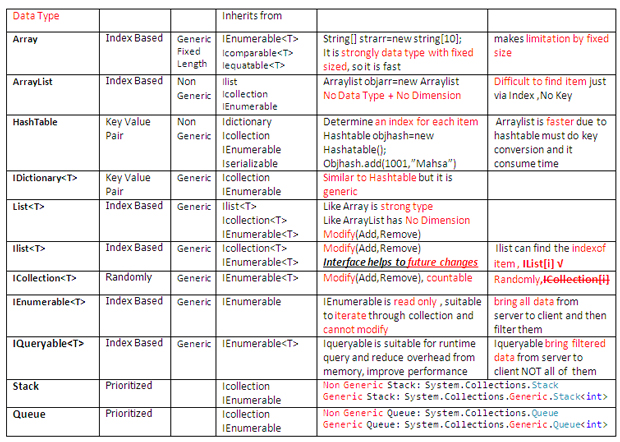
Collection(集合)
Collection是数据记录集合,
编写代码过程中,常常需要合适的容器保存临时数据,方便修改和查找,如何选取合适的数据容器,关键在于将执行的数据操作以及数据记录是否大量。

Array(数组)
特征
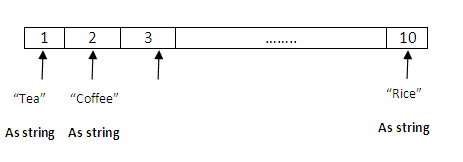
1. 固定大小,数组的大小是初始化时决定无法修改的数值。
2. 强类型,存储数据元素类型必须在初始化时指定,因此在运行时,不需要耗费额外的时间来定义数组类型,能够大大提升运行效率。
3. 可使用Foreach关键字实现数组迭代和查找。
因为数组大小是固定的,且是强类型数据结构,因此在运行时只占用很少的内存,运行时效率很高。
1: //It is obvious that strArray is
2: //1. string --> Strongly Type
3: //2. Sized=10 --> Fixed Size
4:
5: string[] strArray = new string[10];
6:
7: for (int i = 0; i < 10; i++)
8: {
9: if (strArray[i]==null)
10: {
11: strArray[i] = (i+1).ToString();
12: }
13: }
14:
15: this.ListBoxArray.DataSource = null;
16: this.ListBoxArray.Items.Clear();
17:
18: this.ListBoxArray.DataSource = strArray;
19: this.ListBoxArray.DataBind();
ArrayList
1. ArrayList 没有固定的长度,容量可动态增加,可应用于开发人员无法确定数组元素个数等场景,当然这种情况下,在定义结构体的时候会非常耗时。
2. ArrayList 不是强类型,ArrayList中不同元素类型可以不相同,并且需要在运行时根据实际的输入来确定元素类型。因此在运行时消耗内存较多。
3. 可使用Froeach 关键字操作ArrayList。

1: public class Product
2: {
3: public Product()
4: {
5:
6: }
7: public Product(string Code, string Name)
8: {
9: _Code = Code;
10: _Name = Name;
11: }
12:
13: public string _Code {get; set;}
14: public string _Name { get; set; }
15: }
ArrayList支持String,int,以及十进制小数类型。
1: //It is NOT obvious that strArrayList is 1. string? int? object? decimal? --> NOT Strongly Type
2: // 2. Sized=10? 20? 100? -->NOT Fixed Size
3: // Namespace: System.Collections
4:
5: System.Collections.ArrayList strArrayList = new System.Collections.ArrayList();
6: //System.Linq.IQueryable type of data is not specific runtime defered support
7: strArrayList.Add("Mahsa"); // "Mahsa": is string
8: strArrayList.Add(1); // 1 : is integer
9: strArrayList.Add(0.89); // 0.89: is decimal
10:
11: this.ListBoxArrayList.DataSource = null;
12: this.ListBoxArrayList.Items.Clear();
13: this.ListBoxArrayList.DataSource = strArrayList;
14: this.ListBoxArrayList.DataBind();
15:
16: System.Text.StringBuilder str= new System.Text.StringBuilder();
17:
18: foreach (var item in strArrayList)
19: {
20: str.Append(" , "+item);
21: }
22: this.lblArrayList.Text = str.ToString();
23:
24: //Below is old way to fill obj from product , in Arraylist you need to create more than one instance
25: // Product objProduct = new Product();
26: // objProduct.Code = "1001";
27: // objProduct.Name = "Chair";
28:
29: //It is NOT obvious that strArrayList is
30: //1. string? int? object? decimal? OR OBJECT?? --> NOT Strongly Type
31: //2. Sized=10? 20? 100? -->NOT Fixed Size
32: // Namespace: System.Collections
33:
34: System.Collections.ArrayList objArrayList = new System.Collections.ArrayList();
35:
36: objArrayList.Add(new Product("1001", "Chair"));
37: objArrayList.Add(new Product("1002", "Sofa"));
38: objArrayList.Add(new Product("1003", "Carpet"));
39:
40: this.DropDownListArrayListObject.DataSource = null;
41: this.DropDownListArrayListObject.Items.Clear();
42: this.DropDownListArrayListObject.DataSource = objArrayList;
43:
44: //* Finding among Object of Array List is difficult , you have to find your specific item by index
45: Product objTemp = (Product)objArrayList[0];
46: objArrayList.Remove(objTemp);
47: //*
48: this.DropDownListArrayListObject.DataTextField = "_Name";
49: this.DropDownListArrayListObject.DataValueField = "_Code";
50: this.DropDownListArrayListObject.DataBind();
51: this.GridViewArrayListObject.DataSource = objArrayList;
52: this.GridViewArrayListObject.DataBind();
HashTable(哈希表)
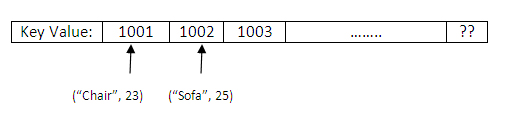
HashTable是一种定义关键字的数据结构体,使用哈希表查找数据非常方便,哈希表既不是强类型也不固定大小限制。
1: //It is NOT obvious that strArrayList is
2: //1. string? int? object? decimal? OR OBJECT?? --> NOT Strongly Type
3: //2. Sized=10? 20? 100? -->NOT Fixed Size
4: // Namespace: System.Collections
5: //Hashtable solve the problem in Arraylist when we are looking for specific item
6: //Hashtable dedicate a key for each item, then finding item is easier and faster
7:
8: System.Collections.Hashtable objHashTable = new System.Collections.Hashtable();
9:
10: objHashTable.Add("1001","Chair");
11: objHashTable.Add("1002", "Sofa");
12: objHashTable.Add("1003", "Carpet");
13:
14:
15: this.DropDownListHashTable.DataSource = null;
16: this.DropDownListHashTable.Items.Clear();
17: this.DropDownListHashTable.DataSource = objHashTable;
18: //* finding item is easier you just need to point to it by call its key
19: objHashTable.Remove("1002");
20: //*
21: this.DropDownListHashTable.DataTextField = "Value";
22: this.DropDownListHashTable.DataValueField = "Key";
23: this.DropDownListHashTable.DataBind();
Stack
栈是最典型的数据结构,栈具有优先级划分的数据结构,栈为每个内容项定义优先级,表示每个Item入栈和出栈的优先顺序。因此操作栈中的数据,需要先将数据push 到栈的顶部,需要删除元素必须变成栈顶部,即要遵守后进先出(LIFO)的原则。
栈与哈希表一样既不是强类型也不限制元素个数。

Push 操作
1: //Stack is LIFO: Last in First Out
2: System.Collections.Stack objStackPush = new System.Collections.Stack();
3:
4: //By Push method you can insert item at the top of the stack
5: objStackPush.Push("Mahsa");
6: objStackPush.Push("Hassankashi");
7: this.lblPop.Text = "";
8: this.ListBoxStack.DataSource = objStackPush.ToArray();
9: this.ListBoxStack.DataBind();
Pop操作
1: System.Collections.Stack objStackPop = new System.Collections.Stack();
2:
3: objStackPop.Push("Mahsa");
4: objStackPop.Push("Hassankashi");
5:
6: //By Pop method you can remove item from the top of the stack --> Last in First in
7: this.lblPop.Text = objStackPop.Pop().ToString();
8:
9: this.ListBoxStack.DataSource = objStackPop.ToArray();
10: this.ListBoxStack.DataBind();
Queue
Queue同栈一样也是具有优先级定义的结构体,遵循的规则是先进先出(FIFO),既不是强类型也不具有固定的大小限制。

入队操作
1: //Queue is FIFO: First in First Out
2: System.Collections.Queue objQueue = new System.Collections.Queue();
3:
4: //By Enqueue method you can insert item at the END of the Queue
5: objQueue.Enqueue("Mahsa");
6: objQueue.Enqueue("Hassankashi");
7: objQueue.Enqueue("Cosmic");
8: objQueue.Enqueue("Verse");
9:
10: this.lblQueue.Text = "";
11: this.ListBoxQueue.DataSource = objQueue.ToArray();
12: this.ListBoxQueue.DataBind();
出队操作
1: System.Collections.Queue objQueue = new System.Collections.Queue();
2:
3: objQueue.Enqueue("Mahsa");
4: objQueue.Enqueue("Hassankashi");
5: objQueue.Enqueue("Cosmic");
6: objQueue.Enqueue("Verse");
7:
8: //By Dequeue method you can remove item from the BEGINING of the Queue --> First in First out FIFO
9: this.lblQueue.Text=objQueue.Dequeue().ToString();
10:
11: this.ListBoxQueue.DataSource = objQueue.ToArray();
12: this.ListBoxQueue.DataBind();
入队操作
1: System.Collections.Queue objQueue = new System.Collections.Queue();
2:
3: objQueue.Enqueue("Mahsa");
4: objQueue.Enqueue("Hassankashi");
5: objQueue.Enqueue("Cosmic");
6: objQueue.Enqueue("Verse");
7:
8: //By Dequeue method you can remove item from the BEGINING of the Queue --> First in First out FIFO
9: this.lblQueue.Text=objQueue.Dequeue().ToString();
10:
11: this.ListBoxQueue.DataSource = objQueue.ToArray();
12: this.ListBoxQueue.DataBind();
List
什么情况下需要使用List?
1. List长度可不固定
2. 当数据为通用类型,List是强类型,List中元素类型不需要等到运行时来确定,这种特性使得List 运行时效率非常高。
3. 可使用Foreach关键字。
因为List不需要设定固定的大小,List灵活度高,且效率高常用于开发过程中。

1: //Like Array is Strong Type
2: //Like ArrayList with No Dimension
3: System.Collections.Generic.List<string> strList = new List<string>();
4:
5:
6: strList.Add("Mahsa");
7: strList.Add("Hassankashi");
8: strList.Add("Cosmic");
9: strList.Add("Verse");
10:
11: this.ListBoxListGeneric.DataSource = strList;
12: this.ListBoxListGeneric.DataBind();
13:
14: System.Text.StringBuilder str = new System.Text.StringBuilder();
15:
16: foreach (var item in strList)
17: {
18: str.Append(" , " + item);
19: }
20: this.lblList.Text = str.ToString();
IList
IList 继承了List,包含多种方法的List接口。如果你无法判断代码改动的可能性,可以使用IList接口,减少模块之间的依赖性。IList是接口因此无法被实例化,所以必须使用List来初始化。
1: System.Collections.Generic.IList<string> strIList = new List<string>();
我们一起了解一下具体的类和接口之间的区别。
1. 具体类可继承其他类,并实现一个或多个接口。
2. 在内部类中可以定义变量并赋值,接口中不允许此操作。
3. 具体类可包含构造函数,而接口中不能定义构造函数
4. 抽象类中可包含访问修饰符如public,private等,接口中不能包含。

1: //Ilist can not be instantiate from Ilist , so it should be instantiate from List
2: System.Collections.Generic.IList<string> strIList = new List<string>();
3:
4: strIList.Add("Mahsa");
5: strIList.Add("Hassankashi");
6: strIList.Add("Cosmic");
7: strIList.Add("Verse");
8:
9:
10: this.ListBoxListGeneric.DataSource = strIList;
11: this.ListBoxListGeneric.DataBind();
12:
13: System.Text.StringBuilder str = new System.Text.StringBuilder();
14:
15: foreach (var item in strIList)
16: {
17: str.Append(" , " + item);
18: }
19: this.lblList.Text = str.ToString();
IEnumerable
IEnumerable常用于遍历集合元素,但是无法修改(删除或添加)数据,使用IEnumberable 会从服务器端将所有数据拷贝到客户端,并进行一定的过滤,如果服务器端有大量数据会造成内存负载超重。

1: //IEnumerable can not be instantiate from Enumerable , so it should be instantiate from List
2: System.Collections.Generic.IEnumerable<Employee> empIEnumerable = new List<Employee>
3: { new Employee { ID = 1001, Name="Mahsa"},
4: new Employee { ID = 1002, Name = "Hassankashi" },
5: new Employee { ID = 1003, Name = "CosmicVerse" },
6: new Employee { ID = 1004, Name = "Technical" }
7: };
8:
9:
10: this.GridViewIEnumerable.DataSource = empIEnumerable;
11: this.GridViewIEnumerable.DataBind();
12:
13: System.Text.StringBuilder str = new System.Text.StringBuilder();
14:
15: foreach (Employee item in empIEnumerable)
16: {
17: str.Append(" , " + item.ID +"-"+item.Name);
18: }
19:
20: this.lblIEnumerable.Text = str.ToString();
IQueryable
IQueryable与IEnumberable不同的是,当从服务器端加载过量的数据,IQueryable会自动减少应用负载。IQueryable可保证大数据量时应用程序的高性能。
IQueryable会先过滤数据,然后发送给客户端。

1: DataAccessEntities ctx = new DataAccessEntities();
2: var ctx = new DataAccessEntities();

1: //Difference between IQueryable and IEnumerable
2:
3: //You can instantiate IEnumerable from List
4:
5: IEnumerable<employee> queryIEnumerable = new List<employee>() ;
6:
7:
8: //Bring ALL records from server --> to client then filter collection
9: //To bring all data from server you should omit where cluse from linq to sql
10: queryIEnumerable = from m in ctx.Employees select m;
11:
12: //If you use where as extension method with IEnumerable then All records will be loaded
13: queryIEnumerable = queryIEnumerable.Where(x => x.ID == 1).ToList();
14:
15:
16:
17: //You can not instantiate IQueryable
18:
19: IQueryable<employee> queryIQueryable=null;
20:
21: //Bring just ONE record from server --> to client
22:
23: queryIQueryable = (from m in ctx.Employees
24: where m.ID == 1
25: select m);
26:
27: //Whenever you call IQueryable so ==> It will be executed
28: this.GridViewIQueryable.DataSource = queryIQueryable.ToList();
29: this.GridViewIQueryable.DataBind();
30: </employee>
SQL Profiler:
如何追踪查询语句生成TSQL,生成需要的数据结构体:
Step 1:
Start -> MS SQL Server 2008 -> Performance Tools -> SQL Server Profiler

Step 2:
SQL Server Profiler -> File -> New Trace

Step 3:
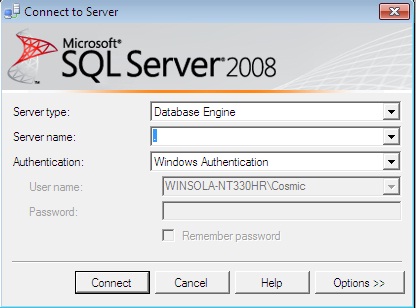
输入连接数据库的用户名和密码
Step 4:
General (Tab) -> Use the Template: Standard

Step 5:
Event Selection (Tab) -> Event : TSQL -> Select : SQL-BatchCompleted | Select Show all Columns
Press Column Filter -> Database Name: Like: "DataAccess"
运行
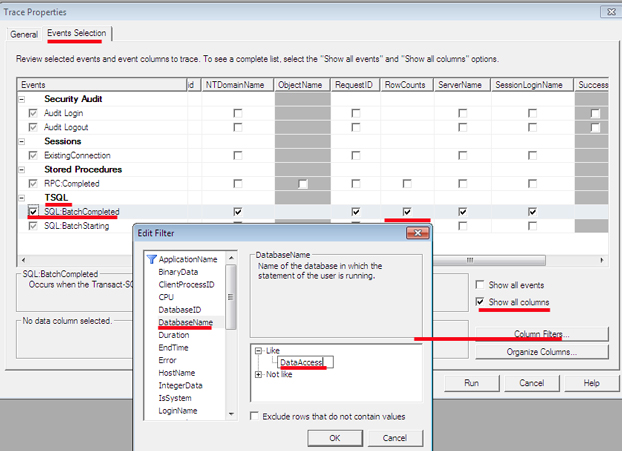
Step 6:
查看结果
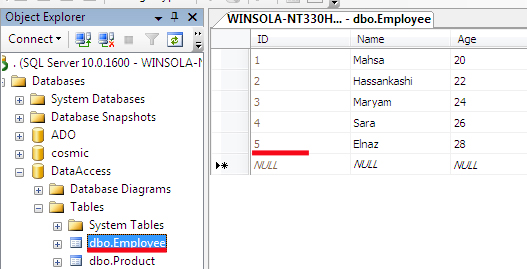
Step 7:
生成 IEnumerable数据 :
1: SELECT
2: [Extent1].[ID] AS [ID],
3: [Extent1].[Name] AS [Name],
4: [Extent1].[Age] AS [Age]
5: FROM [dbo].[Employee] AS [Extent1]

生成 IQueryable :
SELECT

[Extent1].[ID] AS [ID],

[Extent1].[Name] AS [Name],

[Extent1].[Age] AS [Age]

FROM [dbo].[Employee] AS [Extent1]

WHERE 1 = [Extent1].[ID]

ICollection 继承了IEnumberable,但是IEnumberable是基于索引的,ICollection不基于索引。

1: //IList {indexer and Modify} vs ICollection {randomly and Modify}
2: //Collection can not be instantiate from ICollection , so it should be instantiate from List
3: System.Collections.Generic.ICollection<string> strICollection = new List<string>();
4: strICollection.Add("Mahsa");
5: strICollection.Add("Hassankashi");
6:
7: //Countable***
8: int ICollectionCount=strICollection.Count;
9:
10: this.ListBoxICollection.DataSource = strICollection;
11: this.ListBoxICollection.DataBind();
12: System.Text.StringBuilder str = new System.Text.StringBuilder();
13: foreach (var item in strICollection)
14: {
15: str.Append(" , " + item);
16: }
17: this.lblICollection.Text = str.ToString();
18:
19: //IList***
20: System.Collections.Generic.IList<Employee> objIList = new List<Employee>();
21: objIList = (from m in ctx.Employees
22: select m).ToList();
23:
24: Employee obj = objIList.Where(i => i.Name == "Sara").FirstOrDefault();
25: int indexofSara= objIList.IndexOf(obj);
26: int cIList = objIList.Count;
27:
28: //ICollection***
29: System.Collections.Generic.ICollection<Employee> objICollection = new List<Employee>();
30: objICollection = (from m in ctx.Employees
31: select m).ToList();
32: Employee objIC = objICollection.Where(i => i.Name == "Sara").FirstOrDefault();
33: //You can not get index of object , if you clear comment from below code appears error
34: // int indexofSaraICollection = objIC.IndexOf(objIC);
35: int cICollection = objICollection.Count;
Stack Generic
入栈:
1: //Stack is LIFO: Last in First Out
2: //Here is for Push Stack in Generic
3: //System.Collections.Stack objStackPush = new System.Collections.Stack();
4: //Stack<T> can be instantiated from Stack<T>
5:
6: System.Collections.Generic.Stack<int> objStackPush = new System.Collections.Generic.Stack<int>();
7:
8: objStackPush.Push(1);
9: objStackPush.Push(2);
10:
11: this.lblPopGeneric.Text = "";
12: this.ListBoxStackGeneric.DataSource = objStackPush.ToArray();
13: this.ListBoxStackGeneric.DataBind();
出栈:
1: //Stack is LIFO: Last in First Out
2: //Here is for Pop Stack in Generic
3: //System.Collections.Stack objStackPop = new System.Collections.Stack();
4: //Stack<T> can be instantiated from Stack<T>
5:
6: System.Collections.Generic.Stack<int> objStackPop = new System.Collections.Generic.Stack<int>();
7:
8: objStackPop.Push(1);
9: objStackPop.Push(2);
10:
11: this.lblPop.Text = objStackPop.Pop().ToString();
12: this.ListBoxStack.DataSource = objStackPop.ToArray();
13: this.ListBoxStack.DataBind();
Queue Generic
入队:
1: //Queue is FIFO: First in First Out
2: //Here is for Enqueue Queue in Generic
3: //System.Collections.Queue objQueue = new System.Collections.Queue();
4: //Queue<T> can be instantiated from Queue<T>
5:
6: System.Collections.Generic.Queue<int> objQueue = new System.Collections.Generic.Queue<int>();
7: objQueue.Enqueue(1);
8: objQueue.Enqueue(2);
9:
10: this.lblQueue.Text = "";
11:
12: this.ListBoxQueue.DataSource = objQueue.ToArray();
13: this.ListBoxQueue.DataBind();
出队:
1: //Queue is FIFO: First in First Out
2: //Here is for Enqueue Queue in Generic
3: //System.Collections.Queue objQueue = new System.Collections.Queue();
4: //Queue<T> can be instantiated from Queue<T>
5:
6: System.Collections.Generic.Queue<int> objQueue = new System.Collections.Generic.Queue<int>();
7: objQueue.Enqueue(1);
8: objQueue.Enqueue(2);
9:
10: this.lblQueue.Text = "";
11:
12: this.ListBoxQueue.DataSource = objQueue.ToArray();
13: this.ListBoxQueue.DataBind();
Dictionary 及 IDictionary:
Dictionary 可通用,而哈希表不是通用的。Dictionary定义 <TKey,Tvalue>。IDictionary是Dictionary的接口,如果在后期开发中需要大量修改,建议使用IDictionary。
//Dictionary can instantiate from Dictionary , Dictionary is similar to Hashtable,

//Dictionary is GENERIC but Hashtable is NON GENERIC

//Such Hashtable you can find object by its key

System.Collections.Generic.Dictionary<int, string=""> objDictionary = new Dictionary<int, string="">();

objDictionary.Add(1001, "Mahsa");

objDictionary.Add(1002, "Hassankashi");

objDictionary.Add(1003, "Cosmicverse");

string str = objDictionary[1002];

this.ListBoxDictionary.DataSource = objDictionary;

this.ListBoxDictionary.DataBind();</int,>
最全数据结构详述: List VS IEnumerable VS IQueryable VS ICollection VS IDictionary的更多相关文章
- 【C#夯实】我与接口二三事:IEnumerable、IQueryable 与 LINQ
序 学生时期,有过小组作业,当时分工一人做那么两三个页面,然而在前端差不多的时候,我和另一个同学发生了争执.当时用的是简单的三层架构(DLL.BLL.UI),我个人觉得各写各的吧,到时候合并,而他觉得 ...
- IEnumerable和IQueryable在使用时的区别
最近在调研数据库查询时因使用IEnumerable进行Linq to entity的操作,造成数据库访问缓慢.此文讲述的便是IEnumerable和IQueryable的区别. 微软对IEnumera ...
- Entity Framework返回IEnumerable还是IQueryable?
在使用EF的过程中,我们常常使用repository模式,本文就在repository层的返回值是IEnumerable类型还是IQueryable进行探讨. 阅读目录: 一.什么是Repositor ...
- IEnumerable和IQueryable的区别以及背后的ExpressionTree表达式树
关于IEnumerable和IQueryable的区别,这事还要从泛型委托Func<T>说起.来看一个简单的泛型委托例子: class Program { static void Main ...
- [C#] IEnumerable vs IQueryable
这篇博客将介绍IEnumerable和IQueryable之间的区别. 1. IQueryable是继承自IEnumerable接口的.所以IEnumerable能做的,IQueryable都能做. ...
- IEnumerable 与 Iqueryable 的区别
IEnumerable 和 IQueryable 共有两组 LINQ 标准查询运算符,一组在类型为 IEnumerable<T> 的对象上运行,另一组在类型为 IQueryable&l ...
- IEnumerable与IQueryable区别
最近在使用MongoDB的时候,发现查询很慢,一个根据Id查询的语句竟然用了50秒,debug了一下,没发现什么大问题,但是另一个查询的语句只用了2秒,对比了一下,发现50s的那个语句使用的IEnum ...
- 一个简单问题引发对IEnumerable和IQueryable的思考
问题概述: 首先看下图,有客户表和客户负责人表关系是多对多,访问数据库使用的是EF所以这里我们开启了延迟加载,需求就是将每个客户的所有负责人逗号拼接显示在负责人这一栏位, 对你没看错需求就是这么 ...
- 2019.03.22 读书笔记 Linq中的IEnumerable与IQueryable
Linq主要分为 Linq to object .Linq to XML .Linq to sql(现在都用EF了). 针对object和sql,微软分别设计了两套接口IEnumerable.IQue ...
随机推荐
- mysql 乱码问题(程序界面显示正常,mysql command line显示乱码)
今天用java写一个程序,用的是mysql数据库.界面出现乱码,然后写了一个过滤器结果了乱码问题. 但是,当我在mysql command line 中查询数据的时候,在界面上显示正常的数据,在mys ...
- JQuery调用Servlet实现文件下载
jsp页面上的txt附件,点击后浏览器默认直接打开,结果是乱码. 因为用户上传的txt文件可能是ANSI.Unicode.UTF-8编码的任意一种,上传时后台获取文件内容重写一遍保证浏览器打开正常太过 ...
- Cracking-- 4.7 在一颗二叉树中找两个节点的第一个共同祖先
分别记录从 root 到 node1 的path 到 node2的path,再找其中共同的部分 struct Node{ int val; struct Node *left; struct Node ...
- Linux系统目录结构
Linux系统目录结构图 目录:/ 是Linux的根目录 每个文件和目录从根目录开始,只有root用户具有该目录下的写权限: /root是root用户的主目录,这与 / 目录不一样: 目录:/bin ...
- Android应用第一次安装成功点击“打开”后Home键切出应用后再点击桌面图标返回导致应用重启问题
最近项目中遇到一个问题,用户第一次安装应用在系统的安装器安装完成界面有“完成”和“打开”两个按钮. 当用户点击“打开”按钮进入用户注册页面进行手机号验证码发送和验证码输入等操作界面,若此时用户点击Ho ...
- Centos 7下mysql的安装与配置
1,先下载好MySQ安装包并解压(不做详细说明). 2,上传解压后的MySQL安装包到虚拟机上. 3,安装MySQL [root@localhost /]# yum install mysql5.7. ...
- LinkList(JAVA版,contain rear)
//含有rear,尾插时时O(1)的复杂度package linearList;//凡是实现后插后删都比较容易,尽量向着这个方向转换public class linearList { cl ...
- 用 R 进行高频金融数据分析简介
作者:李洪成 摘自:http://cos.name/wp-content/uploads/2013/11/ChinaR2013SH_Nov03_04_LiHongcheng.pdf 高频数据 金融市场 ...
- Combination Sum II Combinations
https://leetcode.com/problems/combination-sum-ii/ 题目跟前面几道题很类似,直接写代码: class Solution { public: vector ...
- PERL/LEX/YACC技术实现文本解析--XML解析
继周六的p_enum.pl后,再来一篇说说我用perl做的lex,yacc工具.之前说了,我学习lex和yacc的最初动机是为了做个C语言解释器的SHELL:但后来工作中的实际需要也是制作perl版l ...