
Django之Middleware中间件方法使用
自定义中间件五个方法(部分方法)实例
自定义中间件项目:
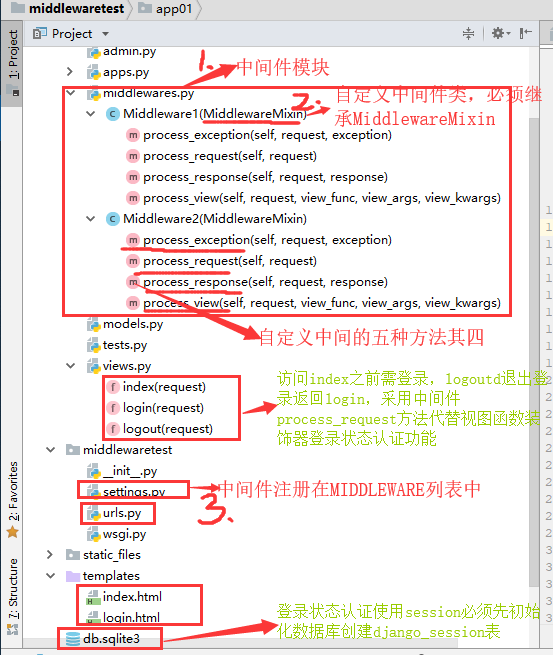
模板Templates
login.html
 {% load static %}

 <!DOCTYPE html>

 <html lang="en">

 <head>

     <meta charset="UTF-8">

     <script src="{% static 'jquery-3.4.1.js' %}"></script>

     <script src="{% static 'jquery-cookie-1.4.1.js' %}"></script>

     <title>login</title>

 </head>

 <body>

 <div>

     用户名:<input type="text" id="username"><br>

     密码:<input type="password" id="password"><br>

     {% csrf_token %}

     <input type="button" id="submit" value="登录">

     <span id="warning" style="color: red;"></span>

 </div>

 </body>

 <script>

     $(function () {

         $('#submit').click(function () {

             $.ajax({

                 url:'{% url "login" %}',

                 type:'post',

                 headers:{'X-CSRFToken':$.cookie('csrftoken')},

                 data:{

                   username:$('#username').val(),

                   password:$('#password').val(),

                 },

                 success:function (response) {

                     if (response.status){

                         location.href=response.url

                     }else {

                         $('#warning').text('账号或密码有误!')

                     }

                 }

             })

         })

     })

 </script>

 </html>
login.html
index.html
 <!DOCTYPE html>

 <html lang="en">

 <head>

     <meta charset="UTF-8">

     <title>index</title>

 </head>

 <body>

 <div>

     <h1>这是主页index,欢迎您的登录!</h1>

     <a href="{% url 'logout' %}"></a>

 </div>

 </body>

 </html>
index.html
控制器urls.py
 from django.conf.urls import url

 from django.contrib import admin

 from app01 import views

 urlpatterns = [

     url(r'^admin/', admin.site.urls),

 url(r'^login/', views.login,name='login'),

 url(r'^index/', views.index,name='index'),

 url(r'^logout/', views.logout,name='logout'),

 ]
urls.py
视图views.py
 from django.shortcuts import render,HttpResponse,redirect

 from django.urls import reverse

 import json

 from django.http import JsonResponse

 # Create your views here.

 def login(request):

     if request.method=='GET':

         print('view视图函数')

         # raise ValueError    #视图函数抛出异常时,才会逆序依次执行中自定义中间件中的process_exception方法

         return  render(request,'login.html')

     elif request.method=='POST':

         name=request.POST.get('username')

         psd=request.POST.get('password')

         if name=='yang' and psd=='':

             request.session['status']=True

             request.session['name']=name

             # return HttpResponse(json.dumps({'status':1,'url':reverse('index')}),content_type='application/json')

             return JsonResponse({'status':1,'url':reverse('index')})

         else:

             return JsonResponse({'status':0,'url':''})

 def index(request):

     return render(request,'index.html')

 def logout(request):

     request.session.flush()#退出同时清空客户端cookie和服务端session

     return redirect('login')
views.py
自定义中间件middlewares.py
 #process_request和process_response两个方法最常用

 from django.utils.deprecation import MiddlewareMixin

 from django.shortcuts import redirect,HttpResponse

 from django.urls import reverse

 class Middleware1(MiddlewareMixin):

     def process_request(self, request):

         print('M1_process_request:wsgi.py封装socket和请求对象request之后,url控制器分发之前')

         #设置白名单,在url列表中的请求均可不执行该中间件的以下代码,直接绕过登录认证

         url = [reverse('login'), ]#请求白名单

         if request.path in url:

             return None

         else:

             if request.session.get('status'):

                 pass

             else:

                 # 在process_request中,返回值只有为None时才会继续执行后边的中间件,否则直接返回当前process_request中return的内容

                 return redirect('login')

     def process_view(self, request, view_func, view_args, view_kwargs):

         print('M1_process_view:控制器映射之后,视图函数执行之前')

     def process_exception(self, request, exception):

         print('M1_process_exception:视图函数中捕获到错误时自动触发该函数')

     def process_response(self,request,response):

         print('M1_process_response')

         # 在process_response中,返回值只有为response对象时,才会接力式返回视图函数的返回结果,否则会被process_response中的return结果覆盖,不写则报错

         return HttpResponse('M1_process_response:视图函数执行之后,wsgi.py封装send之前,返回值不是接力原视图函数resopnse对象,而是被覆盖')

         # return response

 class Middleware2(MiddlewareMixin):

     def process_request(self, request):

         print('M2_process_request:wsgi.py封装socket和请求对象request之后,url控制器分发之前')

         #在process_request中,返回值只有为None时才会继续执行后边的中间件,否则直接返回当前process_request中return的内容

         # return HttpResponse('M2_process_request返回不是None直接终止处理返回')

     def process_view(self, request, view_func, view_args, view_kwargs):

         print('M2_process_view:控制器映射之后,视图函数执行之前')

     def process_exception(self, request, exception):

         print('M2_process_exception:视图函数中捕获到错误时自动触发该函数')

     def process_response(self,request,response):

         print('M2_process_response')

         return HttpResponse('M2_process_response:视图函数执行之后,wsgi.py封装send之前,返回值不是接力原视图函数resopnse对象,而是被覆盖')

         # return response
middlewares.py
配置settings.py
执行结果:
后端:
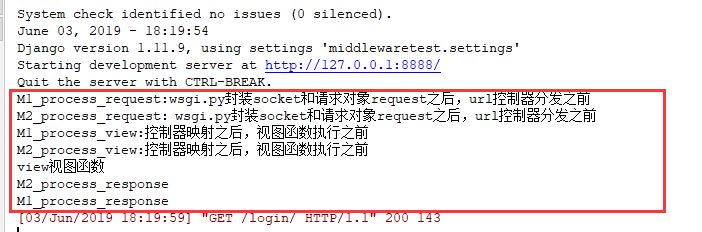
前端:

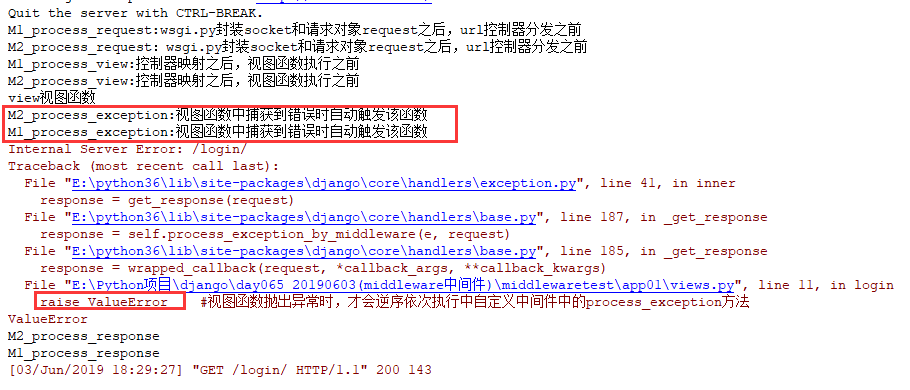
视图函数抛出异常测试process_exception
中间件补充说明
process_template_response(用的比较少)
process_template_response(self, request, response)
它的参数,一个HttpRequest对象,response是TemplateResponse对象(由视图函数或者中间件产生)。
process_template_response是在视图函数执行完成后立即执行,但是它有一个前提条件,那就是视图函数返回的对象有一个render()方法(或者表明该对象是一个TemplateResponse对象或等价方法)。
 #中间件:

 class MD1(MiddlewareMixin):

     def process_request(self, request):

         print("MD1里面的 process_request")

     def process_response(self, request, response):

         print("MD1里面的 process_response")

         return response

     def process_view(self, request, view_func, view_args, view_kwargs):

         print("-" * 80)

         print("MD1 中的process_view")

         print(view_func, view_func.__name__)

     def process_exception(self, request, exception):

         print(exception)

         print("MD1 中的process_exception")

         return HttpResponse(str(exception))

     def process_template_response(self, request, response):

         print("MD1 中的process_template_response")

         return response

 class MD2(MiddlewareMixin):

     def process_request(self, request):

         print("MD2里面的 process_request")

         pass

     def process_response(self, request, response):

         print("MD2里面的 process_response")

         return response

     def process_view(self, request, view_func, view_args, view_kwargs):

         print("-" * 80)

         print("MD2 中的process_view")

         print(view_func, view_func.__name__)

     def process_exception(self, request, exception):

         print(exception)

         print("MD2 中的process_exception")

     def process_template_response(self, request, response):

         print("MD2 中的process_template_response")

         return response

 views.py视图:

 def index(request):

     print("app01 中的 index视图")

 #raise ValueError('出错啦')

     def render():

         print("in index/render")

         #raise ValueError('出错啦') #至于render函数中报错了,那么会先执行process_template_response方法,然后执行process_exception方法,如果是在render方法外面报错了,那么就不会执行这个process_template_response方法了。

         return HttpResponse("O98K") #返回的将是这个新的对象

     rep = HttpResponse("OK")

     rep.render = render

 return rep

 访问index视图,终端输出的结果:

 MD2里面的 process_request

 MD1里面的 process_request

 --------------------------------------------------------------------------------

 MD2 中的process_view

 <function index at 0x000001C111B97488> index

 --------------------------------------------------------------------------------

 MD1 中的process_view

 <function index at 0x000001C111B97488> index

 app01 中的 index视图

 MD2 中的process_template_response

 MD1 中的process_template_response

 in index/render

 MD1里面的 process_response

 MD2里面的 process_response
补充
Django之Middleware中间件方法使用的更多相关文章
- Django中Middleware中间件
Django中Middleware中间件 1 Middleware中间件概述 django中间middleware实质就是一个类,django会根据自己的规则在合适的时机执行中间件相应的方法.实际上当 ...
- Django中的中间件(middleware)
中间件: 在研究中间件的时候我们首先要知道 1 什么是中间件? 官方的说法:中间件是一个用来处理Django的请求和响应的框架级别的钩子.它是一个轻量.低级别的插件系统,用于在全局范围内改变Djang ...
- Django 中CSRF中间件 'django.middleware.csrf.CsrfViewMiddleware',
1.Django中CSRF中间件的工作原理及form表单提交需要添加{% csrf_token %}防止出现403错误 CSRF # 表示django全局发送post请求均需要字符串验证功能:防止跨站 ...
- Django middleware (中间件)
关于中间价: django 中的中间件其实就是一个类,在请求到来和结束后,django会根据自己的规则在合适的时机执行中间件中相应的方法. 在django项目的settings中,有一个 MIDDLE ...
- Django框架之中间件MiddleWare
Django中的中间件是一个轻量级.底层的插件系统,可以介入Django的请求和响应处理过程,修改Django的输入或输出.中间件的设计为开发者提供了一种无侵入式的开发方式,增强了Django框架的健 ...
- Django中的MiddleWare中间件
1. middleware简介 Django的middleware的概念相当于SSH框架里面的filter的概念.中间键的作用就是对所有的request,在request前,和在response后做一 ...
- django 缓存、中间件、信号、CSRF 详解
中间件 django 中的中间件(middleware),在django中,中间件其实就是一个类,在请求到来和结束后,django会根据自己的规则在合适的时机执行中间件中相应的方法. 在django项 ...
- Django框架之中间件与Auth
Django框架之中间件与Auth模块一 cbv加装饰器 -先导入:from django.utils.decorators import method_decorator -1 可以在方法上加装饰器 ...
- Django进阶之中间件
中间件简介 django 中的中间件(middleware),在django中,中间件其实就是一个类,在请求到来和结束后,django会根据自己的规则在合适的时机执行中间件中相应的方法. 在djang ...
随机推荐
- mysql错误代码对照表较完整
mysql错误代码对照表较完整 mysql_errno() From: http://blog.csdn.net/aidenliu/article/details/5925604 mysql错误代码对 ...
- 【ubuntu】Error: environment block too small. Press any key to continue
Error: environment block too small. Press any key to continue 如何修复这个Error呢? 输入以下命令 sudo su cd /boot/ ...
- Pycharm中设置encoding
在Pycharm专业版中,为了防止文件在别的机器上出现乱码,所以需要进行字符编码的设置. 首先在Pycharm中的View中将下图中的Toolbar打上勾. 接着,工具栏就会出现,选中settings ...
- PHP 面试题总结
1.获取数组最后一个位置的值 比较常规的是:$arr[count($arr)-1]; 貌似还有一个数组函数end();可以直接获取最后一个元素的值.相应的还有reset(),next(),curren ...
- .NET Core技术研究-通过Roslyn代码分析技术规范提升代码质量
随着团队越来越多,越来越大,需求更迭越来越快,每天提交的代码变更由原先的2位数,暴涨到3位数,每天几百次代码Check In,补丁提交,大量的代码审查消耗了大量的资源投入. 如何确保提交代码的质量和提 ...
- 使用python绘制世界人口地图及数据处理
本篇我们来说:下载和处理json格式的文件,并通过pygal中的地图工具来实现数据可视化 ------------------------------------------------------- ...
- python安装pycrypto库
使用pycharm时安装pycrypto库,一直安装不上,提示安装成功,退出去一看,依旧没有 最后选择了pip安装,但一直报错(Microsoft Visual C++ 9.0 is required ...
- LoadRunner安装时提示缺少C++ 2005 SP1(x86)插件
把安装文件里的所有中文文件重命名为英 文 名就ok!!! 把安装文件里的所有中文文件重命名为英 文 名就ok!!! 把安装文件里的所有中文文件重命名为英 文 名就ok!!! 重要的事情说三遍! 不插图 ...
- Codeforces Round #577 (Div. 2) D. Treasure Hunting
Codeforces Round #577 (Div. 2) D. Treasure Hunting 这个一场div2 前面三题特别简单,这个D题的dp还是比较难的,不过题目告诉你了只能往上走,所以 ...
- K - Painful Bases 状压dp
Painful Bases LightOJ - 1021 这个题目一开始看,感觉有点像数位dp,但是因为是最多有16进制,因为限制了每一个数字都不同最多就有16个数. 所以可以用状压dp,看网上题解是 ...